
Start하기#
기본 개념#
Automatically connect file collection through processing and result delivery
In media and data workflows, the location where files are created, the equipment that processes them, and the location where the results are used may all be different.
For example, you can collect video files generated by multiple recording devices, transfer them to a conversion server, store the processed results in storage, and then transfer them to the next work environment.
- File Creation
- File Collection
- File Processing
- Result Use

The result of each stage becomes the input for the next task, allowing you to connect everything from file creation through collection, processing, and result use in a single flow.
Automated Flow#
Collect files from multiple devices and process them in a defined order
In an automated flow, files generated by multiple devices are collected as one task and the collected results are connected to the required processing equipment.
When processing is complete, you can transfer the resulting files to a designated location for use in the next task.
By configuring each next stage to run based on file status and task completion conditions, you can automatically connect file tasks in sequence.
Automation Benefits#
Reduce repetitive file movement and management at each stage
When multi-stage file tasks are handled separately, file preparation, transfer, and processing-result checks are repeated.
By configuring an automated flow, you can connect the result of each previous stage to the next task and manage the process after file creation as one flow.
| Category | Individual File Processing | Automated Flow |
|---|---|---|
| File Collection | Check files from each device separately | Collect files from multiple devices in one flow |
| Processing Execution | Run the task after preparing files | Run the next task based on the collection result |
| Result Use | Manage completed files at the next location | Connect results to designated locations and tasks |
| Progress Check | Check each stage separately | Check the overall flow and results by stage |
This allows file tasks distributed across multiple devices and systems to be connected in a single automated flow.
IT 엔지니어#
Configure an automated processing flow for media and data files
Collection Environment#
Connect file-generating devices to collection locations
First, connect the devices where files are generated to the locations where the files will be collected.
Configure environments where files are generated, such as recording devices, business servers, data collection equipment, and storage, as Sources, and specify the file path to use on each device.

Configuring the collection environment lets you connect files generated in multiple locations into one automated flow.
Processing Connection#
Connect collected files to the required processing equipment
Connect collected files to environments that perform the required tasks, such as conversion servers, analysis servers, and AI processing equipment.
You can consolidate files from multiple Sources into one processing device or connect them to different tasks based on file type and processing conditions.
When processing is complete, connect the resulting files to the next result stage.
Result Delivery#
Store processing results and connect them to the next work environment
Transfer processed result files to locations used by the next task, such as storage, servers, and applications.
By connecting result storage and transfer to the next work environment as one result stage, you can automatically continue from processing completion to file use.
If needed, you can extend the file-use flow by connecting notifications or additional processing tasks after result delivery.
Execution 조 matches#
Run the next stage based on file and task status
Each stage can be configured to run according to specified conditions.
For example, you can configure the flow to start collection when a file is created, run processing when collection is complete, and start result delivery when the processing result is ready.
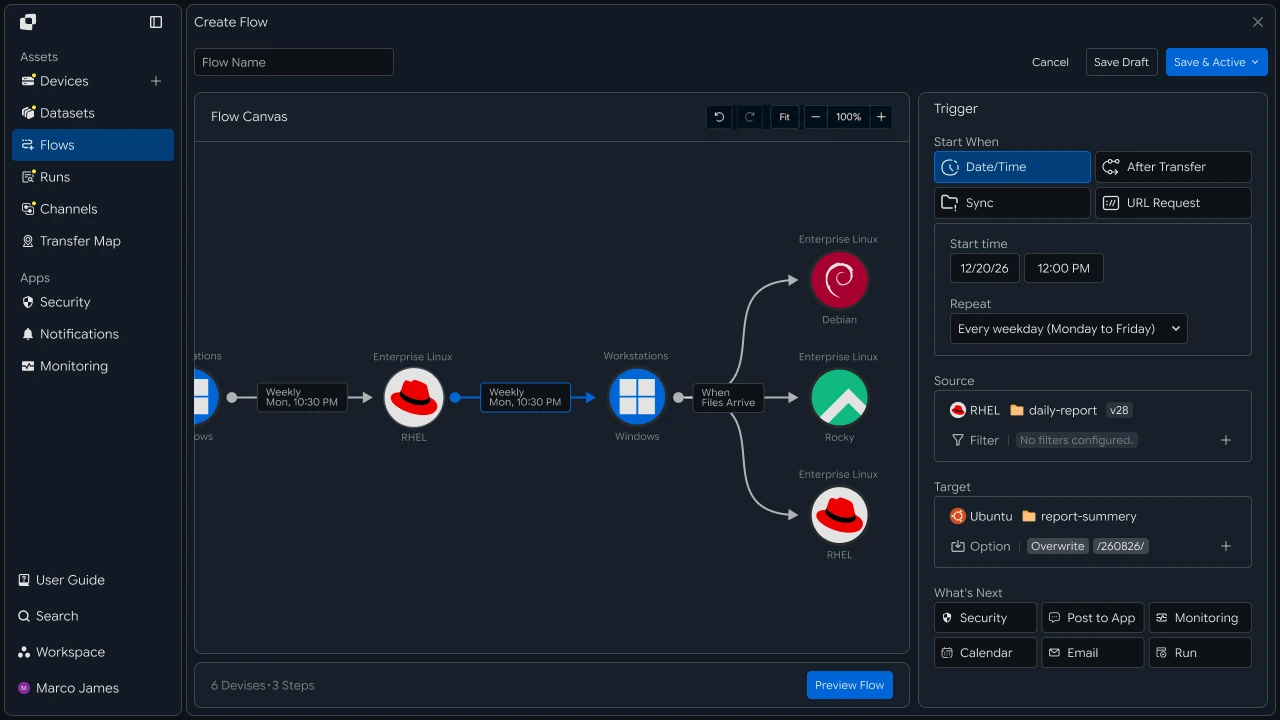
By using file status and the result of the previous task as execution conditions, you can connect multiple tasks in a defined sequence.
Result Check#
Check the overall flow and processing status by stage
When the automated flow runs, you can check the overall workflow status and the processing result of each stage together.
You can check how far the current task has progressed based on collected files, processing tasks, and result delivery status.
Workflow Run
- Collect✓
- Process✓
- Result● Running
- Complete
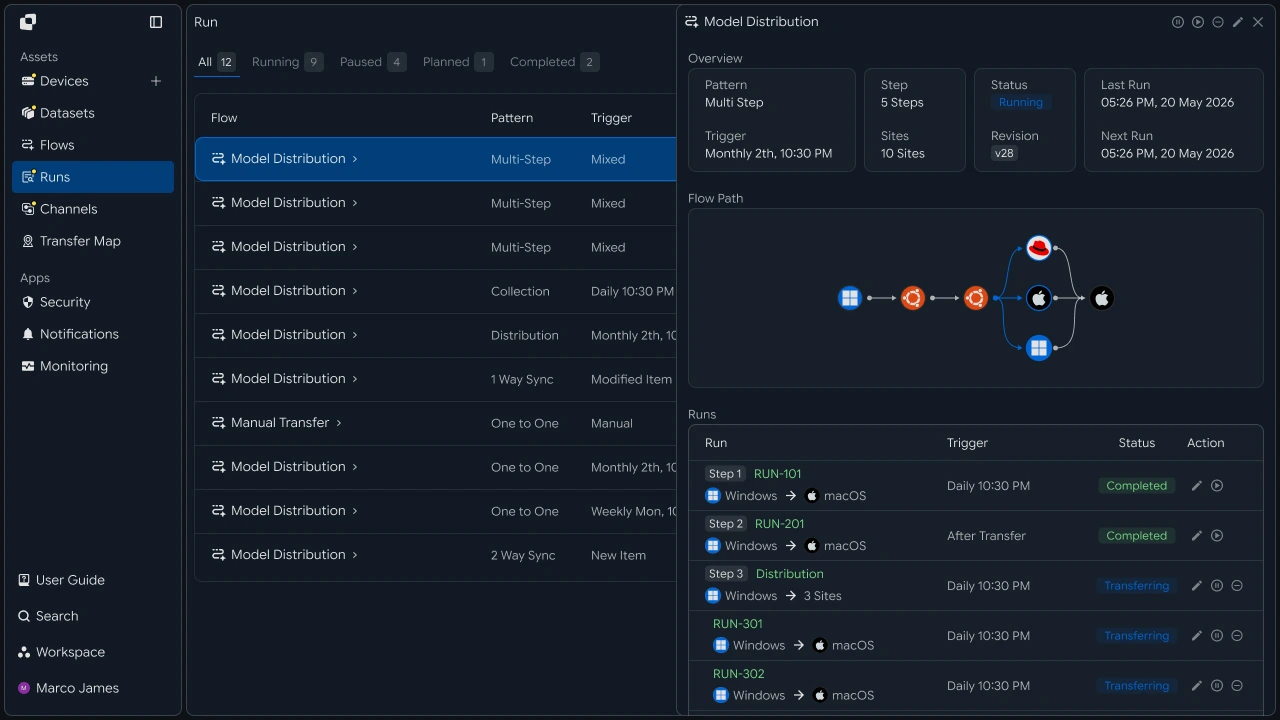
| Check Stage | Main Check |
|---|---|
| Collection | Collected files and execution status |
| Processing | Processing task and progress result |
| Result | Stored or transferred result files |
| Overall Execution | Workflow progress status and execution time |
Checking the overall flow and individual stage statuses together lets you quickly understand the current progress and processing results.
Yes외 대응#
Review stages that need attention and rerun the task
If additional review is required during execution, check the details and execution history for the relevant stage.
You can select the task requiring attention among file collection, processing equipment, and result delivery, check device connections, file paths, and processing status, and then rerun the required task.

| Check Item | Details | Follow-up Task |
|---|---|---|
| Collection Environment | Device connection and file path | Check the environment and rerun |
| Processing Task | Processing status and execution result | Check the processing environment |
| Result Delivery | Target location and transfer status | Check the connection status and rerun |
| Execution History | Task information by stage | Review the details and take action |
Developers#
Select targets by extension and size, collect them on processing equipment, and pass results to the next device
Integration Setup#
Prepare common API-call code and path notation
import os
import requests

BASE_URL = os.getenv("INNORIX_BASE_URL", "https://app.innorix.com").rstrip("/")
TOKEN = os.environ["INNORIX_ACCESS_TOKEN"]
WORKSPACE_ID = os.getenv("INNORIX_WORKSPACE_ID")   # optional; falls back to the current workspace

STATUS_COMPLETE = 2
TERMINAL = {2, 4, 5, 9, 99}          # complete / error / cancelled / partial / failed
NOT_SUCCEEDED = {4, 5, 9, 99}


def api(method, path, body=None, params=None):
    headers = {
        "Content-Type": "application/json",
        "Authorization": f"Bearer {TOKEN}",
    }

    if WORKSPACE_ID:
        headers["x-workspace-id"] = WORKSPACE_ID

    response = requests.request(
        method, BASE_URL + path,
        headers=headers, json=body, params=params, timeout=30,
    )

    payload = response.json() if response.content else {}

    if not response.ok:
        raise RuntimeError(payload.get("message") or f"HTTP {response.status_code}")

    return payload.get("data")


def is_terminal(detail):
    return detail.get("isTerminal", detail.get("status") in TERMINAL)
// InnorixClient.java
public static final String BASE_URL =
env("INNORIX_BASE_URL", "https://app.innorix.com").replaceAll("/+quot;, "");
public static final String WORKSPACE_ID = env("INNORIX_WORKSPACE_ID", null);
public static final int STATUS_COMPLETE = 2;
// States the transfer no longer moves out of
public static final Set<Integer> TERMINAL = Set.of(2, 4, 5, 9, 99);
// Terminal states that are not a full success
public static final Set<Integer> NOT_SUCCEEDED = Set.of(4, 5, 9, 99);
private HttpRequest.Builder headers(HttpRequest.Builder builder) {
builder.header("Content-Type", "application/json")
.header("Authorization", "Bearer " + session.accessToken());
// When omitted the account's current workspace is used.
if (workspaceId != null) builder.header("x-workspace-id", workspaceId);
return builder;
}
/** Unwraps and returns data from the response. Throws ApiError on failure. */
public Object api(String method, String path, Object body, Map<String, Object> params) {
Resp response = request(method, path, body, params);
Object payload = null;
try {
payload = Json.parse(response.text());
} catch (RuntimeException ignored) {
payload = null;
}
if (!response.ok()) {
Map<String, Object> map = Json.asObj(payload);
String message = Json.str(map, "message", Json.str(map, "error", "unknown error"));
throw new ApiError(response.status, message, map);
}
return Json.get(payload, "data");
}
/** Use the server flag when present, otherwise fall back to the status code. */
public static boolean isTerminal(Map<String, Object> record) {
Boolean flag = Json.boolOrNull(record, "isTerminal");
if (flag != null) return flag;
Integer status = Json.intOrNull(record, "status");
return status != null && TERMINAL.contains(status);
}// innorix-client.js
const BASE_URL = (process.env.INNORIX_BASE_URL
|| "https://app.innorix.com").replace(/\/+$/, "");
const TOKEN = process.env.INNORIX_ACCESS_TOKEN;
const WORKSPACE_ID = process.env.INNORIX_WORKSPACE_ID || null;
export const STATUS_COMPLETE = 2;
export const TERMINAL = new Set([2, 4, 5, 9, 99]); // complete / error / cancelled / partial / failed
export const NOT_SUCCEEDED = new Set([4, 5, 9, 99]);
export async function api(method, path, body = null, params = null) {
const url = new URL(BASE_URL + path);
if (params) {
for (const [key, value] of Object.entries(params)) {
if (value === undefined || value === null) continue;
url.searchParams.set(key, String(value));
}
}
const headers = {
"Content-Type": "application/json",
Authorization: `Bearer ${TOKEN}`,
};
// When omitted the account's current workspace is used.
if (WORKSPACE_ID) headers["x-workspace-id"] = WORKSPACE_ID;
const response = await fetch(url, {
method,
headers,
body: body === null ? undefined : JSON.stringify(body),
signal: AbortSignal.timeout(30_000),
});
const payload = await response.json().catch(() => ({}));
if (!response.ok) {
throw new Error(payload.message || `HTTP ${response.status}`);
}
return payload.data;
}
export function isTerminal(detail) {
return detail.isTerminal !== undefined
? detail.isTerminal
: TERMINAL.has(detail.status);
}// InnorixClient.cs
public static readonly string BaseUrl =
Env("INNORIX_BASE_URL", "https://app.innorix.com").TrimEnd('/');
public static readonly string WorkspaceIdFromEnv = Env("INNORIX_WORKSPACE_ID", null);
public const int StatusComplete = 2;
/// <summary>States the transfer no longer moves out of</summary>
public static readonly HashSet<int> Terminal = new HashSet<int> { 2, 4, 5, 9, 99 };
/// <summary>Terminal states that are not a full success</summary>
public static readonly HashSet<int> NotSucceeded = new HashSet<int> { 4, 5, 9, 99 };
// Applied on every request
request.Headers.TryAddWithoutValidation("Authorization", "Bearer " + Session.AccessToken);
// When omitted the account's current workspace is used.
if (WorkspaceId != null) request.Headers.TryAddWithoutValidation("x-workspace-id", WorkspaceId);
public async Task<JsonNode> ApiAsync(string method, string path, JsonNode body = null,
IDictionary<string, object> parameters = null)
{
Resp response = await RequestAsync(method, path, body, parameters).ConfigureAwait(false);
JsonNode payload = null;
try
{
payload = J.Parse(response.Text());
}
catch (Exception)
{
payload = null;
}
if (!response.Ok)
{
JsonObject map = J.AsObj(payload);
string message = J.Str(map, "message", J.Str(map, "error", "unknown error"));
throw new ApiError(response.Status, message, map);
}
return J.Get(payload, "data");
}
/// <summary>Use the server flag when present, otherwise fall back to the status code.</summary>
public static bool IsTerminal(JsonObject record)
{
bool? flag = J.BoolOrNull(record, "isTerminal");
if (flag != null) return flag.Value;
int? status = J.IntOrNull(record, "status");
return status != null && Terminal.Contains(status.Value);
}import base64
import time
def encode_path(device_id, raw_path):
normalized = str(raw_path or "").replace("\\", "/")
token = base64.b64encode(normalized.encode("utf-8")).decode("ascii")
return f"{device_id}_ino_{token}"
def now_iso():
return time.strftime("%Y-%m-%dT%H:%M:%S.000Z", time.gmtime())public static String encodePath(String deviceId, String rawPath) {
String normalized = (rawPath == null ? "" : rawPath).replace("\\", "/");
return deviceId + "_ino_"
+ Base64.getEncoder().encodeToString(normalized.getBytes(StandardCharsets.UTF_8));
}
public static String nowIso() {
return Instant.now().truncatedTo(ChronoUnit.SECONDS).toString().replace("Z", ".000Z");
}export function encodePath(deviceId, rawPath) {
const normalized = String(rawPath ?? "").replace(/\\/g, "/");
const token = Buffer.from(normalized, "utf8").toString("base64");
return `${deviceId}_ino_${token}`;
}
export function nowIso() {
return new Date().toISOString().replace(/\.\d{3}Z$/, ".000Z");
}public static string EncodePath(string deviceId, string rawPath)
{
string normalized = (rawPath ?? "").Replace("\\", "/");
return deviceId + "_ino_" + Convert.ToBase64String(Encoding.UTF8.GetBytes(normalized));
}
public static string NowIso()
{
return DateTime.UtcNow.ToString("yyyy-MM-dd'T'HH:mm:ss'.000Z'",
System.Globalization.CultureInfo.InvariantCulture);
}Transfer status is determined by the values below. There are five terminal states, and the value corresponding to success is Complete (2).
| Status Value | Meaning | Terminal |
|---|---|---|
| 2 | Complete | Yes |
| 4 | Error | Yes |
| 5 | Canceled | Yes |
| 9 | Partially Complete | Yes |
| 99 | Failed | Yes |
| 1, 6, 12, 13 | Starting, Transferring, Synchronizing, Receiving | No |
Target Selection#
Filter files to send by extension, size, and name conditions
Specify filters in the transfer options so that only files matching the conditions are sent instead of the entire source folder.
def build_filter(exts=None, min_size=None, exclude=None):
    file_option = {}

    if exts:
        # extension whitelist, without the leading dot
        file_option["extension"] = {
            "extension": [e.lstrip(".").lower() for e in exts],
            "allow": True,
        }

    if min_size is not None:
        # over and equal both True means size or larger
        file_option["fileSize"] = {"size": min_size, "over": True, "equal": True}

    if exclude:
        # allow=False excludes files whose name contains this. Server matching is case sensitive.
        file_option["fileName"] = {"name": exclude, "allow": False}

    return {"send-fileoption": file_option} if file_option else {}
public static Map<String, Object> buildFilter(List<String> exts, Long minSize, String exclude) {
Map<String, Object> fileOption = new LinkedHashMap<>();
if (exts != null && !exts.isEmpty()) {
List<Object> cleaned = new ArrayList<>();
// e.g. ["mp4","mov"] (no dot). allow=true -> whitelist
for (String ext : exts) cleaned.add(ext.replaceAll("^\\.+", "").toLowerCase());
fileOption.put("extension", Json.newObj("extension", cleaned, "allow", true));
}
if (minSize != null) {
// over=true/equal=true -> only files at or above size
fileOption.put("fileSize", Json.newObj("size", minSize, "over", true, "equal", true));
}
if (exclude != null) {
// allow=false -> skip files whose name contains exclude (server match is case sensitive)
fileOption.put("fileName", Json.newObj("name", exclude, "allow", false));
}
return fileOption.isEmpty()
? new LinkedHashMap<>()
: Json.newObj("send-fileoption", fileOption);
}export function buildFilter({ exts = null, minSize = null, exclude = null } = {}) {
const fileOption = {};
if (exts) {
// Extension whitelist, without the leading dot.
fileOption.extension = {
extension: exts.map((e) => e.replace(/^\./, "").toLowerCase()),
allow: true,
};
}
if (minSize !== null && minSize !== undefined) {
// over and equal both true means size or larger.
fileOption.fileSize = { size: minSize, over: true, equal: true };
}
if (exclude) {
// allow=false excludes files whose name contains this. Matching is case sensitive.
fileOption.fileName = { name: exclude, allow: false };
}
return Object.keys(fileOption).length ? { "send-fileoption": fileOption } : {};
}public static JsonObject BuildFilter(IReadOnlyList<string> exts = null,
long? minSize = null, string exclude = null)
{
var fileOption = new JsonObject();
if (exts != null && exts.Count > 0)
{
// e.g. ["mp4","mov"] (no dot). allow=true -> whitelist
var cleaned = new JsonArray();
foreach (string ext in exts) cleaned.Add(ext.TrimStart('.').ToLowerInvariant());
fileOption["extension"] = new JsonObject { ["extension"] = cleaned, ["allow"] = true };
}
if (minSize != null)
{
// over=true/equal=true -> only files at or above size
fileOption["fileSize"] = new JsonObject
{
["size"] = minSize.Value,
["over"] = true,
["equal"] = true,
};
}
if (exclude != null)
{
// allow=false -> skip files whose name contains exclude (server match is case sensitive)
fileOption["fileName"] = new JsonObject { ["name"] = exclude, ["allow"] = false };
}
return fileOption.Count == 0
? new JsonObject()
: new JsonObject { ["send-fileoption"] = fileOption };
}The extension filter uses send-fileoption.extension. send-filetype-cus The regular expression matches only the filename without its extension, so it does not work as an extension condition.
| Filter | Location | Behavior |
|---|---|---|
| Extension | send-fileoption.extension |
allow: true means only this extension is transferred |
| Size | send-fileoption.fileSize |
over, equal specifies greater-than-or-equal and less-than-or-equal limits |
| Name | send-fileoption.fileName |
allow: false means files containing the value are excluded |
When multiple filters are provided, they are combined with AND. Only files that pass all filters are transferred.
FILTER = build_filter(exts=["mp4", "mov", "wav"], min_size=1024, exclude=".tmp")Map<String, Object> filter = InnorixClient.buildFilter(
List.of("mp4", "mov", "wav"), 1024L, ".tmp");const filter = buildFilter({ exts: ["mp4", "mov", "wav"], minSize: 1024, exclude: ".tmp" });JsonObject filter = InnorixClient.BuildFilter(
new[] { "mp4", "mov", "wav" }, minSize: 1024, exclude: ".tmp");Verify through a search that the conditions work as intended before adding them to the automation.
page = api("POST", f"/api/devices/{SOURCE_ID}/files/search",
           {"path": SOURCE_PATH, "pageSize": 500})

matched = [i for i in page["items"]
           if i["type"] == "file" and i["name"].lower().endswith((".mp4", ".mov"))]

print(f"{len(matched)} matched")Map<String, Object> page = client.apiObj("POST",
"/api/devices/" + SOURCE_ID + "/files/search",
Json.newObj("path", SOURCE_PATH, "pageSize", 500));
long matched = 0;
for (Object node : Json.arrOf(page, "items")) {
Map<String, Object> item = Json.asObj(node);
String name = Json.str(item, "name").toLowerCase();
if ("file".equals(Json.str(item, "type"))
&& (name.endsWith(".mp4") || name.endsWith(".mov"))) matched++;
}
System.out.println(matched + " matches");const page = await client.api("POST",
`/api/devices/${SOURCE_ID}/files/search`,
{ path: SOURCE_PATH, pageSize: 500 });
const matched = page.items.filter((i) =>
i.type === "file" && /\.(mp4|mov)$/i.test(i.name));
console.log(`${matched.length} matches`);JsonObject page = await client.ApiObjAsync("POST",
quot;/api/devices/{SOURCE_ID}/files/search",
new JsonObject { ["path"] = SOURCE_PATH, ["pageSize"] = 500 });
int matched = J.ArrOf(page, "items").Select(J.AsObj).Count(i =>
J.Str(i, "type") == "file"
&& Regex.IsMatch(J.Str(i, "name"), @"\.(mp4|mov)quot;, RegexOptions.IgnoreCase));
Console.WriteLine(quot;{matched} matches");The search does not accept condition parameters, so evaluate the returned results.
File Collection#
Collect files from multiple devices on one processing device
One transfer handles one source device. Create a transfer for each device and separate the destination path for each source.
SOURCES = [
    ("device-cam-01", "/media/raw"),
    ("device-cam-02", "/media/raw"),
    ("device-mic-01", "/audio/raw"),
]

for source, source_path in SOURCES:
    # give each source its own folder so file names do not collide
    target_path = f"/work/incoming/{source}"

    monitor_id = api("POST", "/api/transfers/manual", {
        "sourceDevice": source,
        "targetDevice": PROCESS_ID,
        "targetPath": target_path,
        "sourcePaths": [source_path],
        "sendAllFolder": True,
        "transferOptions": {"target-action": "numbering", **FILTER},
    })["monitorId"]

print(source, "->", target_path, monitor_id)List<String[]> sources = List.of(
new String[]{"device-cam-01", "/media/raw"},
new String[]{"device-cam-02", "/media/raw"},
new String[]{"device-mic-01", "/audio/raw"});
for (String[] entry : sources) {
String source = entry[0], sourcePath = entry[1];
// give each source its own folder so file names do not collide
String targetPath = "/work/incoming/" + source;
Map<String, Object> options = new LinkedHashMap<>(filter);
options.put("target-action", "numbering");
Map<String, Object> transfer = client.apiObj("POST", "/api/transfers/manual", Json.newObj(
"sourceDevice", source,
"targetDevice", PROCESS_ID,
"targetPath", targetPath,
"sourcePaths", List.of(sourcePath),
"sendAllFolder", true,
"transferOptions", options));
System.out.println(source + " -> " + targetPath + " " + Json.str(transfer, "monitorId"));
}const SOURCES = [
["device-cam-01", "/media/raw"],
["device-cam-02", "/media/raw"],
["device-mic-01", "/audio/raw"],
];
for (const [source, sourcePath] of SOURCES) {
// give each source its own folder so file names do not collide
const targetPath = `/work/incoming/${source}`;
const transfer = await client.api("POST", "/api/transfers/manual", {
sourceDevice: source,
targetDevice: PROCESS_ID,
targetPath,
sourcePaths: [sourcePath],
sendAllFolder: true,
transferOptions: { "target-action": "numbering", ...filter },
});
console.log(source, "->", targetPath, transfer.monitorId);
}var sources = new[]
{
("device-cam-01", "/media/raw"),
("device-cam-02", "/media/raw"),
("device-mic-01", "/audio/raw"),
};
foreach (var (source, sourcePath) in sources)
{
// give each source its own folder so file names do not collide
string targetPath = quot;/work/incoming/{source}";
var options = new JsonObject(filter.DeepClone().AsObject())
{
["target-action"] = "numbering",
};
JsonObject transfer = await client.ApiObjAsync("POST", "/api/transfers/manual",
new JsonObject
{
["sourceDevice"] = source,
["targetDevice"] = PROCESS_ID,
["targetPath"] = targetPath,
["sourcePaths"] = new JsonArray { sourcePath },
["sendAllFolder"] = true,
["transferOptions"] = options,
});
Console.WriteLine(quot;{source} -> {targetPath} {J.Str(transfer, "monitorId")}");
}When sources are separated by device, collection from the remaining devices continues even if one device is offline. If destination paths are not separated, files with the same name from different devices will overwrite one another.
Storage Location 제어#
Define the folder structure below the destination path
TARGET_OPTIONS = {
    "savepath": True,          # keep the source folder structure (lowercase p)
    "optionPath": 3,           # how many trailing path segments to keep
    "target-action": "numbering",
}Map<String, Object> targetOptions = Json.newObj(
"savepath", true, // keep the source folder structure (lowercase p)
"optionPath", 3, // how many trailing path segments to keep
"target-action", "numbering");const targetOptions = {
savepath: true, // keep the source folder structure (lowercase p)
optionPath: 3, // how many trailing path segments to keep
"target-action": "numbering",
};var targetOptions = new JsonObject
{
["savepath"] = true, // keep the source folder structure (lowercase p)
["optionPath"] = 3, // how many trailing path segments to keep
["target-action"] = "numbering",
};| 필드 | 타입 | 내용 |
|---|---|---|
savepath |
boolean | Whether to preserve the source folder structure |
optionPath |
integer | Number of trailing source-path segments to preserve |
target-action |
string | Policy for handling duplicate names |
If files with the same names arrive from multiple devices, optionPath increase the value to distinguish their sources. To organize files by date, put the date directly in the destination path rather than using an option.
from datetime import date

target_path = f"/work/incoming/{date.today():%Y/%m/%d}"
String targetPath = "/work/incoming/"
+ LocalDate.now().format(DateTimeFormatter.ofPattern("yyyy/MM/dd"));const d = new Date();
const targetPath = `/work/incoming/${d.getFullYear()}/`
+ `${String(d.getMonth() + 1).padStart(2, "0")}/`
+ `${String(d.getDate()).padStart(2, "0")}`;string targetPath = quot;/work/incoming/{DateTime.Now:yyyy/MM/dd}";Stage Connection#
Automatically start result delivery when collection is complete
Create each segment as an automation and group them under the same flowId. Put the previous stage's automationId in the next stage's triggerAutomation.value so the server continues execution.
import uuid

flow_id = str(uuid.uuid4())


def build_step(name, source, source_path, target, target_path,
               step, trigger_id=None, options=None, webhook=None):
    schedule = {
        "type": "none",
        "startDateType": "now",
        "startDate": now_iso(),
        "timezone": "Asia/Seoul",
    }

    if trigger_id:
        schedule["triggerAutomation"] = {"value": trigger_id}

    body = {
        "name": name,
        "flowName": name,
        "flowId": flow_id,
        "transferType": "normal",
        "timezone": "Asia/Seoul",
        "step": step,
        "isUpcoming": False,
        "details": [
            {
                "senderId": source,
                "receiverId": target,
                "sourceItem": [
                    {
                        "hash": encode_path(source, source_path),
                        "filePath": source_path,
                        "isDir": True,
                    }
                ],
                "targetPath": encode_path(target, target_path),
                "step": step,
                "transferOptions": {
                    "noSchedule": False,
                    "target-action": "numbering",
                    "send-fileoption": {},
                    **(options or {}),
                },
            }
        ],
        "schedules": [schedule],
    }

    if webhook:
        body["processors"] = [{
            "category": "run",
            "type": "http",
            "config": {"url": webhook, "method": "POST"},
        }]

    return body


collect_id = api("POST", "/api/automations", build_step(
    "collect", "device-cam-01", "/media/raw",
    PROCESS_ID, "/work/incoming", step=1,
    options=FILTER, webhook=ENCODE_HOOK))["automationId"]

archive_id = api("POST", "/api/automations", build_step(
    "archive", PROCESS_ID, "/work/output",
    ARCHIVE_ID, "/archive", step=2,
    trigger_id=collect_id, options=TARGET_OPTIONS))["automationId"]
String flowId = UUID.randomUUID().toString();
Map<String, Object> buildStep(String name, String source, String sourcePath,
String target, String targetPath, int step,
String triggerId, Map<String, Object> options,
String webhook) {
Map<String, Object> schedule = new LinkedHashMap<>(Json.newObj(
"type", "none", "startDateType", "now",
"startDate", InnorixClient.nowIso(), "timezone", "Asia/Seoul"));
if (triggerId != null) {
schedule.put("triggerAutomation", Json.newObj("value", triggerId));
}
Map<String, Object> transferOptions = new LinkedHashMap<>(Json.newObj(
"noSchedule", false, "target-action", "numbering",
"send-fileoption", Json.newObj()));
if (options != null) transferOptions.putAll(options);
Map<String, Object> detail = Json.newObj(
"senderId", source, "receiverId", target,
"sourceItem", List.of(Json.newObj(
"hash", InnorixClient.encodePath(source, sourcePath),
"filePath", sourcePath, "isDir", true)),
"targetPath", InnorixClient.encodePath(target, targetPath),
"step", step, "transferOptions", transferOptions);
Map<String, Object> body = new LinkedHashMap<>(Json.newObj(
"name", name, "flowName", name, "flowId", flowId,
"transferType", "normal", "timezone", "Asia/Seoul",
"step", step, "isUpcoming", false,
"details", List.of(detail),
"schedules", List.of(schedule)));
if (webhook != null) {
body.put("processors", List.of(Json.newObj(
"category", "run", "type", "http",
"config", Json.newObj("url", webhook, "method", "POST"))));
}
return body;
}import { randomUUID } from "node:crypto";
const flowId = randomUUID();
function buildStep(name, source, sourcePath, target, targetPath, {
step, triggerId = null, options = null, webhook = null,
}) {
const schedule = {
type: "none", startDateType: "now",
startDate: nowIso(), timezone: "Asia/Seoul",
};
if (triggerId) schedule.triggerAutomation = { value: triggerId };
const body = {
name, flowName: name, flowId,
transferType: "normal", timezone: "Asia/Seoul",
step, isUpcoming: false,
details: [{
senderId: source, receiverId: target,
sourceItem: [{
hash: encodePath(source, sourcePath),
filePath: sourcePath, isDir: true,
}],
targetPath: encodePath(target, targetPath),
step,
transferOptions: {
noSchedule: false, "target-action": "numbering",
"send-fileoption": {}, ...(options || {}),
},
}],
schedules: [schedule],
};
if (webhook) {
body.processors = [{
category: "run", type: "http",
config: { url: webhook, method: "POST" },
}];
}
return body;
}string flowId = Guid.NewGuid().ToString();
JsonObject BuildStep(string name, string source, string sourcePath,
string target, string targetPath, int step, string triggerId = null,
JsonObject options = null, string webhook = null)
{
var schedule = new JsonObject
{
["type"] = "none", ["startDateType"] = "now",
["startDate"] = InnorixClient.NowIso(), ["timezone"] = "Asia/Seoul",
};
if (triggerId != null)
schedule["triggerAutomation"] = new JsonObject { ["value"] = triggerId };
var transferOptions = new JsonObject
{
["noSchedule"] = false,
["target-action"] = "numbering",
["send-fileoption"] = new JsonObject(),
};
if (options != null)
foreach (var kv in options) transferOptions[kv.Key] = kv.Value?.DeepClone();
var body = new JsonObject
{
["name"] = name, ["flowName"] = name, ["flowId"] = flowId,
["transferType"] = "normal", ["timezone"] = "Asia/Seoul",
["step"] = step, ["isUpcoming"] = false,
["details"] = new JsonArray
{
new JsonObject
{
["senderId"] = source, ["receiverId"] = target,
["sourceItem"] = new JsonArray
{
new JsonObject
{
["hash"] = InnorixClient.EncodePath(source, sourcePath),
["filePath"] = sourcePath, ["isDir"] = true,
},
},
["targetPath"] = InnorixClient.EncodePath(target, targetPath),
["step"] = step, ["transferOptions"] = transferOptions,
},
},
["schedules"] = new JsonArray { schedule },
};
if (webhook != null)
{
body["processors"] = new JsonArray
{
new JsonObject
{
["category"] = "run", ["type"] = "http",
["config"] = new JsonObject { ["url"] = webhook, ["method"] = "POST" },
},
};
}
return body;
}There are four items that must be followed in automation requests.
| 항목 | Configuration |
|---|---|
isUpcoming |
Must be false. The server default true ignores the schedule in the request and replaces it with a five-minute one-time schedule. The server forces stages with triggerAutomation to false, so specify it directly only for the first stage without a trigger. |
step |
Include it at both the top level and in details. It is the hop position within the flow. |
sourceItem |
Include both hash (path token) and filePath (plain-text path). |
syncType |
Put it inside transferOptions. 1 is one-way and 2 is two-way. |
Registration succeeds even if all four items are omitted, but behavior changes at execution time. If a recurring schedule runs only once and then stops, check isUpcoming first.
The source and target of a stage must be different devices. Specifying the same device returns 400.
The processor is called after the transfer completes. Specify which events it responds to with config.events; to receive failures as well, check the status on the receiving side.
Changes Transfer#
Send only files changed since the last execution
transfer = api("POST", "/api/transfers/manual", {
    "sourceDevice": "device-cam-01",
    "targetDevice": PROCESS_ID,
    "targetPath": "/work/incoming",
    "sourcePaths": ["/media/raw"],
    "sendAllFolder": True,
    "incremental": True,
    "transferOptions": {"target-action": "overwrite"},
})Map<String, Object> transfer = client.apiObj("POST", "/api/transfers/manual", Json.newObj(
"sourceDevice", "device-cam-01",
"targetDevice", PROCESS_ID,
"targetPath", "/work/incoming",
"sourcePaths", List.of("/media/raw"),
"sendAllFolder", true,
"incremental", true,
"transferOptions", Json.newObj("target-action", "overwrite")));const transfer = await client.api("POST", "/api/transfers/manual", {
sourceDevice: "device-cam-01",
targetDevice: PROCESS_ID,
targetPath: "/work/incoming",
sourcePaths: ["/media/raw"],
sendAllFolder: true,
incremental: true,
transferOptions: { "target-action": "overwrite" },
});JsonObject transfer = await client.ApiObjAsync("POST", "/api/transfers/manual",
new JsonObject
{
["sourceDevice"] = "device-cam-01",
["targetDevice"] = PROCESS_ID,
["targetPath"] = "/work/incoming",
["sourcePaths"] = new JsonArray { "/media/raw" },
["sendAllFolder"] = true,
["incremental"] = true,
["transferOptions"] = new JsonObject { ["target-action"] = "overwrite" },
});The default is off. The device agent calculates the changes and transfers only files added or modified since the last execution.
For incremental transfers, the destination policy must be set to overwrite. With a numbering policy, modified files accumulate under new names, causing the processing equipment to keep reading older files.
Result Check과 Retransmission#
Check each stage run and retransmit only failed files
def wait(monitor_id, timeout=3600, interval=3):
    deadline = time.time() + timeout

    while time.time() < deadline:
        detail = api("GET", f"/api/transfers/{monitor_id}")

        if is_terminal(detail):
            return detail

        time.sleep(interval)

    raise TimeoutError(monitor_id)


def failed_files(monitor_id):
    result = api("GET", f"/api/transfers/{monitor_id}/files", params={
        "state": "any", "size": 500,
    }) or {}

    return [r for r in (result.get("children") or [])
            if r.get("status") in NOT_SUCCEEDED]


def retry_failed(monitor_id):
    rows = failed_files(monitor_id)

    if not rows:
        return 0

    api("POST", f"/api/transfers/{monitor_id}/retry", {
        "filesRetry": [
            {"filePath": r["sourceFilePath"], "isDir": bool(r.get("isFolder"))}
            for r in rows
        ]
    })

    return len(rows)
public Map<String, Object> wait(String monitorId, int timeoutSeconds, int intervalSeconds) {
long deadline = System.currentTimeMillis() + timeoutSeconds * 1000L;
while (System.currentTimeMillis() < deadline) {
Map<String, Object> detail = apiObj("GET", "/api/transfers/" + monitorId);
if (isTerminal(detail)) return detail;
sleep(intervalSeconds * 1000L);
}
throw new ApiError(0, "timeout waiting for " + monitorId);
}
public List<Map<String, Object>> failedFiles(String monitorId) {
List<Map<String, Object>> failed = new ArrayList<>();
for (Map<String, Object> row : transferFiles(monitorId)) {
Integer status = Json.intOrNull(row, "status");
if (status != null && NOT_SUCCEEDED.contains(status)) failed.add(row);
}
return failed;
}
public int retryFailed(String monitorId) {
List<Map<String, Object>> rows = failedFiles(monitorId);
if (rows.isEmpty()) return 0;
List<Object> filesRetry = new ArrayList<>();
for (Map<String, Object> row : rows) {
String path = Json.str(row, "sourceFilePath");
if (path == null) continue;
filesRetry.add(Json.newObj("filePath", path, "isDir", Json.bool(row, "isFolder", false)));
}
api("POST", "/api/transfers/" + monitorId + "/retry", Json.newObj("filesRetry", filesRetry));
return rows.size();
}const sleep = (ms) => new Promise((resolve) => setTimeout(resolve, ms));
export async function wait(monitorId, { timeout = 3600, interval = 3 } = {}) {
const deadline = Date.now() + timeout * 1000;
while (Date.now() < deadline) {
const detail = await api("GET", `/api/transfers/${monitorId}`);
if (isTerminal(detail)) return detail;
await sleep(interval * 1000);
}
throw new Error(`timeout waiting for ${monitorId}`);
}
export async function failedFiles(monitorId) {
const result = (await api("GET", `/api/transfers/${monitorId}/files`, null, {
state: "any", size: 500,
})) || {};
return (result.children || []).filter((row) => NOT_SUCCEEDED.has(row.status));
}
export async function retryFailed(monitorId) {
const rows = await failedFiles(monitorId);
if (rows.length === 0) return 0;
await api("POST", `/api/transfers/${monitorId}/retry`, {
filesRetry: rows
.filter((row) => row.sourceFilePath)
.map((row) => ({ filePath: row.sourceFilePath, isDir: Boolean(row.isFolder) })),
});
return rows.length;
}public async Task<JsonObject> WaitAsync(string monitorId, int timeoutSeconds = 3600,
int intervalSeconds = 3)
{
long deadline = Environment.TickCount64 + timeoutSeconds * 1000L;
while (Environment.TickCount64 < deadline)
{
JsonObject detail = await ApiObjAsync("GET", "/api/transfers/" + monitorId)
.ConfigureAwait(false);
if (IsTerminal(detail)) return detail;
await Task.Delay(intervalSeconds * 1000).ConfigureAwait(false);
}
throw new ApiError(0, "timeout waiting for " + monitorId);
}
public async Task<List<JsonObject>> FailedFilesAsync(string monitorId)
{
List<JsonObject> rows = await TransferFilesAsync(monitorId).ConfigureAwait(false);
return rows.Where(row =>
{
int? status = J.IntOrNull(row, "status");
return status != null && NotSucceeded.Contains(status.Value);
}).ToList();
}
/// <summary>Only callable once the transfer has reached a terminal state.</summary>
public async Task<int> RetryFailedAsync(string monitorId)
{
List<JsonObject> rows = await FailedFilesAsync(monitorId).ConfigureAwait(false);
if (rows.Count == 0) return 0;
var filesRetry = new JsonArray();
foreach (JsonObject row in rows)
{
string path = J.Str(row, "sourceFilePath");
if (path == null) continue;
filesRetry.Add(new JsonObject
{
["filePath"] = path,
["isDir"] = J.Bool(row, "isFolder", false),
});
}
await ApiAsync("POST", "/api/transfers/" + monitorId + "/retry",
new JsonObject { ["filesRetry"] = filesRetry }).ConfigureAwait(false);
return rows.Count;
}for step, automation_id in enumerate([collect_id, archive_id], start=1):
runs = api("GET", f"/api/automations/{automation_id}/executions") or []
latest = runs[0] if runs else {}
if latest.get("status") not in (None, STATUS_COMPLETE):
print(f"step {step} failed, retried {retry_failed(latest['monitorId'])} files")
breakList<String> stepIds = List.of(collectId, archiveId);
for (int i = 0; i < stepIds.size(); i++) {
List<Map<String, Object>> runs = client.executions(stepIds.get(i));
Map<String, Object> latest = runs.isEmpty() ? Map.of() : runs.get(0);
Integer status = Json.intOrNull(latest, "status");
if (status != null && status != InnorixClient.STATUS_COMPLETE) {
int count = client.retryFailed(Json.str(latest, "monitorId"));
System.out.printf("%dStage Failed, Retransmission %d matches%n", i + 1, count);
break;
}
}const stepIds = [collectId, archiveId];
for (const [index, automationId] of stepIds.entries()) {
const runs = (await client.executions(automationId)) || [];
const latest = runs[0] || {};
if (latest.status !== undefined && latest.status !== STATUS_COMPLETE) {
const count = await client.retryFailed(latest.monitorId);
console.log(`${index + 1}Stage Failed, Retransmission ${count} matches`);
break;
}
}var stepIds = new[] { collectId, archiveId };
for (int index = 0; index < stepIds.Length; index++)
{
List<JsonObject> runs = J.AsList(await client.ExecutionsAsync(stepIds[index]));
JsonObject latest = runs.Count > 0 ? runs[0] : new JsonObject();
int? status = J.IntOrNull(latest, "status");
if (status != null && status != InnorixClient.StatusComplete)
{
int count = await client.RetryFailedAsync(J.Str(latest, "monitorId"));
Console.WriteLine(quot;{index + 1}Stage Failed, Retransmission {count} matches");
break;
}
}Execution history is returned in full without pagination, with the latest run at the beginning of the array.
| Check Item | Details |
|---|---|
| Selection Conditions | Extension, size, and name filters |
| Collection | Separate destination paths by device |
| Storage Location | savepath와 optionPath |
| Flow | Runs and status by stage |
| Retransmission | Failed files and processing results |