
시작하기#
기본 개념#
설치 파일과 펌웨어를 장비와 버전 기준에 따라 배포하기
소프트웨어와 펌웨어 파일은 서버, 지점 시스템, 생산 장비, 엣지 장비 등 여러 환경에서 사용됩니다.
소프트웨어, 펌웨어 배포는 설치 패키지와 빌드 결과물, 펌웨어 파일을 준비하고 대상 장비와 적용할 버전을 기준으로 배포 작업을 구성하는 방식입니다.
하나의 파일을 여러 장비에 배포하거나 장비 그룹별로 서로 다른 파일과 버전을 적용하는 등 운영 환경에 맞는 배포 흐름을 구성할 수 있습니다.
배포 구성
이 과정을 통해 배포할 파일과 대상 장비, 적용 기준을 하나의 흐름으로 관리할 수 있습니다.

배포 흐름#
파일 준비부터 대상 장비 반영과 결과 확인까지 이어가기
배포 작업은 먼저 설치 파일이나 펌웨어를 준비하고, 해당 파일을 적용할 장비와 버전을 설정하는 과정부터 시작합니다.
이후 지정된 조건에 따라 배포 작업을 실행하면 파일이 각 대상 장비로 전송되고, 장비별 진행 상태와 파일 반영 결과를 확인할 수 있습니다.
- 배포 파일 준비
- 대상 장비 구성
- 버전과 실행 기준 설정
- 대상별 파일 배포
- 반영 결과 확인
필요한 경우 특정 장비 또는 장비 그룹을 기준으로 다시 배포 작업을 실행할 수 있습니다.
배포 효과#
여러 장비의 파일 배포와 버전 관리를 하나의 흐름으로 구성하기
여러 장비에 소프트웨어와 펌웨어를 적용하는 업무에서는 배포할 파일, 적용 대상, 버전, 실행 결과를 함께 관리합니다.
소프트웨어, 펌웨어 배포를 활용하면 장비별 배포 작업을 하나의 관리 흐름으로 구성하고, 어떤 파일이 어느 대상에 배포되었는지 확인할 수 있습니다.
| 구분 | 개별 장비 관리 | 배포 흐름 구성 |
|---|---|---|
| 배포 대상 | 장비별로 대상 확인 | 장비와 그룹 기준으로 관리 |
| 배포 파일 | 파일별 적용 대상 확인 | 배포 작업과 함께 구성 |
| 버전 적용 | 장비별 적용 상태 확인 | 버전 기준에 따라 배포 |
| 실행 결과 | 각 장비의 결과 개별 확인 | 대상별 결과를 함께 확인 |
| 재배포 | 필요한 장비를 다시 선택 | 대상 또는 그룹 기준으로 다시 실행 |
이를 통해 소프트웨어와 펌웨어 파일의 배포부터 대상별 결과 확인까지 하나의 운영 흐름으로 관리할 수 있습니다.
IT 엔지니어#
배포 파일#
설치 패키지와 펌웨어 파일을 배포 기준에 맞게 준비하기
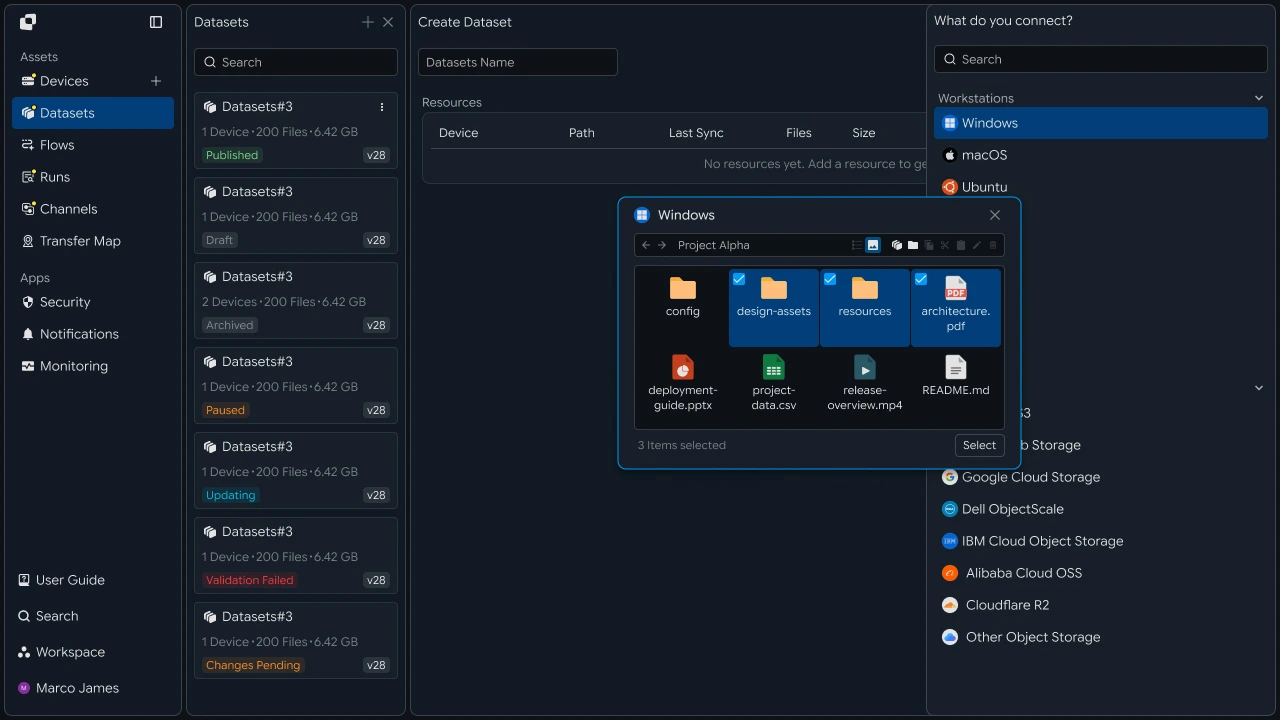
먼저 배포에 사용할 설치 패키지, 빌드 결과물 또는 펌웨어 파일을 준비합니다.
파일은 하나의 배포 작업에서 여러 대상에 사용할 수 있으며, 운영 환경에 따라 장비 그룹별로 서로 다른 파일을 지정할 수도 있습니다.
예를 들어 다음과 같은 파일을 배포 대상으로 구성할 수 있습니다.
| 파일 유형 | 활용 예시 |
|---|---|
| 설치 패키지 | 애플리케이션 설치 파일 |
| 빌드 결과물 | 최신 빌드 파일과 배포 패키지 |
| 펌웨어 | 장비와 엣지 시스템의 펌웨어 |
| 업데이트 파일 | 기존 환경에 적용할 업데이트 파일 |
배포 파일을 준비한 후에는 다음 단계에서 해당 파일을 적용할 장비와 그룹을 구성합니다.
대상 구성#
서버, 지점, 엣지 장비를 배포 그룹과 장비별로 구성하기
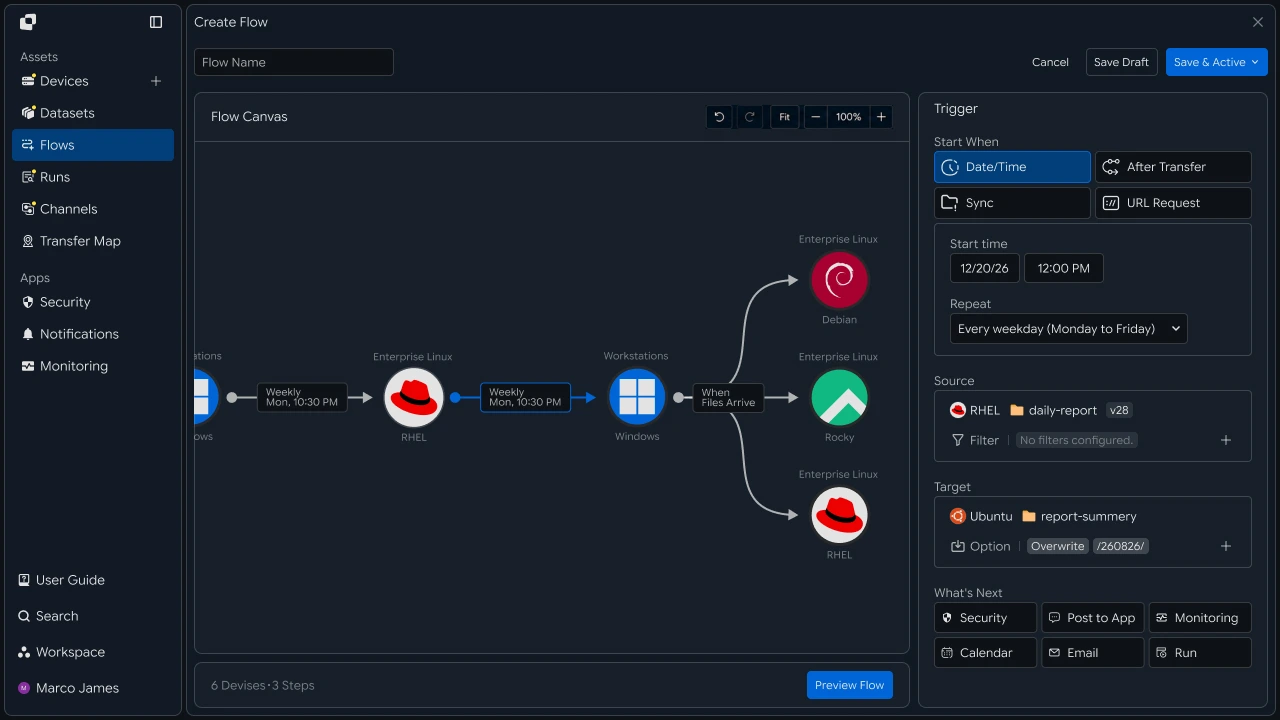
배포 대상은 개별 장비 또는 여러 장비를 하나의 그룹으로 구성할 수 있습니다.
예를 들어 본사 서버, 전국 지점 시스템, 특정 생산 설비, 엣지 장비 그룹처럼 운영 기준에 따라 대상을 구성합니다.
배포 대상
- 서버 그룹장비 A장비 B장비 C
- 지점 그룹장비 D장비 E장비 F
- 엣지 그룹장비 G장비 H장비 I
이렇게 구성하면 하나의 배포 작업에서 여러 장비를 함께 선택하거나, 특정 그룹만 대상으로 배포 범위를 구성할 수 있습니다.
배포 기준#
장비별 파일 버전과 실행 조건을 설정하기
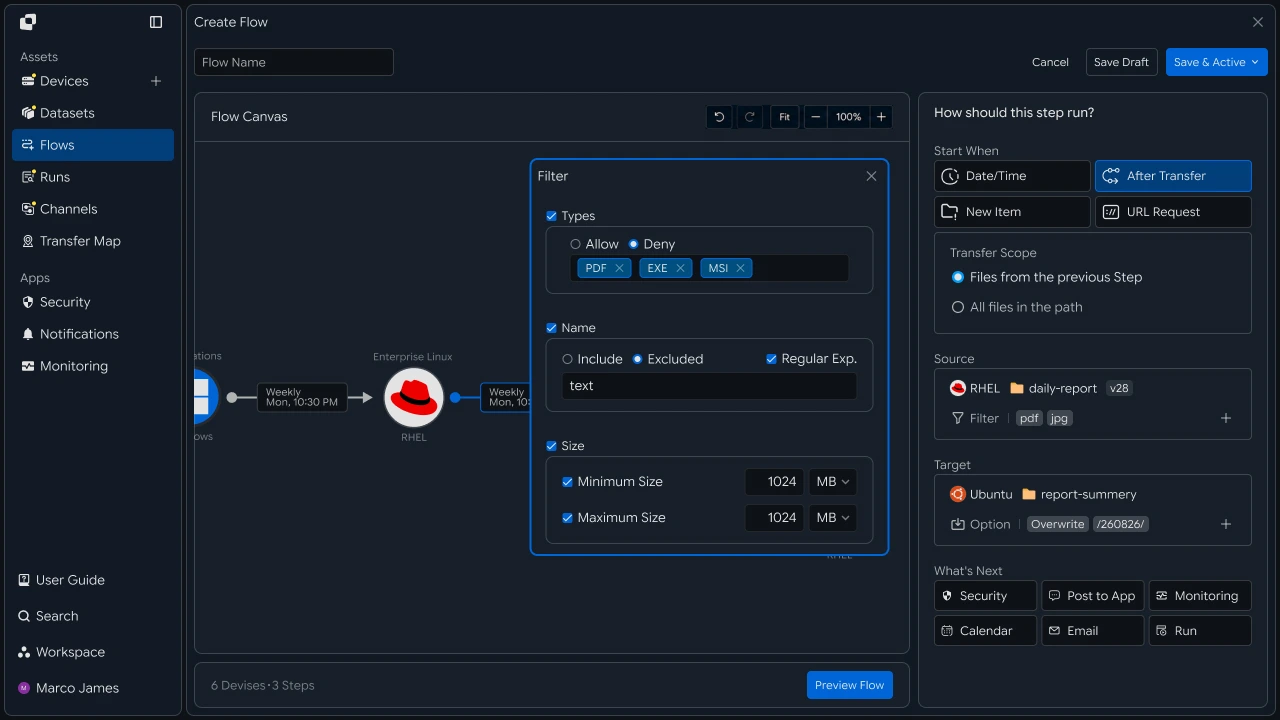
대상 구성이 완료되면 어떤 파일을 어떤 기준으로 배포할지 설정합니다.
배포 파일의 버전과 대상 장비를 연결하고, 즉시 실행하거나 지정된 일정 또는 다른 작업의 완료 상태를 기준으로 실행 조건을 구성할 수 있습니다.
설정할 기준
| 설정 항목 | 구성 내용 |
|---|---|
| 배포 파일 | 설치 패키지 또는 펌웨어 지정 |
| 적용 버전 | 대상 장비에 배포할 파일 버전 지정 |
| 대상 범위 | 전체 장비, 그룹 또는 개별 장비 선택 |
| 실행 조건 | 즉시 실행, 일정 또는 다른 작업 완료 후 실행 |
| 파일 경로 | 대상 장비의 저장 또는 적용 위치 설정 |
예를 들어 최신 펌웨어가 준비된 후 특정 장비 그룹에 배포하거나, 빌드 작업이 완료된 후 생성된 결과물을 지정된 서버에 배포하는 흐름을 구성할 수 있습니다.
다중 배포#
하나의 배포 작업으로 여러 대상 장비에 파일 전송하기
배포 기준을 설정한 후에는 하나의 파일을 여러 대상 장비에 전송하는 다중 배포 흐름을 구성합니다.
Flow Canvas에서 하나의 배포 원본을 여러 대상 장비와 연결하면 동일한 파일을 서버, 지점, 엣지 장비 등 여러 환경으로 배포할 수 있습니다.
배포 파일
- Server완료 확인
- Branch완료 확인
- Edge완료 확인
대상 장비는 전체를 함께 처리하거나 운영 기준에 따라 특정 그룹과 장비를 선택해 배포할 수 있습니다.
결과 관리#
대상별 반영 상태를 확인하고 필요한 장비의 배포 작업 다시 실행하기
배포 작업이 실행되면 Runs와 작업 상세 정보를 통해 전체 배포 상태와 대상별 결과를 확인합니다.
확인 과정에서는 각 장비의 진행 상태와 처리된 파일, 실행 시간 등을 함께 살펴볼 수 있습니다.
배포 결과 흐름

| 확인 항목 | 확인 내용 |
|---|---|
| 대상 장비 | 파일이 배포된 서버와 장비 |
| 진행 상태 | 현재 배포 작업의 처리 상태 |
| 파일 결과 | 대상 장비별 파일 반영 결과 |
| 실행 시간 | 배포 시작과 완료 시간 |
| 재배포 대상 | 다시 실행할 장비 또는 그룹 |
특정 장비의 배포 결과를 다시 확인해야 하는 경우 해당 대상 또는 장비 그룹을 기준으로 필요한 배포 작업을 다시 실행할 수 있습니다.
개발자#
하나의 산출물을 여러 장비에 배포하고 장비별 반영 결과 집계하기
연동 준비#
공통 호출 코드와 상태 값 준비하기
import os
import requests

BASE_URL = os.getenv("INNORIX_BASE_URL", "https://app.innorix.com").rstrip("/")
TOKEN = os.environ["INNORIX_ACCESS_TOKEN"]
WORKSPACE_ID = os.getenv("INNORIX_WORKSPACE_ID")   # optional; falls back to the current workspace

STATUS_COMPLETE = 2
TERMINAL = {2, 4, 5, 9, 99}          # complete / error / cancelled / partial / failed
NOT_SUCCEEDED = {4, 5, 9, 99}


def api(method, path, body=None, params=None):
    headers = {
        "Content-Type": "application/json",
        "Authorization": f"Bearer {TOKEN}",
    }

    if WORKSPACE_ID:
        headers["x-workspace-id"] = WORKSPACE_ID

    response = requests.request(
        method, BASE_URL + path,
        headers=headers, json=body, params=params, timeout=30,
    )

    payload = response.json() if response.content else {}

    if not response.ok:
        raise RuntimeError(payload.get("message") or f"HTTP {response.status_code}")

    return payload.get("data")


def is_terminal(detail):
    return detail.get("isTerminal", detail.get("status") in TERMINAL)
// InnorixClient.java
public static final String BASE_URL =
env("INNORIX_BASE_URL", "https://app.innorix.com").replaceAll("/+quot;, "");
public static final String WORKSPACE_ID = env("INNORIX_WORKSPACE_ID", null);
public static final int STATUS_COMPLETE = 2;
// States the transfer no longer moves out of
public static final Set<Integer> TERMINAL = Set.of(2, 4, 5, 9, 99);
// Terminal states that are not a full success
public static final Set<Integer> NOT_SUCCEEDED = Set.of(4, 5, 9, 99);
private HttpRequest.Builder headers(HttpRequest.Builder builder) {
builder.header("Content-Type", "application/json")
.header("Authorization", "Bearer " + session.accessToken());
// When omitted the account's current workspace is used.
if (workspaceId != null) builder.header("x-workspace-id", workspaceId);
return builder;
}
/** Unwraps and returns data from the response. Throws ApiError on failure. */
public Object api(String method, String path, Object body, Map<String, Object> params) {
Resp response = request(method, path, body, params);
Object payload = null;
try {
payload = Json.parse(response.text());
} catch (RuntimeException ignored) {
payload = null;
}
if (!response.ok()) {
Map<String, Object> map = Json.asObj(payload);
String message = Json.str(map, "message", Json.str(map, "error", "unknown error"));
throw new ApiError(response.status, message, map);
}
return Json.get(payload, "data");
}
/** Use the server flag when present, otherwise fall back to the status code. */
public static boolean isTerminal(Map<String, Object> record) {
Boolean flag = Json.boolOrNull(record, "isTerminal");
if (flag != null) return flag;
Integer status = Json.intOrNull(record, "status");
return status != null && TERMINAL.contains(status);
}// innorix-client.js
const BASE_URL = (process.env.INNORIX_BASE_URL
|| "https://app.innorix.com").replace(/\/+$/, "");
const TOKEN = process.env.INNORIX_ACCESS_TOKEN;
const WORKSPACE_ID = process.env.INNORIX_WORKSPACE_ID || null;
export const STATUS_COMPLETE = 2;
export const TERMINAL = new Set([2, 4, 5, 9, 99]); // complete / error / cancelled / partial / failed
export const NOT_SUCCEEDED = new Set([4, 5, 9, 99]);
export async function api(method, path, body = null, params = null) {
const url = new URL(BASE_URL + path);
if (params) {
for (const [key, value] of Object.entries(params)) {
if (value === undefined || value === null) continue;
url.searchParams.set(key, String(value));
}
}
const headers = {
"Content-Type": "application/json",
Authorization: `Bearer ${TOKEN}`,
};
// When omitted the account's current workspace is used.
if (WORKSPACE_ID) headers["x-workspace-id"] = WORKSPACE_ID;
const response = await fetch(url, {
method,
headers,
body: body === null ? undefined : JSON.stringify(body),
signal: AbortSignal.timeout(30_000),
});
const payload = await response.json().catch(() => ({}));
if (!response.ok) {
throw new Error(payload.message || `HTTP ${response.status}`);
}
return payload.data;
}
export function isTerminal(detail) {
return detail.isTerminal !== undefined
? detail.isTerminal
: TERMINAL.has(detail.status);
}// InnorixClient.cs
public static readonly string BaseUrl =
Env("INNORIX_BASE_URL", "https://app.innorix.com").TrimEnd('/');
public static readonly string WorkspaceIdFromEnv = Env("INNORIX_WORKSPACE_ID", null);
public const int StatusComplete = 2;
/// <summary>States the transfer no longer moves out of</summary>
public static readonly HashSet<int> Terminal = new HashSet<int> { 2, 4, 5, 9, 99 };
/// <summary>Terminal states that are not a full success</summary>
public static readonly HashSet<int> NotSucceeded = new HashSet<int> { 4, 5, 9, 99 };
// Applied on every request
request.Headers.TryAddWithoutValidation("Authorization", "Bearer " + Session.AccessToken);
// When omitted the account's current workspace is used.
if (WorkspaceId != null) request.Headers.TryAddWithoutValidation("x-workspace-id", WorkspaceId);
public async Task<JsonNode> ApiAsync(string method, string path, JsonNode body = null,
IDictionary<string, object> parameters = null)
{
Resp response = await RequestAsync(method, path, body, parameters).ConfigureAwait(false);
JsonNode payload = null;
try
{
payload = J.Parse(response.Text());
}
catch (Exception)
{
payload = null;
}
if (!response.Ok)
{
JsonObject map = J.AsObj(payload);
string message = J.Str(map, "message", J.Str(map, "error", "unknown error"));
throw new ApiError(response.Status, message, map);
}
return J.Get(payload, "data");
}
/// <summary>Use the server flag when present, otherwise fall back to the status code.</summary>
public static bool IsTerminal(JsonObject record)
{
bool? flag = J.BoolOrNull(record, "isTerminal");
if (flag != null) return flag.Value;
int? status = J.IntOrNull(record, "status");
return status != null && Terminal.Contains(status.Value);
}전송 상태는 아래 값으로 판단합니다. 종료 상태는 다섯 개이고 성공에 해당하는 값은 완료(2)입니다.
| 상태 값 | 의미 | 종료 |
|---|---|---|
| 2 | 완료 | 예 |
| 4 | 오류 | 예 |
| 5 | 취소 | 예 |
| 9 | 부분 완료 | 예 |
| 99 | 실패 | 예 |
| 1, 6, 12, 13 | 시작, 전송 중, 동기화 중, 수신 중 | 아니오 |
배포 대상 구성#
장비 그룹을 목록으로 정의하고 식별자 확인하기
배포 대상은 목록으로 관리합니다. 장비명으로 다룬다면 먼저 식별자로 바꿉니다.
def resolve_device(name):
    result = api("GET", "/api/devices/resolve", params={"name": name}) or {}
    devices = result.get("devices") or []
    count = result.get("matchCount", len(devices))

    if count != 1 or not devices:
        raise RuntimeError(f"{name}: {count} matches")

    return devices[0]["deviceId"]


GROUPS = {
    "server": ["srv-01", "srv-02", "srv-03"],
    "branch": ["branch-seoul", "branch-busan"],
    "edge":   ["edge-line-01", "edge-line-02"],
}

RESOLVED = {
    group: [resolve_device(name) for name in names]
    for group, names in GROUPS.items()
}
String resolveDevice(String name) {
Map<String, Object> result = client.apiObj("GET", "/api/devices/resolve", null,
Json.newObj("name", name));
List<Object> devices = Json.arrOf(result, "devices");
int count = Json.intOr(result, "matchCount", devices.size());
if (count != 1 || devices.isEmpty()) {
throw new RuntimeException(name + ": " + count + " matches");
}
return Json.str(Json.asObj(devices.get(0)), "deviceId");
}
Map<String, List<String>> groups = Map.of(
"server", List.of("srv-01", "srv-02", "srv-03"),
"branch", List.of("branch-seoul", "branch-busan"),
"edge", List.of("edge-line-01", "edge-line-02"));
Map<String, List<String>> resolved = new LinkedHashMap<>();
groups.forEach((group, names) -> {
List<String> ids = new ArrayList<>();
for (String n : names) ids.add(resolveDevice(n));
resolved.put(group, ids);
});async function resolveDevice(name) {
const result = (await client.api("GET", "/api/devices/resolve",
null, { name })) || {};
const devices = result.devices || [];
const count = result.matchCount ?? devices.length;
if (count !== 1 || devices.length === 0) {
throw new Error(`${name}: ${count} matches`);
}
return devices[0].deviceId;
}
const GROUPS = {
server: ["srv-01", "srv-02", "srv-03"],
branch: ["branch-seoul", "branch-busan"],
edge: ["edge-line-01", "edge-line-02"],
};
const RESOLVED = {};
for (const [group, names] of Object.entries(GROUPS)) {
RESOLVED[group] = [];
for (const n of names) RESOLVED[group].push(await resolveDevice(n));
}async Task<string> ResolveDeviceAsync(string name)
{
JsonObject result = await client.ApiObjAsync("GET", "/api/devices/resolve",
null, new Dictionary<string, object> { ["name"] = name });
var devices = J.ArrOf(result, "devices");
int count = J.Int(result, "matchCount", devices.Count);
if (count != 1 || devices.Count == 0)
{
throw new Exception(quot;{name}: {count} matches");
}
return J.Str(J.AsObj(devices[0]), "deviceId");
}
var groups = new Dictionary<string, string[]>
{
["server"] = new[] { "srv-01", "srv-02", "srv-03" },
["branch"] = new[] { "branch-seoul", "branch-busan" },
["edge"] = new[] { "edge-line-01", "edge-line-02" },
};
var resolved = new Dictionary<string, List<string>>();
foreach (var (group, names) in groups)
{
var ids = new List<string>();
foreach (string n in names) ids.Add(await ResolveDeviceAsync(n));
resolved[group] = ids;
}전체 장비 목록에서 조건으로 걸러내는 방법도 있습니다.
result = api("GET", "/api/devices", params={"page": 1, "size": 200}) or {}

edge_devices = [d["deviceId"] for d in result.get("devices") or []
if d["name"].startswith("edge-")]Map<String, Object> result = client.apiObj("GET", "/api/devices", null,
Json.newObj("page", 1, "size", 200));
List<String> edgeDevices = new ArrayList<>();
for (Object node : Json.arrOf(result, "devices")) {
Map<String, Object> device = Json.asObj(node);
if (Json.str(device, "name").startsWith("edge-")) {
edgeDevices.add(Json.str(device, "deviceId"));
}
}const result = (await client.api("GET", "/api/devices", null,
{ page: 1, size: 200 })) || {};
const edgeDevices = (result.devices || [])
.filter((d) => d.name.startsWith("edge-"))
.map((d) => d.deviceId);JsonObject result = await client.ApiObjAsync("GET", "/api/devices", null,
new Dictionary<string, object> { ["page"] = 1, ["size"] = 200 });
var edgeDevices = J.ArrOf(result, "devices").Select(J.AsObj)
.Where(d => J.Str(d, "name").StartsWith("edge-"))
.Select(d => J.Str(d, "deviceId")).ToList();장비 목록은 data.devices 배열로 반환됩니다.
버전 경로 설계#
배포 파일의 버전이 경로에 드러나게 하기
어느 버전이 어디에 반영됐는지 경로에 기록합니다.
def package_path(product, version):
    return f"/release/{product}/{version}"


def target_path(product, version):
    return f"/opt/{product}/{version}"


PRODUCT, VERSION = "app", "2.14.0"
String packagePath(String product, String version) {
return "/release/" + product + "/" + version;
}
String targetPath(String product, String version) {
return "/opt/" + product + "/" + version;
}
String product = "app", version = "2.14.0";const packagePath = (product, version) => `/release/${product}/${version}`;
const targetPath = (product, version) => `/opt/${product}/${version}`;
const PRODUCT = "app";
const VERSION = "2.14.0";string PackagePath(string product, string version) => quot;/release/{product}/{version}";
string TargetPath(string product, string version) => quot;/opt/{product}/{version}";
const string Product = "app";
const string Version = "2.14.0";버전 폴더를 따로 두면 이전 버전이 남아 있어 문제가 생겼을 때 되돌리기 쉽습니다. 한 경로에 덮어쓰면 롤백할 대상이 없습니다.
다중 배포#
하나의 파일을 여러 장비로 보내기
하나의 전송은 대상 장비 하나를 다룹니다. 대상마다 전송을 만들고, 반환된 monitorId를 장비별로 보관해 진행과 결과를 추적합니다.
def deploy(source, targets, product, version, target_paths=None):
    src = package_path(product, version)

    # pass a list when targets need different paths; the order must match
    paths = target_paths or [target_path(product, version)] * len(targets)

    return {
        device: api("POST", "/api/transfers/manual", {
            "sourceDevice": source,
            "targetDevice": device,
            "targetPath": path,
            "sourcePaths": [src],
            "sendAllFolder": True,
            "checkIntegrity": True,
            "transferOptions": {"target-action": "overwrite"},
        })["monitorId"]
        for device, path in zip(targets, paths)
    }


transfers = deploy("device-build-01", RESOLVED["edge"], PRODUCT, VERSION)Map<String, String> deploy(String source, List<String> targets,
String product, String version, List<String> targetPaths) {
String src = packagePath(product, version);
// pass a list when targets need different paths; the order must match
List<String> paths = targetPaths;
if (paths == null) {
paths = new ArrayList<>();
for (int i = 0; i < targets.size(); i++) paths.add(targetPath(product, version));
}
Map<String, String> transfers = new LinkedHashMap<>();
for (int i = 0; i < targets.size(); i++) {
String device = targets.get(i);
Map<String, Object> transfer = client.apiObj("POST", "/api/transfers/manual", Json.newObj(
"sourceDevice", source,
"targetDevice", device,
"targetPath", paths.get(i),
"sourcePaths", List.of(src),
"sendAllFolder", true,
"checkIntegrity", true,
"transferOptions", Json.newObj("target-action", "overwrite")));
transfers.put(device, Json.str(transfer, "monitorId"));
}
return transfers;
}
Map<String, String> transfers = deploy("device-build-01", resolved.get("edge"),
product, version, null);async function deploy(source, targets, product, version, targetPaths = null) {
const src = packagePath(product, version);
// pass a list when targets need different paths; the order must match
const paths = targetPaths || targets.map(() => targetPath(product, version));
const transfers = {};
for (const [i, device] of targets.entries()) {
const transfer = await client.api("POST", "/api/transfers/manual", {
sourceDevice: source,
targetDevice: device,
targetPath: paths[i],
sourcePaths: [src],
sendAllFolder: true,
checkIntegrity: true,
transferOptions: { "target-action": "overwrite" },
});
transfers[device] = transfer.monitorId;
}
return transfers;
}
const transfers = await deploy("device-build-01", RESOLVED.edge, PRODUCT, VERSION);async Task<Dictionary<string, string>> DeployAsync(string source,
List<string> targets, string product, string version, List<string> targetPaths = null)
{
string src = PackagePath(product, version);
// pass a list when targets need different paths; the order must match
List<string> paths = targetPaths
?? targets.Select(_ => TargetPath(product, version)).ToList();
var transfers = new Dictionary<string, string>();
for (int i = 0; i < targets.Count; i++)
{
string device = targets[i];
JsonObject transfer = await client.ApiObjAsync("POST", "/api/transfers/manual",
new JsonObject
{
["sourceDevice"] = source,
["targetDevice"] = device,
["targetPath"] = paths[i],
["sourcePaths"] = new JsonArray { src },
["sendAllFolder"] = true,
["checkIntegrity"] = true,
["transferOptions"] = new JsonObject { ["target-action"] = "overwrite" },
});
transfers[device] = J.Str(transfer, "monitorId");
}
return transfers;
}
Dictionary<string, string> transfers = await DeployAsync("device-build-01",
resolved["edge"], Product, Version);버전 폴더 안에서는 같은 파일을 다시 전송하는 경우가 대부분이므로 overwrite를 씁니다. numbering을 쓰면 재배포할 때마다 사본이 쌓입니다.
무결성 검증을 켭니다. 펌웨어가 손상된 채로 적용되면 장비가 부팅되지 않을 수 있습니다.
현장 회선을 함께 쓰는 환경이라면 속도 제한을 걸어 다른 업무에 영향이 가지 않게 합니다.
"transferOptions": {
  "target-action": "overwrite",
  "limitRate": 20480
}limitRate의 단위는 KB/s입니다.
결과 집계#
장비별 반영 상태를 모아 확인하기
def wait(monitor_id, timeout=3600, interval=3):
    deadline = time.time() + timeout

    while time.time() < deadline:
        detail = api("GET", f"/api/transfers/{monitor_id}")

        if is_terminal(detail):
            return detail

        time.sleep(interval)

    raise TimeoutError(monitor_id)


def failed_files(monitor_id):
    result = api("GET", f"/api/transfers/{monitor_id}/files", params={
        "state": "any", "size": 500,
    }) or {}

    return [r for r in (result.get("children") or [])
            if r.get("status") in NOT_SUCCEEDED]


def retry_failed(monitor_id):
    rows = failed_files(monitor_id)

    if not rows:
        return 0

    api("POST", f"/api/transfers/{monitor_id}/retry", {
        "filesRetry": [
            {"filePath": r["sourceFilePath"], "isDir": bool(r.get("isFolder"))}
            for r in rows
        ]
    })

    return len(rows)
public Map<String, Object> wait(String monitorId, int timeoutSeconds, int intervalSeconds) {
long deadline = System.currentTimeMillis() + timeoutSeconds * 1000L;
while (System.currentTimeMillis() < deadline) {
Map<String, Object> detail = apiObj("GET", "/api/transfers/" + monitorId);
if (isTerminal(detail)) return detail;
sleep(intervalSeconds * 1000L);
}
throw new ApiError(0, "timeout waiting for " + monitorId);
}
public List<Map<String, Object>> failedFiles(String monitorId) {
List<Map<String, Object>> failed = new ArrayList<>();
for (Map<String, Object> row : transferFiles(monitorId)) {
Integer status = Json.intOrNull(row, "status");
if (status != null && NOT_SUCCEEDED.contains(status)) failed.add(row);
}
return failed;
}
public int retryFailed(String monitorId) {
List<Map<String, Object>> rows = failedFiles(monitorId);
if (rows.isEmpty()) return 0;
List<Object> filesRetry = new ArrayList<>();
for (Map<String, Object> row : rows) {
String path = Json.str(row, "sourceFilePath");
if (path == null) continue;
filesRetry.add(Json.newObj("filePath", path, "isDir", Json.bool(row, "isFolder", false)));
}
api("POST", "/api/transfers/" + monitorId + "/retry", Json.newObj("filesRetry", filesRetry));
return rows.size();
}const sleep = (ms) => new Promise((resolve) => setTimeout(resolve, ms));
export async function wait(monitorId, { timeout = 3600, interval = 3 } = {}) {
const deadline = Date.now() + timeout * 1000;
while (Date.now() < deadline) {
const detail = await api("GET", `/api/transfers/${monitorId}`);
if (isTerminal(detail)) return detail;
await sleep(interval * 1000);
}
throw new Error(`timeout waiting for ${monitorId}`);
}
export async function failedFiles(monitorId) {
const result = (await api("GET", `/api/transfers/${monitorId}/files`, null, {
state: "any", size: 500,
})) || {};
return (result.children || []).filter((row) => NOT_SUCCEEDED.has(row.status));
}
export async function retryFailed(monitorId) {
const rows = await failedFiles(monitorId);
if (rows.length === 0) return 0;
await api("POST", `/api/transfers/${monitorId}/retry`, {
filesRetry: rows
.filter((row) => row.sourceFilePath)
.map((row) => ({ filePath: row.sourceFilePath, isDir: Boolean(row.isFolder) })),
});
return rows.length;
}public async Task<JsonObject> WaitAsync(string monitorId, int timeoutSeconds = 3600,
int intervalSeconds = 3)
{
long deadline = Environment.TickCount64 + timeoutSeconds * 1000L;
while (Environment.TickCount64 < deadline)
{
JsonObject detail = await ApiObjAsync("GET", "/api/transfers/" + monitorId)
.ConfigureAwait(false);
if (IsTerminal(detail)) return detail;
await Task.Delay(intervalSeconds * 1000).ConfigureAwait(false);
}
throw new ApiError(0, "timeout waiting for " + monitorId);
}
public async Task<List<JsonObject>> FailedFilesAsync(string monitorId)
{
List<JsonObject> rows = await TransferFilesAsync(monitorId).ConfigureAwait(false);
return rows.Where(row =>
{
int? status = J.IntOrNull(row, "status");
return status != null && NotSucceeded.Contains(status.Value);
}).ToList();
}
/// <summary>Only callable once the transfer has reached a terminal state.</summary>
public async Task<int> RetryFailedAsync(string monitorId)
{
List<JsonObject> rows = await FailedFilesAsync(monitorId).ConfigureAwait(false);
if (rows.Count == 0) return 0;
var filesRetry = new JsonArray();
foreach (JsonObject row in rows)
{
string path = J.Str(row, "sourceFilePath");
if (path == null) continue;
filesRetry.Add(new JsonObject
{
["filePath"] = path,
["isDir"] = J.Bool(row, "isFolder", false),
});
}
await ApiAsync("POST", "/api/transfers/" + monitorId + "/retry",
new JsonObject { ["filesRetry"] = filesRetry }).ConfigureAwait(false);
return rows.Count;
}한 장비가 실패해도 나머지를 계속 확인해야 어디까지 반영됐는지 알 수 있습니다.
def deploy_report(transfers, timeout=3600):
    results = {}

    for device, monitor_id in transfers.items():
        try:
            results[device] = wait(monitor_id, timeout=timeout)
        except TimeoutError:
            results[device] = {"status": None}

    succeeded = [d for d, r in results.items()
                 if r.get("status") == STATUS_COMPLETE]
    failed = [d for d in results if d not in succeeded]

    return succeeded, failed, results


succeeded, failed, results = deploy_report(transfers)

print(f"{len(succeeded)} succeeded / {len(failed)} failed")

for device in failed:
    detail = results[device]
    print(f"  {device:20} {detail.get('statusName') or detail.get('status')}")
record DeployResult(List<String> succeeded, List<String> failed,
Map<String, Map<String, Object>> results) {}
DeployResult deployReport(Map<String, String> transfers, int timeout) {
Map<String, Map<String, Object>> results = new LinkedHashMap<>();
transfers.forEach((device, monitorId) -> {
try {
results.put(device, client.await(monitorId, timeout, null));
} catch (RuntimeException error) {
results.put(device, Json.newObj("status", null));
}
});
List<String> succeeded = new ArrayList<>();
List<String> failed = new ArrayList<>();
results.forEach((device, detail) -> {
if (Json.intOr(detail, "status", -1) == InnorixClient.STATUS_COMPLETE) succeeded.add(device);
else failed.add(device);
});
return new DeployResult(succeeded, failed, results);
}
DeployResult report = deployReport(transfers, 3600);
System.out.printf("%d succeeded / %d failed%n",
report.succeeded().size(), report.failed().size());
for (String device : report.failed()) {
Map<String, Object> detail = report.results().get(device);
System.out.println(" " + device + " " + Json.str(detail, "statusName"));
}async function deployReport(transfers, timeout = 3600) {
const results = {};
for (const [device, monitorId] of Object.entries(transfers)) {
try {
results[device] = await wait(monitorId, { timeout });
} catch {
results[device] = { status: null };
}
}
const succeeded = Object.entries(results)
.filter(([, r]) => r.status === STATUS_COMPLETE).map(([d]) => d);
const failed = Object.keys(results).filter((d) => !succeeded.includes(d));
return { succeeded, failed, results };
}
const { succeeded, failed, results } = await deployReport(transfers);
console.log(`${succeeded.length} succeeded / ${failed.length} failed`);
for (const device of failed) {
console.log(` ${device} ${results[device].statusName ?? results[device].status}`);
}async Task<(List<string> Succeeded, List<string> Failed,
Dictionary<string, JsonObject> Results)> DeployReportAsync(
Dictionary<string, string> transfers, int timeout = 3600)
{
var results = new Dictionary<string, JsonObject>();
foreach (var (device, monitorId) in transfers)
{
try
{
results[device] = await client.WaitAsync(monitorId, timeout);
}
catch
{
results[device] = new JsonObject { ["status"] = null };
}
}
var succeeded = results
.Where(kv => J.IntOrNull(kv.Value, "status") == InnorixClient.StatusComplete)
.Select(kv => kv.Key).ToList();
var failed = results.Keys.Where(d => !succeeded.Contains(d)).ToList();
return (succeeded, failed, results);
}
var (succeeded, failed, results) = await DeployReportAsync(transfers);
Console.WriteLine(quot;{succeeded.Count} succeeded / {failed.Count} failed");
foreach (string device in failed)
{
Console.WriteLine(quot; {device} {J.Str(results[device], "statusName")}");
}| 확인 항목 | 확인 내용 |
|---|---|
status |
장비별 전송 상태 |
percent |
진행률 |
fileCount, totalSize |
반영된 파일 수와 용량 |
endDate |
완료 시간 |
실패 장비 재배포#
성공한 장비는 건너뛰고 실패한 대상만 재배포하기
전체를 다시 실행하면 이미 반영된 장비까지 다시 전송하게 됩니다. 실패한 대상만 선별해 재실행합니다.
for device in failed:
    monitor_id = transfers[device]
    rows = failed_files(monitor_id)

    if rows:
        # reached the device, but some files failed
        print(f"{device}: retried {retry_failed(monitor_id)} files")
    else:
        # no per file record means the transfer never started
        state = api("GET", f"/api/devices/{device}/connectivity") or {}
        print(f"{device}: transfer never started - connected {state.get('isConnected')}"
              f" ({state.get('stateLabel')})")
for (String device : failed) {
String monitorId = transfers.get(device);
List<Map<String, Object>> rows = client.failedFiles(monitorId);
if (!rows.isEmpty()) {
// reached the device, but some files failed
System.out.println(device + ": retried " + client.retryFailed(monitorId) + " files");
} else {
// no per file record means the transfer never started
Map<String, Object> state = client.apiObj("GET",
"/api/devices/" + device + "/connectivity");
System.out.println(device + ": transfer never started - connected "
+ Json.bool(state, "isConnected", false)
+ " (" + Json.str(state, "stateLabel") + ")");
}
}for (const device of failed) {
const monitorId = transfers[device];
const rows = await failedFiles(monitorId);
if (rows.length) {
// reached the device, but some files failed
console.log(`${device}: retried ${await retryFailed(monitorId)} files`);
} else {
// no per file record means the transfer never started
const state = (await client.api("GET",
`/api/devices/${device}/connectivity`)) || {};
console.log(`${device}: transfer never started - connected ${state.isConnected}`
+ ` (${state.stateLabel})`);
}
}foreach (string device in failed)
{
string monitorId = transfers[device];
List<JsonObject> rows = await client.FailedFilesAsync(monitorId);
if (rows.Count > 0)
{
// reached the device, but some files failed
Console.WriteLine(quot;{device}: retried {await client.RetryFailedAsync(monitorId)} files");
}
else
{
// no per file record means the transfer never started
JsonObject state = await client.ApiObjAsync("GET",
quot;/api/devices/{device}/connectivity");
Console.WriteLine(quot;{device}: transfer never started - "
+ quot;connected {J.Bool(state, "isConnected", false)} "
+ quot;({J.Str(state, "stateLabel")})");
}
}파일별 실패 기록이 없으면 장비 연결부터 확인합니다. 연결이 복구된 뒤에 배포를 다시 실행합니다.
if still_offline:
    retry_transfers = deploy("device-build-01", recovered, PRODUCT, VERSION)
    _, still_failed, _ = deploy_report(retry_transfers)
if (stillOffline) {
Map<String, String> retryTransfers = deploy("device-build-01", recovered,
product, version, null);
DeployResult retry = deployReport(retryTransfers, 3600);
}if (stillOffline) {
const retryTransfers = await deploy("device-build-01", recovered, PRODUCT, VERSION);
const { failed: stillFailed } = await deployReport(retryTransfers);
}if (stillOffline)
{
Dictionary<string, string> retryTransfers = await DeployAsync(
"device-build-01", recovered, Product, Version);
var (_, stillFailed, _) = await DeployReportAsync(retryTransfers);
}배포 이력 조회#
어느 장비에 어느 버전이 언제 반영됐는지 확인하기
from datetime import datetime, timedelta, timezone


def paginate(path, params=None, limit=200, max_pages=50):
    query = dict(params or {})
    query["limit"] = limit
    cursor = None

    for _ in range(max_pages):
        if cursor:
            query["cursor"] = cursor

        result = api("GET", path, params=query) or {}

        for record in result.get("data") or []:
            yield record

        pagination = result.get("pagination") or {}

        if not pagination.get("hasMore"):
            return

        cursor = pagination.get("nextCursor")

        if not cursor:
            return


end = datetime.now(timezone.utc)
fmt = "%Y-%m-%dT%H:%M:%SZ"

for row in paginate(f"/api/devices/{device_id}/transfer-history", params={
    "startDate": (end - timedelta(days=30)).strftime(fmt),
    "endDate": end.strftime(fmt),
}):
print(row.get("startDate"), row.get("statusName"), row.get("monitorId"))List<Map<String, Object>> history = client.paginate(
"/api/devices/" + deviceId + "/transfer-history",
Json.newObj("startDate", start, "endDate", end), 200, 50);
for (Map<String, Object> row : history) {
System.out.println(Json.str(row, "startDate") + " "
+ Json.str(row, "statusName") + " " + Json.str(row, "monitorId"));
}for await (const row of paginate(`/api/devices/${deviceId}/transfer-history`, {
startDate: start,
endDate: end,
})) {
console.log(row.startDate, row.statusName, row.monitorId);
}List<JsonObject> history = await client.PaginateAsync(
quot;/api/devices/{deviceId}/transfer-history",
new Dictionary<string, object> { ["startDate"] = start, ["endDate"] = end });
foreach (JsonObject row in history)
{
Console.WriteLine(quot;{J.Str(row, "startDate")} {J.Str(row, "statusName")} "
+ quot;{J.Str(row, "monitorId")}");
}배포 식별자와 버전을 애플리케이션에 함께 기록해 두면 이력과 버전이 연결됩니다.
db.insert("deployments", {
    "product": PRODUCT,
    "version": VERSION,
    "device": device,
    "monitorId": transfers[device],
    "result": "done" if device in succeeded else "failed",
})db.insert("deployments", Json.newObj(
"product", product,
"version", version,
"device", device,
"monitorId", transfers.get(device),
"result", succeeded.contains(device) ? "done" : "failed"));await db.insert("deployments", {
product: PRODUCT,
version: VERSION,
device,
monitorId: transfers[device],
result: succeeded.includes(device) ? "done" : "failed",
});await db.InsertAsync("deployments", new
{
product = Product,
version = Version,
device,
monitorId = transfers[device],
result = succeeded.Contains(device) ? "done" : "failed",
});| 확인 항목 | 확인 내용 |
|---|---|
| 배포 파일 | 전송한 패키지와 버전 |
| 대상 | 장비와 그룹 |
| 결과 | 장비별 성공과 실패 |
| 재배포 | 다시 실행한 대상과 결과 |
| 이력 | 장비별 최근 배포 기록 |