
시작하기#
기본 개념#
여러 장비의 파일을 한곳에서 확인하기
통합 파일 탐색은 여러 장비를 연결하고 각 장비의 파일과 폴더를 하나의 탐색 화면에서 확인할 수 있도록 구성하는 기능입니다.
사용자는 연결된 장비를 선택하고 폴더를 탐색해 필요한 파일을 확인할 수 있으며, 여러 장비의 파일을 하나의 업무 환경에서 이어서 활용할 수 있습니다.
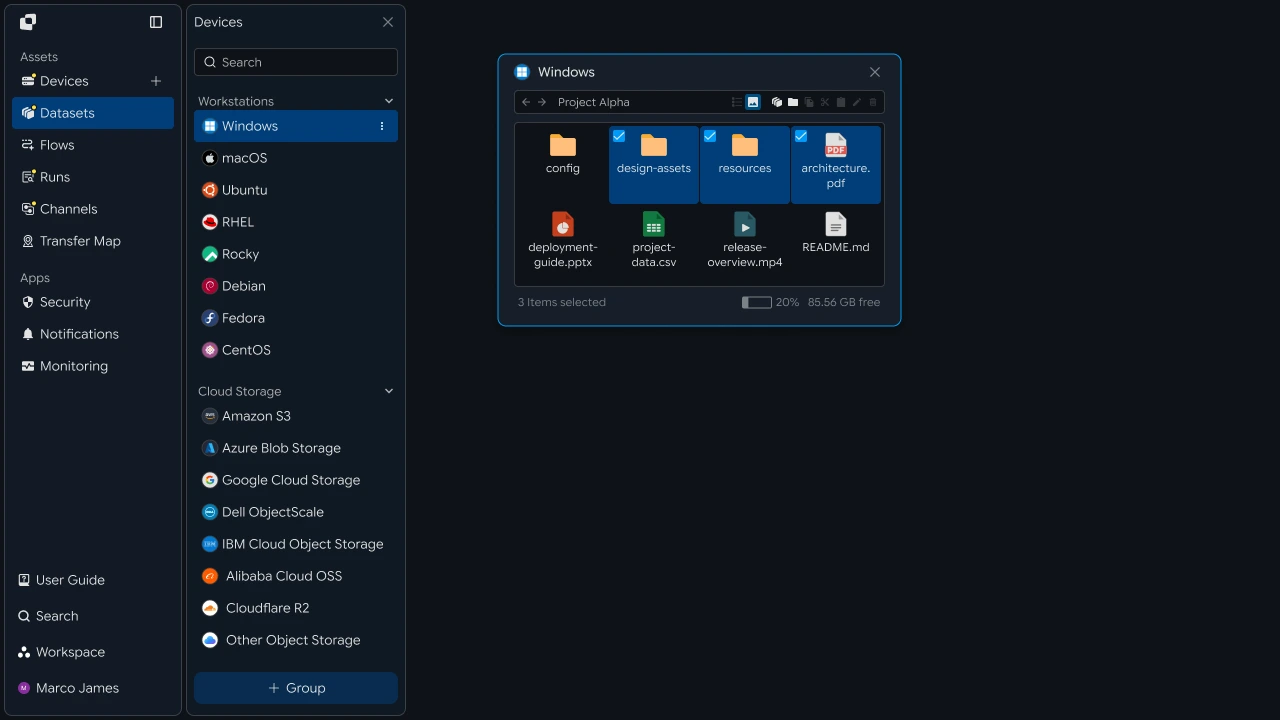
예를 들어 업무 PC의 문서, 서버의 데이터, 스토리지의 결과 파일을 하나의 탐색 환경에서 확인하고 필요한 파일을 선택할 수 있습니다.
탐색 흐름#
장비 선택부터 파일 확인과 전송까지 이어가기
통합 파일 탐색은 연결된 장비에서 필요한 파일을 찾고, 선택한 파일을 다음 업무 환경으로 전송하는 흐름으로 구성됩니다.
- 장비 선택
- 폴더 탐색
- 파일 확인
- 필요한 파일 선택
- 전송 대상 선택
- 파일 전송
- 결과 확인
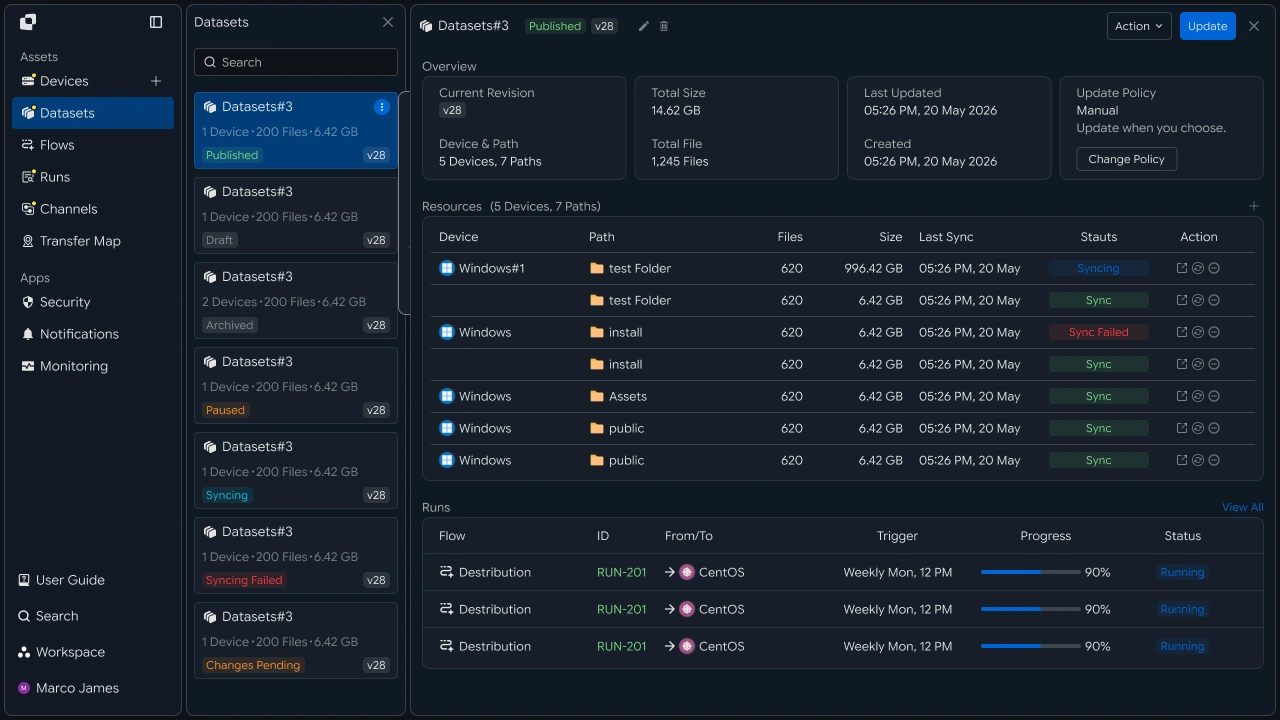
이 흐름을 통해 파일을 찾는 과정부터 필요한 업무 위치로 전송하고 결과를 확인하는 과정까지 이어갈 수 있습니다.
업무 변화#
파일 탐색과 전송 과정을 하나의 업무 흐름으로 연결하기
여러 장비에서 파일을 사용하는 업무에서는 필요한 파일이 있는 위치를 확인하고, 해당 장비에서 파일을 찾은 뒤 다음 업무 환경으로 준비하는 과정이 이어집니다.
통합 파일 탐색을 활용하면 연결된 장비에서 필요한 파일을 찾고, 선택한 파일을 지정된 장비나 작업 공간으로 바로 전송할 수 있습니다.
| 구분 | 장비별 파일 관리 | 통합 파일 탐색 |
|---|---|---|
| 업무 시작 | 필요한 파일이 있는 장비 확인 | 연결된 장비 목록에서 바로 선택 |
| 파일 탐색 | 장비별 환경에서 파일과 폴더 확인 | 하나의 화면에서 장비와 파일 탐색 |
| 파일 준비 | 파일을 확인한 후 다음 업무 위치로 준비 | 선택한 파일을 대상 장비로 바로 전송 |
| 업무 연결 | 파일 준비 후 다음 업무 진행 | 전송 완료 후 다음 업무에 바로 활용 |
이렇게 파일 탐색과 전송을 하나의 흐름으로 구성하면 여러 업무 환경에 있는 파일을 필요한 위치에서 바로 활용할 수 있습니다.
IT 엔지니어#
여러 장비의 파일 탐색 환경을 구성하고 관리하기
장비 연결#
탐색할 장비를 연결하고 필요한 환경까지 확장하기
통합 파일 탐색을 구성하려면 먼저 파일을 확인할 PC, 서버, 스토리지 등 업무 환경의 장비를 연결합니다.
각 장비의 연결 정보를 설정하면 통합 탐색 화면에서 해당 시스템의 파일과 폴더를 확인할 수 있습니다.
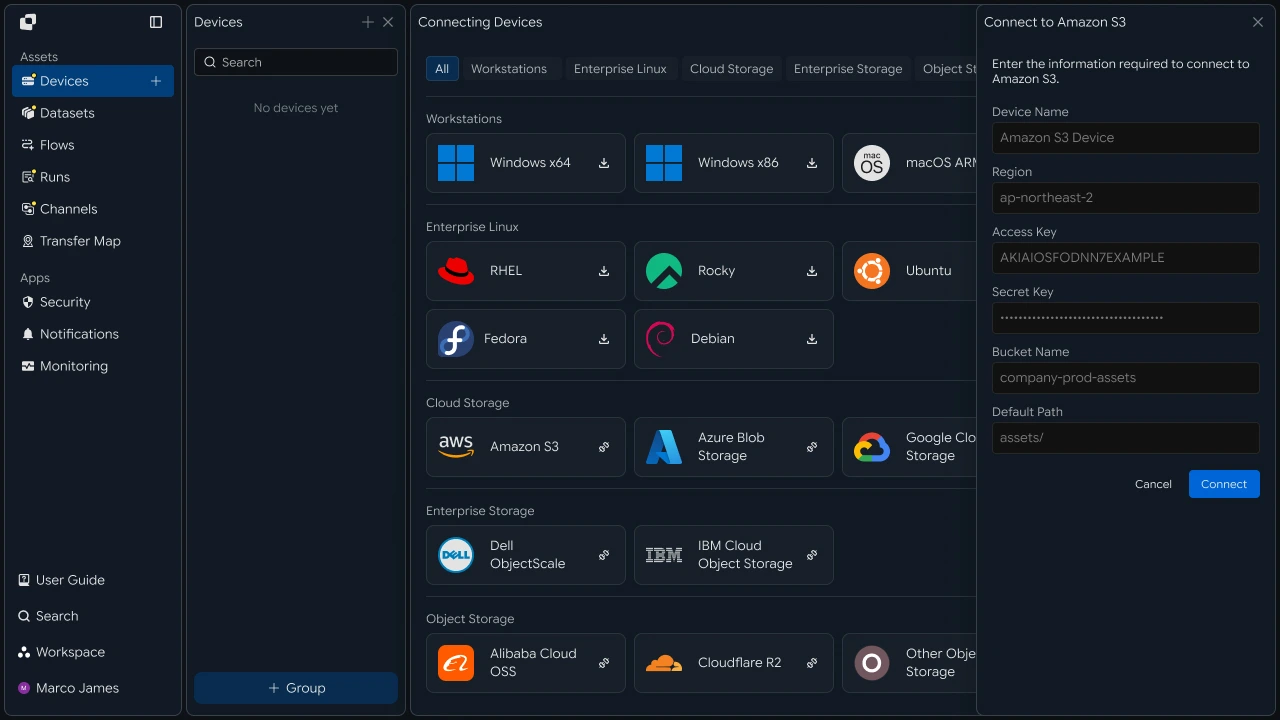
업무 환경이 확장되면 새로운 서버나 스토리지를 같은 방식으로 추가할 수 있습니다. 추가한 장비도 연결 정보를 설정한 후 기존 탐색 환경에 포함할 수 있습니다.
| 장비 유형 | 활용 파일 |
|---|---|
| 업무 PC | 개인 및 팀 업무 파일 |
| Windows 서버 | 업무 문서와 운영 파일 |
| Linux 서버 | 데이터와 처리 파일 |
| 스토리지 | 공유 파일과 결과 파일 |
장비를 추가하면 기존 파일 탐색 환경을 유지하면서 업무에 필요한 시스템까지 탐색 범위를 확장할 수 있습니다.
접근 범위#
사용자와 장비별로 확인할 파일과 폴더 범위 설정하기
장비를 연결한 후에는 사용자와 업무 역할에 따라 확인할 수 있는 장비와 파일 경로를 설정합니다.
사용자 또는 사용자 그룹별로 탐색할 장비를 지정하고, 각 장비에서 사용할 폴더 범위를 구성할 수 있습니다.
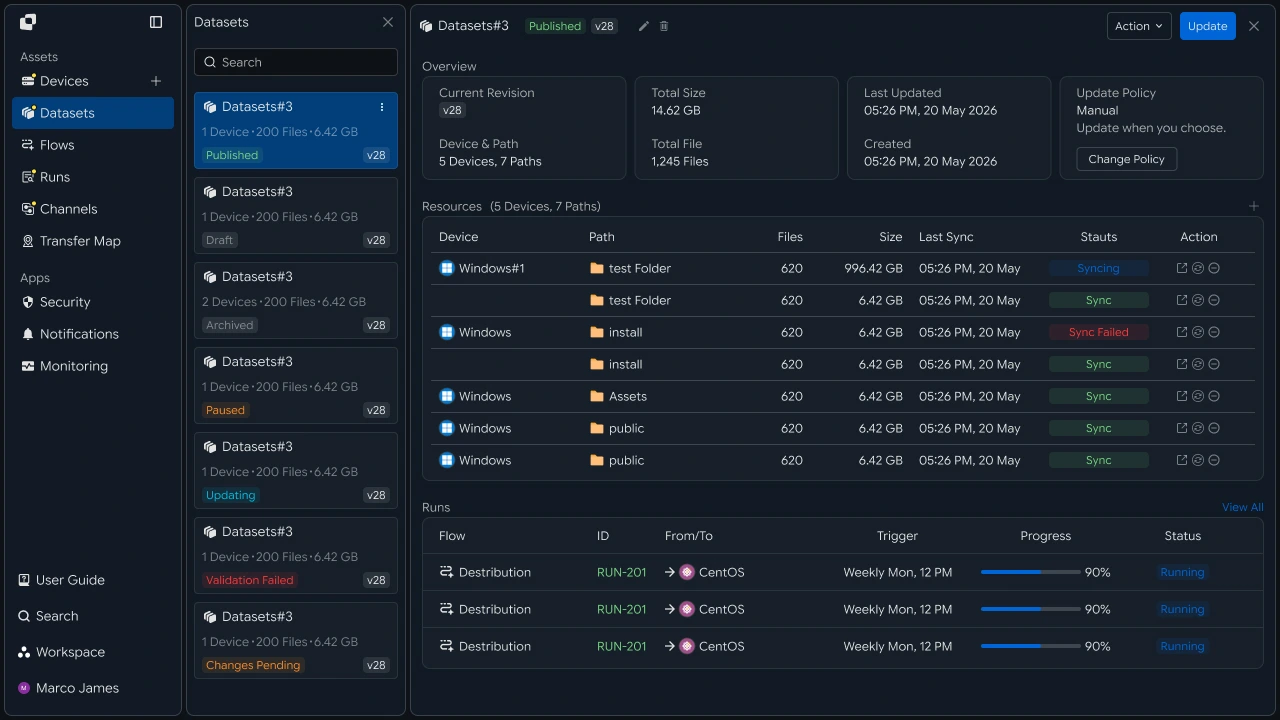
예를 들어 운영팀은 운영 서버의 지정된 폴더를 확인하고, 데이터팀은 분석 서버와 데이터 스토리지의 업무 경로를 확인하도록 구성할 수 있습니다.
| 사용자 그룹 | 탐색 장비 | 파일 범위 |
|---|---|---|
| 운영팀 | 운영 서버 | 운영 파일 경로 |
| 데이터팀 | 분석 서버 | 데이터 폴더 |
| 업무팀 | 공유 스토리지 | 업무 자료 폴더 |
이렇게 사용자별 탐색 범위를 구성하면 각 업무에서 필요한 장비와 파일을 중심으로 통합 파일 탐색 환경을 운영할 수 있습니다.
파일 탐색#
연결된 여러 장비에서 필요한 파일 찾기
장비와 접근 범위가 구성되면 사용자는 통합 탐색 화면에서 필요한 장비를 선택하고 폴더와 파일을 확인할 수 있습니다.
장비 목록에서 시스템을 선택하면 해당 장비의 폴더 구조와 파일 목록을 확인할 수 있으며, 파일 이름과 경로를 기준으로 필요한 파일을 찾을 수 있습니다.

파일 탐색 화면에서는 다음과 같은 정보를 함께 확인할 수 있습니다.
| 확인 항목 | 내용 |
|---|---|
| Device | 파일이 있는 장비 |
| Path | 현재 파일 경로 |
| File Name | 파일 이름 |
| Size | 파일 크기 |
| Modified | 마지막 변경 시간 |
필요한 파일을 찾으면 해당 항목을 선택해 바로 다음 전송 작업으로 이어갈 수 있습니다.
파일 전송#
선택한 파일을 필요한 장비와 작업 공간으로 전송하기
탐색 화면에서 필요한 파일을 선택한 후 전송할 장비와 대상 경로를 지정합니다.
선택한 파일은 현재 위치에서 지정된 대상 장비나 작업 공간으로 전송되며, 전송된 파일은 다음 업무에서 확인하고 활용할 수 있습니다.
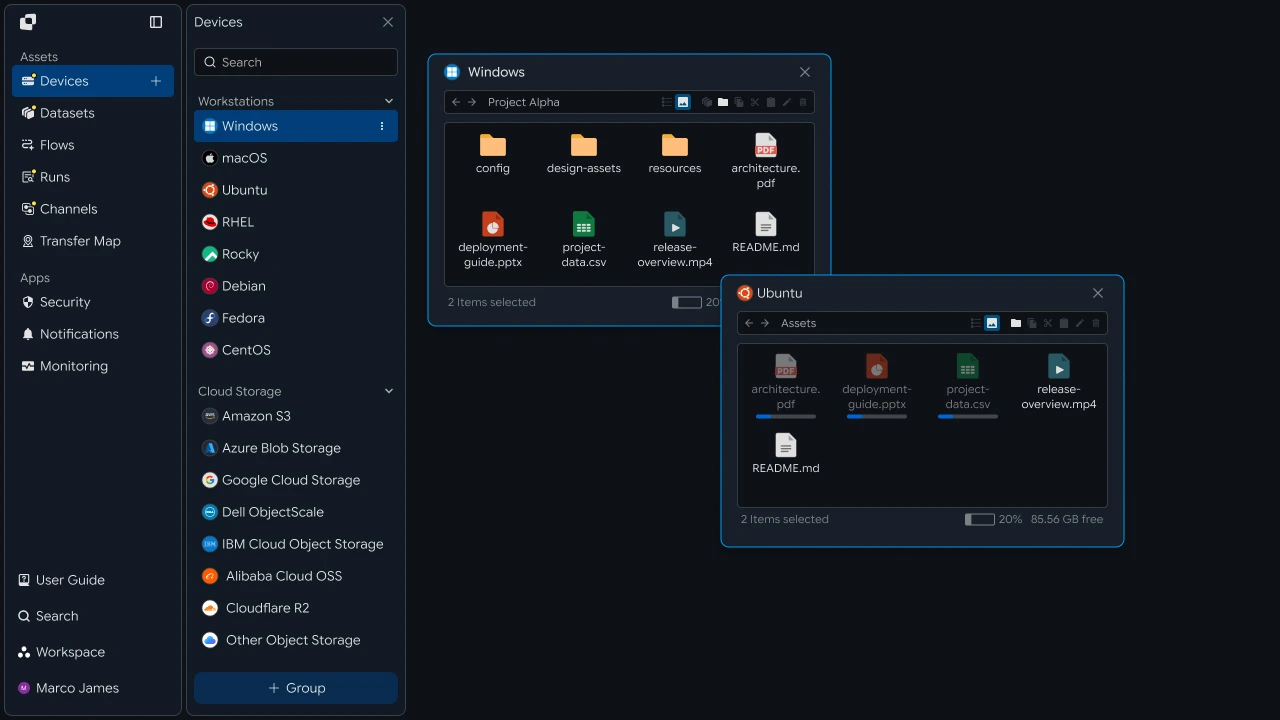
전송 흐름은 다음과 같이 구성됩니다.
하나의 탐색 화면에서 파일을 찾고 대상 위치까지 지정하면 파일 탐색과 전송을 하나의 업무 흐름으로 연결할 수 있습니다.
결과 확인#
전송 상태와 파일 처리 결과 확인하기
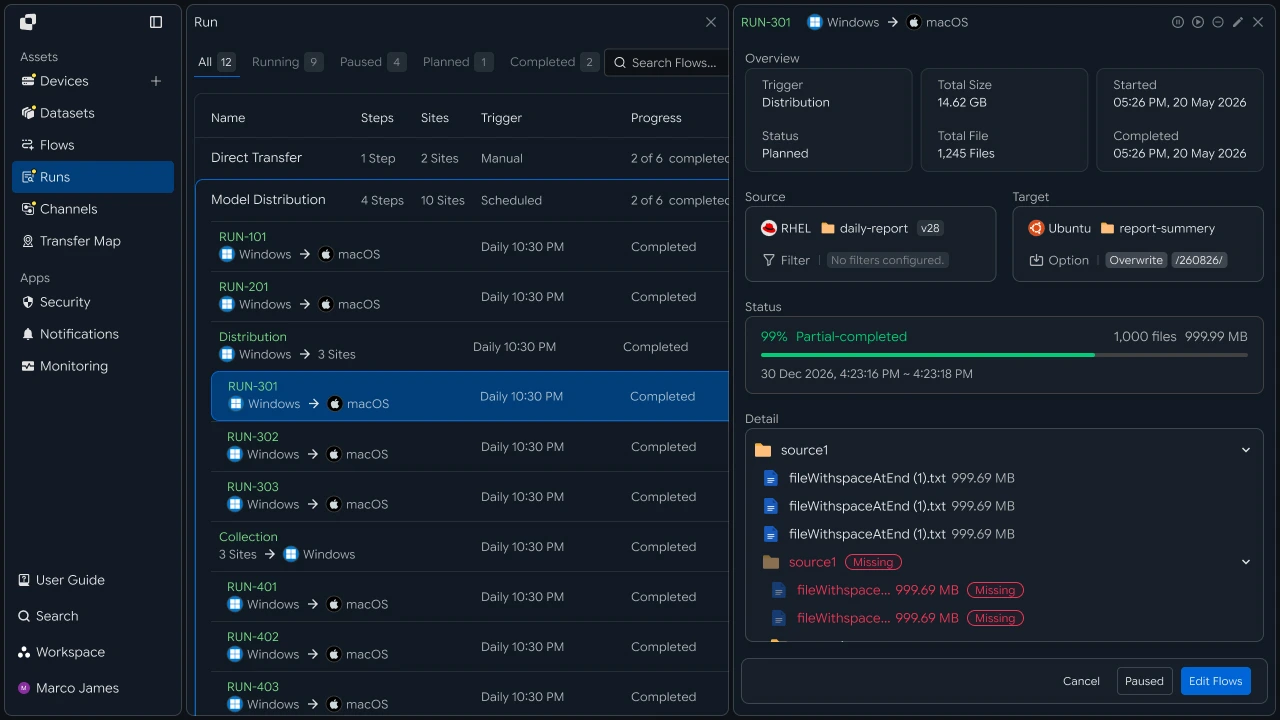
파일 전송이 실행되면 Runs에서 작업의 진행 상태와 처리 결과를 확인할 수 있습니다.
각 작업에서는 전송한 파일의 Source와 Target, 파일 수와 전송량, 진행률, 실행 시간, 현재 상태 등을 확인할 수 있습니다.
| 확인 항목 | 확인 내용 |
|---|---|
| Source | 파일을 선택한 장비와 경로 |
| Target | 파일을 전송할 장비와 작업 공간 |
| Files | 처리된 파일 수 |
| Size | 전체 전송량 |
| Progress | 전송 진행률 |
| Status | 현재 작업 상태 |
| Time | 실행 시간과 완료 시간 |
운영자는 실행 결과를 통해 장비 간 파일 전송 흐름과 처리 상태를 확인하고, 각 업무 환경에 파일이 반영된 결과를 관리할 수 있습니다.
개발자#
원격 장비의 파일 목록과 검색 결과를 API로 받아 장비 간 전송 실행하기
연동 준비#
공통 호출 코드와 상태 값 준비하기
import os
import requests

BASE_URL = os.getenv("INNORIX_BASE_URL", "https://app.innorix.com").rstrip("/")
TOKEN = os.environ["INNORIX_ACCESS_TOKEN"]
WORKSPACE_ID = os.getenv("INNORIX_WORKSPACE_ID")   # optional; falls back to the current workspace

STATUS_COMPLETE = 2
TERMINAL = {2, 4, 5, 9, 99}          # complete / error / cancelled / partial / failed
NOT_SUCCEEDED = {4, 5, 9, 99}


def api(method, path, body=None, params=None):
    headers = {
        "Content-Type": "application/json",
        "Authorization": f"Bearer {TOKEN}",
    }

    if WORKSPACE_ID:
        headers["x-workspace-id"] = WORKSPACE_ID

    response = requests.request(
        method, BASE_URL + path,
        headers=headers, json=body, params=params, timeout=30,
    )

    payload = response.json() if response.content else {}

    if not response.ok:
        raise RuntimeError(payload.get("message") or f"HTTP {response.status_code}")

    return payload.get("data")


def is_terminal(detail):
    return detail.get("isTerminal", detail.get("status") in TERMINAL)
// InnorixClient.java
public static final String BASE_URL =
env("INNORIX_BASE_URL", "https://app.innorix.com").replaceAll("/+quot;, "");
public static final String WORKSPACE_ID = env("INNORIX_WORKSPACE_ID", null);
public static final int STATUS_COMPLETE = 2;
// States the transfer no longer moves out of
public static final Set<Integer> TERMINAL = Set.of(2, 4, 5, 9, 99);
// Terminal states that are not a full success
public static final Set<Integer> NOT_SUCCEEDED = Set.of(4, 5, 9, 99);
private HttpRequest.Builder headers(HttpRequest.Builder builder) {
builder.header("Content-Type", "application/json")
.header("Authorization", "Bearer " + session.accessToken());
// When omitted the account's current workspace is used.
if (workspaceId != null) builder.header("x-workspace-id", workspaceId);
return builder;
}
/** Unwraps and returns data from the response. Throws ApiError on failure. */
public Object api(String method, String path, Object body, Map<String, Object> params) {
Resp response = request(method, path, body, params);
Object payload = null;
try {
payload = Json.parse(response.text());
} catch (RuntimeException ignored) {
payload = null;
}
if (!response.ok()) {
Map<String, Object> map = Json.asObj(payload);
String message = Json.str(map, "message", Json.str(map, "error", "unknown error"));
throw new ApiError(response.status, message, map);
}
return Json.get(payload, "data");
}
/** Use the server flag when present, otherwise fall back to the status code. */
public static boolean isTerminal(Map<String, Object> record) {
Boolean flag = Json.boolOrNull(record, "isTerminal");
if (flag != null) return flag;
Integer status = Json.intOrNull(record, "status");
return status != null && TERMINAL.contains(status);
}// innorix-client.js
const BASE_URL = (process.env.INNORIX_BASE_URL
|| "https://app.innorix.com").replace(/\/+$/, "");
const TOKEN = process.env.INNORIX_ACCESS_TOKEN;
const WORKSPACE_ID = process.env.INNORIX_WORKSPACE_ID || null;
export const STATUS_COMPLETE = 2;
export const TERMINAL = new Set([2, 4, 5, 9, 99]); // complete / error / cancelled / partial / failed
export const NOT_SUCCEEDED = new Set([4, 5, 9, 99]);
export async function api(method, path, body = null, params = null) {
const url = new URL(BASE_URL + path);
if (params) {
for (const [key, value] of Object.entries(params)) {
if (value === undefined || value === null) continue;
url.searchParams.set(key, String(value));
}
}
const headers = {
"Content-Type": "application/json",
Authorization: `Bearer ${TOKEN}`,
};
// When omitted the account's current workspace is used.
if (WORKSPACE_ID) headers["x-workspace-id"] = WORKSPACE_ID;
const response = await fetch(url, {
method,
headers,
body: body === null ? undefined : JSON.stringify(body),
signal: AbortSignal.timeout(30_000),
});
const payload = await response.json().catch(() => ({}));
if (!response.ok) {
throw new Error(payload.message || `HTTP ${response.status}`);
}
return payload.data;
}
export function isTerminal(detail) {
return detail.isTerminal !== undefined
? detail.isTerminal
: TERMINAL.has(detail.status);
}// InnorixClient.cs
public static readonly string BaseUrl =
Env("INNORIX_BASE_URL", "https://app.innorix.com").TrimEnd('/');
public static readonly string WorkspaceIdFromEnv = Env("INNORIX_WORKSPACE_ID", null);
public const int StatusComplete = 2;
/// <summary>States the transfer no longer moves out of</summary>
public static readonly HashSet<int> Terminal = new HashSet<int> { 2, 4, 5, 9, 99 };
/// <summary>Terminal states that are not a full success</summary>
public static readonly HashSet<int> NotSucceeded = new HashSet<int> { 4, 5, 9, 99 };
// Applied on every request
request.Headers.TryAddWithoutValidation("Authorization", "Bearer " + Session.AccessToken);
// When omitted the account's current workspace is used.
if (WorkspaceId != null) request.Headers.TryAddWithoutValidation("x-workspace-id", WorkspaceId);
public async Task<JsonNode> ApiAsync(string method, string path, JsonNode body = null,
IDictionary<string, object> parameters = null)
{
Resp response = await RequestAsync(method, path, body, parameters).ConfigureAwait(false);
JsonNode payload = null;
try
{
payload = J.Parse(response.Text());
}
catch (Exception)
{
payload = null;
}
if (!response.Ok)
{
JsonObject map = J.AsObj(payload);
string message = J.Str(map, "message", J.Str(map, "error", "unknown error"));
throw new ApiError(response.Status, message, map);
}
return J.Get(payload, "data");
}
/// <summary>Use the server flag when present, otherwise fall back to the status code.</summary>
public static bool IsTerminal(JsonObject record)
{
bool? flag = J.BoolOrNull(record, "isTerminal");
if (flag != null) return flag.Value;
int? status = J.IntOrNull(record, "status");
return status != null && Terminal.Contains(status.Value);
}전송 상태는 아래 값으로 판단합니다. 종료 상태는 다섯 개이고 성공에 해당하는 값은 완료(2)입니다.
| 상태 값 | 의미 | 종료 |
|---|---|---|
| 2 | 완료 | 예 |
| 4 | 오류 | 예 |
| 5 | 취소 | 예 |
| 9 | 부분 완료 | 예 |
| 99 | 실패 | 예 |
| 1, 6, 12, 13 | 시작, 전송 중, 동기화 중, 수신 중 | 아니오 |
폴더 조회#
장비별 파일 목록을 받아 화면에 표시하기
장비 식별자와 경로를 지정해 해당 폴더의 파일과 하위 폴더를 조회합니다. --device에 넣는 값은 경로 파라미터로 들어가므로 장비 ID여야 합니다.
result = api("GET", f"/api/devices/{device_id}/files", params={
    "path": "/data/reports",
    "page": 1,
    "size": 50,
    "sort": "name:asc",
    "type": "all",
})

for item in result["items"]:
    kind = "DIR " if item["isDir"] else "FILE"
print(kind, item["name"], item["size"], item.get("modifiedAt"))Map<String, Object> params = Json.newObj(
"path", "/data/reports",
"page", 1,
"size", 50,
"sort", "name:asc",
"type", "all");
Map<String, Object> result = client.apiObj("GET", "/api/devices/" + deviceId + "/files", null, params);
for (Object item : Json.arrOf(result, "items")) {
Map<String, Object> file = Json.asObj(item);
String kind = Json.bool(file, "isDir", false) ? "DIR " : "FILE";
System.out.println(kind + " " + Json.str(file, "name") + " " + Json.str(file, "size"));
}const result = await client.api("GET", `/api/devices/${deviceId}/files`, null, {
path: "/data/reports",
page: 1,
size: 50,
sort: "name:asc",
type: "all",
});
for (const item of result.items) {
const kind = item.isDir ? "DIR " : "FILE";
console.log(kind, item.name, item.size, item.modifiedAt);
}var parameters = new Dictionary<string, object>
{
["path"] = "/data/reports",
["page"] = 1,
["size"] = 50,
["sort"] = "name:asc",
["type"] = "all",
};
JsonObject result = await client.ApiObjAsync(
"GET", "/api/devices/" + deviceId + "/files", null, parameters);
foreach (JsonNode item in J.ArrOf(result, "items"))
{
JsonObject file = J.AsObj(item);
string kind = J.Bool(file, "isDir", false) ? "DIR " : "FILE";
Console.WriteLine(quot;{kind} {J.Str(file, "name")} {J.Str(file, "size")}");
}| 응답 항목 | 내용 |
|---|---|
items |
파일과 폴더 목록 |
total, lastPage |
전체 개수와 마지막 페이지 |
truncated |
항목 수가 상한을 넘어 일부만 반환됐는지 여부 |
isDir |
폴더 여부 |
장비 ID는 목록 조회로 확인합니다.
result = api("GET", "/api/devices", params={"page": 1, "size": 200})

for device in result["devices"]:
    print(device["deviceId"], device["name"], device.get("os"),
device.get("ipAddress"))Map<String, Object> result = client.apiObj("GET", "/api/devices", null,
Json.newObj("page", 1, "size", 200));
for (Object item : Json.arrOf(result, "devices")) {
Map<String, Object> device = Json.asObj(item);
System.out.println(Json.str(device, "deviceId") + " " + Json.str(device, "name")
+ " " + Json.str(device, "os") + " " + Json.str(device, "ipAddress"));
}const result = await client.api("GET", "/api/devices", null, { page: 1, size: 200 });
for (const device of result.devices) {
console.log(device.deviceId, device.name, device.os, device.ipAddress);
}JsonObject result = await client.ApiObjAsync("GET", "/api/devices", null,
new Dictionary<string, object> { ["page"] = 1, ["size"] = 200 });
foreach (JsonNode item in J.ArrOf(result, "devices"))
{
JsonObject device = J.AsObj(item);
Console.WriteLine(quot;{J.Str(device, "deviceId")} {J.Str(device, "name")} "
+ quot;{J.Str(device, "os")} {J.Str(device, "ipAddress")}");
}장비 목록은 data.devices 배열로 반환됩니다.
파일 검색#
하위 폴더까지 재귀 탐색해 파일 찾기
폴더 조회는 해당 폴더만 보여줍니다. 하위 폴더까지 찾으려면 검색을 시작하고 결과를 커서로 이어 받습니다.
RESTART_CODES = {"INVALID_CURSOR", "CURSOR_OUT_OF_SEQUENCE", "SEARCH_EXPIRED"}


def start_search(device_id, path, page_size=500):
    return api("POST", f"/api/devices/{device_id}/files/search",
               {"path": path, "pageSize": page_size})


def iter_search(device_id, path, max_pages=200):
    page = start_search(device_id, path)
    search_id = page.get("searchId")

    for _ in range(max_pages):
        for item in page.get("items") or []:
            yield search_id, item

        if not page.get("hasMore"):
            return

        try:
            page = api("GET", f"/api/devices/{device_id}/files/search",
                       params={"cursor": page["nextCursor"]})
        except RuntimeError:
            # restart the scan when the cursor expires or falls out of sequence
            page = start_search(device_id, path)
            search_id = page.get("searchId")
static final Set<String> RESTART_CODES =
Set.of("INVALID_CURSOR", "CURSOR_OUT_OF_SEQUENCE", "SEARCH_EXPIRED");
Map<String, Object> startSearch(String deviceId, String path, int pageSize) {
return client.apiObj("POST", "/api/devices/" + deviceId + "/files/search",
Json.newObj("path", path, "pageSize", pageSize));
}
List<Map<String, Object>> search(String deviceId, String path, int maxPages) {
List<Map<String, Object>> found = new ArrayList<>();
Map<String, Object> page = startSearch(deviceId, path, 500);
for (int i = 0; i < maxPages; i++) {
for (Object item : Json.arrOf(page, "items")) found.add(Json.asObj(item));
if (!Json.bool(page, "hasMore", false)) return found;
try {
page = client.apiObj("GET", "/api/devices/" + deviceId + "/files/search",
null, Json.newObj("cursor", Json.str(page, "nextCursor")));
} catch (InnorixClient.ApiError error) {
// Restart the scan when the cursor expires or falls out of sequence.
if (!RESTART_CODES.contains(Json.str(error.payload(), "error"))) throw error;
page = startSearch(deviceId, path, 500);
}
}
return found;
}const RESTART_CODES = new Set([
"INVALID_CURSOR", "CURSOR_OUT_OF_SEQUENCE", "SEARCH_EXPIRED",
]);
async function startSearch(deviceId, path, pageSize = 500) {
return client.api("POST", `/api/devices/${deviceId}/files/search`,
{ path, pageSize });
}
async function* iterSearch(deviceId, path, maxPages = 200) {
let page = await startSearch(deviceId, path);
let searchId = page.searchId;
for (let i = 0; i < maxPages; i += 1) {
for (const item of page.items || []) yield [searchId, item];
if (!page.hasMore) return;
try {
page = await client.api("GET", `/api/devices/${deviceId}/files/search`,
null, { cursor: page.nextCursor });
} catch (error) {
// Restart the scan when the cursor expires or falls out of sequence.
if (!RESTART_CODES.has(error.payload?.error)) throw error;
page = await startSearch(deviceId, path);
searchId = page.searchId;
}
}
}static readonly HashSet<string> RestartCodes = new HashSet<string>
{
"INVALID_CURSOR", "CURSOR_OUT_OF_SEQUENCE", "SEARCH_EXPIRED",
};
async Task<JsonObject> StartSearchAsync(string deviceId, string path, int pageSize = 500)
{
return await client.ApiObjAsync("POST", quot;/api/devices/{deviceId}/files/search",
new JsonObject { ["path"] = path, ["pageSize"] = pageSize });
}
async Task<List<JsonObject>> SearchAsync(string deviceId, string path, int maxPages = 200)
{
var found = new List<JsonObject>();
JsonObject page = await StartSearchAsync(deviceId, path);
for (int i = 0; i < maxPages; i++)
{
foreach (JsonNode item in J.ArrOf(page, "items")) found.Add(J.AsObj(item));
if (!J.Bool(page, "hasMore", false)) return found;
try
{
page = await client.ApiObjAsync("GET", quot;/api/devices/{deviceId}/files/search",
null, new Dictionary<string, object> { ["cursor"] = J.Str(page, "nextCursor") });
}
catch (InnorixClient.ApiError error)
{
// Restart the scan when the cursor expires or falls out of sequence.
if (!RestartCodes.Contains(J.Str(error.Payload, "error"))) throw;
page = await StartSearchAsync(deviceId, path);
}
}
return found;
}검색 요청은 기준 경로와 페이지 크기만 받습니다. 이름과 확장자 조건은 받은 결과에서 판단하므로, 기준 경로를 좁게 잡을수록 검색 범위가 줄어듭니다.
| 응답 항목 | 내용 |
|---|---|
searchId |
검색 중단 요청에 넘기는 검색 식별자 |
items[].type |
file 또는 directory |
hasMore, nextCursor |
다음 페이지 존재 여부와 조회에 사용할 커서 |
검색 중단#
진행 중인 검색 멈추기
검색은 장비가 디스크를 실제로 탐색하는 작업입니다. 사용자가 화면을 벗어나면 중단해 장비 부하가 쌓이지 않게 합니다.
def cancel_search(device_id, search_id):
    api("POST", f"/api/devices/{device_id}/files/search/cancel",
        {"uuid": search_id})       # pass the searchId returned when the search started


search_id = None

try:
    for search_id, item in iter_search(device_id, "/data"):
        if item["type"] == "file" and item["name"].endswith(".csv"):
            print(item["path"], item["size"])
finally:
    if search_id:
        cancel_search(device_id, search_id)
void cancelSearch(String deviceId, String searchId) {
// pass the searchId returned when the search started
client.api("POST", "/api/devices/" + deviceId + "/files/search/cancel",
Json.newObj("uuid", searchId));
}
String searchId = null;
try {
Map<String, Object> page = startSearch(deviceId, "/data", 500);
searchId = Json.str(page, "searchId");
// ... walk the results
} finally {
if (searchId != null) cancelSearch(deviceId, searchId);
}async function cancelSearch(deviceId, searchId) {
// pass the searchId returned when the search started
await client.api("POST", `/api/devices/${deviceId}/files/search/cancel`,
{ uuid: searchId });
}
let searchId = null;
try {
for await (const [id, item] of iterSearch(deviceId, "/data")) {
searchId = id;
if (item.type === "file" && item.name.endsWith(".csv")) {
console.log(item.path, item.size);
}
}
} finally {
if (searchId) await cancelSearch(deviceId, searchId);
}async Task CancelSearchAsync(string deviceId, string searchId)
{
// pass the searchId returned when the search started
await client.ApiAsync("POST", quot;/api/devices/{deviceId}/files/search/cancel",
new JsonObject { ["uuid"] = searchId });
}
string searchId = null;
try
{
JsonObject page = await StartSearchAsync(deviceId, "/data");
searchId = J.Str(page, "searchId");
// ... walk the results
}
finally
{
if (searchId != null) await CancelSearchAsync(deviceId, searchId);
}새 검색을 시작할 때와 화면을 닫을 때 모두 같은 정리 코드를 실행합니다.
파일 전송#
선택한 파일을 다른 장비로 보내기
즉시 전송은 장비를 이름, IP, 식별자 중 어느 것으로도 지정할 수 있고, 경로는 평문 문자열로 넘깁니다. 탐색 API가 장비 ID만 받는 것과 다릅니다.
파일 목록을 보낼 때는 sourcePaths가 아니라 sourceItem에 isDir: false로 명시합니다. sourcePaths는 모든 경로를 폴더로 취급하므로, 파일을 넣으면 서버가 각 파일을 폴더로 스캔하려 해 느려지거나 시간이 초과됩니다.
def send_files(source, target, target_path, paths, action="numbering"):
    transfer = api("POST", "/api/transfers/manual", {
        "sourceDevice": source,
        "targetDevice": target,
        "targetPath": target_path,
        "sourceItem": [{"path": p, "isDir": False} for p in paths],
        "sendAllFolder": False,
        "transferOptions": {"target-action": action},
    })

    return transfer["monitorId"]


monitor_id = send_files("device-a", "device-b", "/data/collected",
                        ["/data/reports/2026-08.csv"])
String sendFiles(String source, String target, String targetPath,
List<String> paths, String action) {
List<Object> items = new ArrayList<>();
for (String path : paths) items.add(Json.newObj("path", path, "isDir", false));
Map<String, Object> transfer = client.apiObj("POST", "/api/transfers/manual", Json.newObj(
"sourceDevice", source,
"targetDevice", target,
"targetPath", targetPath,
"sourceItem", items,
"sendAllFolder", false,
"transferOptions", Json.newObj("target-action", action)));
return Json.str(transfer, "monitorId");
}
String monitorId = sendFiles("device-a", "device-b", "/data/collected",
List.of("/data/reports/2026-08.csv"), "numbering");async function sendFiles(source, target, targetPath, paths, action = "numbering") {
const transfer = await client.api("POST", "/api/transfers/manual", {
sourceDevice: source,
targetDevice: target,
targetPath,
sourceItem: paths.map((path) => ({ path, isDir: false })),
sendAllFolder: false,
transferOptions: { "target-action": action },
});
return transfer.monitorId;
}
const monitorId = await sendFiles("device-a", "device-b", "/data/collected",
["/data/reports/2026-08.csv"]);async Task<string> SendFilesAsync(string source, string target, string targetPath,
IEnumerable<string> paths, string action = "numbering")
{
var items = new JsonArray();
foreach (string path in paths)
items.Add(new JsonObject { ["path"] = path, ["isDir"] = false });
JsonObject transfer = await client.ApiObjAsync("POST", "/api/transfers/manual",
new JsonObject
{
["sourceDevice"] = source,
["targetDevice"] = target,
["targetPath"] = targetPath,
["sourceItem"] = items,
["sendAllFolder"] = false,
["transferOptions"] = new JsonObject { ["target-action"] = action },
});
return J.Str(transfer, "monitorId");
}
string monitorId = await SendFilesAsync("device-a", "device-b", "/data/collected",
new[] { "/data/reports/2026-08.csv" });폴더 단위로 보낼 때는 sourcePaths와 sendAllFolder: True를 씁니다.
api("POST", "/api/transfers/manual", {
    "sourceDevice": "device-a",
    "targetDevice": "device-b",
    "targetPath": "/data/collected",
    "sourcePaths": ["/data/reports"],
    "sendAllFolder": True,
    "transferOptions": {"target-action": "numbering"},
})client.api("POST", "/api/transfers/manual", Json.newObj(
"sourceDevice", "device-a",
"targetDevice", "device-b",
"targetPath", "/data/collected",
"sourcePaths", List.of("/data/reports"),
"sendAllFolder", true,
"transferOptions", Json.newObj("target-action", "numbering")));await client.api("POST", "/api/transfers/manual", {
sourceDevice: "device-a",
targetDevice: "device-b",
targetPath: "/data/collected",
sourcePaths: ["/data/reports"],
sendAllFolder: true,
transferOptions: { "target-action": "numbering" },
});await client.ApiAsync("POST", "/api/transfers/manual", new JsonObject
{
["sourceDevice"] = "device-a",
["targetDevice"] = "device-b",
["targetPath"] = "/data/collected",
["sourcePaths"] = new JsonArray { "/data/reports" },
["sendAllFolder"] = true,
["transferOptions"] = new JsonObject { ["target-action"] = "numbering" },
});파일 크기를 이미 알고 있다면 fileSize를 함께 넘겨 서버의 항목별 조회를 건너뛸 수 있습니다.
"sourceItem": [
  { "path": "/data/a.csv", "isDir": false, "fileSize": 1200 }
]
결과 확인#
전송 상태와 파일별 처리 결과 확인하기
import time


def wait(monitor_id, timeout=1800, interval=3):
    deadline = time.time() + timeout

    while time.time() < deadline:
        detail = api("GET", f"/api/transfers/{monitor_id}")

        if is_terminal(detail):
            return detail

        time.sleep(interval)

    raise TimeoutError(monitor_id)


detail = wait(monitor_id)
succeeded = detail["status"] == STATUS_COMPLETEMap<String, Object> wait(String monitorId, int timeoutSeconds, int intervalSeconds) {
long deadline = System.currentTimeMillis() + timeoutSeconds * 1000L;
while (System.currentTimeMillis() < deadline) {
Map<String, Object> detail = client.apiObj("GET", "/api/transfers/" + monitorId);
if (InnorixClient.isTerminal(detail)) return detail;
Thread.sleep(intervalSeconds * 1000L);
}
throw new InnorixClient.ApiError(0, "timeout waiting for " + monitorId);
}
Map<String, Object> detail = wait(monitorId, 1800, 3);
boolean succeeded = Json.intOrNull(detail, "status") != null
&& Json.intOrNull(detail, "status") == InnorixClient.STATUS_COMPLETE;const sleep = (ms) => new Promise((resolve) => setTimeout(resolve, ms));
async function wait(monitorId, { timeout = 1800, interval = 3 } = {}) {
const deadline = Date.now() + timeout * 1000;
while (Date.now() < deadline) {
const detail = await client.api("GET", `/api/transfers/${monitorId}`);
if (isTerminal(detail)) return detail;
await sleep(interval * 1000);
}
throw new Error(`timeout waiting for ${monitorId}`);
}
const detail = await wait(monitorId);
const succeeded = detail.status === STATUS_COMPLETE;async Task<JsonObject> WaitAsync(string monitorId, int timeoutSeconds = 1800,
int intervalSeconds = 3)
{
long deadline = Environment.TickCount64 + timeoutSeconds * 1000L;
while (Environment.TickCount64 < deadline)
{
JsonObject detail = await client.ApiObjAsync("GET", "/api/transfers/" + monitorId);
if (InnorixClient.IsTerminal(detail)) return detail;
await Task.Delay(intervalSeconds * 1000);
}
throw new InnorixClient.ApiError(0, "timeout waiting for " + monitorId);
}
JsonObject detail = await WaitAsync(monitorId);
bool succeeded = J.IntOrNull(detail, "status") == InnorixClient.StatusComplete;전체 실패와 일부 실패는 화면에서 다르게 보여야 합니다. 파일 조회로 파일별 상태를 확인하고, 실패한 파일만 재전송합니다.
def failed_files(monitor_id):
    result = api("GET", f"/api/transfers/{monitor_id}/files", params={
        "state": "any", "size": 500,
    }) or {}

    return [r for r in (result.get("children") or [])
            if r.get("status") in NOT_SUCCEEDED]


def retry_failed(monitor_id):
    rows = failed_files(monitor_id)

    if not rows:
        return 0

    api("POST", f"/api/transfers/{monitor_id}/retry", {
        "filesRetry": [
            {"filePath": r["sourceFilePath"], "isDir": bool(r.get("isFolder"))}
            for r in rows
        ]
    })

return len(rows)List<Map<String, Object>> failedFiles(String monitorId) {
Map<String, Object> result = client.apiObj("GET",
"/api/transfers/" + monitorId + "/files", null,
Json.newObj("state", "any", "size", 500));
List<Map<String, Object>> failed = new ArrayList<>();
for (Object item : Json.arrOf(result, "children")) {
Map<String, Object> row = Json.asObj(item);
Integer status = Json.intOrNull(row, "status");
if (status != null && InnorixClient.NOT_SUCCEEDED.contains(status)) failed.add(row);
}
return failed;
}
int retryFailed(String monitorId) {
List<Map<String, Object>> rows = failedFiles(monitorId);
if (rows.isEmpty()) return 0;
List<Object> filesRetry = new ArrayList<>();
for (Map<String, Object> row : rows) {
filesRetry.add(Json.newObj(
"filePath", Json.str(row, "sourceFilePath"),
"isDir", Json.bool(row, "isFolder", false)));
}
client.api("POST", "/api/transfers/" + monitorId + "/retry",
Json.newObj("filesRetry", filesRetry));
return rows.size();
}async function failedFiles(monitorId) {
const result = (await client.api("GET", `/api/transfers/${monitorId}/files`,
null, { state: "any", size: 500 })) || {};
return (result.children || []).filter((row) => NOT_SUCCEEDED.has(row.status));
}
async function retryFailed(monitorId) {
const rows = await failedFiles(monitorId);
if (rows.length === 0) return 0;
await client.api("POST", `/api/transfers/${monitorId}/retry`, {
filesRetry: rows.map((row) => ({
filePath: row.sourceFilePath,
isDir: Boolean(row.isFolder),
})),
});
return rows.length;
}async Task<List<JsonObject>> FailedFilesAsync(string monitorId)
{
JsonObject result = await client.ApiObjAsync("GET",
quot;/api/transfers/{monitorId}/files", null,
new Dictionary<string, object> { ["state"] = "any", ["size"] = 500 });
return J.ArrOf(result, "children")
.Select(J.AsObj)
.Where(row =>
{
int? status = J.IntOrNull(row, "status");
return status != null && InnorixClient.NotSucceeded.Contains(status.Value);
})
.ToList();
}
async Task<int> RetryFailedAsync(string monitorId)
{
List<JsonObject> rows = await FailedFilesAsync(monitorId);
if (rows.Count == 0) return 0;
var filesRetry = new JsonArray();
foreach (JsonObject row in rows)
{
filesRetry.Add(new JsonObject
{
["filePath"] = J.Str(row, "sourceFilePath"),
["isDir"] = J.Bool(row, "isFolder", false),
});
}
await client.ApiAsync("POST", quot;/api/transfers/{monitorId}/retry",
new JsonObject { ["filesRetry"] = filesRetry });
return rows.Count;
}재전송은 전송이 종료된 뒤에만 호출할 수 있습니다. 진행 중이면 거부되므로 상태를 먼저 확인합니다.
| 확인 항목 | 확인 내용 |
|---|---|
status |
전송 상태 값 |
statusLabel |
화면에 표시할 상태 문자열 |
percent |
진행률 |
fileCount, totalSize |
처리 파일 수와 전체 용량 |
children[].errorCode |
파일별 실패 원인 |