
Integrate Twilio Notifications
Overview
You can integrate Twilio notifications to receive file transfer events via SMS.
Once the integration is complete, an SMS message is automatically sent to the specified phone number whenever selected events occur, such as Started, Completed, or Failed.
The setup consists of two steps:
① Obtain your Twilio credentials and sender phone number → ② Configure notification settings in the product
Prerequisites
Before you begin, verify the following requirements.
| Item | Description |
|---|---|
| Twilio Account | A Twilio account with SMS capability is required. A paid account is recommended for production because Trial accounts have sending limitations. |
| Twilio Phone Number | A Twilio phone number that supports SMS messaging is required. |
| Recipient Phone Number | Prepare the recipient phone number in E.164 format (including the country code). |
| Network | The environment where the product is installed must allow outbound HTTPS (443) access to api.twilio.com. |
Verify Twilio Credentials and Sender Phone Number
To receive SMS notifications through Twilio, obtain your account credentials and sender phone number from the Twilio Console.
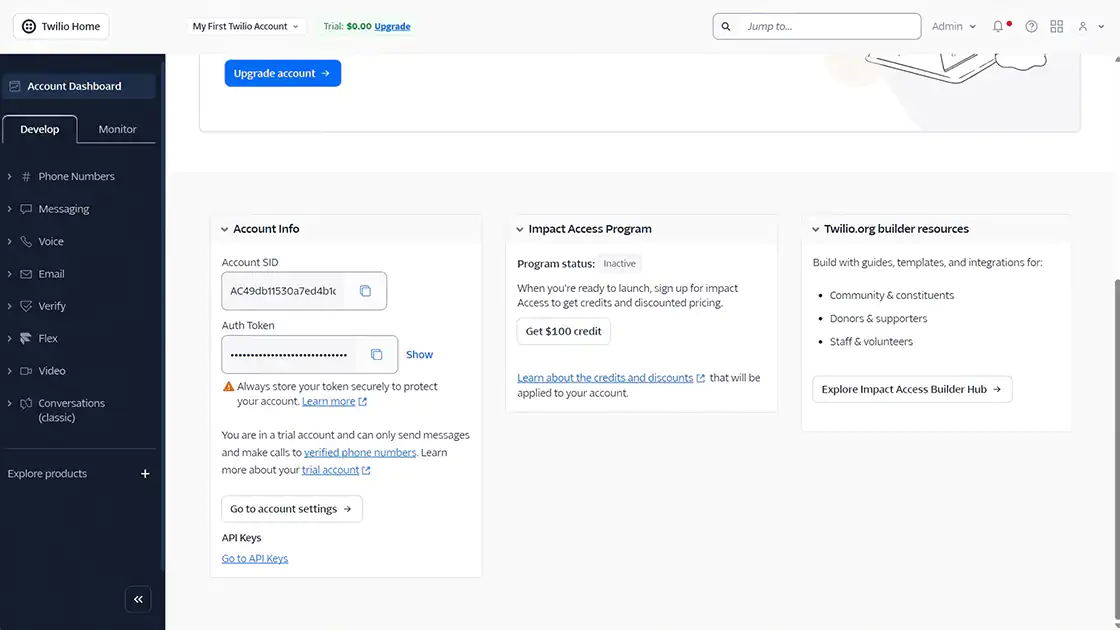
Step 1. Locate the Account SID and Auth Token
Sign in to the Twilio Console:
On the Account Info page, locate your Account SID (starting with AC) and Auth Token.
The Auth Token is a sensitive credential. Anyone with this token can send SMS messages or place calls using your account, which may incur charges. Do not expose it in public repositories or external documents.
If necessary, you can rotate the Auth Token from the Twilio Console.
Step 2. Verify Your Twilio Phone Number
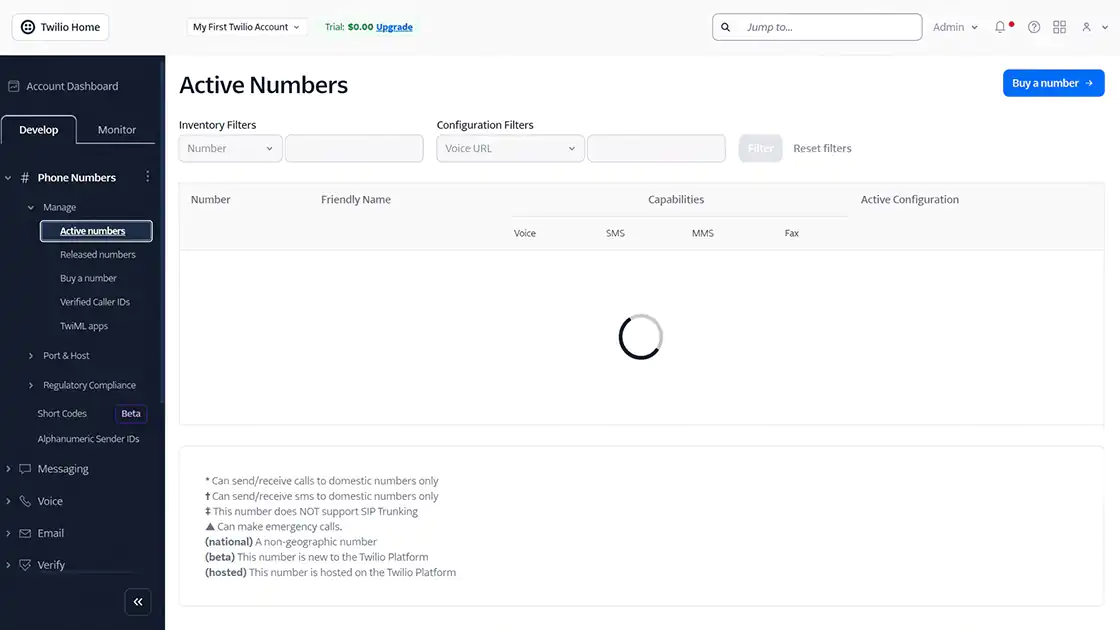
In the Twilio Console, open Phone Numbers → Manage → Active Numbers and verify that you have a Twilio phone number capable of sending SMS messages.
If you do not have one, purchase a new number.
Some numbers support voice only or are limited to specific countries. Confirm that the selected number supports SMS messaging.
Use the phone number in E.164 format.
Step 3. Verify the Recipient Number and Messaging Requirements
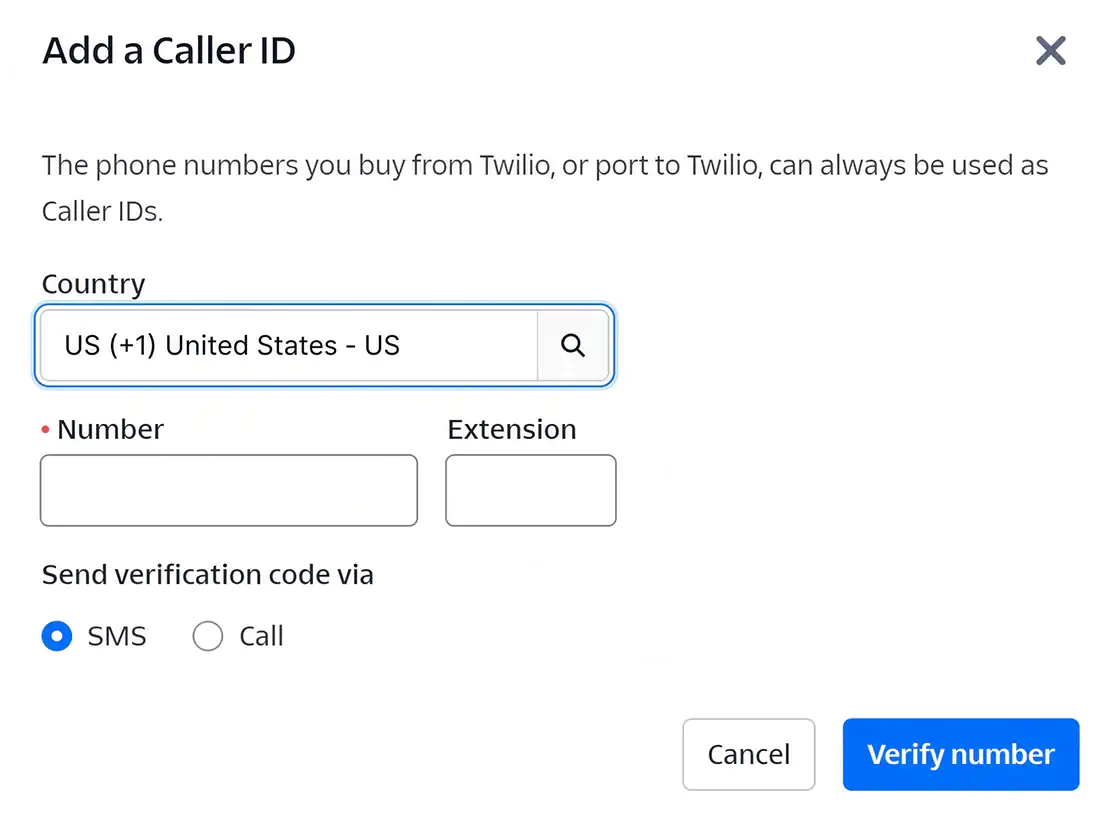
Prepare the recipient phone number in E.164 format.
With a Twilio Trial account, SMS messages can only be sent to numbers listed under Verified Caller IDs. Verify the recipient number or upgrade to a paid account.
Also verify that the destination country is enabled under Messaging → Settings → Geo Permissions.
By default, only the account's registered country is enabled. Enable additional countries if you need to send SMS messages internationally.
Verification
- ✔ The Account SID and Auth Token have been verified.
- ✔ An SMS-enabled Twilio phone number has been verified.
- ✔ The recipient phone number satisfies the messaging requirements (verified number and country permissions).
Configure Twilio Notifications
Enter the verified credentials and phone numbers into the product notification settings.
Open the Notifications settings page.
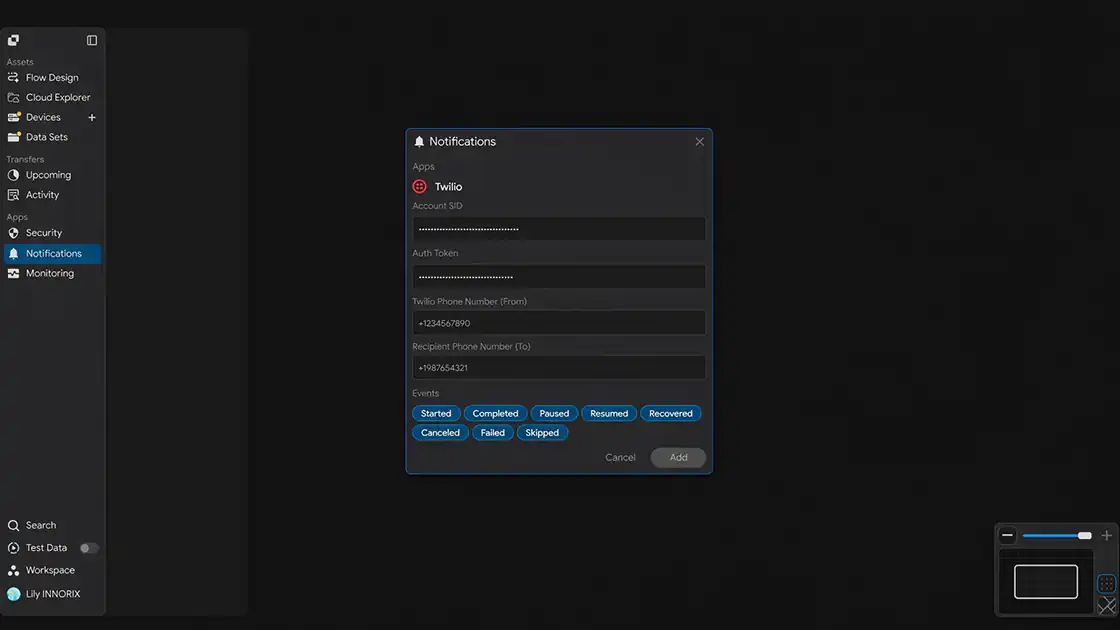
Step 1. Enter the Account SID
In the Account SID field, enter the Account SID identified in the "Verify Twilio Credentials and Sender Phone Number" section (beginning with AC).
Step 2. Enter the Auth Token
In the Auth Token field, enter the Auth Token identified in the "Verify Twilio Credentials and Sender Phone Number" section.
Step 3. Enter the Twilio Phone Number (From)
In the Twilio Phone Number (From) field, enter the sender phone number in E.164 format.
Example:
Step 4. Enter the Recipient Phone Number (To)
In the Recipient Phone Number (To) field, enter the recipient phone number in E.164 format.
Example:
Step 5. Select Notification Events
Select the events that should trigger SMS notifications.
You can select multiple events. SMS messages are sent only when one of the selected events occurs.
| Event | Trigger |
|---|---|
| Started | When a file transfer starts |
| Completed | When a file transfer completes successfully |
| Paused | When a transfer is paused |
| Resumed | When a paused transfer resumes |
| Recovered | When a transfer automatically recovers after an interruption or error |
| Canceled | When a transfer is canceled by the user |
| Failed | When a transfer fails |
| Skipped | When a file is skipped (for example, because it already exists or matches a filter rule) |
Because Twilio charges for each SMS message sent, it is recommended to enable only the events that are necessary.
Step 6. Save the Configuration
Click Add to save the integration.
Verification
- ✔ The Account SID and Auth Token have been entered.
- ✔ The sender and recipient phone numbers have been entered.
- ✔ The notification events have been selected.
Verify the Integration
Verify that the integration is working correctly.
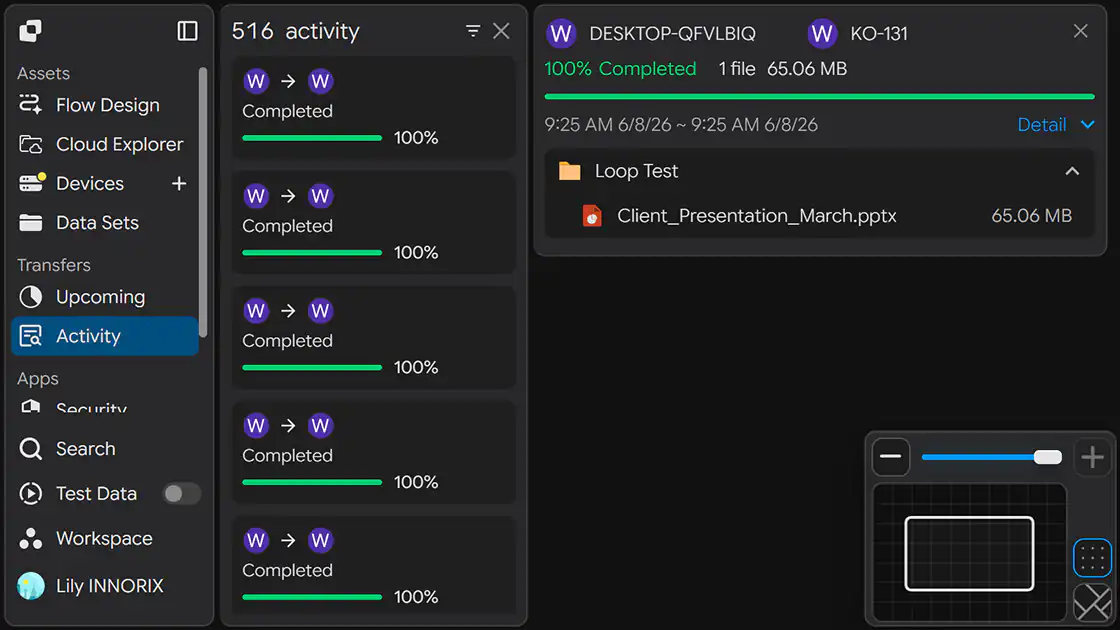
Step 1. Trigger a Test Event
Start an actual file transfer or trigger one of the selected notification events.
Step 2. Check the Recipient Phone
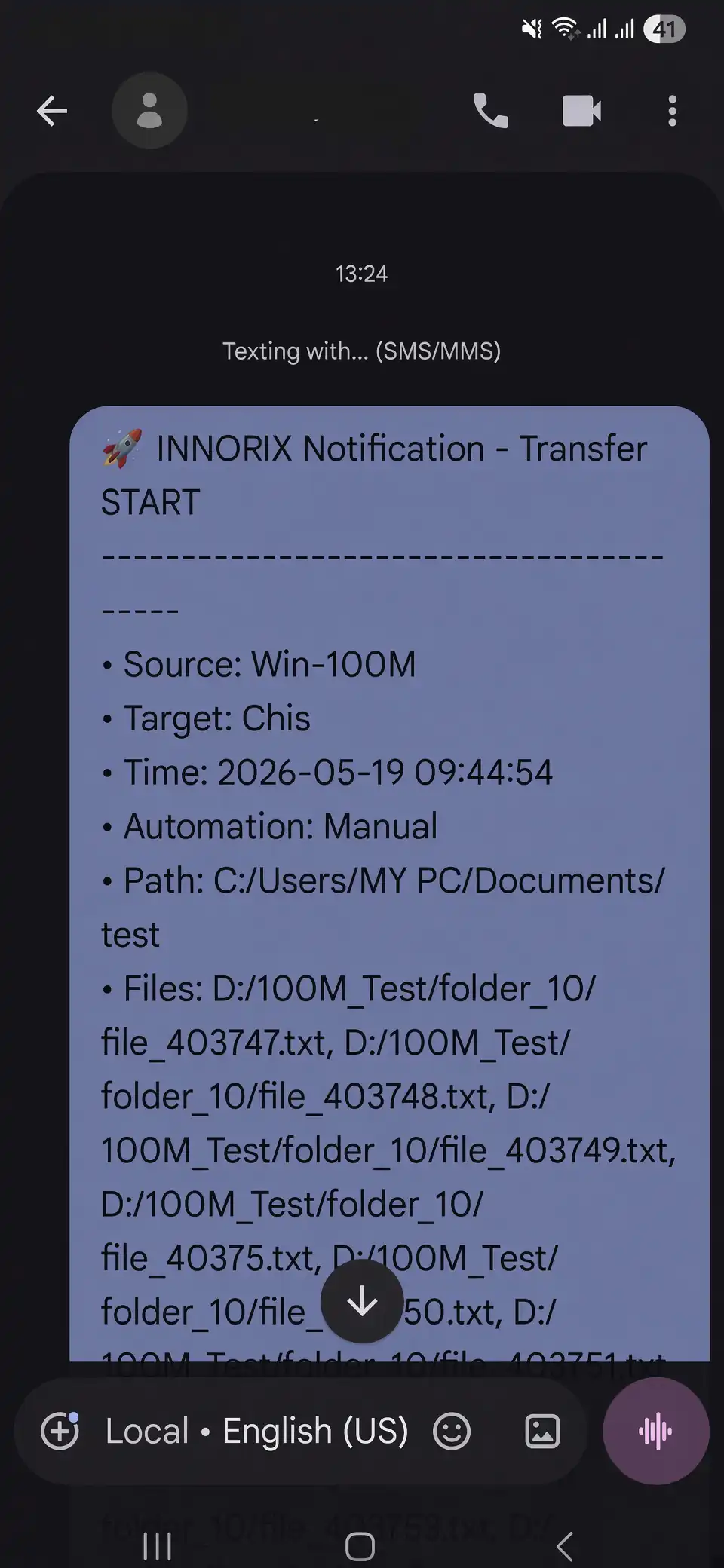
Confirm that an SMS notification has been received on the configured phone number.
Verification
- ✔ An SMS notification has been received.
- ✔ The event information has been delivered correctly.
Configuration Complete
Once the configuration is saved, the integration becomes active.
From this point forward, an SMS notification is automatically sent to the configured recipient whenever one of the selected events occurs.
Troubleshooting
If SMS notifications are not received, verify the following items.
| Issue | Check |
|---|---|
| SMS message is not received | Verify that the Account SID, Auth Token, sender phone number, and recipient phone number are entered correctly, and that the phone numbers use E.164 format (including + and the country code). |
| Authentication error | Verify that the Account SID and Auth Token are correct and that the Auth Token has not been rotated. |
| SMS cannot be sent from a Trial account | Verify that the recipient phone number has been added to Verified Caller IDs, or upgrade to a paid account. |
| SMS cannot be sent to a specific country | Verify that the destination country is enabled under Messaging → Settings → Geo Permissions. Some countries may require additional registration. |
| Sender phone number error | Verify that the selected Twilio phone number supports SMS messaging. |
| Notification delivery fails in a restricted network | Ensure that outbound HTTPS (443) access to api.twilio.com is allowed through the firewall or proxy. |