Getting Started
Basic Concept
Source code and configuration files are well suited for Git, but managing large build artifacts, binaries, and video files in the same way can increase repository size and affect operations such as Clone and Pull.
For example, installation files, container images, model files, or media outputs generated in a development environment may need to be delivered to multiple servers and test environments.
Instead of managing these files in Git together with source code, responsibilities can be separated so that Git manages code changes while large files are delivered through a separate file transfer flow.
Developer
    │
    ├── Source Code ──────────────▶ Git Repository
    │
    └── Build Artifacts
            │
            ▼
        Transfer Flow
            │
     ┌──────┼────────┐
     ▼      ▼        ▼
   Test   Server   Storage
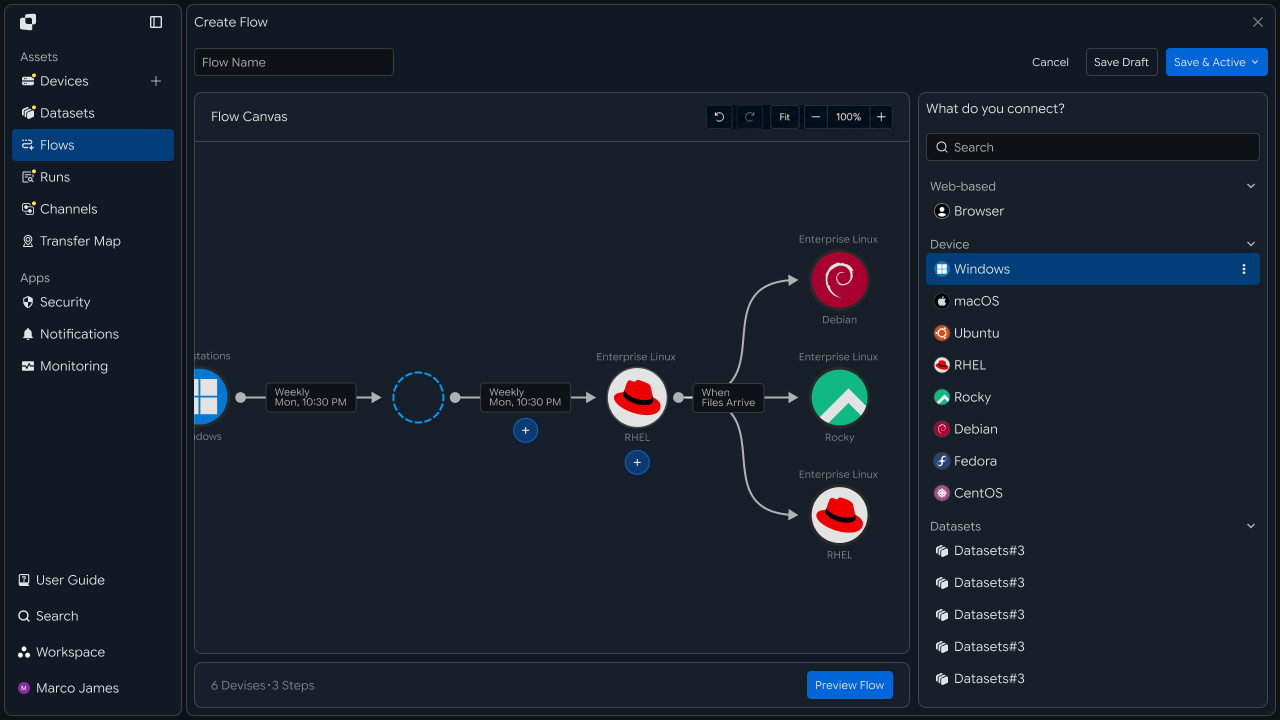
This separates code changes from large-file delivery while creating a separate automated flow covering build artifact creation → file detection → transfer to target environment → result verification.
File Classification
Files for automatic delivery can focus on large artifacts not managed by Git rather than all project files.
For example, source code from a build job can be managed in a Git Repository while only result files generated after the build completes are selected for transfer.
project/
│
├── src/
│   └── application source
│
├── config/
│   └── application settings
│
└── build/
    ├── application.zip
    ├── application.bin
    └── media/
        ├── video.mp4
        └── assets.tar
| File Type | Management or Delivery Method |
|---|---|
| Source code | Manage change history with Git |
| Configuration files | Manage with Git or environment-specific configuration |
| Build artifacts | Deliver to a specified server or storage |
| Binaries | Automatically transfer to deployment environments |
| Large media | Deliver to separate storage or processing environments |
| Temporary files | Exclude from transfer |
Separating management methods by file type keeps files that require actual change management in the Git Repository while delivering large files to required environments through separate transfer paths.
Delivery Flow
Build artifacts can be delivered as soon as they are generated or transferred to the next stage after build and validation operations complete.
For example, after a build completes in a CI environment, result files can be delivered to a test server and then, after validation completes, to a production deployment environment or separate storage.
Code Change
    │
    ▼
Build
    │
    ▼
Artifacts Ready
    │
    ├── Build Failed ──▶ Review
    │
    ▼
Transfer
    │
    ▼
Test Environment
    │
    ▼
Validation
    │
    ├── Approved ─────▶ Next Distribution
    │
    └── Check Needed ─▶ Review Result
Here, file transfer can be configured not simply as copying a specific folder, but as a process that connects required artifacts to the next environment based on the previous operation's result and file readiness.
IT Engineer
Source Connection
First, connect the system where build artifacts or binary files are generated as the Source.
The Source can be a development server, build server, CI environment, or storage where large files are prepared.
By specifying where files to transfer are generated, you can configure the scope of files for automatic delivery based on that path.
Build Server
     │
     ▼
/var/build/output/
     │
     ├── app-v2.4.0.zip
     ├── installer.exe
     └── media-package.tar
              │
              ▼
         Transfer Source
The following items can be defined in the Source configuration.
| Configuration Item | Setting |
|---|---|
| Connected system | Build or file-generation environment |
| Source Path | File path where artifacts are generated |
| File conditions | Select by extension and name |
| Exclusion conditions | Exclude temporary files and unnecessary results |
| File readiness | Criteria for starting transfer after generation completes |
For example, you can transfer only .zip, .tar, and .bin files from the build/output path while excluding temporary files generated during the build.
Execution Conditions
Large result files can be configured for transfer after the build job actually completes rather than immediately when the file is created.
For example, a transfer can run after a build-completion event, or the next file transfer operation can run based on a successful CI job result.
Build Started
      │
      ▼
Building Files
      │
      ▼
Build Completed?
   ┌──┴──┐
   │     │
  No    Yes
   │     │
   ▼     ▼
 Review  File Ready
              │
              ▼
          Transfer Run
| Execution Criteria | Usage |
|---|---|
| File Ready | Transfer when a new result file is ready |
| After Transfer | Run after the previous file-processing operation completes |
| Build Complete | Deliver based on build completion result |
| Date/Time | Deliver result files at a specified time |
| Manual Run | Run manually after checking result files |
| URL Request | Run transfer in response to an external request |
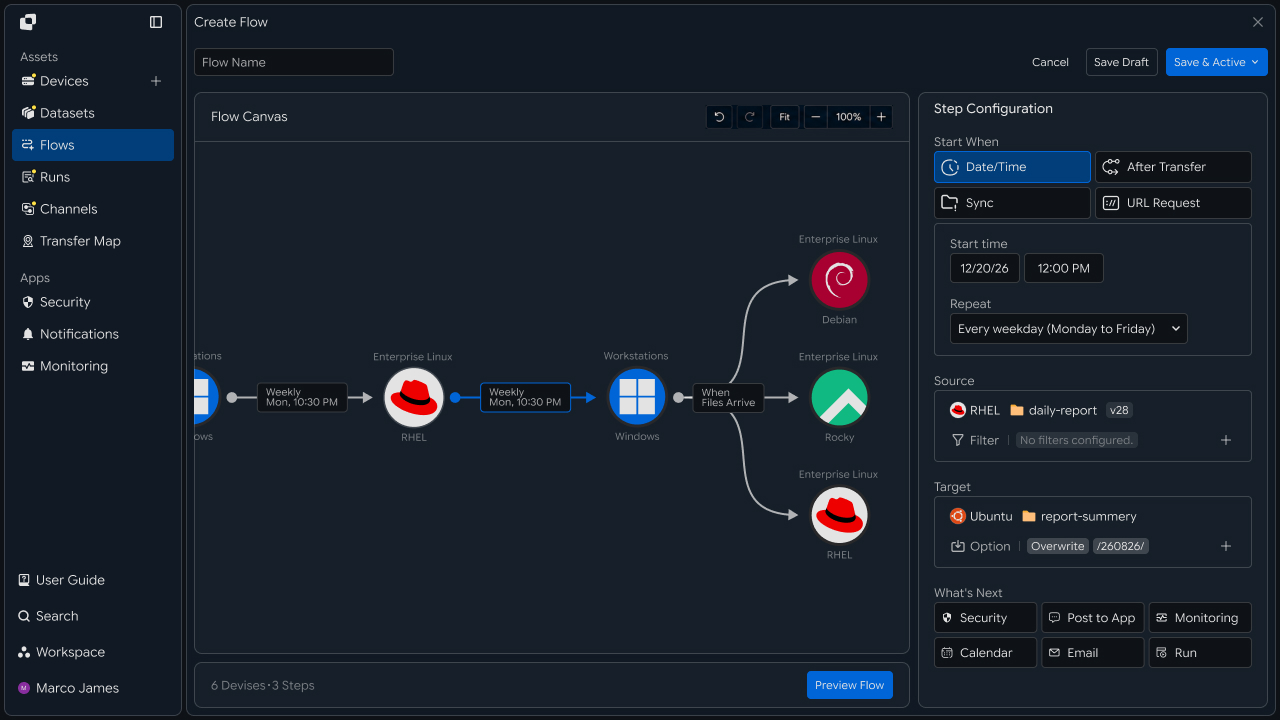
This reduces cases where files still being generated or artifacts from incomplete builds are delivered to target environments.
Target Branching
When one build artifact is needed in multiple environments, the transfer path can branch from one Source to multiple Targets.
For example, a generated installation package can be delivered to a test server while also being stored in long-term storage.
                Build Artifacts
                       │
                       ▼
                  Transfer Flow
                       │
          ┌────────────┼────────────┐
          ▼            ▼            ▼
       QA Server   Release Server  Archive
          │            │            │
          ▼            ▼            ▼
       Testing     Deployment      Storage
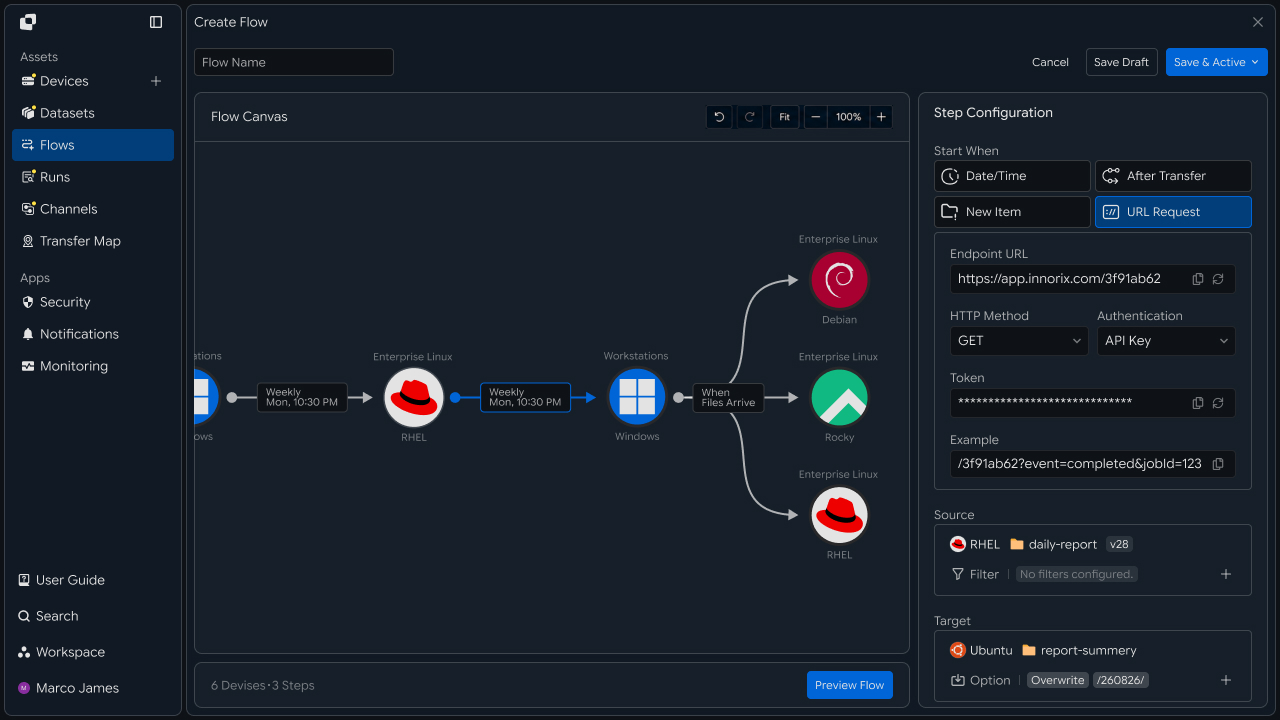
Target environments can be divided according to how files are used.
| Target | Usage |
|---|---|
| Test server | Validate build results |
| Deployment server | Prepare installation or production deployment |
| File storage | Long-term artifact storage |
| Media server | Process large media files |
| Remote system | Deliver files to branch or external environments |
Even when one artifact is needed in multiple locations, delivery paths for each Target can be configured in one Flow instead of copying files separately.
Version Management
Build artifacts can be managed by version or build number instead of repeatedly overwriting the same file name.
For example, each generated file name can include a version, and the same structure can be maintained on the Target.
Source
/build/releases/
├── app-v2.3.0.zip
├── app-v2.4.0.zip
└── app-v2.5.0.zip
          │
          ▼
Target
/releases/
├── v2.3.0/
├── v2.4.0/
└── v2.5.0/
Separating the delivery scope by file path or name also allows only artifacts from a specific version to be delivered.
| Management Criteria | Usage |
|---|---|
| Version number | Deliver artifacts for a specified version |
| Build number | Distinguish results from a specific build |
| Creation date | Select the latest result files |
| Project path | Separate artifacts by project |
| File type | Separate installation files from media files |
| This allows the delivery scope of large files used for actual deployment to be managed independently of Git Commit or Repository. |
Follow-up Chaining
After files are delivered to the target environment, the next operation that uses the artifacts can also be connected.
For example, automatic validation can start when build artifacts arrive on the test server, and the next deployment operation can run according to the validation result.
Build Complete
      │
      ▼
Artifact Transfer
      │
      ▼
Target Ready
      │
      ├──────────────┐
      ▼              ▼
   Validation      Archive
      │
      ▼
  Result Review
      │
 ┌────┴─────┐
 ▼          ▼
Success    Review
 │
 ▼
Next Deployment
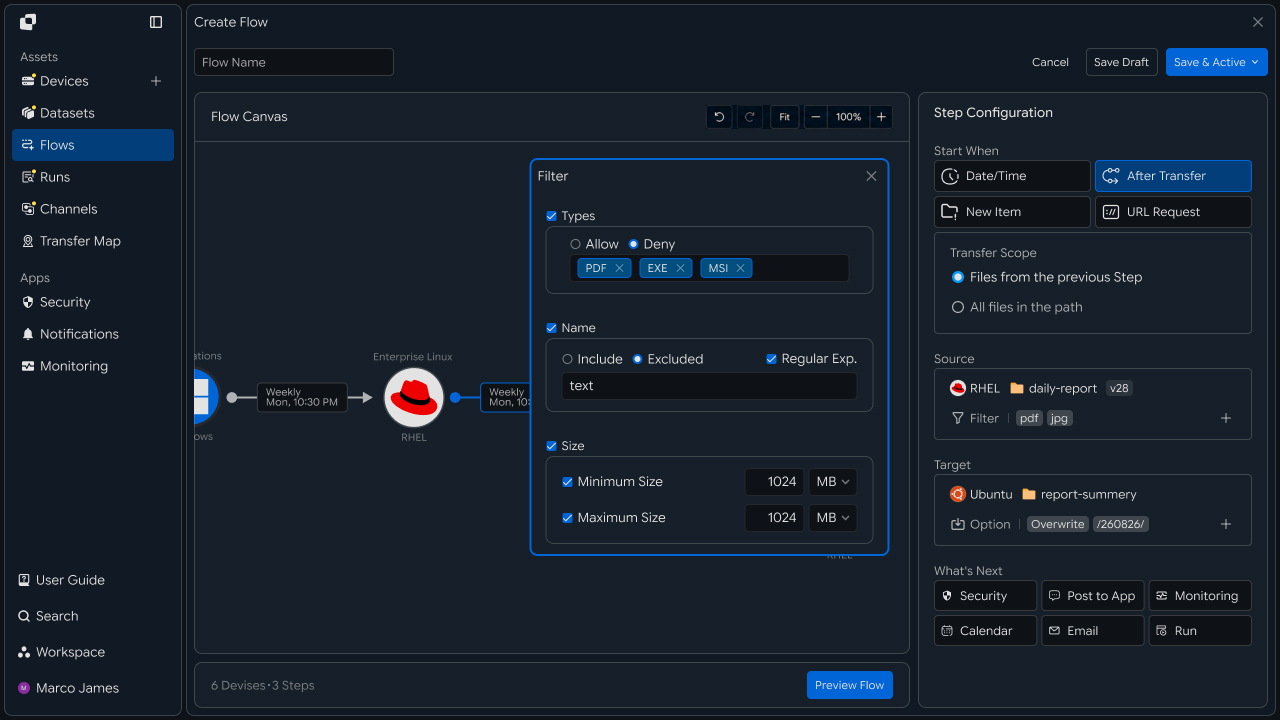
Connecting follow-up operations reduces the need for a separate operator to check delivered files and start the next operation.
For example, the flow can be configured as follows.
| Transfer Result | Follow-up Operation |
|---|---|
| Transfer completed | Run automatic validation |
| Validation completed | Deliver to the next deployment environment |
| Storage completed | Record result history |
| Partial failure | Check the affected Target |
| Additional review required | Review Run details |
Result Verification
When a file delivery operation runs, check overall progress and processing results by Source and Target in Runs.
Even when one build artifact is delivered to multiple target environments, execution results can be reviewed separately by Target.
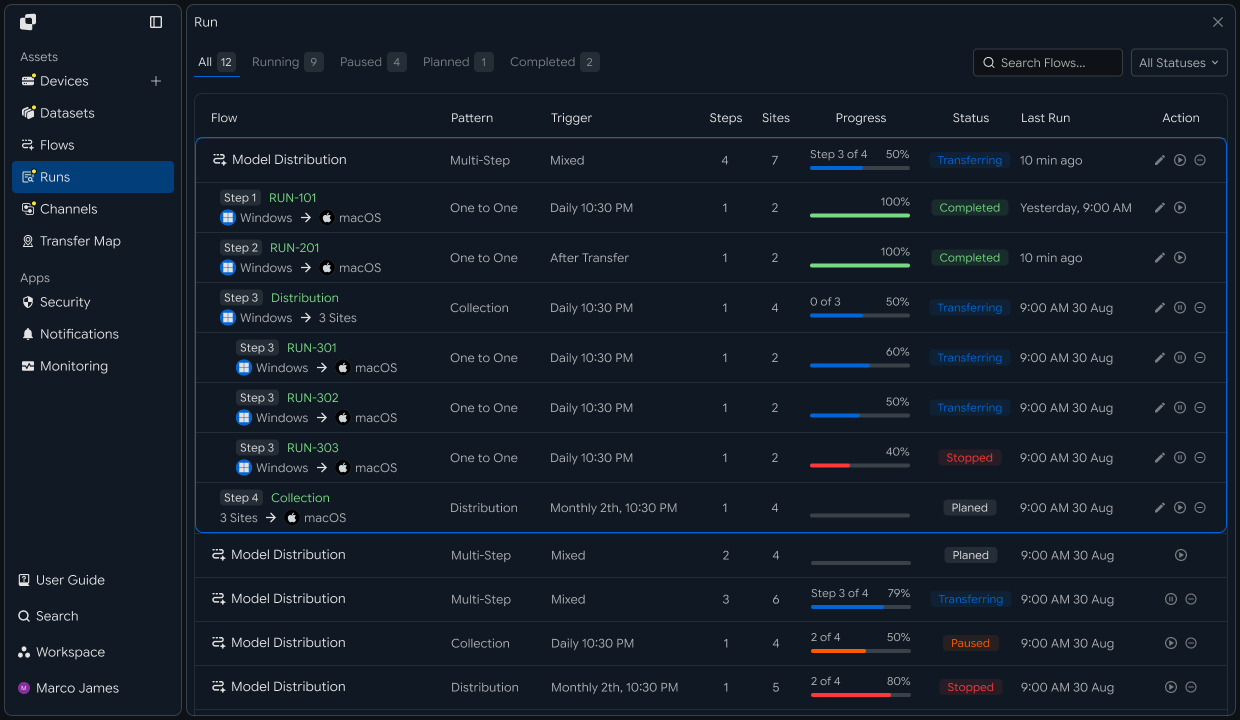
The following items can be checked in the execution results.
| Item | Details |
|---|---|
| Source | System and path where build artifacts were generated |
| Target | Server or storage where files were delivered |
| Total Files | Number of processed result files |
| Total Size | Total size of delivered files |
| Progress | Current file transfer progress |
| Status | Execution completion and failure status |
| Started | Transfer start time |
| Completed | Transfer completion time |
Selecting a specific Run shows per-file processing results and which artifacts were successfully applied to each target environment.
This allows large-file delivery status to be managed in one execution flow instead of checking server-specific scripts or individual logs separately.
Failure Handling
If files are not delivered successfully to a specific target environment, use the Run details to identify where the issue occurred and review file-processing status.
For example, if the target server connection is interrupted or the storage path cannot be accessed, check that Target's connection status, path, and access permissions.
Transfer Run
      │
      ▼
Result Review
      │
 ┌────┼─────────────┐
 ▼    ▼             ▼
QA ✓  Release ✓   Archive !
                       │
                       ▼
                  View Details
                       │
             ┌─────────┼─────────┐
             ▼         ▼         ▼
         Connection   Path   Permission
             │         │         │
             └─────────┼─────────┘
                       ▼
                     Adjust
                       │
                       ▼
                      Retry
                       │
                       ▼
                   New Run
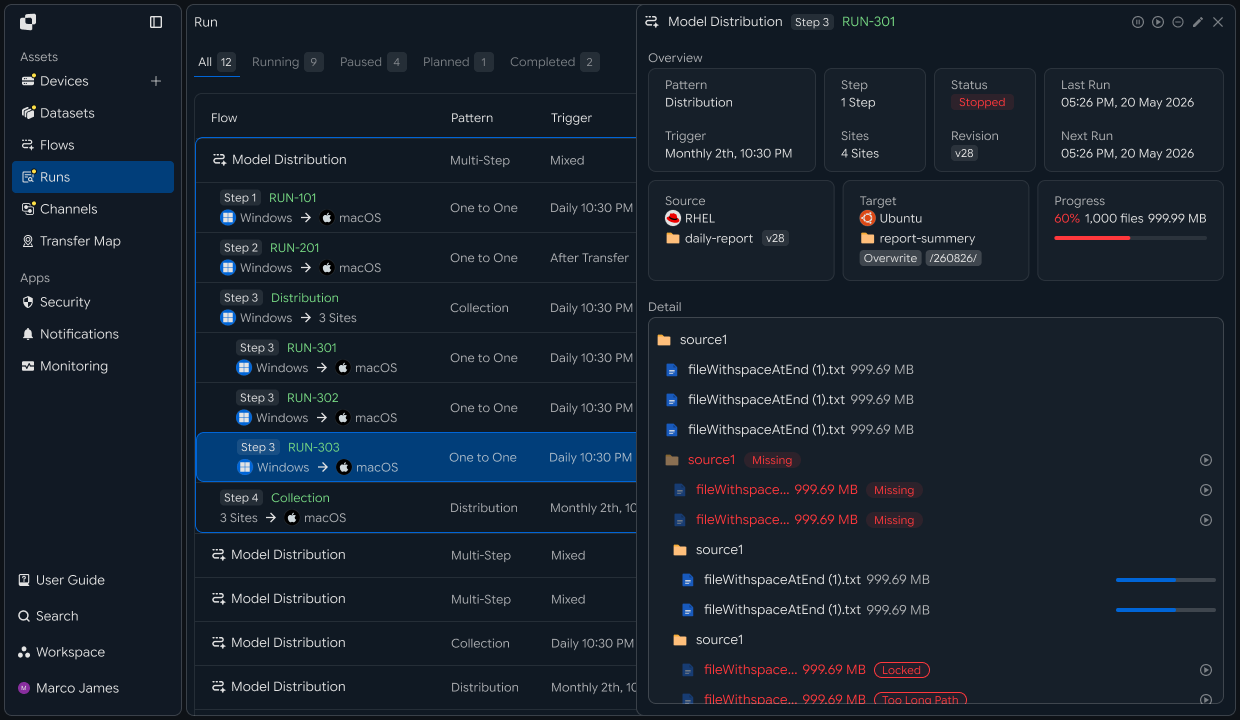
After resolving the issue, rerun the transfer for the required files and target environment instead of repeating the entire build process.
After rerunning, use the new Run to verify that large build artifacts and binary files were successfully applied to the specified location.
This process creates a large-file delivery flow covering prepare build results → select transfer files → set execution conditions → branch target environments → deliver by version → connect follow-up operations → verify results → handle failed Targets.
By using Git to manage source code and change history while automatically delivering large build artifacts, binaries, and media files through a separate Flow, you can separate code management from large-file distribution while keeping the overall development · deployment flow connected.
Developer
Deliver large artifacts outside Git to versioned paths and record references
Register the build server and storage target as Devices, transfer artifacts to a versioned path, and check the terminal status. Prepare the following before starting.
| Prerequisite | Details |
|---|---|
| INNORIX authentication | INNORIX_ACCESS_TOKEN (Authorization: Bearer) |
| Source Device | Build server device ID and artifact path (e.g. /out/2.14.0) |
| Target Device | Shared storage · server device ID and storage root (e.g. /artifacts) |
| Runtime | Python 3 + requests · Java 17+ · Node.js 18+ · .NET 8+ |
Python and Node.js reuse the minimal
api()helper for direct REST calls and status constants (STATUS_COMPLETE·TERMINAL) from the API Call Recipe. Java and C# use the bundledInnorixClient(including constants) andJsonhelper (Jfor C#). Replace Device identifiers and paths with actual values.
Deliver Artifacts to a Versioned Path
Transfer artifacts to the storage-root/version path and create a path for consumers to reference from the returned transfer information. Record the returned reference information (device · path · version) in Git metadata or a deployment manifest during the CI stage.
import time


def push_artifact(source, source_path, target, store_root, version):
    target_path = f"{store_root.rstrip('/')}/{version}"   # version path
    transfer = api("POST", "/api/transfers/manual", {
        "sourceDevice": source,
        "targetDevice": target,
        "targetPath": target_path,
        "sourcePaths": [source_path],
        "sendAllFolder": True,
        "checkIntegrity": True,
        "transferOptions": {"target-action": "overwrite"},
    })
    detail = wait_transfer(transfer["monitorId"])
    ok = detail.get("status") == STATUS_COMPLETE
    # reference to record in Git (device + path + version)
    return {"ok": ok, "device": target, "path": target_path, "version": version}


def wait_transfer(monitor_id, timeout=14400, interval=5):
    deadline = time.time() + timeout
    while time.time() < deadline:
        detail = api("GET", f"/api/transfers/{monitor_id}") or {}
        if detail.get("status") in TERMINAL:
            return detail
        time.sleep(interval)
    raise TimeoutError(monitor_id)


ref = push_artifact("build-src", "/out/2.14.0", "artifact-store", "/artifacts", "2.14.0")
print("delivered" if ref["ok"] else "needs check", "->", ref["path"])
Version path rule Delivering artifacts to the
storage-root/versionpath identifies the version through the path. Record only this reference (device · path · version) in Git and keep the actual files outside the repository.
Integrity verification If the Source · Target Device combination supports integrity verification,
checkIntegrity: truecan verify that source and destination files match. Do not use it for unsupported combinations such as object-storage-to-object-storage transfers (see the Integrity Verification Recipe).
Consumers can use the recorded device ID and version path to access the artifact or receive it through a separate transfer. If failures occur, use retry_failed from the Pause and Resume Recipe to retransmit only the failed items.
Implementation Result
With this recipe, large files outside Git can be delivered using the following flow.
Build artifacts (build-src) /out/2.14.0
   ↓  Transfer to versioned path (checkIntegrity)

Shared storage (artifact-store) /artifacts/2.14.0
   ↓  Record only the reference in Git

Consumer receives from the same path
Deliver large artifacts outside the Git repository through versioned paths and leave only references in commits, keeping the repository lightweight while verifying integrity.