
Getting Started#
Core Concept#
Automatically transfer database dumps, backups, and archive files to designated locations
Database and backup systems generate various files, including DB dumps, full backup files, incremental backup files, and log archives.
Automated DB and backup file transfer checks for generated files and automatically transfers them to a remote data center or cloud storage according to configured conditions.
By connecting the location where files are generated with the remote storage environment, regularly generated files can be managed according to a defined flow.
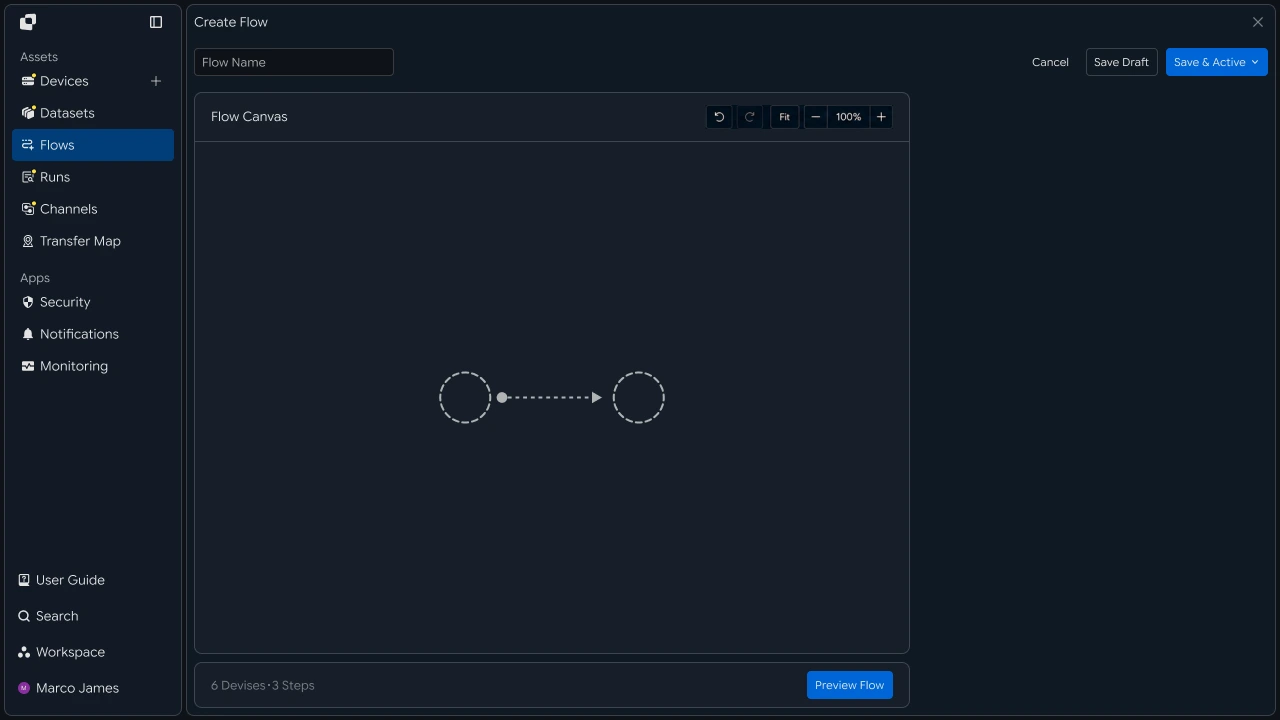
Automation Flow#
Connect the process from backup file creation through remote storage and result verification in sequence
When a backup file is created or a backup operation is completed, the next transfer operation can be run according to configured conditions.
You can also configure a flow that checks files generated on a defined schedule and transfers them to the remote storage environment.
- Create a DB dump or backup file
- Confirm file or backup completion
- Run the transfer operation
- Store in the remote environment
- Review the result
This flow automatically connects backup file creation and remote storage operations in sequence.
Operational Benefits#
Manage regular backup file transfers and remote storage as a single flow
DB and backup environments continuously manage file creation, remote transfers, storage locations, and execution results.
By configuring an automated transfer flow, regularly generated files can be transferred to designated remote environments while execution results and storage status are reviewed together.
| Category | Individual Management | Automated Transfer |
|---|---|---|
| File Check | Check generated files for each operation | Check according to configured conditions |
| Transfer Execution | Run each file transfer manually | Run automatically according to conditions and schedules |
| Storage Location | Specify the destination for each operation | Configure paths by file type |
| Result Management | Review results by operation | Review execution history and storage results together |
This lets you build a single operational flow from DB dump and backup file creation through remote storage.
IT Engineer#
Source Connection#
Connect the file creation locations of database and backup equipment
First, connect the devices and folders where DB dumps and backup files are created to the transfer environment.
Specify file paths generated on database servers, backup servers, or storage systems and configure them as transfer sources.
| Source Environment | Generated Files |
|---|---|
| Database Server | DB dumps and export files |
| Backup Server | Full and incremental backup files |
| Log Server | Transaction logs and archives |
| Storage | Files for long-term retention |
 |
Transfer Configuration#
Configure the remote storage location and execution conditions as a single transfer flow
After connecting the source files, configure the remote data center or cloud storage as the transfer target.
You can configure the transfer to start when a file is created, when a backup operation is completed, or according to a defined schedule.
| Configuration Item | Configuration |
|---|---|
| Remote Target | Data center or cloud storage |
| Storage Location | Folder or bucket path by file type |
| Execution Condition | File creation, backup completion, scheduled execution |
| File Type | DB Dump, Backup, Archive, etc. |
For example, you can configure a flow that sends daily backups to cloud storage while sending weekly backups and long-term retention files to separate remote paths.
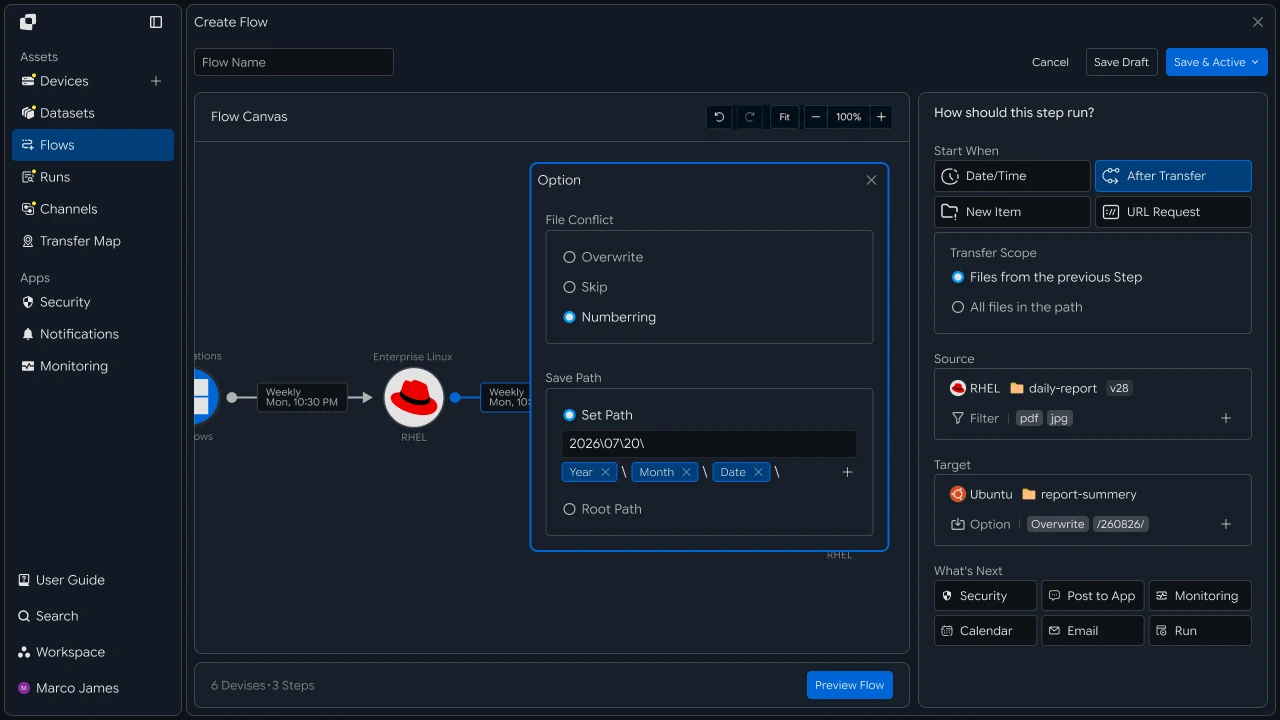
Automated Transfer#
Automatically transfer generated backup files to the designated remote environment
When the configured conditions are met, DB dumps and backup files are transferred to the designated remote environment.
You can branch to different storage locations by file type and path, or configure a single backup file to be transferred to multiple remote environments.
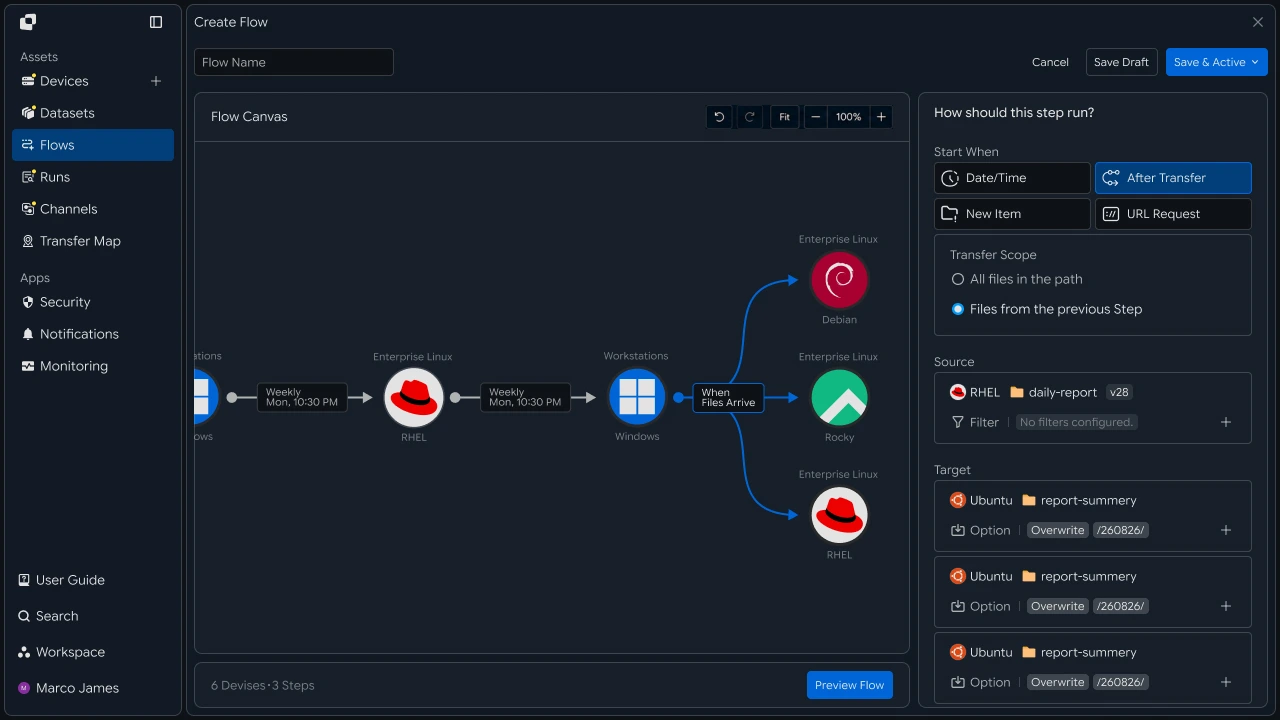
Result Management#
Review transfer status and storage results, then rerun required operations
When a transfer operation runs, you can review file processing status and remote storage results through Runs and the operation details.
If a specific operation requires additional review, check the source file, device connection, target path, and access scope through the Activity Log and execution information, then rerun the required operation.
| Review Item | Details |
|---|---|
| Source File | Transferred DB dumps and backup files |
| Target Location | Remote server or cloud storage path |
| Progress Status | Current operation status and progress |
| Processing Result | Number of transferred files and total size |
| Execution History | File processing steps and operation results |

Developer#
Transfer the dump remotely when the backup completes and verify it with a checksum
Integration Preparation#
Prepare common request code and path representation
import os
import requests

BASE_URL = os.getenv("INNORIX_BASE_URL", "https://app.innorix.com").rstrip("/")
TOKEN = os.environ["INNORIX_ACCESS_TOKEN"]
WORKSPACE_ID = os.getenv("INNORIX_WORKSPACE_ID")   # optional; falls back to the current workspace

STATUS_COMPLETE = 2
TERMINAL = {2, 4, 5, 9, 99}          # complete / error / cancelled / partial / failed
NOT_SUCCEEDED = {4, 5, 9, 99}


def api(method, path, body=None, params=None):
    headers = {
        "Content-Type": "application/json",
        "Authorization": f"Bearer {TOKEN}",
    }

    if WORKSPACE_ID:
        headers["x-workspace-id"] = WORKSPACE_ID

    response = requests.request(
        method, BASE_URL + path,
        headers=headers, json=body, params=params, timeout=30,
    )

    payload = response.json() if response.content else {}

    if not response.ok:
        raise RuntimeError(payload.get("message") or f"HTTP {response.status_code}")

    return payload.get("data")


def is_terminal(detail):
    return detail.get("isTerminal", detail.get("status") in TERMINAL)
// InnorixClient.java
public static final String BASE_URL =
env("INNORIX_BASE_URL", "https://app.innorix.com").replaceAll("/+quot;, "");
public static final String WORKSPACE_ID = env("INNORIX_WORKSPACE_ID", null);
public static final int STATUS_COMPLETE = 2;
// States the transfer no longer moves out of
public static final Set<Integer> TERMINAL = Set.of(2, 4, 5, 9, 99);
// Terminal states that are not a full success
public static final Set<Integer> NOT_SUCCEEDED = Set.of(4, 5, 9, 99);
private HttpRequest.Builder headers(HttpRequest.Builder builder) {
builder.header("Content-Type", "application/json")
.header("Authorization", "Bearer " + session.accessToken());
// When omitted the account's current workspace is used.
if (workspaceId != null) builder.header("x-workspace-id", workspaceId);
return builder;
}
/** Unwraps and returns data from the response. Throws ApiError on failure. */
public Object api(String method, String path, Object body, Map<String, Object> params) {
Resp response = request(method, path, body, params);
Object payload = null;
try {
payload = Json.parse(response.text());
} catch (RuntimeException ignored) {
payload = null;
}
if (!response.ok()) {
Map<String, Object> map = Json.asObj(payload);
String message = Json.str(map, "message", Json.str(map, "error", "unknown error"));
throw new ApiError(response.status, message, map);
}
return Json.get(payload, "data");
}
/** Use the server flag when present, otherwise fall back to the status code. */
public static boolean isTerminal(Map<String, Object> record) {
Boolean flag = Json.boolOrNull(record, "isTerminal");
if (flag != null) return flag;
Integer status = Json.intOrNull(record, "status");
return status != null && TERMINAL.contains(status);
}// innorix-client.js
const BASE_URL = (process.env.INNORIX_BASE_URL
|| "https://app.innorix.com").replace(/\/+$/, "");
const TOKEN = process.env.INNORIX_ACCESS_TOKEN;
const WORKSPACE_ID = process.env.INNORIX_WORKSPACE_ID || null;
export const STATUS_COMPLETE = 2;
export const TERMINAL = new Set([2, 4, 5, 9, 99]); // complete / error / cancelled / partial / failed
export const NOT_SUCCEEDED = new Set([4, 5, 9, 99]);
export async function api(method, path, body = null, params = null) {
const url = new URL(BASE_URL + path);
if (params) {
for (const [key, value] of Object.entries(params)) {
if (value === undefined || value === null) continue;
url.searchParams.set(key, String(value));
}
}
const headers = {
"Content-Type": "application/json",
Authorization: `Bearer ${TOKEN}`,
};
// When omitted the account's current workspace is used.
if (WORKSPACE_ID) headers["x-workspace-id"] = WORKSPACE_ID;
const response = await fetch(url, {
method,
headers,
body: body === null ? undefined : JSON.stringify(body),
signal: AbortSignal.timeout(30_000),
});
const payload = await response.json().catch(() => ({}));
if (!response.ok) {
throw new Error(payload.message || `HTTP ${response.status}`);
}
return payload.data;
}
export function isTerminal(detail) {
return detail.isTerminal !== undefined
? detail.isTerminal
: TERMINAL.has(detail.status);
}// InnorixClient.cs
public static readonly string BaseUrl =
Env("INNORIX_BASE_URL", "https://app.innorix.com").TrimEnd('/');
public static readonly string WorkspaceIdFromEnv = Env("INNORIX_WORKSPACE_ID", null);
public const int StatusComplete = 2;
/// <summary>States the transfer no longer moves out of</summary>
public static readonly HashSet<int> Terminal = new HashSet<int> { 2, 4, 5, 9, 99 };
/// <summary>Terminal states that are not a full success</summary>
public static readonly HashSet<int> NotSucceeded = new HashSet<int> { 4, 5, 9, 99 };
// Applied on every request
request.Headers.TryAddWithoutValidation("Authorization", "Bearer " + Session.AccessToken);
// When omitted the account's current workspace is used.
if (WorkspaceId != null) request.Headers.TryAddWithoutValidation("x-workspace-id", WorkspaceId);
public async Task<JsonNode> ApiAsync(string method, string path, JsonNode body = null,
IDictionary<string, object> parameters = null)
{
Resp response = await RequestAsync(method, path, body, parameters).ConfigureAwait(false);
JsonNode payload = null;
try
{
payload = J.Parse(response.Text());
}
catch (Exception)
{
payload = null;
}
if (!response.Ok)
{
JsonObject map = J.AsObj(payload);
string message = J.Str(map, "message", J.Str(map, "error", "unknown error"));
throw new ApiError(response.Status, message, map);
}
return J.Get(payload, "data");
}
/// <summary>Use the server flag when present, otherwise fall back to the status code.</summary>
public static bool IsTerminal(JsonObject record)
{
bool? flag = J.BoolOrNull(record, "isTerminal");
if (flag != null) return flag.Value;
int? status = J.IntOrNull(record, "status");
return status != null && Terminal.Contains(status.Value);
}import base64
import time
def encode_path(device_id, raw_path):
normalized = str(raw_path or "").replace("\\", "/")
token = base64.b64encode(normalized.encode("utf-8")).decode("ascii")
return f"{device_id}_ino_{token}"
def now_iso():
return time.strftime("%Y-%m-%dT%H:%M:%S.000Z", time.gmtime())public static String encodePath(String deviceId, String rawPath) {
String normalized = (rawPath == null ? "" : rawPath).replace("\\", "/");
return deviceId + "_ino_"
+ Base64.getEncoder().encodeToString(normalized.getBytes(StandardCharsets.UTF_8));
}
public static String nowIso() {
return Instant.now().truncatedTo(ChronoUnit.SECONDS).toString().replace("Z", ".000Z");
}export function encodePath(deviceId, rawPath) {
const normalized = String(rawPath ?? "").replace(/\\/g, "/");
const token = Buffer.from(normalized, "utf8").toString("base64");
return `${deviceId}_ino_${token}`;
}
export function nowIso() {
return new Date().toISOString().replace(/\.\d{3}Z$/, ".000Z");
}public static string EncodePath(string deviceId, string rawPath)
{
string normalized = (rawPath ?? "").Replace("\\", "/");
return deviceId + "_ino_" + Convert.ToBase64String(Encoding.UTF8.GetBytes(normalized));
}
public static string NowIso()
{
return DateTime.UtcNow.ToString("yyyy-MM-dd'T'HH:mm:ss'.000Z'",
System.Globalization.CultureInfo.InvariantCulture);
}Determine the transfer status using the values below. There are five terminal states, and the successful value is Complete (2).
| Status Value | Meaning | Terminal |
|---|---|---|
| 2 | Complete | Yes |
| 4 | Error | Yes |
| 5 | Cancelled | Yes |
| 9 | Partially Complete | Yes |
| 99 | Failed | Yes |
| 1 , 6 , 12 , 13 | Started, Transferring, Synchronizing, Receiving | No |
Transfer After Backup Completion#
Continue the transfer from the end of the backup script
Calling the transfer immediately after the backup program creates the file ensures that the file is ready at the correct point in time.
When sending a file, explicitly set isDir: false in sourceItem. sourcePaths treats every path as a folder, so passing a dump file causes the server to scan it as a folder, which can slow the operation or cause a timeout.
import glob
import os


def latest_backup(directory, pattern="*.dump"):
    files = glob.glob(os.path.join(directory, pattern))

    if not files:
        raise FileNotFoundError(directory)

    return max(files, key=os.path.getmtime)


def send_backup(source, target, backup_path, target_path):
    transfer = api("POST", "/api/transfers/manual", {
        "sourceDevice": source,
        "targetDevice": target,
        "targetPath": target_path,
        "sourceItem": [{
            "path": backup_path,
            "isDir": False,
            "fileSize": os.path.getsize(backup_path),
        }],
        "sendAllFolder": False,
        "checkIntegrity": True,
        "transferOptions": {"target-action": "numbering"},
    })

    return transfer["monitorId"]
String latestBackup(String directory, String pattern) throws IOException {
Path dir = Path.of(directory);
try (var stream = Files.newDirectoryStream(dir, pattern)) {
Path latest = null;
for (Path p : stream) {
if (latest == null || Files.getLastModifiedTime(p)
.compareTo(Files.getLastModifiedTime(latest)) > 0) latest = p;
}
if (latest == null) throw new FileNotFoundException(directory);
return latest.toString();
}
}
String sendBackup(String source, String target, String backupPath, String targetPath)
throws IOException {
Map<String, Object> transfer = client.apiObj("POST", "/api/transfers/manual", Json.newObj(
"sourceDevice", source,
"targetDevice", target,
"targetPath", targetPath,
"sourceItem", List.of(Json.newObj(
"path", backupPath, "isDir", false,
"fileSize", Files.size(Path.of(backupPath)))),
"sendAllFolder", false,
"checkIntegrity", true,
"transferOptions", Json.newObj("target-action", "numbering")));
return Json.str(transfer, "monitorId");
}import { readdirSync, statSync } from "node:fs";
import { join } from "node:path";
function latestBackup(directory, pattern = /\.dump$/) {
const files = readdirSync(directory).filter((f) => pattern.test(f))
.map((f) => join(directory, f));
if (files.length === 0) throw new Error(directory);
return files.reduce((a, b) =>
statSync(a).mtimeMs > statSync(b).mtimeMs ? a : b);
}
async function sendBackup(source, target, backupPath, targetPath) {
const transfer = await client.api("POST", "/api/transfers/manual", {
sourceDevice: source,
targetDevice: target,
targetPath,
sourceItem: [{
path: backupPath,
isDir: false,
fileSize: statSync(backupPath).size,
}],
sendAllFolder: false,
checkIntegrity: true,
transferOptions: { "target-action": "numbering" },
});
return transfer.monitorId;
}string LatestBackup(string directory, string pattern = "*.dump")
{
var files = Directory.GetFiles(directory, pattern);
if (files.Length == 0) throw new FileNotFoundException(directory);
return files.OrderByDescending(f => new FileInfo(f).LastWriteTimeUtc).First();
}
async Task<string> SendBackupAsync(string source, string target,
string backupPath, string targetPath)
{
JsonObject transfer = await client.ApiObjAsync("POST", "/api/transfers/manual",
new JsonObject
{
["sourceDevice"] = source,
["targetDevice"] = target,
["targetPath"] = targetPath,
["sourceItem"] = new JsonArray
{
new JsonObject
{
["path"] = backupPath,
["isDir"] = false,
["fileSize"] = new FileInfo(backupPath).Length,
},
},
["sendAllFolder"] = false,
["checkIntegrity"] = true,
["transferOptions"] = new JsonObject { ["target-action"] = "numbering" },
});
return J.Str(transfer, "monitorId");
}Because backup files must retain each backup iteration, set the destination policy to numbering. If you use overwrite, the previous backup is removed and you cannot select the recovery point.
Passing the file size along lets the server skip querying the size of each item again, improving performance.
A corrupted backup may only be discovered when recovery is attempted, so use checkIntegrity to verify integrity during the transfer stage.
Branch by File Type#
Send dumps, incrementals, and archives to different locations
A single transfer handles one target. If targets differ by file type, create separate transfers.
ROUTES = {
    "dump":    ("device-dc-01", "/backup/dump"),
    "daily":   ("device-cloud-01", "/backup/daily"),
    "archive": ("device-archive-01", "/backup/archive"),
}


def classify(filename):
    name = os.path.basename(filename).lower()

    if name.endswith(".dump"):
        return "dump"

    if "archive" in name or name.endswith(".tar.gz"):
        return "archive"

    return "daily"


def dispatch(source, files):
    transfers = {}

    for path in files:
        target, target_path = ROUTES[classify(path)]
        transfers[path] = send_backup(source, target, path, target_path)

    return transfers
static final Map<String, String[]> ROUTES = Map.of(
"dump", new String[]{"device-dc-01", "/backup/dump"},
"daily", new String[]{"device-cloud-01", "/backup/daily"},
"archive", new String[]{"device-archive-01", "/backup/archive"});
String classify(String filename) {
String name = Path.of(filename).getFileName().toString().toLowerCase();
if (name.endsWith(".dump")) return "dump";
if (name.contains("archive") || name.endsWith(".tar.gz")) return "archive";
return "daily";
}
Map<String, String> dispatch(String source, List<String> files) throws IOException {
Map<String, String> transfers = new LinkedHashMap<>();
for (String path : files) {
String[] route = ROUTES.get(classify(path));
transfers.put(path, sendBackup(source, route[0], path, route[1]));
}
return transfers;
}const ROUTES = {
dump: ["device-dc-01", "/backup/dump"],
daily: ["device-cloud-01", "/backup/daily"],
archive: ["device-archive-01", "/backup/archive"],
};
function classify(filename) {
const name = filename.split("/").pop().toLowerCase();
if (name.endsWith(".dump")) return "dump";
if (name.includes("archive") || name.endsWith(".tar.gz")) return "archive";
return "daily";
}
async function dispatch(source, files) {
const transfers = {};
for (const path of files) {
const [target, targetPath] = ROUTES[classify(path)];
transfers[path] = await sendBackup(source, target, path, targetPath);
}
return transfers;
}static readonly Dictionary<string, (string Device, string Path)> Routes = new()
{
["dump"] = ("device-dc-01", "/backup/dump"),
["daily"] = ("device-cloud-01", "/backup/daily"),
["archive"] = ("device-archive-01", "/backup/archive"),
};
string Classify(string filename)
{
string name = Path.GetFileName(filename).ToLowerInvariant();
if (name.EndsWith(".dump")) return "dump";
if (name.Contains("archive") || name.EndsWith(".tar.gz")) return "archive";
return "daily";
}
async Task<Dictionary<string, string>> DispatchAsync(string source, IEnumerable<string> files)
{
var transfers = new Dictionary<string, string>();
foreach (string path in files)
{
var (target, targetPath) = Routes[Classify(path)];
transfers[path] = await SendBackupAsync(source, target, path, targetPath);
}
return transfers;
}If a single backup file must be sent to multiple remote environments, create a transfer for each target and store the returned monitorId for each target so you can query each transfer later.
copies = {
    target: send_backup("device-db-01", target, backup_path, path)
    for target, path in [("device-dc-01", "/backup/dump"),
                         ("device-cloud-01", "/backup/mirror")]
}Map<String, String> copies = new LinkedHashMap<>();
for (String[] dest : List.of(
new String[]{"device-dc-01", "/backup/dump"},
new String[]{"device-cloud-01", "/backup/mirror"})) {
copies.put(dest[0], sendBackup("device-db-01", dest[0], backupPath, dest[1]));
}const copies = {};
for (const [target, path] of [
["device-dc-01", "/backup/dump"],
["device-cloud-01", "/backup/mirror"],
]) {
copies[target] = await sendBackup("device-db-01", target, backupPath, path);
}var copies = new Dictionary<string, string>();
foreach (var (target, path) in new[]
{
("device-dc-01", "/backup/dump"),
("device-cloud-01", "/backup/mirror"),
})
{
copies[target] = await SendBackupAsync("device-db-01", target, backupPath, path);
}Schedule Automation#
Register the operation to run repeatedly at a defined time
If the backup script cannot be modified, configure it through schedule automation.
def build_schedule_automation(name, source, source_path, target, target_path,
                              schedule):
    return {
        "name": name,
        "flowName": name,
        "transferType": "normal",
        "timezone": "Asia/Seoul",
        "step": 1,
        "isUpcoming": False,
        "details": [
            {
                "senderId": source,
                "receiverId": target,
                "sourceItem": [
                    {
                        "hash": encode_path(source, source_path),
                        "filePath": source_path,
                        "isDir": True,
                    }
                ],
                "targetPath": encode_path(target, target_path),
                "step": 1,
                "transferOptions": {
                    "noSchedule": False,
                    "target-action": "numbering",
                    "send-fileoption": {},
                },
            }
        ],
        "schedules": [schedule],
    }


DAILY_3AM = {
    "type": "day",
    "startDateType": "now",
    "hour": "03",
    "minute": "00",
    "ampm": "am",
    "startDate": now_iso(),
    "timezone": "Asia/Seoul",
}

MONTHLY = {
    "type": "month",
    "startDateType": "now",
    "day": "1",
    "hour": "04",
    "minute": "00",
    "ampm": "am",
    "startDate": now_iso(),
    "timezone": "Asia/Seoul",
}

api("POST", "/api/automations", build_schedule_automation(
    "daily backup", "device-db-01", "/backup",
"device-dc-01", "/backup/daily", DAILY_3AM))Map<String, Object> buildScheduleAutomation(String name, String source, String sourcePath,
String target, String targetPath,
Map<String, Object> schedule) {
Map<String, Object> detail = Json.newObj(
"senderId", source, "receiverId", target,
"sourceItem", List.of(Json.newObj(
"hash", InnorixClient.encodePath(source, sourcePath),
"filePath", sourcePath, "isDir", true)),
"targetPath", InnorixClient.encodePath(target, targetPath),
"step", 1,
"transferOptions", Json.newObj(
"noSchedule", false, "target-action", "numbering",
"send-fileoption", Json.newObj()));
return Json.newObj(
"name", name, "flowName", name,
"transferType", "normal", "timezone", "Asia/Seoul",
"step", 1, "isUpcoming", false,
"details", List.of(detail),
"schedules", List.of(schedule));
}function buildScheduleAutomation(name, source, sourcePath, target, targetPath, schedule) {
return {
name,
flowName: name,
transferType: "normal",
timezone: "Asia/Seoul",
step: 1,
isUpcoming: false,
details: [{
senderId: source,
receiverId: target,
sourceItem: [{
hash: encodePath(source, sourcePath),
filePath: sourcePath,
isDir: true,
}],
targetPath: encodePath(target, targetPath),
step: 1,
transferOptions: {
noSchedule: false,
"target-action": "numbering",
"send-fileoption": {},
},
}],
schedules: [schedule],
};
}JsonObject BuildScheduleAutomation(string name, string source, string sourcePath,
string target, string targetPath, JsonObject schedule)
{
var detail = new JsonObject
{
["senderId"] = source,
["receiverId"] = target,
["sourceItem"] = new JsonArray
{
new JsonObject
{
["hash"] = InnorixClient.EncodePath(source, sourcePath),
["filePath"] = sourcePath,
["isDir"] = true,
},
},
["targetPath"] = InnorixClient.EncodePath(target, targetPath),
["step"] = 1,
["transferOptions"] = new JsonObject
{
["noSchedule"] = false,
["target-action"] = "numbering",
["send-fileoption"] = new JsonObject(),
},
};
return new JsonObject
{
["name"] = name,
["flowName"] = name,
["transferType"] = "normal",
["timezone"] = "Asia/Seoul",
["step"] = 1,
["isUpcoming"] = false,
["details"] = new JsonArray { detail },
["schedules"] = new JsonArray { schedule },
};
}There are four items that must be followed in an automation request.
| Item | Specification |
|---|---|
isUpcoming |
Must be false. The server default true ignores the schedule in the request and replaces it with a five-minute one-time schedule. Steps with triggerAutomation are forced to false by the server, so specify it directly only on the first step without a trigger. |
step |
Include it at both the top level and in details. It represents the hop position in the flow. |
sourceItem |
Include both hash (path token) and filePath (plain-text path). |
syncType |
Put it inside transferOptions. 1 is one-way and 2 is bidirectional. |
All four items can be omitted and registration will still succeed, but behavior changes at execution time. If a recurring schedule was registered but runs only once and stops, check isUpcoming first.
Preventing Duplicate Registration#
Prevent the same backup operation from being created twice
A new automation is created even when an automation with the same name already exists. If a batch is retried, the same backup is transferred twice, and because the destination policy is numbering, two copies of the file accumulate.
def find_automation(name):
    # the name we send is stored as flowName in the response
    # automationName is a server generated id like T4037-8500-1815, not the name we set.
    for page in range(1, 6):
        result = api("GET", "/api/automations",
                     params={"page": page, "size": 100, "search": name}) or {}

        items = [item
                 for flow in result.get("automations") or []
                 for item in flow.get("automations") or []]

        for item in items:
            if item.get("flowName") == name:
                return item

        if len(items) < 100:
            return None

return NoneMap<String, Object> findAutomation(String name) {
// the name we send is stored as flowName in the response
// automationName is a server generated id like T4037-8500-1815, not the name we set.
for (int page = 1; page <= 5; page++) {
Map<String, Object> result = client.apiObj("GET", "/api/automations", null,
Json.newObj("page", page, "size", 100, "search", name));
List<Map<String, Object>> items = new ArrayList<>();
for (Object flow : Json.arrOf(result, "automations")) {
for (Object item : Json.arrOf(Json.asObj(flow), "automations")) {
items.add(Json.asObj(item));
}
}
for (Map<String, Object> item : items) {
if (name.equals(Json.str(item, "flowName"))) return item;
}
if (items.size() < 100) return null;
}
return null;
}async function findAutomation(name) {
// the name we send is stored as flowName in the response
// automationName is a server generated id like T4037-8500-1815, not the name we set.
for (let page = 1; page <= 5; page += 1) {
const result = (await client.api("GET", "/api/automations", null,
{ page, size: 100, search: name })) || {};
const items = (result.automations || [])
.flatMap((flow) => flow.automations || []);
for (const item of items) {
if (item.flowName === name) return item;
}
if (items.length < 100) return null;
}
return null;
}async Task<JsonObject> FindAutomationAsync(string name)
{
// the name we send is stored as flowName in the response
// automationName is a server generated id like T4037-8500-1815, not the name we set.
for (int page = 1; page <= 5; page++)
{
JsonObject result = await client.ApiObjAsync("GET", "/api/automations", null,
new Dictionary<string, object> { ["page"] = page, ["size"] = 100, ["search"] = name });
var items = J.ArrOf(result, "automations")
.SelectMany(flow => J.ArrOf(J.AsObj(flow), "automations"))
.Select(J.AsObj).ToList();
foreach (JsonObject item in items)
{
if (J.Str(item, "flowName") == name) return item;
}
if (items.Count < 100) return null;
}
return null;
}The automation list is returned nested by flow group, so you must iterate through the inner arrays as well. Server search uses partial matching, so select only the item whose name exactly matches the name received.
Integrity Verification#
Verify that the backup stored remotely is identical to the original
def verify(monitor_id, timeout=1800, interval=10):
    api("POST", f"/api/transfers/{monitor_id}/verification", {})

    deadline = time.time() + timeout

    while time.time() < deadline:
        result = api("GET", f"/api/transfers/{monitor_id}/verification") or {}

        if result.get("verified"):
            return result

        time.sleep(interval)

    raise TimeoutError(monitor_id)
public Map<String, Object> verify(String monitorId, int timeoutSeconds, int intervalSeconds) {
api("POST", "/api/transfers/" + monitorId + "/verification", Json.newObj());
long deadline = System.currentTimeMillis() + timeoutSeconds * 1000L;
while (System.currentTimeMillis() < deadline) {
Map<String, Object> result =
apiObj("GET", "/api/transfers/" + monitorId + "/verification");
if (Json.bool(result, "verified", false)) return result;
sleep(intervalSeconds * 1000L);
}
throw new ApiError(0, "verification timeout: " + monitorId);
}export async function verify(monitorId, { timeout = 1800, interval = 10 } = {}) {
await api("POST", `/api/transfers/${monitorId}/verification`, {});
const deadline = Date.now() + timeout * 1000;
while (Date.now() < deadline) {
const result = (await api("GET", `/api/transfers/${monitorId}/verification`)) || {};
if (result.verified) return result;
await sleep(interval * 1000);
}
throw new Error(`verification timeout: ${monitorId}`);
}/// <summary>Start integrity verification, then poll until the result is ready.</summary>
public async Task<JsonObject> VerifyAsync(string monitorId, int timeoutSeconds = 1800,
int intervalSeconds = 10)
{
await ApiAsync("POST", "/api/transfers/" + monitorId + "/verification",
new JsonObject()).ConfigureAwait(false);
long deadline = Environment.TickCount64 + timeoutSeconds * 1000L;
while (Environment.TickCount64 < deadline)
{
JsonObject result = await ApiObjAsync(
"GET", "/api/transfers/" + monitorId + "/verification").ConfigureAwait(false);
if (J.Bool(result, "verified", false)) return result;
await Task.Delay(intervalSeconds * 1000).ConfigureAwait(false);
}
throw new ApiError(0, "verification timeout: " + monitorId);
}result = verify(monitor_id)
if not result["checksumMatched"]:
alert(f"backup integrity failed: {result.get('mismatchedFiles')}")Map<String, Object> result = client.verify(monitorId, 1800, 10);
if (!Json.bool(result, "checksumMatched", false)) {
alert("backup integrity failed: " + Json.get(result, "mismatchedFiles"));
}const result = await verify(monitorId);
if (!result.checksumMatched) {
alert(`backup integrity failed: ${result.mismatchedFiles}`);
}JsonObject result = await client.VerifyAsync(monitorId);
if (!J.Bool(result, "checksumMatched", false))
{
Alert(quot;backup integrity failed: {J.Get(result, "mismatchedFiles")}");
}| Response Item | Details |
|---|---|
checksumAlgorithm |
Checksum algorithm used |
sourceFileCount , targetFileCount |
File counts at the source and remote destination |
checksumMatched |
Whether the checksums match |
mismatchedCount |
Number of mismatches |
If the file counts differ, the transfer is incomplete. If the counts match but there are mismatches, the contents are corrupted. The latter is more dangerous for backups, so report verification failure immediately.
Review Results and Retransmit#
Review transfer results and retransmit failed files
def wait(monitor_id, timeout=3600, interval=3):
    deadline = time.time() + timeout

    while time.time() < deadline:
        detail = api("GET", f"/api/transfers/{monitor_id}")

        if is_terminal(detail):
            return detail

        time.sleep(interval)

    raise TimeoutError(monitor_id)


def failed_files(monitor_id):
    result = api("GET", f"/api/transfers/{monitor_id}/files", params={
        "state": "any", "size": 500,
    }) or {}

    return [r for r in (result.get("children") or [])
            if r.get("status") in NOT_SUCCEEDED]


def retry_failed(monitor_id):
    rows = failed_files(monitor_id)

    if not rows:
        return 0

    api("POST", f"/api/transfers/{monitor_id}/retry", {
        "filesRetry": [
            {"filePath": r["sourceFilePath"], "isDir": bool(r.get("isFolder"))}
            for r in rows
        ]
    })

    return len(rows)
public Map<String, Object> wait(String monitorId, int timeoutSeconds, int intervalSeconds) {
long deadline = System.currentTimeMillis() + timeoutSeconds * 1000L;
while (System.currentTimeMillis() < deadline) {
Map<String, Object> detail = apiObj("GET", "/api/transfers/" + monitorId);
if (isTerminal(detail)) return detail;
sleep(intervalSeconds * 1000L);
}
throw new ApiError(0, "timeout waiting for " + monitorId);
}
public List<Map<String, Object>> failedFiles(String monitorId) {
List<Map<String, Object>> failed = new ArrayList<>();
for (Map<String, Object> row : transferFiles(monitorId)) {
Integer status = Json.intOrNull(row, "status");
if (status != null && NOT_SUCCEEDED.contains(status)) failed.add(row);
}
return failed;
}
public int retryFailed(String monitorId) {
List<Map<String, Object>> rows = failedFiles(monitorId);
if (rows.isEmpty()) return 0;
List<Object> filesRetry = new ArrayList<>();
for (Map<String, Object> row : rows) {
String path = Json.str(row, "sourceFilePath");
if (path == null) continue;
filesRetry.add(Json.newObj("filePath", path, "isDir", Json.bool(row, "isFolder", false)));
}
api("POST", "/api/transfers/" + monitorId + "/retry", Json.newObj("filesRetry", filesRetry));
return rows.size();
}const sleep = (ms) => new Promise((resolve) => setTimeout(resolve, ms));
export async function wait(monitorId, { timeout = 3600, interval = 3 } = {}) {
const deadline = Date.now() + timeout * 1000;
while (Date.now() < deadline) {
const detail = await api("GET", `/api/transfers/${monitorId}`);
if (isTerminal(detail)) return detail;
await sleep(interval * 1000);
}
throw new Error(`timeout waiting for ${monitorId}`);
}
export async function failedFiles(monitorId) {
const result = (await api("GET", `/api/transfers/${monitorId}/files`, null, {
state: "any", size: 500,
})) || {};
return (result.children || []).filter((row) => NOT_SUCCEEDED.has(row.status));
}
export async function retryFailed(monitorId) {
const rows = await failedFiles(monitorId);
if (rows.length === 0) return 0;
await api("POST", `/api/transfers/${monitorId}/retry`, {
filesRetry: rows
.filter((row) => row.sourceFilePath)
.map((row) => ({ filePath: row.sourceFilePath, isDir: Boolean(row.isFolder) })),
});
return rows.length;
}public async Task<JsonObject> WaitAsync(string monitorId, int timeoutSeconds = 3600,
int intervalSeconds = 3)
{
long deadline = Environment.TickCount64 + timeoutSeconds * 1000L;
while (Environment.TickCount64 < deadline)
{
JsonObject detail = await ApiObjAsync("GET", "/api/transfers/" + monitorId)
.ConfigureAwait(false);
if (IsTerminal(detail)) return detail;
await Task.Delay(intervalSeconds * 1000).ConfigureAwait(false);
}
throw new ApiError(0, "timeout waiting for " + monitorId);
}
public async Task<List<JsonObject>> FailedFilesAsync(string monitorId)
{
List<JsonObject> rows = await TransferFilesAsync(monitorId).ConfigureAwait(false);
return rows.Where(row =>
{
int? status = J.IntOrNull(row, "status");
return status != null && NotSucceeded.Contains(status.Value);
}).ToList();
}
/// <summary>Only callable once the transfer has reached a terminal state.</summary>
public async Task<int> RetryFailedAsync(string monitorId)
{
List<JsonObject> rows = await FailedFilesAsync(monitorId).ConfigureAwait(false);
if (rows.Count == 0) return 0;
var filesRetry = new JsonArray();
foreach (JsonObject row in rows)
{
string path = J.Str(row, "sourceFilePath");
if (path == null) continue;
filesRetry.Add(new JsonObject
{
["filePath"] = path,
["isDir"] = J.Bool(row, "isFolder", false),
});
}
await ApiAsync("POST", "/api/transfers/" + monitorId + "/retry",
new JsonObject { ["filesRetry"] = filesRetry }).ConfigureAwait(false);
return rows.Count;
}detail = wait(monitor_id, timeout=7200)
if detail["status"] != STATUS_COMPLETE:
alert(f"backup transfer failed - retried {retry_failed(monitor_id)} files")Map<String, Object> detail = client.await(monitorId, 7200, null);
if (Json.intOr(detail, "status", -1) != InnorixClient.STATUS_COMPLETE) {
alert("backup transfer failed - retried " + client.retryFailed(monitorId) + " files");
}const detail = await wait(monitorId, { timeout: 7200 });
if (detail.status !== STATUS_COMPLETE) {
alert(`backup transfer failed - retried ${await retryFailed(monitorId)} files`);
}JsonObject detail = await client.WaitAsync(monitorId, 7200);
if (J.IntOrNull(detail, "status") != InnorixClient.StatusComplete)
{
Alert(quot;backup transfer failed - retried {await client.RetryFailedAsync(monitorId)} files");
}To check whether the immediately preceding run of a daily operation ended normally, query recent history over a defined period.
from datetime import datetime, timedelta, timezone


def paginate(path, params=None, limit=200, max_pages=50):
    query = dict(params or {})
    query["limit"] = limit
    cursor = None

    for _ in range(max_pages):
        if cursor:
            query["cursor"] = cursor

        result = api("GET", path, params=query) or {}

        for record in result.get("data") or []:
            yield record

        pagination = result.get("pagination") or {}

        if not pagination.get("hasMore"):
            return

        cursor = pagination.get("nextCursor")

        if not cursor:
            return


end = datetime.now(timezone.utc)
fmt = "%Y-%m-%dT%H:%M:%SZ"

rows = list(paginate("/api/transfer-history", params={
    "startDate": (end - timedelta(days=1)).strftime(fmt),
    "endDate": end.strftime(fmt),
}))

failures = [r for r in rows if r.get("status") in NOT_SUCCEEDED]

if failures:
    alert(f"{len(failures)} backup transfers failed yesterday")
Instant end = Instant.now();
DateTimeFormatter fmt = DateTimeFormatter.ofPattern("yyyy-MM-dd'T'HH:mm:ss'Z'")
.withZone(ZoneOffset.UTC);
List<Map<String, Object>> rows = client.paginate("/api/transfer-history",
Json.newObj("startDate", fmt.format(end.minus(1, ChronoUnit.DAYS)),
"endDate", fmt.format(end)), 200, 50);
List<Map<String, Object>> failures = new ArrayList<>();
for (Map<String, Object> row : rows) {
Integer status = Json.intOrNull(row, "status");
if (status != null && InnorixClient.NOT_SUCCEEDED.contains(status)) failures.add(row);
}
if (!failures.isEmpty()) {
alert(failures.size() + " backup transfers failed yesterday");
}const end = new Date();
const fmt = (d) => d.toISOString().replace(/\.\d{3}Z$/, "Z");
const rows = [];
for await (const row of paginate("/api/transfer-history", {
startDate: fmt(new Date(end.getTime() - 86400000)),
endDate: fmt(end),
})) rows.push(row);
const failures = rows.filter((r) => NOT_SUCCEEDED.has(r.status));
if (failures.length) {
alert(`${failures.length} backup transfers failed yesterday`);
}DateTime end = DateTime.UtcNow;
const string Fmt = "yyyy-MM-dd'T'HH:mm:ss'Z'";
List<JsonObject> rows = await client.PaginateAsync("/api/transfer-history",
new Dictionary<string, object>
{
["startDate"] = end.AddDays(-1).ToString(Fmt),
["endDate"] = end.ToString(Fmt),
});
var failures = rows.Where(r =>
{
int? status = J.IntOrNull(r, "status");
return status != null && InnorixClient.NotSucceeded.Contains(status.Value);
}).ToList();
if (failures.Count > 0)
{
Alert(quot;{failures.Count} backup transfers failed yesterday");
}If you need the complete history as a file for auditing, use CSV export.
params = {
    "periodDays": 30,
    "page": 1,
    "size": 10000,
    "filter": "[]",              # the server parses this as a JSON string, so send an empty array
    "sort": "startDate:desc",
}Map<String, Object> params = Json.newObj(
"periodDays", 30,
"page", 1,
"size", 10000,
"filter", "[]", // the server parses this as a JSON string, so send an empty array
"sort", "startDate:desc");const params = {
periodDays: 30,
page: 1,
size: 10000,
filter: "[]", // the server parses this as a JSON string, so send an empty array
sort: "startDate:desc",
};var parameters = new Dictionary<string, object>
{
["periodDays"] = 30,
["page"] = 1,
["size"] = 10000,
["filter"] = "[]", // the server parses this as a JSON string, so send an empty array
["sort"] = "startDate:desc",
};Even when there are no conditions, send an empty array string ("[]") in filter. The server parses this value as JSON. Fields that can be used in sort are status, sourceDeviceName, targetDeviceName, totalSize, sourceFileCount, startDate, endDate, automationName, formattedTransferTime, and savedTime.
| Review Item | Details |
|---|---|
| Source | Transferred dumps and backup files |
| Target | Remote data center or cloud path |
| Verification | File count and checksum match |
| Status | Transfer status and success |
| History | Execution result of the most recent run |
| Retransmission | Failed files and processing results |