
Getting Started#
Basic Concept#
Transfer files and objects across cloud services, accounts, and regions
Files and objects may be stored in different environments depending on the cloud service, account, project, or region.
Cloud-to-cloud storage transfer moves files and objects from a source storage environment to a designated target and creates a data-transfer path across the required accounts and regions.
- Source Storage
- Transfer Flow
- Target Storage

For example, you can transfer from Amazon S3 to Azure Blob or connect different accounts and regions within the same cloud service.
Transfer Flow#
Connect the process from source selection through delivery to the target storage
Cloud-to-cloud transfer starts by connecting the source and target storage environments, selecting the files to transfer, and applying them to the configured destination path.
- Source Storage
- Connect Account, Region
- Set Transfer Path
- Transfer Files, Objects
- Apply to Target Storage
Benefits#
Move distributed cloud data to the environment where it is needed
Cloud-to-cloud storage transfer lets you move data distributed across services, accounts, and regions to storage locations that match your business and operational requirements.
| Use Case | Transfer Flow |
|---|---|
| Service-to-Service | Amazon S3 → Azure Blob |
| Account-to-Account | Account A → Account B |
| Region-to-Region | Region A → Region B |
| Processing Result Management | Processing Storage → Archive Storage |
IT Engineers#
Configure and operate large-file transfers across cloud storage environments
Connect Storage#
Configure the cloud environments and access scope used for transfer
First, connect the cloud storage services you will use, including Amazon S3, Azure Blob, GCS, and Cloudflare R2.
Configure each storage account, project, region, and access scope to prepare the environments used by transfer jobs.
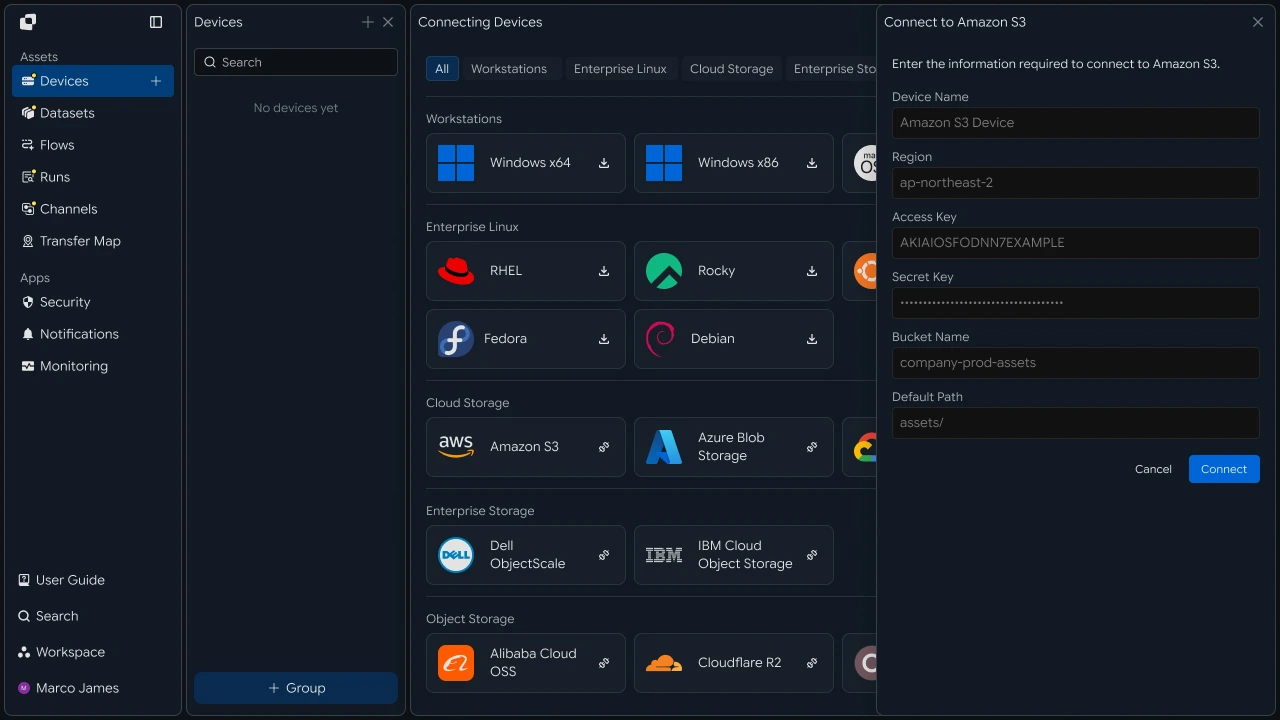
At this stage, configure the transfer environment and access scope together, combining the previous Storage Connection and Account, Region concepts into one step.
Transfer Path#
Connect the source bucket to the target storage location
Specify the source bucket or container and the target storage location, then configure the file-movement path.
When needed, a single transfer job can connect storage locations across different services, accounts, and regions.
Transfer Rules#
Configure transfer jobs according to file scale and processing conditions
When transferring large files or many objects, configure both the file scope and execution conditions.
Select transfer targets based on file path, type, name, and similar criteria, then configure the job to run on a schedule, when files are created, or in response to an external request.
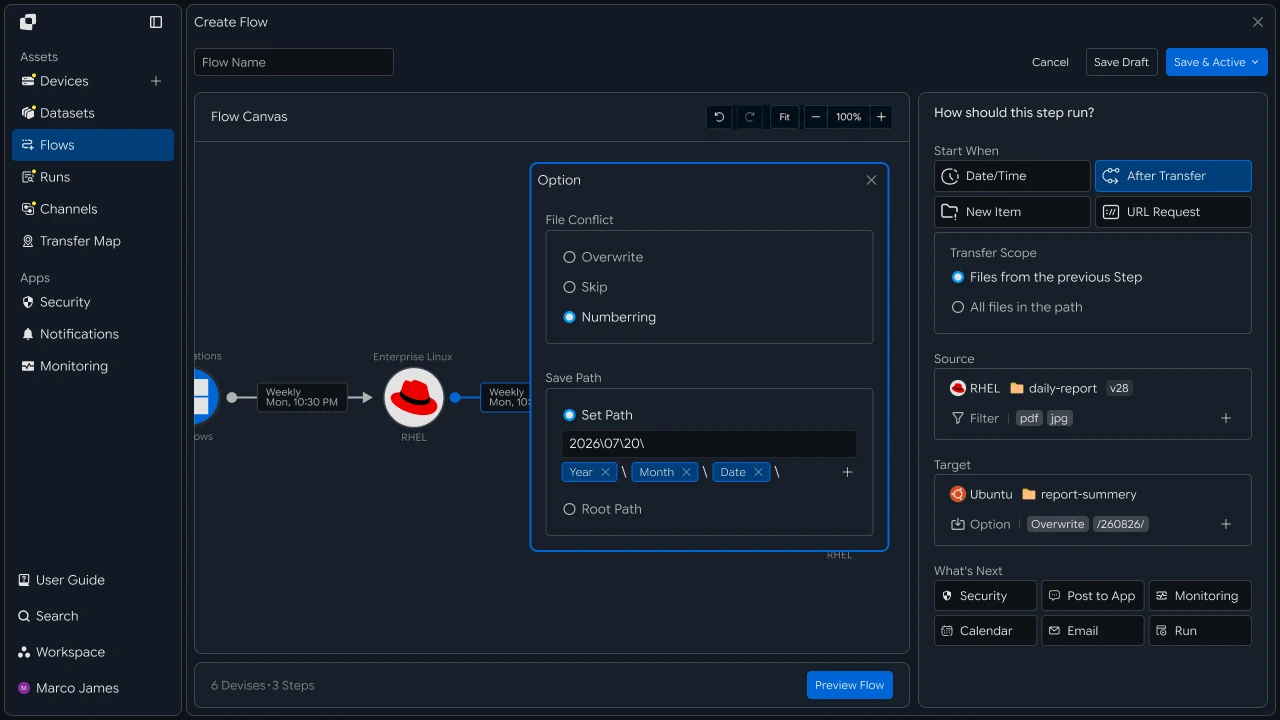
The previous Bulk Transfer and Transfer Conditions sections share the same purpose of defining how the actual transfer job runs, so they are combined into one step.
Verify Results#
Review transferred files and processing status by target
When a transfer runs, use Runs to review the source and target storage, progress, processed file count, total size, and execution status.
Transfer RunSource / TargetTriggerProgressStatus

Reviewing the execution result for each job lets you manage whether files and objects were applied successfully to each target storage environment.
Operations Management#
Manage transfers across multiple cloud environments from one place
When using multiple cloud services, accounts, and regions, you can review the execution history and processing status of transfer jobs together.
If a specific transfer requires additional review, inspect the detailed execution result and rerun the necessary work.
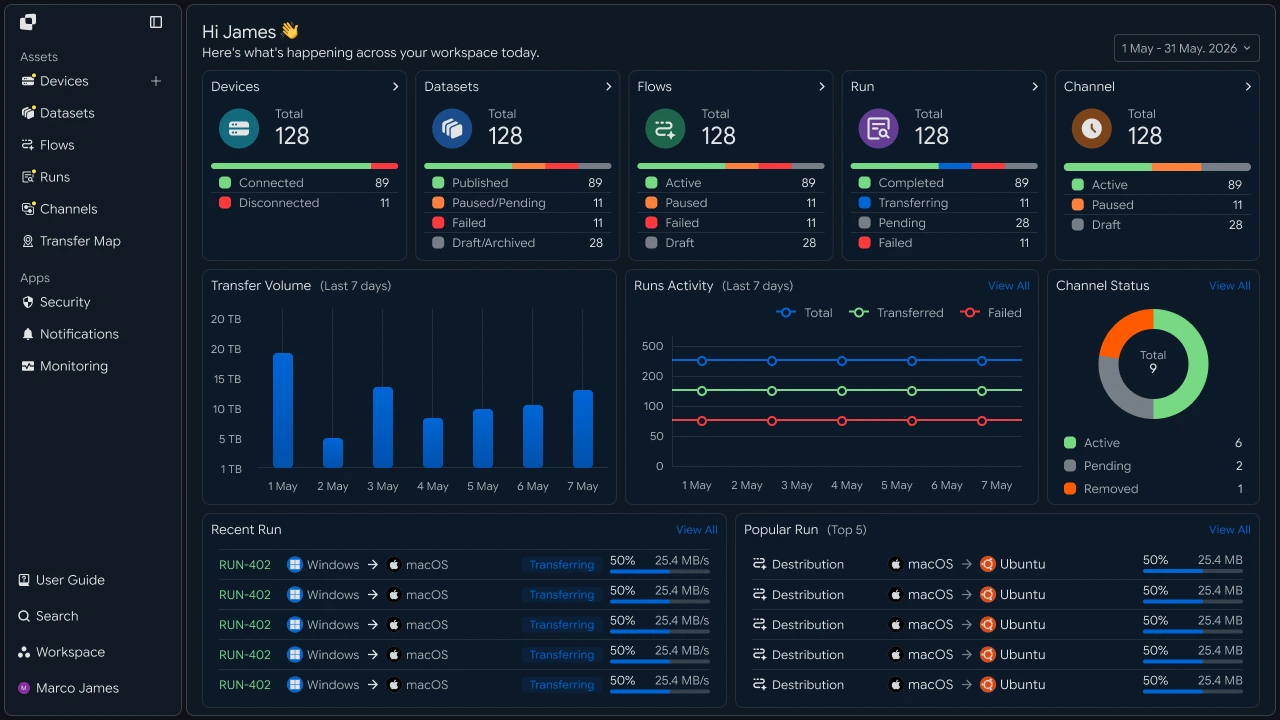
| Management Item | Details |
|---|---|
| Cloud Environment | Service, account, and region |
| Transfer Path | Source and target storage locations |
| Transfer Rules | File scope and execution conditions |
| Execution Status | In-progress jobs and completed results |
| Processing Result | Transferred file and object information |
Developers#
Transfer objects between different cloud storage services and verify the result by comparing object counts
Integration Setup#
Prepare shared API calls and status values
import os
import requests

BASE_URL = os.getenv("INNORIX_BASE_URL", "https://app.innorix.com").rstrip("/")
TOKEN = os.environ["INNORIX_ACCESS_TOKEN"]
WORKSPACE_ID = os.getenv("INNORIX_WORKSPACE_ID")   # optional; falls back to the current workspace

STATUS_COMPLETE = 2
TERMINAL = {2, 4, 5, 9, 99}          # complete / error / cancelled / partial / failed
NOT_SUCCEEDED = {4, 5, 9, 99}


def api(method, path, body=None, params=None):
    headers = {
        "Content-Type": "application/json",
        "Authorization": f"Bearer {TOKEN}",
    }

    if WORKSPACE_ID:
        headers["x-workspace-id"] = WORKSPACE_ID

    response = requests.request(
        method, BASE_URL + path,
        headers=headers, json=body, params=params, timeout=30,
    )

    payload = response.json() if response.content else {}

    if not response.ok:
        raise RuntimeError(payload.get("message") or f"HTTP {response.status_code}")

    return payload.get("data")


def is_terminal(detail):
    return detail.get("isTerminal", detail.get("status") in TERMINAL)
// InnorixClient.java
public static final String BASE_URL =
env("INNORIX_BASE_URL", "https://app.innorix.com").replaceAll("/+quot;, "");
public static final String WORKSPACE_ID = env("INNORIX_WORKSPACE_ID", null);
public static final int STATUS_COMPLETE = 2;
// States the transfer no longer moves out of
public static final Set<Integer> TERMINAL = Set.of(2, 4, 5, 9, 99);
// Terminal states that are not a full success
public static final Set<Integer> NOT_SUCCEEDED = Set.of(4, 5, 9, 99);
private HttpRequest.Builder headers(HttpRequest.Builder builder) {
builder.header("Content-Type", "application/json")
.header("Authorization", "Bearer " + session.accessToken());
// When omitted the account's current workspace is used.
if (workspaceId != null) builder.header("x-workspace-id", workspaceId);
return builder;
}
/** Unwraps and returns data from the response. Throws ApiError on failure. */
public Object api(String method, String path, Object body, Map<String, Object> params) {
Resp response = request(method, path, body, params);
Object payload = null;
try {
payload = Json.parse(response.text());
} catch (RuntimeException ignored) {
payload = null;
}
if (!response.ok()) {
Map<String, Object> map = Json.asObj(payload);
String message = Json.str(map, "message", Json.str(map, "error", "unknown error"));
throw new ApiError(response.status, message, map);
}
return Json.get(payload, "data");
}
/** Use the server flag when present, otherwise fall back to the status code. */
public static boolean isTerminal(Map<String, Object> record) {
Boolean flag = Json.boolOrNull(record, "isTerminal");
if (flag != null) return flag;
Integer status = Json.intOrNull(record, "status");
return status != null && TERMINAL.contains(status);
}// innorix-client.js
const BASE_URL = (process.env.INNORIX_BASE_URL
|| "https://app.innorix.com").replace(/\/+$/, "");
const TOKEN = process.env.INNORIX_ACCESS_TOKEN;
const WORKSPACE_ID = process.env.INNORIX_WORKSPACE_ID || null;
export const STATUS_COMPLETE = 2;
export const TERMINAL = new Set([2, 4, 5, 9, 99]); // complete / error / cancelled / partial / failed
export const NOT_SUCCEEDED = new Set([4, 5, 9, 99]);
export async function api(method, path, body = null, params = null) {
const url = new URL(BASE_URL + path);
if (params) {
for (const [key, value] of Object.entries(params)) {
if (value === undefined || value === null) continue;
url.searchParams.set(key, String(value));
}
}
const headers = {
"Content-Type": "application/json",
Authorization: `Bearer ${TOKEN}`,
};
// When omitted the account's current workspace is used.
if (WORKSPACE_ID) headers["x-workspace-id"] = WORKSPACE_ID;
const response = await fetch(url, {
method,
headers,
body: body === null ? undefined : JSON.stringify(body),
signal: AbortSignal.timeout(30_000),
});
const payload = await response.json().catch(() => ({}));
if (!response.ok) {
throw new Error(payload.message || `HTTP ${response.status}`);
}
return payload.data;
}
export function isTerminal(detail) {
return detail.isTerminal !== undefined
? detail.isTerminal
: TERMINAL.has(detail.status);
}// InnorixClient.cs
public static readonly string BaseUrl =
Env("INNORIX_BASE_URL", "https://app.innorix.com").TrimEnd('/');
public static readonly string WorkspaceIdFromEnv = Env("INNORIX_WORKSPACE_ID", null);
public const int StatusComplete = 2;
/// <summary>States the transfer no longer moves out of</summary>
public static readonly HashSet<int> Terminal = new HashSet<int> { 2, 4, 5, 9, 99 };
/// <summary>Terminal states that are not a full success</summary>
public static readonly HashSet<int> NotSucceeded = new HashSet<int> { 4, 5, 9, 99 };
// Applied on every request
request.Headers.TryAddWithoutValidation("Authorization", "Bearer " + Session.AccessToken);
// When omitted the account's current workspace is used.
if (WorkspaceId != null) request.Headers.TryAddWithoutValidation("x-workspace-id", WorkspaceId);
public async Task<JsonNode> ApiAsync(string method, string path, JsonNode body = null,
IDictionary<string, object> parameters = null)
{
Resp response = await RequestAsync(method, path, body, parameters).ConfigureAwait(false);
JsonNode payload = null;
try
{
payload = J.Parse(response.Text());
}
catch (Exception)
{
payload = null;
}
if (!response.Ok)
{
JsonObject map = J.AsObj(payload);
string message = J.Str(map, "message", J.Str(map, "error", "unknown error"));
throw new ApiError(response.Status, message, map);
}
return J.Get(payload, "data");
}
/// <summary>Use the server flag when present, otherwise fall back to the status code.</summary>
public static bool IsTerminal(JsonObject record)
{
bool? flag = J.BoolOrNull(record, "isTerminal");
if (flag != null) return flag.Value;
int? status = J.IntOrNull(record, "status");
return status != null && Terminal.Contains(status.Value);
}Use the following values to determine transfer status. There are five terminal states, and Complete (2) is the successful state.
| Status Value | Meaning | Terminal |
|---|---|---|
| 2 | Complete | Yes |
| 4 | Error | Yes |
| 5 | Cancelled | Yes |
| 9 | Partial Complete | Yes |
| 99 | Failed | Yes |
| 1, 6, 12, 13 | Starting, Transferring, Synchronizing, Receiving | No |
Select Storage#
Identify the device IDs and paths for connected storage environments
Connected cloud storage appears as transfer devices. Retrieve the identifiers from the device list.
result = api("GET", "/api/devices", params={"page": 1, "size": 200}) or {}

for device in result.get("devices") or []:
print(device["deviceId"], device["name"], device.get("os"))Map<String, Object> result = client.apiObj("GET", "/api/devices", null,
Json.newObj("page", 1, "size", 200));
for (Object node : Json.arrOf(result, "devices")) {
Map<String, Object> device = Json.asObj(node);
System.out.println(Json.str(device, "deviceId") + " "
+ Json.str(device, "name") + " " + Json.str(device, "os"));
}const result = (await client.api("GET", "/api/devices", null,
{ page: 1, size: 200 })) || {};
for (const device of result.devices || []) {
console.log(device.deviceId, device.name, device.os);
}JsonObject result = await client.ApiObjAsync("GET", "/api/devices", null,
new Dictionary<string, object> { ["page"] = 1, ["size"] = 200 });
foreach (JsonNode node in J.ArrOf(result, "devices"))
{
JsonObject device = J.AsObj(node);
Console.WriteLine(quot;{J.Str(device, "deviceId")} {J.Str(device, "name")} "
+ quot;{J.Str(device, "os")}");
}The device list is returned in the data.devices array.
If you work by name, resolve the name to an identifier first. When several connections use the same cloud service across different accounts or regions, similar names can be confusing.
def resolve_device(name):
    result = api("GET", "/api/devices/resolve", params={"name": name}) or {}
    devices = result.get("devices") or []
    count = result.get("matchCount", len(devices))

    if count != 1 or not devices:
        raise RuntimeError(f"{name}: {count} matches - use a more specific name")

    return devices[0]["deviceId"]
String resolveDevice(String name) {
Map<String, Object> result = client.apiObj("GET", "/api/devices/resolve", null,
Json.newObj("name", name));
List<Object> devices = Json.arrOf(result, "devices");
int count = Json.intOr(result, "matchCount", devices.size());
if (count != 1 || devices.isEmpty()) {
throw new RuntimeException(name + ": " + count + " matches - use a more specific name");
}
return Json.str(Json.asObj(devices.get(0)), "deviceId");
}async function resolveDevice(name) {
const result = (await client.api("GET", "/api/devices/resolve",
null, { name })) || {};
const devices = result.devices || [];
const count = result.matchCount ?? devices.length;
if (count !== 1 || devices.length === 0) {
throw new Error(`${name}: ${count} matches - use a more specific name`);
}
return devices[0].deviceId;
}async Task<string> ResolveDeviceAsync(string name)
{
JsonObject result = await client.ApiObjAsync("GET", "/api/devices/resolve",
null, new Dictionary<string, object> { ["name"] = name });
var devices = J.ArrOf(result, "devices");
int count = J.Int(result, "matchCount", devices.Count);
if (count != 1 || devices.Count == 0)
{
throw new Exception(quot;{name}: {count} matches - use a more specific name");
}
return J.Str(J.AsObj(devices[0]), "deviceId");
}Use the bucket or container path as the prefix directly. Storage services accept prefix-style paths, so no additional transformation is required.
Run Transfer#
Send objects under the source prefix to the target
def move_objects(source, target, source_prefix, target_prefix):
    transfer = api("POST", "/api/transfers/manual", {
        "sourceDevice": source,
        "targetDevice": target,
        "targetPath": target_prefix,
        "sourcePaths": [source_prefix],
        "sendAllFolder": True,
        "transferOptions": {"target-action": "overwrite"},
    })

    return transfer["monitorId"]
String moveObjects(String source, String target,
String sourcePrefix, String targetPrefix) {
Map<String, Object> transfer = client.apiObj("POST", "/api/transfers/manual", Json.newObj(
"sourceDevice", source,
"targetDevice", target,
"targetPath", targetPrefix,
"sourcePaths", List.of(sourcePrefix),
"sendAllFolder", true,
"transferOptions", Json.newObj("target-action", "overwrite")));
return Json.str(transfer, "monitorId");
}async function moveObjects(source, target, sourcePrefix, targetPrefix) {
const transfer = await client.api("POST", "/api/transfers/manual", {
sourceDevice: source,
targetDevice: target,
targetPath: targetPrefix,
sourcePaths: [sourcePrefix],
sendAllFolder: true,
transferOptions: { "target-action": "overwrite" },
});
return transfer.monitorId;
}async Task<string> MoveObjectsAsync(string source, string target,
string sourcePrefix, string targetPrefix)
{
JsonObject transfer = await client.ApiObjAsync("POST", "/api/transfers/manual",
new JsonObject
{
["sourceDevice"] = source,
["targetDevice"] = target,
["targetPath"] = targetPrefix,
["sourcePaths"] = new JsonArray { sourcePrefix },
["sendAllFolder"] = true,
["transferOptions"] = new JsonObject { ["target-action"] = "overwrite" },
});
return J.Str(transfer, "monitorId");
}For service-to-service movement, overwrite is the safer option. Using numbering changes object keys and can break paths referenced by applications.
To review transfer targets in advance, list the source storage contents.
result = api("GET", f"/api/devices/{SOURCE}/files", params={
    "path": "media/2026/09",
    "page": 1, "size": 200, "type": "file",
})

print(result.get("total"), "objects")

if result.get("truncated"):
print("result was truncated - narrow the prefix")Map<String, Object> result = client.apiObj("GET", "/api/devices/" + SOURCE + "/files", null,
Json.newObj("path", "media/2026/09",
"page", 1, "size", 200, "type", "file"));
System.out.println(Json.str(result, "total") + " objects");
if (Json.bool(result, "truncated", false)) {
System.out.println("result was truncated - narrow the prefix");
}const result = await client.api("GET", `/api/devices/${SOURCE}/files`, null, {
path: "media/2026/09",
page: 1, size: 200, type: "file",
});
console.log(result.total, "objects");
if (result.truncated) {
console.log("result was truncated - narrow the prefix");
}JsonObject result = await client.ApiObjAsync("GET", quot;/api/devices/{SOURCE}/files", null,
new Dictionary<string, object>
{
["path"] = "media/2026/09",
["page"] = 1, ["size"] = 200, ["type"] = "file",
});
Console.WriteLine(quot;{J.Str(result, "total")} objects");
if (J.Bool(result, "truncated", false))
{
Console.WriteLine("result was truncated - narrow the prefix");
}Process Large Object Sets#
Split objects by prefix and move them in multiple transfers
If a bucket contains millions of objects, moving everything at once can be impractical. Splitting by prefix allows only the failed range to be retransferred.
PREFIXES = [f"media/2026/{month:02d}" for month in range(1, 13)]

transfers = {
    prefix: move_objects(SOURCE, TARGET, prefix,
                         prefix.replace("media", "archive", 1))
    for prefix in PREFIXES
}List<String> prefixes = new ArrayList<>();
for (int month = 1; month <= 12; month++) {
prefixes.add(String.format("media/2026/%02d", month));
}
Map<String, String> transfers = new LinkedHashMap<>();
for (String prefix : prefixes) {
transfers.put(prefix, moveObjects(SOURCE, TARGET, prefix,
prefix.replaceFirst("media", "archive"), true));
}const PREFIXES = Array.from({ length: 12 },
(_, i) => `media/2026/${String(i + 1).padStart(2, "0")}`);
const transfers = {};
for (const prefix of PREFIXES) {
transfers[prefix] = await moveObjects(SOURCE, TARGET, prefix,
prefix.replace("media", "archive"));
}var prefixes = Enumerable.Range(1, 12).Select(m => quot;media/2026/{m:D2}");
var transfers = new Dictionary<string, string>();
foreach (string prefix in prefixes)
{
var target = new Regex("media").Replace(prefix, "archive", 1);
transfers[prefix] = await MoveObjectsAsync(SOURCE, TARGET, prefix, target);
}def wait(monitor_id, timeout=3600, interval=3):
deadline = time.time() + timeout
while time.time() < deadline:
detail = api("GET", f"/api/transfers/{monitor_id}")
if is_terminal(detail):
return detail
time.sleep(interval)
raise TimeoutError(monitor_id)
def failed_files(monitor_id):
result = api("GET", f"/api/transfers/{monitor_id}/files", params={
"state": "any", "size": 500,
}) or {}
return [r for r in (result.get("children") or [])
if r.get("status") in NOT_SUCCEEDED]
def retry_failed(monitor_id):
rows = failed_files(monitor_id)
if not rows:
return 0
api("POST", f"/api/transfers/{monitor_id}/retry", {
"filesRetry": [
{"filePath": r["sourceFilePath"], "isDir": bool(r.get("isFolder"))}
for r in rows
]
})
return len(rows)public Map<String, Object> wait(String monitorId, int timeoutSeconds, int intervalSeconds) {
long deadline = System.currentTimeMillis() + timeoutSeconds * 1000L;
while (System.currentTimeMillis() < deadline) {
Map<String, Object> detail = apiObj("GET", "/api/transfers/" + monitorId);
if (isTerminal(detail)) return detail;
sleep(intervalSeconds * 1000L);
}
throw new ApiError(0, "timeout waiting for " + monitorId);
}
public List<Map<String, Object>> failedFiles(String monitorId) {
List<Map<String, Object>> failed = new ArrayList<>();
for (Map<String, Object> row : transferFiles(monitorId)) {
Integer status = Json.intOrNull(row, "status");
if (status != null && NOT_SUCCEEDED.contains(status)) failed.add(row);
}
return failed;
}
public int retryFailed(String monitorId) {
List<Map<String, Object>> rows = failedFiles(monitorId);
if (rows.isEmpty()) return 0;
List<Object> filesRetry = new ArrayList<>();
for (Map<String, Object> row : rows) {
String path = Json.str(row, "sourceFilePath");
if (path == null) continue;
filesRetry.add(Json.newObj("filePath", path, "isDir", Json.bool(row, "isFolder", false)));
}
api("POST", "/api/transfers/" + monitorId + "/retry", Json.newObj("filesRetry", filesRetry));
return rows.size();
}const sleep = (ms) => new Promise((resolve) => setTimeout(resolve, ms));
export async function wait(monitorId, { timeout = 3600, interval = 3 } = {}) {
const deadline = Date.now() + timeout * 1000;
while (Date.now() < deadline) {
const detail = await api("GET", `/api/transfers/${monitorId}`);
if (isTerminal(detail)) return detail;
await sleep(interval * 1000);
}
throw new Error(`timeout waiting for ${monitorId}`);
}
export async function failedFiles(monitorId) {
const result = (await api("GET", `/api/transfers/${monitorId}/files`, null, {
state: "any", size: 500,
})) || {};
return (result.children || []).filter((row) => NOT_SUCCEEDED.has(row.status));
}
export async function retryFailed(monitorId) {
const rows = await failedFiles(monitorId);
if (rows.length === 0) return 0;
await api("POST", `/api/transfers/${monitorId}/retry`, {
filesRetry: rows
.filter((row) => row.sourceFilePath)
.map((row) => ({ filePath: row.sourceFilePath, isDir: Boolean(row.isFolder) })),
});
return rows.length;
}public async Task<JsonObject> WaitAsync(string monitorId, int timeoutSeconds = 3600,
int intervalSeconds = 3)
{
long deadline = Environment.TickCount64 + timeoutSeconds * 1000L;
while (Environment.TickCount64 < deadline)
{
JsonObject detail = await ApiObjAsync("GET", "/api/transfers/" + monitorId)
.ConfigureAwait(false);
if (IsTerminal(detail)) return detail;
await Task.Delay(intervalSeconds * 1000).ConfigureAwait(false);
}
throw new ApiError(0, "timeout waiting for " + monitorId);
}
public async Task<List<JsonObject>> FailedFilesAsync(string monitorId)
{
List<JsonObject> rows = await TransferFilesAsync(monitorId).ConfigureAwait(false);
return rows.Where(row =>
{
int? status = J.IntOrNull(row, "status");
return status != null && NotSucceeded.Contains(status.Value);
}).ToList();
}
/// <summary>Only callable once the transfer has reached a terminal state.</summary>
public async Task<int> RetryFailedAsync(string monitorId)
{
List<JsonObject> rows = await FailedFilesAsync(monitorId).ConfigureAwait(false);
if (rows.Count == 0) return 0;
var filesRetry = new JsonArray();
foreach (JsonObject row in rows)
{
string path = J.Str(row, "sourceFilePath");
if (path == null) continue;
filesRetry.Add(new JsonObject
{
["filePath"] = path,
["isDir"] = J.Bool(row, "isFolder", false),
});
}
await ApiAsync("POST", "/api/transfers/" + monitorId + "/retry",
new JsonObject { ["filesRetry"] = filesRetry }).ConfigureAwait(false);
return rows.Count;
}for prefix, monitor_id in transfers.items():
detail = wait(monitor_id, timeout=14400)
print(f"{prefix:24} {detail.get('statusName')}"
f" {detail.get('fileCount')} objects {detail.get('totalSize')} bytes")
if detail["status"] != STATUS_COMPLETE:
print(f" retried {retry_failed(monitor_id)} files")for (var entry : transfers.entrySet()) {
Map<String, Object> detail = client.await(entry.getValue(), 14400, null);
System.out.printf("%-24s %s %s objects %s bytes%n",
entry.getKey(), Json.str(detail, "statusName"),
Json.str(detail, "fileCount"), Json.str(detail, "totalSize"));
if (Json.intOr(detail, "status", -1) != InnorixClient.STATUS_COMPLETE) {
System.out.println(" retried " + client.retryFailed(entry.getValue()) + " files");
}
}for (const [prefix, monitorId] of Object.entries(transfers)) {
const detail = await wait(monitorId, { timeout: 14400 });
console.log(`${prefix.padEnd(24)} ${detail.statusName}`
+ ` ${detail.fileCount} objects ${detail.totalSize} bytes`);
if (detail.status !== STATUS_COMPLETE) {
console.log(` retried ${await retryFailed(monitorId)} files`);
}
}foreach (var (prefix, monitorId) in transfers)
{
JsonObject detail = await client.WaitAsync(monitorId, 14400);
Console.WriteLine(quot;{prefix,-24} {J.Str(detail, "statusName")}"
+ quot; {J.Str(detail, "fileCount")} objects {J.Str(detail, "totalSize")} bytes");
if (J.IntOrNull(detail, "status") != InnorixClient.StatusComplete)
{
Console.WriteLine(quot; retried {await client.RetryFailedAsync(monitorId)} files");
}
}Continue reviewing the remaining ranges even if one fails so you can determine how far the migration completed.
Conditional Transfer#
Select objects to move by type and size
Often, only specific files need to be moved rather than the entire dataset.
def build_filter(exts=None, min_size=None, exclude=None):
    file_option = {}

    if exts:
        # extension whitelist, without the leading dot
        file_option["extension"] = {
            "extension": [e.lstrip(".").lower() for e in exts],
            "allow": True,
        }

    if min_size is not None:
        # over and equal both True means size or larger
        file_option["fileSize"] = {"size": min_size, "over": True, "equal": True}

    if exclude:
        # allow=False excludes files whose name contains this. Server matching is case sensitive.
        file_option["fileName"] = {"name": exclude, "allow": False}

    return {"send-fileoption": file_option} if file_option else {}
public static Map<String, Object> buildFilter(List<String> exts, Long minSize, String exclude) {
Map<String, Object> fileOption = new LinkedHashMap<>();
if (exts != null && !exts.isEmpty()) {
List<Object> cleaned = new ArrayList<>();
// e.g. ["mp4","mov"] (no dot). allow=true -> whitelist
for (String ext : exts) cleaned.add(ext.replaceAll("^\\.+", "").toLowerCase());
fileOption.put("extension", Json.newObj("extension", cleaned, "allow", true));
}
if (minSize != null) {
// over=true/equal=true -> only files at or above size
fileOption.put("fileSize", Json.newObj("size", minSize, "over", true, "equal", true));
}
if (exclude != null) {
// allow=false -> skip files whose name contains exclude (server match is case sensitive)
fileOption.put("fileName", Json.newObj("name", exclude, "allow", false));
}
return fileOption.isEmpty()
? new LinkedHashMap<>()
: Json.newObj("send-fileoption", fileOption);
}export function buildFilter({ exts = null, minSize = null, exclude = null } = {}) {
const fileOption = {};
if (exts) {
// Extension whitelist, without the leading dot.
fileOption.extension = {
extension: exts.map((e) => e.replace(/^\./, "").toLowerCase()),
allow: true,
};
}
if (minSize !== null && minSize !== undefined) {
// over and equal both true means size or larger.
fileOption.fileSize = { size: minSize, over: true, equal: true };
}
if (exclude) {
// allow=false excludes files whose name contains this. Matching is case sensitive.
fileOption.fileName = { name: exclude, allow: false };
}
return Object.keys(fileOption).length ? { "send-fileoption": fileOption } : {};
}public static JsonObject BuildFilter(IReadOnlyList<string> exts = null,
long? minSize = null, string exclude = null)
{
var fileOption = new JsonObject();
if (exts != null && exts.Count > 0)
{
// e.g. ["mp4","mov"] (no dot). allow=true -> whitelist
var cleaned = new JsonArray();
foreach (string ext in exts) cleaned.Add(ext.TrimStart('.').ToLowerInvariant());
fileOption["extension"] = new JsonObject { ["extension"] = cleaned, ["allow"] = true };
}
if (minSize != null)
{
// over=true/equal=true -> only files at or above size
fileOption["fileSize"] = new JsonObject
{
["size"] = minSize.Value,
["over"] = true,
["equal"] = true,
};
}
if (exclude != null)
{
// allow=false -> skip files whose name contains exclude (server match is case sensitive)
fileOption["fileName"] = new JsonObject { ["name"] = exclude, ["allow"] = false };
}
return fileOption.Count == 0
? new JsonObject()
: new JsonObject { ["send-fileoption"] = fileOption };
}Use send-fileoption.extension for extension filters. The send-filetype-cus regular expression matches only the file name without the extension, so it does not work as an extension filter.
| Filter | Location | Behavior |
|---|---|---|
| Extension | send-fileoption.extension |
With allow: true, transfer only files with these extensions |
| Size | send-fileoption.fileSize |
Use over and equal to define inclusive size thresholds |
| Name | send-fileoption.fileName |
With allow: false, exclude files containing the specified text |
When multiple filters are provided, they are combined with AND. Only files that match every condition are transferred.
options = {
    **build_filter(exts=["mp4", "mov"], min_size=1048576),
    "target-action": "overwrite",
}

api("POST", "/api/transfers/manual", {
    "sourceDevice": SOURCE,
    "targetDevice": TARGET,
    "targetPath": "archive/2026/09",
    "sourcePaths": ["media/2026/09"],
    "sendAllFolder": True,
    "transferOptions": options,
})Map<String, Object> options = new LinkedHashMap<>(
InnorixClient.buildFilter(List.of("mp4", "mov"), 1048576L, null));
options.put("target-action", "overwrite");
client.api("POST", "/api/transfers/manual", Json.newObj(
"sourceDevice", SOURCE,
"targetDevice", TARGET,
"targetPath", "archive/2026/09",
"sourcePaths", List.of("media/2026/09"),
"sendAllFolder", true,
"transferOptions", options));const options = {
...buildFilter({ exts: ["mp4", "mov"], minSize: 1048576 }),
"target-action": "overwrite",
};
await client.api("POST", "/api/transfers/manual", {
sourceDevice: SOURCE,
targetDevice: TARGET,
targetPath: "archive/2026/09",
sourcePaths: ["media/2026/09"],
sendAllFolder: true,
transferOptions: options,
});var options = new JsonObject(
InnorixClient.BuildFilter(new[] { "mp4", "mov" }, minSize: 1048576)
.DeepClone().AsObject())
{
["target-action"] = "overwrite",
};
await client.ApiAsync("POST", "/api/transfers/manual", new JsonObject
{
["sourceDevice"] = SOURCE,
["targetDevice"] = TARGET,
["targetPath"] = "archive/2026/09",
["sourcePaths"] = new JsonArray { "media/2026/09" },
["sendAllFolder"] = true,
["transferOptions"] = options,
});Incremental Transfer#
Send only objects added or modified since the last transfer
If the same prefix is moved periodically, there is no need to retransmit the entire set every time.
transfer = api("POST", "/api/transfers/manual", {
    "sourceDevice": SOURCE,
    "targetDevice": TARGET,
    "targetPath": "archive/2026/09",
    "sourcePaths": ["media/2026/09"],
    "sendAllFolder": True,
    "incremental": True,
    "transferOptions": {"target-action": "overwrite"},
})Map<String, Object> transfer = client.apiObj("POST", "/api/transfers/manual", Json.newObj(
"sourceDevice", SOURCE,
"targetDevice", TARGET,
"targetPath", "archive/2026/09",
"sourcePaths", List.of("media/2026/09"),
"sendAllFolder", true,
"incremental", true,
"transferOptions", Json.newObj("target-action", "overwrite")));const transfer = await client.api("POST", "/api/transfers/manual", {
sourceDevice: SOURCE,
targetDevice: TARGET,
targetPath: "archive/2026/09",
sourcePaths: ["media/2026/09"],
sendAllFolder: true,
incremental: true,
transferOptions: { "target-action": "overwrite" },
});JsonObject transfer = await client.ApiObjAsync("POST", "/api/transfers/manual",
new JsonObject
{
["sourceDevice"] = SOURCE,
["targetDevice"] = TARGET,
["targetPath"] = "archive/2026/09",
["sourcePaths"] = new JsonArray { "media/2026/09" },
["sendAllFolder"] = true,
["incremental"] = true,
["transferOptions"] = new JsonObject { ["target-action"] = "overwrite" },
});Incremental transfer is disabled by default. The agent calculates the delta and transfers only objects added or modified since the previous transfer. Always use overwrite with incremental transfer.
Verify Results#
Compare source and target object counts
Unlike file systems, object storage may not support checksum retrieval. Compare the source and target object counts to confirm that nothing is missing.
def count_objects(device, prefix):
    total, page = 0, 1

    while True:
        result = api("GET", f"/api/devices/{device}/files", params={
            "path": prefix,
            "page": page, "size": 1000, "type": "file",
        }) or {}

        total += len(result.get("items") or [])

        if page >= (result.get("lastPage") or 1):
            return total

        page += 1


source_count = count_objects(SOURCE, "media/2026/09")
target_count = count_objects(TARGET, "archive/2026/09")

if source_count != target_count:
    raise RuntimeError(
        f"object counts differ: source {source_count} / target {target_count}")
int countObjects(String device, String prefix) {
int total = 0, page = 1;
while (true) {
Map<String, Object> result = client.apiObj("GET",
"/api/devices/" + device + "/files", null,
Json.newObj("path", prefix,
"page", page, "size", 1000, "type", "file"));
total += Json.arrOf(result, "items").size();
if (page >= Json.intOr(result, "lastPage", 1)) return total;
page++;
}
}
int sourceCount = countObjects(SOURCE, "media/2026/09");
int targetCount = countObjects(TARGET, "archive/2026/09");
if (sourceCount != targetCount) {
throw new RuntimeException("object counts differ: source "
+ sourceCount + " / target " + targetCount);
}async function countObjects(device, prefix) {
let total = 0;
let page = 1;
for (;;) {
const result = (await client.api("GET", `/api/devices/${device}/files`, null, {
path: prefix,
page, size: 1000, type: "file",
})) || {};
total += (result.items || []).length;
if (page >= (result.lastPage || 1)) return total;
page += 1;
}
}
const sourceCount = await countObjects(SOURCE, "media/2026/09");
const targetCount = await countObjects(TARGET, "archive/2026/09");
if (sourceCount !== targetCount) {
throw new Error(`object counts differ: source ${sourceCount} / target ${targetCount}`);
}async Task<int> CountObjectsAsync(string device, string prefix)
{
int total = 0, page = 1;
while (true)
{
JsonObject result = await client.ApiObjAsync("GET",
quot;/api/devices/{device}/files", null,
new Dictionary<string, object>
{
["path"] = prefix,
["page"] = page, ["size"] = 1000, ["type"] = "file",
});
total += J.ArrOf(result, "items").Count;
if (page >= J.Int(result, "lastPage", 1)) return total;
page++;
}
}
int sourceCount = await CountObjectsAsync(SOURCE, "media/2026/09");
int targetCount = await CountObjectsAsync(TARGET, "archive/2026/09");
if (sourceCount != targetCount)
{
throw new Exception(quot;object counts differ: source {sourceCount} / target {targetCount}");
}If the counts differ, the transfer is incomplete. Retransfer the failed prefix ranges until the counts match.
| Item | Details |
|---|---|
| Storage | Device identifiers for the source and target |
| Transfer Path | Bucket and prefix |
| Scope | Prefix ranges processed separately |
| Result | Success or failure by range |
| Verification | Whether source and target object counts match |