
Getting Started#
Basic Concepts#
Migrate data from existing file environments to cloud storage
Enterprise files are distributed across various environments, including NAS, SMB shared folders, NFS storage, and file servers.
Cloud migration consists of transferring existing files to designated cloud storage and continuously applying changes that occur during the migration period to manage file state until the final cutover.
- Existing File Environment
- Initial File Migration
- Changed Files Synchronization
- Check Cutover Status
- Cloud Cutover
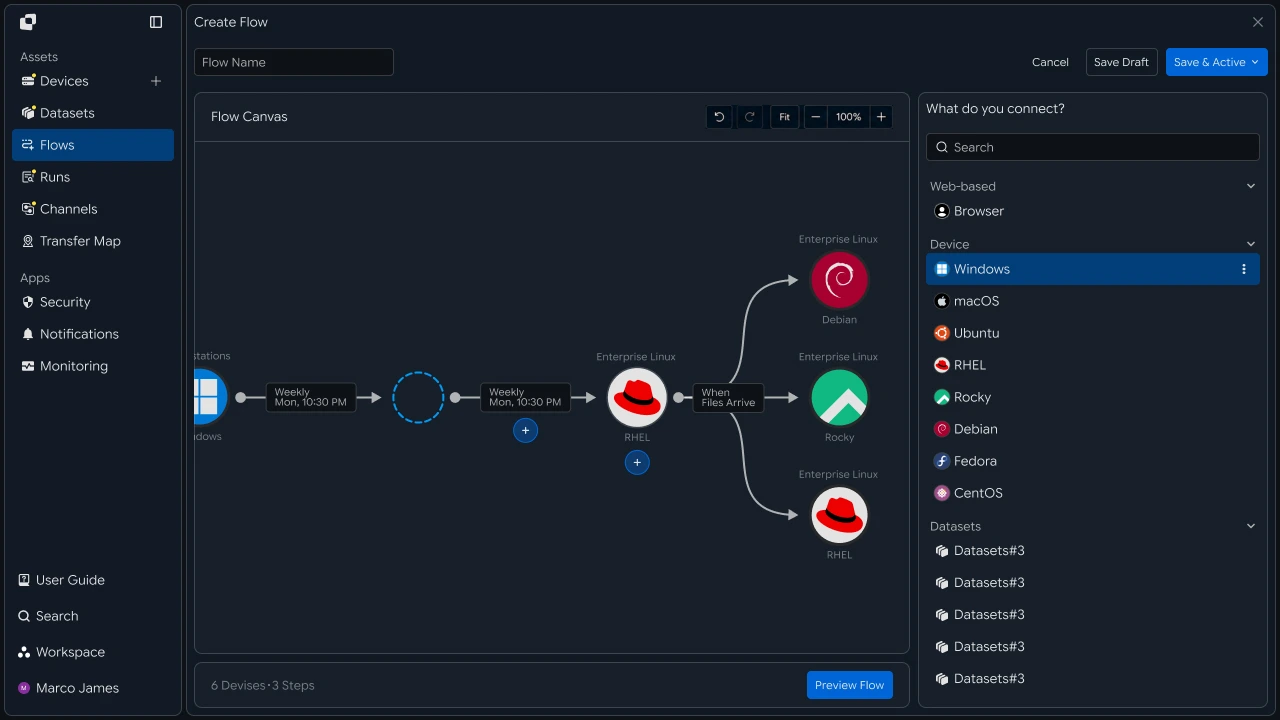
By connecting the initial file migration with changed-file synchronization, you can migrate data from the existing file environment to the cloud and manage file state until the cutover.
Migration Flow#
Continue from initial file migration through changed-file synchronization to final cutover
File migration consists of transferring the initial data to the cloud and continuously applying files created or modified during the migration period.
- ```flow
- Source Environment Connection
- Initial File Migration
- Detect Changes
- Changed Files Synchronization
- Check Cutover Status
- Cloud Cutover
This flow lets you manage the initial files and subsequent changes together while proceeding with the cloud cutover.
### Cutover Benefits 3
**Continue the existing file flow into the cloud environment**
Configuring initial migration and change synchronization together lets you manage file state across the source environment and cloud throughout the cutover period.
|Category|Existing File Environment|Cloud Cutover Flow|
|---|---|---|
|Initial Data|Managed in the existing environment|Migrate large volumes of files to the cloud|
|Changed Files|Check status by file|Continuously synchronize changes|
|Cutover Preparation|Check file state by environment|Verify based on migration and synchronization results|
|Subsequent Work|Use the existing storage location|Connect based on the cloud storage location|
## IT Engineers 4
### Source Environment 5
**Connect migration paths from NAS and file servers**
First, connect the NAS, SMB, NFS, or file server where the files to be migrated are stored, and specify the file paths to migrate to the cloud.
Set the access scope so files can be read and changes can be checked in each source environment.
```pipe
- NAS
- SMB
- NFS
- File Server
Migration Flow
By connecting multiple source environments, you can configure migration tasks for each file location in a single flow.
Cloud Connection#
Configure cloud storage and target paths
After connecting the source environment, configure the cloud storage and target location where files will be stored.
Specify the target bucket or container and storage path, and connect them to the source file path.
- Original Storage
- Migration Flow
- Cloud StorageTarget Path
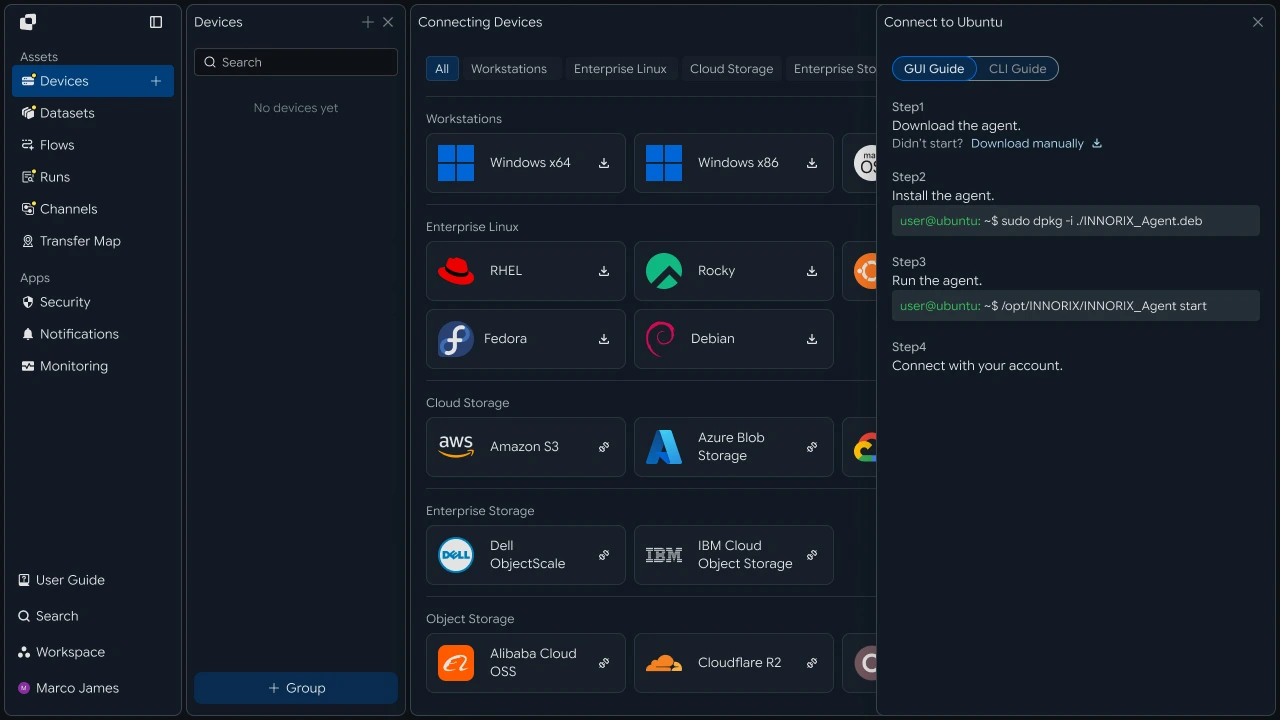
Configuring the source paths to migrate and cloud storage locations prepares the file flow for initial migration and change synchronization.
Initial Migration#
Transfer existing large volumes of files to the cloud
After configuring the migration environment, transfer existing files and large datasets to cloud storage.
During execution, you can check the number of processed files, total capacity, progress, and task status.
- Original Files
- Initial Transfer
- Cloud Storage
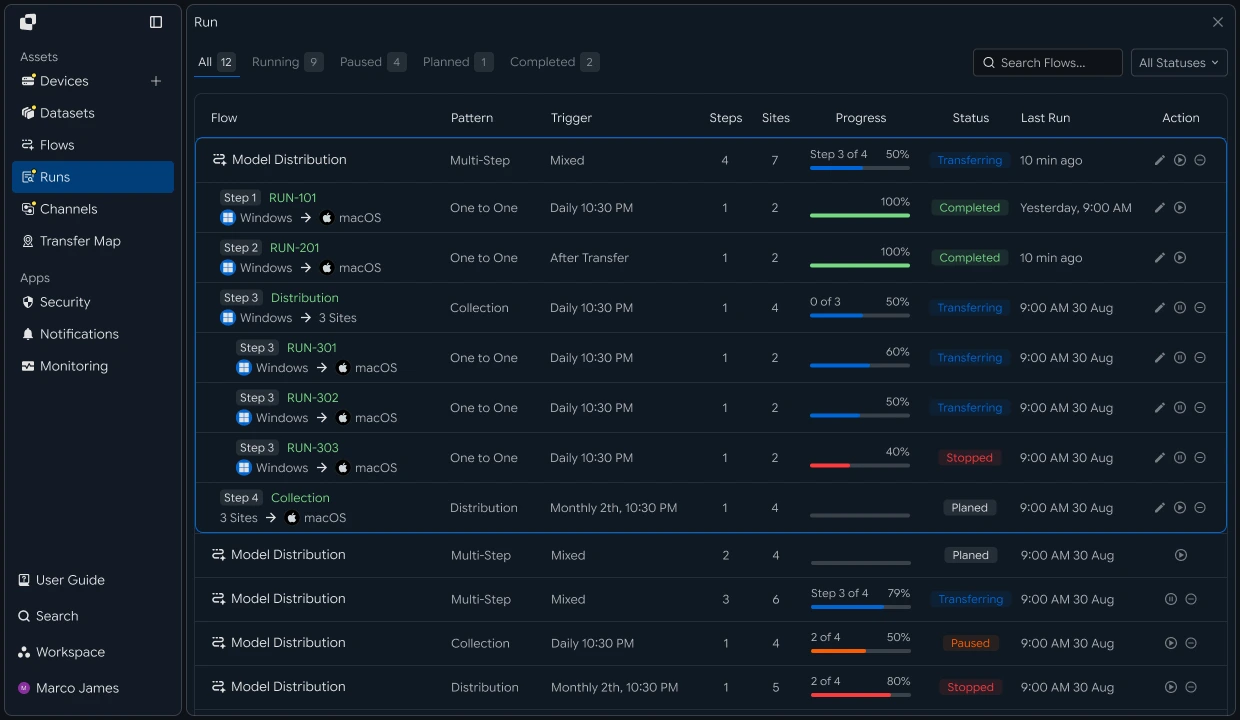
Use the initial migration results as the baseline for subsequent changed-file synchronization and final cutover.
Change Synchronization#
Continuously apply files changed during the migration period
Even after the initial migration, new files may be created or existing files may be modified in the original file environment.
Use New ItemsandModified Items` to identify changes and configure those files to be synchronized to cloud storage.
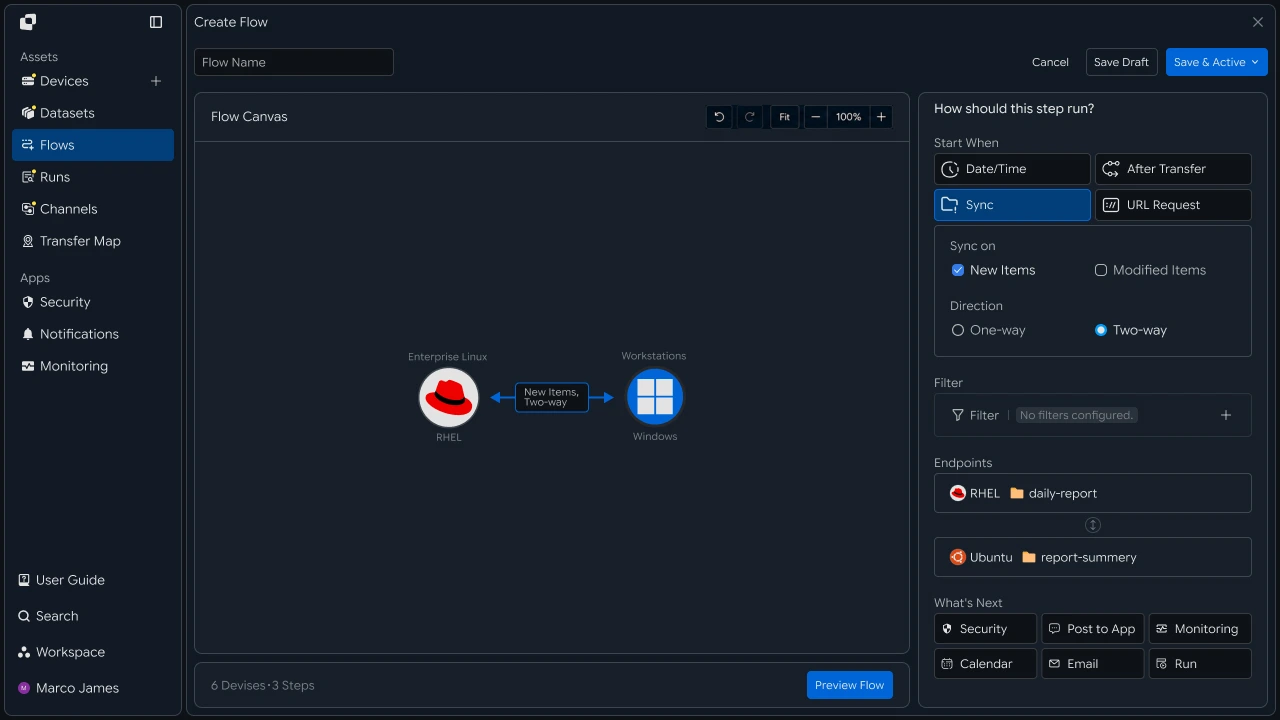
By continuously applying changed files, you can continue managing file state in the cloud after the initial migration.
Cutover Verification#
Verify initial migration and change-synchronization results
Before the final cutover, check the initial file migration results together with the synchronization status of subsequently changed files.
You can verify cutover readiness between the source and cloud environments based on file count and capacity, recent execution results, and synchronization status.
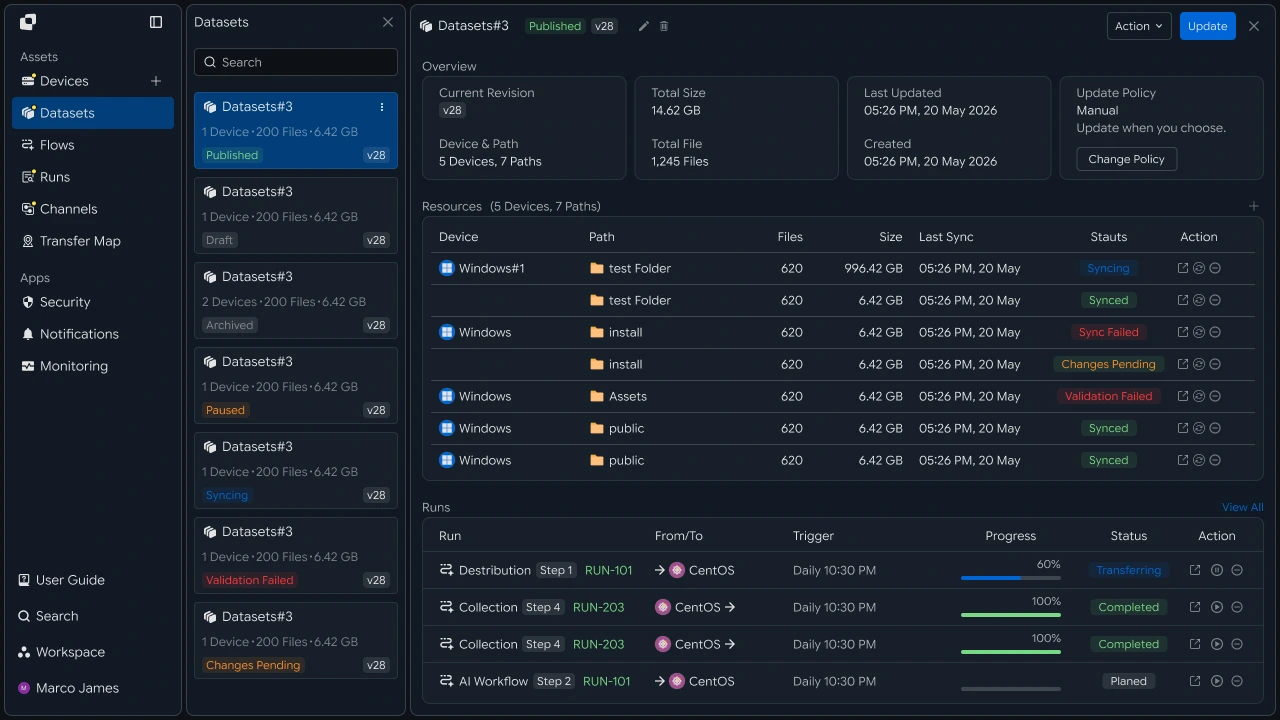
Reviewing the initial migration and change-synchronization results together lets you determine when to switch operations to the cloud environment.
Final Cutover#
Switch file operations to the cloud environment
After cutover verification is complete, set cloud storage as the baseline environment for subsequent file operations.
Connect the storage locations of business systems, applications, and subsequent file tasks to the cloud to continue the file flow.
- NAS / File ServerBefore
- Migration Flow
- Cloud Storage
- App / Service / WorkflowAfter
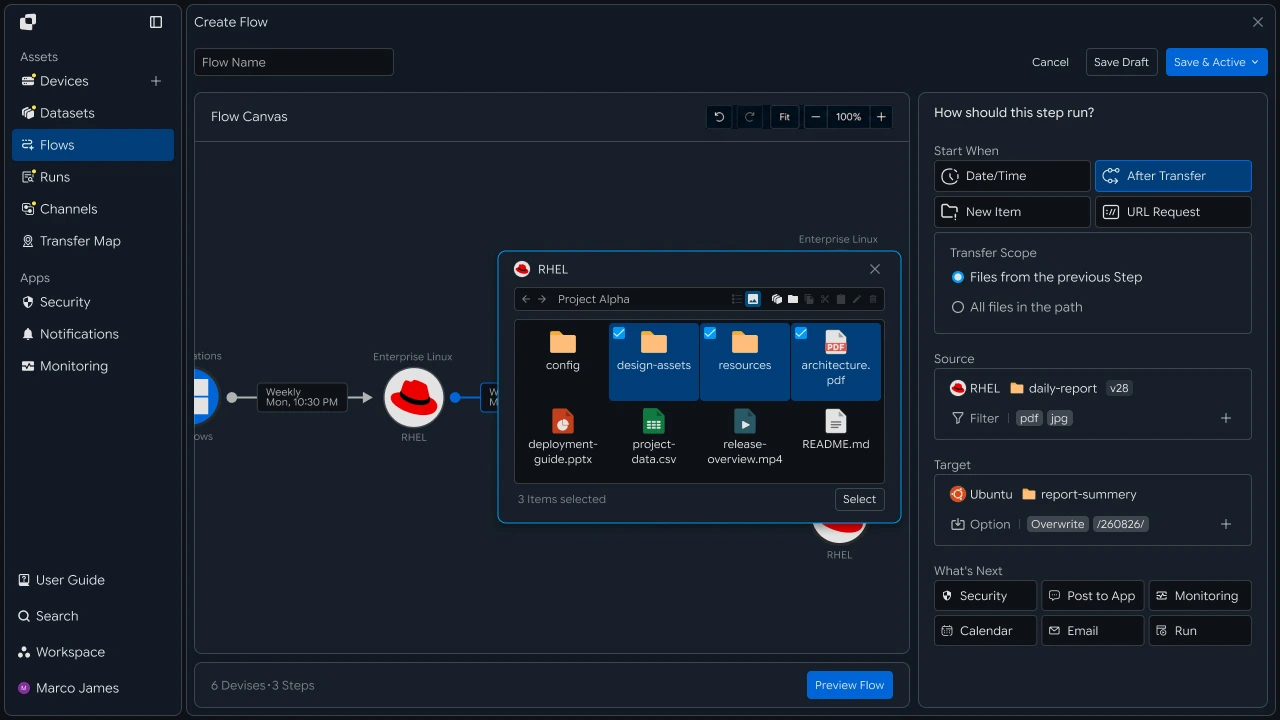
After migration, you can connect subsequent work and automation tasks based on files stored in the cloud.
Operations Response#
Review and rerun migration and synchronization tasks
For tasks requiring review during migration, use Runs and detailed execution records to check source connectivity, target paths, file-processing results, and synchronization status.
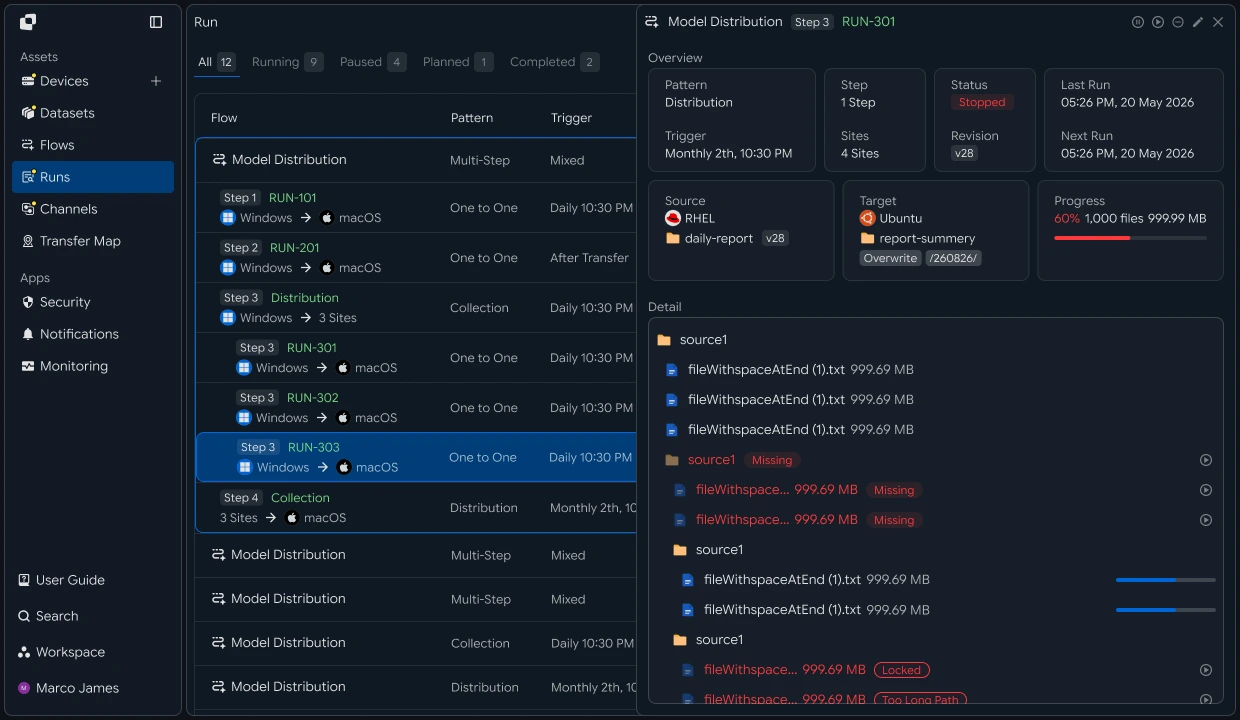
| Check Item | Details | Follow-up Action |
|---|---|---|
| Source Environment | NAS, SMB, NFS, and File Server Connections and Paths | Check connection and path |
| Cloud | Storage location and access status | Check target settings |
| Initial Migration | Large-file processing results | Rerun the required task |
| Change Synchronization | Status of added and modified files | Rerun the synchronization task |
| Execution History | Task status and detailed processing results | Check settings and rerun |
Developers#
Move an existing shared folder to the cloud and continuously apply changes during the migration period
Integration Setup#
Prepare common API-call code and path notation
import os
import requests

BASE_URL = os.getenv("INNORIX_BASE_URL", "https://app.innorix.com").rstrip("/")
TOKEN = os.environ["INNORIX_ACCESS_TOKEN"]
WORKSPACE_ID = os.getenv("INNORIX_WORKSPACE_ID")   # optional; falls back to the current workspace

STATUS_COMPLETE = 2
TERMINAL = {2, 4, 5, 9, 99}          # complete / error / cancelled / partial / failed
NOT_SUCCEEDED = {4, 5, 9, 99}


def api(method, path, body=None, params=None):
    headers = {
        "Content-Type": "application/json",
        "Authorization": f"Bearer {TOKEN}",
    }

    if WORKSPACE_ID:
        headers["x-workspace-id"] = WORKSPACE_ID

    response = requests.request(
        method, BASE_URL + path,
        headers=headers, json=body, params=params, timeout=30,
    )

    payload = response.json() if response.content else {}

    if not response.ok:
        raise RuntimeError(payload.get("message") or f"HTTP {response.status_code}")

    return payload.get("data")


def is_terminal(detail):
    return detail.get("isTerminal", detail.get("status") in TERMINAL)
// InnorixClient.java
public static final String BASE_URL =
env("INNORIX_BASE_URL", "https://app.innorix.com").replaceAll("/+quot;, "");
public static final String WORKSPACE_ID = env("INNORIX_WORKSPACE_ID", null);
public static final int STATUS_COMPLETE = 2;
// States the transfer no longer moves out of
public static final Set<Integer> TERMINAL = Set.of(2, 4, 5, 9, 99);
// Terminal states that are not a full success
public static final Set<Integer> NOT_SUCCEEDED = Set.of(4, 5, 9, 99);
private HttpRequest.Builder headers(HttpRequest.Builder builder) {
builder.header("Content-Type", "application/json")
.header("Authorization", "Bearer " + session.accessToken());
// When omitted the account's current workspace is used.
if (workspaceId != null) builder.header("x-workspace-id", workspaceId);
return builder;
}
/** Unwraps and returns data from the response. Throws ApiError on failure. */
public Object api(String method, String path, Object body, Map<String, Object> params) {
Resp response = request(method, path, body, params);
Object payload = null;
try {
payload = Json.parse(response.text());
} catch (RuntimeException ignored) {
payload = null;
}
if (!response.ok()) {
Map<String, Object> map = Json.asObj(payload);
String message = Json.str(map, "message", Json.str(map, "error", "unknown error"));
throw new ApiError(response.status, message, map);
}
return Json.get(payload, "data");
}
/** Use the server flag when present, otherwise fall back to the status code. */
public static boolean isTerminal(Map<String, Object> record) {
Boolean flag = Json.boolOrNull(record, "isTerminal");
if (flag != null) return flag;
Integer status = Json.intOrNull(record, "status");
return status != null && TERMINAL.contains(status);
}// innorix-client.js
const BASE_URL = (process.env.INNORIX_BASE_URL
|| "https://app.innorix.com").replace(/\/+$/, "");
const TOKEN = process.env.INNORIX_ACCESS_TOKEN;
const WORKSPACE_ID = process.env.INNORIX_WORKSPACE_ID || null;
export const STATUS_COMPLETE = 2;
export const TERMINAL = new Set([2, 4, 5, 9, 99]); // complete / error / cancelled / partial / failed
export const NOT_SUCCEEDED = new Set([4, 5, 9, 99]);
export async function api(method, path, body = null, params = null) {
const url = new URL(BASE_URL + path);
if (params) {
for (const [key, value] of Object.entries(params)) {
if (value === undefined || value === null) continue;
url.searchParams.set(key, String(value));
}
}
const headers = {
"Content-Type": "application/json",
Authorization: `Bearer ${TOKEN}`,
};
// When omitted the account's current workspace is used.
if (WORKSPACE_ID) headers["x-workspace-id"] = WORKSPACE_ID;
const response = await fetch(url, {
method,
headers,
body: body === null ? undefined : JSON.stringify(body),
signal: AbortSignal.timeout(30_000),
});
const payload = await response.json().catch(() => ({}));
if (!response.ok) {
throw new Error(payload.message || `HTTP ${response.status}`);
}
return payload.data;
}
export function isTerminal(detail) {
return detail.isTerminal !== undefined
? detail.isTerminal
: TERMINAL.has(detail.status);
}// InnorixClient.cs
public static readonly string BaseUrl =
Env("INNORIX_BASE_URL", "https://app.innorix.com").TrimEnd('/');
public static readonly string WorkspaceIdFromEnv = Env("INNORIX_WORKSPACE_ID", null);
public const int StatusComplete = 2;
/// <summary>States the transfer no longer moves out of</summary>
public static readonly HashSet<int> Terminal = new HashSet<int> { 2, 4, 5, 9, 99 };
/// <summary>Terminal states that are not a full success</summary>
public static readonly HashSet<int> NotSucceeded = new HashSet<int> { 4, 5, 9, 99 };
// Applied on every request
request.Headers.TryAddWithoutValidation("Authorization", "Bearer " + Session.AccessToken);
// When omitted the account's current workspace is used.
if (WorkspaceId != null) request.Headers.TryAddWithoutValidation("x-workspace-id", WorkspaceId);
public async Task<JsonNode> ApiAsync(string method, string path, JsonNode body = null,
IDictionary<string, object> parameters = null)
{
Resp response = await RequestAsync(method, path, body, parameters).ConfigureAwait(false);
JsonNode payload = null;
try
{
payload = J.Parse(response.Text());
}
catch (Exception)
{
payload = null;
}
if (!response.Ok)
{
JsonObject map = J.AsObj(payload);
string message = J.Str(map, "message", J.Str(map, "error", "unknown error"));
throw new ApiError(response.Status, message, map);
}
return J.Get(payload, "data");
}
/// <summary>Use the server flag when present, otherwise fall back to the status code.</summary>
public static bool IsTerminal(JsonObject record)
{
bool? flag = J.BoolOrNull(record, "isTerminal");
if (flag != null) return flag.Value;
int? status = J.IntOrNull(record, "status");
return status != null && Terminal.Contains(status.Value);
}import base64
import time
def encode_path(device_id, raw_path):
normalized = str(raw_path or "").replace("\\", "/")
token = base64.b64encode(normalized.encode("utf-8")).decode("ascii")
return f"{device_id}_ino_{token}"
def now_iso():
return time.strftime("%Y-%m-%dT%H:%M:%S.000Z", time.gmtime())public static String encodePath(String deviceId, String rawPath) {
String normalized = (rawPath == null ? "" : rawPath).replace("\\", "/");
return deviceId + "_ino_"
+ Base64.getEncoder().encodeToString(normalized.getBytes(StandardCharsets.UTF_8));
}
public static String nowIso() {
return Instant.now().truncatedTo(ChronoUnit.SECONDS).toString().replace("Z", ".000Z");
}export function encodePath(deviceId, rawPath) {
const normalized = String(rawPath ?? "").replace(/\\/g, "/");
const token = Buffer.from(normalized, "utf8").toString("base64");
return `${deviceId}_ino_${token}`;
}
export function nowIso() {
return new Date().toISOString().replace(/\.\d{3}Z$/, ".000Z");
}public static string EncodePath(string deviceId, string rawPath)
{
string normalized = (rawPath ?? "").Replace("\\", "/");
return deviceId + "_ino_" + Convert.ToBase64String(Encoding.UTF8.GetBytes(normalized));
}
public static string NowIso()
{
return DateTime.UtcNow.ToString("yyyy-MM-dd'T'HH:mm:ss'.000Z'",
System.Globalization.CultureInfo.InvariantCulture);
}Transfer status is determined by the values below. There are five terminal states, and the successful value is Complete (2).
| Status Value | Meaning | Terminal |
|---|---|---|
| 2 | Complete | Yes |
| 4 | Error | Yes |
| 5 | Canceled | Yes |
| 9 | Partially Complete | Yes |
| 99 | Failed | Yes |
| 1 , 6 , 12 , 13 | Starting, Transferring, Synchronizing, Receiving | No |
Determine the Migration Scope#
Check the number and capacity of files to migrate in advance
You need to know the scale before starting the migration so you can plan the schedule.
def scan(device_id, path, max_pages=200):
    page = api("POST", f"/api/devices/{device_id}/files/search",
               {"path": path, "pageSize": 1000})

    total = size = 0
    search_id = page.get("searchId")

    try:
        for _ in range(max_pages):
            for item in page.get("items") or []:
                if item["type"] == "file":
                    total += 1
                    size += item.get("size") or 0

            if not page.get("hasMore"):
                break

            page = api("GET", f"/api/devices/{device_id}/files/search",
                       params={"cursor": page["nextCursor"]})
    finally:
        # stop the device scan once the count is done
        if search_id:
            api("POST", f"/api/devices/{device_id}/files/search/cancel",
                {"uuid": search_id})

    return total, size


count, size = scan("device-nas-01", "/share/team")
print(f"{count} files / {size / (1024 ** 3):.1f}GB")long[] scan(String deviceId, String path, int maxPages) throws Exception {
Map<String, Object> page = client.apiObj("POST",
"/api/devices/" + deviceId + "/files/search",
Json.newObj("path", path, "pageSize", 1000));
long total = 0, size = 0;
String searchId = Json.str(page, "searchId");
try {
for (int i = 0; i < maxPages; i++) {
for (Object node : Json.arrOf(page, "items")) {
Map<String, Object> item = Json.asObj(node);
if ("file".equals(Json.str(item, "type"))) {
total++;
Long s = Json.longOrNull(item, "size");
size += s != null ? s : 0;
}
}
if (!Json.bool(page, "hasMore", false)) break;
page = client.apiObj("GET", "/api/devices/" + deviceId + "/files/search",
null, Json.newObj("cursor", Json.str(page, "nextCursor")));
}
} finally {
// stop the device scan once the count is done
if (searchId != null) {
client.api("POST", "/api/devices/" + deviceId + "/files/search/cancel",
Json.newObj("uuid", searchId));
}
}
return new long[]{total, size};
}async function scan(deviceId, path, maxPages = 200) {
let page = await client.api("POST", `/api/devices/${deviceId}/files/search`,
{ path, pageSize: 1000 });
let total = 0;
let size = 0;
const searchId = page.searchId;
try {
for (let i = 0; i < maxPages; i += 1) {
for (const item of page.items || []) {
if (item.type === "file") {
total += 1;
size += item.size || 0;
}
}
if (!page.hasMore) break;
page = await client.api("GET", `/api/devices/${deviceId}/files/search`,
null, { cursor: page.nextCursor });
}
} finally {
// stop the device scan once the count is done
if (searchId) {
await client.api("POST", `/api/devices/${deviceId}/files/search/cancel`,
{ uuid: searchId });
}
}
return { total, size };
}async Task<(long Total, long Size)> ScanAsync(string deviceId, string path,
int maxPages = 200)
{
JsonObject page = await client.ApiObjAsync("POST",
quot;/api/devices/{deviceId}/files/search",
new JsonObject { ["path"] = path, ["pageSize"] = 1000 });
long total = 0, size = 0;
string searchId = J.Str(page, "searchId");
try
{
for (int i = 0; i < maxPages; i++)
{
foreach (JsonNode node in J.ArrOf(page, "items"))
{
JsonObject item = J.AsObj(node);
if (J.Str(item, "type") == "file")
{
total++;
size += J.LongOrNull(item, "size") ?? 0;
}
}
if (!J.Bool(page, "hasMore", false)) break;
page = await client.ApiObjAsync("GET",
quot;/api/devices/{deviceId}/files/search", null,
new Dictionary<string, object> { ["cursor"] = J.Str(page, "nextCursor") });
}
}
finally
{
// stop the device scan once the count is done
if (searchId != null)
{
await client.ApiAsync("POST",
quot;/api/devices/{deviceId}/files/search/cancel",
new JsonObject { ["uuid"] = searchId });
}
}
return (total, size);
}A search actually scans the device's disk. If it is not stopped, scanning continues even after the check is complete.
Initial Migration#
Send existing large volumes of files to the cloud
Sending everything at once increases the scope that must be restarted after a failure. Split the transfer by top-level folder.
def target_for(folder, base):
    return folder.replace("/share", base, 1)


def migrate(source, target, folder, base):
    transfer = api("POST", "/api/transfers/manual", {
        "sourceDevice": source,
        "targetDevice": target,
        "targetPath": target_for(folder, base),
        "sourcePaths": [folder],
        "sendAllFolder": True,
        "transferOptions": {"target-action": "overwrite"},
    })

    return transfer["monitorId"]


FOLDERS = ["/share/team/design", "/share/team/docs", "/share/team/archive"]

transfers = {
    folder: migrate("device-nas-01", "device-cloud-01", folder, "/migrated")
    for folder in FOLDERS
}
String targetFor(String folder, String base) {
return folder.replaceFirst("/share", base);
}
String migrate(String source, String target, String folder, String base) {
Map<String, Object> transfer = client.apiObj("POST", "/api/transfers/manual", Json.newObj(
"sourceDevice", source,
"targetDevice", target,
"targetPath", targetFor(folder, base),
"sourcePaths", List.of(folder),
"sendAllFolder", true,
"transferOptions", Json.newObj("target-action", "overwrite")));
return Json.str(transfer, "monitorId");
}
List<String> folders = List.of("/share/team/design", "/share/team/docs",
"/share/team/archive");
Map<String, String> transfers = new LinkedHashMap<>();
for (String folder : folders) {
transfers.put(folder, migrate("device-nas-01", "device-cloud-01", folder, "/migrated"));
}const targetFor = (folder, base) => folder.replace("/share", base);
async function migrate(source, target, folder, base) {
const transfer = await client.api("POST", "/api/transfers/manual", {
sourceDevice: source,
targetDevice: target,
targetPath: targetFor(folder, base),
sourcePaths: [folder],
sendAllFolder: true,
transferOptions: { "target-action": "overwrite" },
});
return transfer.monitorId;
}
const FOLDERS = ["/share/team/design", "/share/team/docs", "/share/team/archive"];
const transfers = {};
for (const folder of FOLDERS) {
transfers[folder] = await migrate("device-nas-01", "device-cloud-01", folder, "/migrated");
}string TargetFor(string folder, string baseDir) =>
new Regex("/share").Replace(folder, baseDir, 1);
async Task<string> MigrateAsync(string source, string target, string folder, string baseDir)
{
JsonObject transfer = await client.ApiObjAsync("POST", "/api/transfers/manual",
new JsonObject
{
["sourceDevice"] = source,
["targetDevice"] = target,
["targetPath"] = TargetFor(folder, baseDir),
["sourcePaths"] = new JsonArray { folder },
["sendAllFolder"] = true,
["transferOptions"] = new JsonObject { ["target-action"] = "overwrite" },
});
return J.Str(transfer, "monitorId");
}
var folders = new[] { "/share/team/design", "/share/team/docs", "/share/team/archive" };
var transfers = new Dictionary<string, string>();
foreach (string folder in folders)
{
transfers[folder] = await MigrateAsync("device-nas-01", "device-cloud-01", folder, "/migrated");
}Use the overwrite destination policy. Reruns are common during migration, and numbering causes copies to accumulate.
Folders containing very large numbers of files can take a long time to transfer. If interrupted, the transfer can resume, so there is no need to retransmit from the beginning.
def wait(monitor_id, timeout=3600, interval=3):
    deadline = time.time() + timeout

    while time.time() < deadline:
        detail = api("GET", f"/api/transfers/{monitor_id}")

        if is_terminal(detail):
            return detail

        time.sleep(interval)

    raise TimeoutError(monitor_id)


def failed_files(monitor_id):
    result = api("GET", f"/api/transfers/{monitor_id}/files", params={
        "state": "any", "size": 500,
    }) or {}

    return [r for r in (result.get("children") or [])
            if r.get("status") in NOT_SUCCEEDED]


def retry_failed(monitor_id):
    rows = failed_files(monitor_id)

    if not rows:
        return 0

    api("POST", f"/api/transfers/{monitor_id}/retry", {
        "filesRetry": [
            {"filePath": r["sourceFilePath"], "isDir": bool(r.get("isFolder"))}
            for r in rows
        ]
    })

    return len(rows)
public Map<String, Object> wait(String monitorId, int timeoutSeconds, int intervalSeconds) {
long deadline = System.currentTimeMillis() + timeoutSeconds * 1000L;
while (System.currentTimeMillis() < deadline) {
Map<String, Object> detail = apiObj("GET", "/api/transfers/" + monitorId);
if (isTerminal(detail)) return detail;
sleep(intervalSeconds * 1000L);
}
throw new ApiError(0, "timeout waiting for " + monitorId);
}
public List<Map<String, Object>> failedFiles(String monitorId) {
List<Map<String, Object>> failed = new ArrayList<>();
for (Map<String, Object> row : transferFiles(monitorId)) {
Integer status = Json.intOrNull(row, "status");
if (status != null && NOT_SUCCEEDED.contains(status)) failed.add(row);
}
return failed;
}
public int retryFailed(String monitorId) {
List<Map<String, Object>> rows = failedFiles(monitorId);
if (rows.isEmpty()) return 0;
List<Object> filesRetry = new ArrayList<>();
for (Map<String, Object> row : rows) {
String path = Json.str(row, "sourceFilePath");
if (path == null) continue;
filesRetry.add(Json.newObj("filePath", path, "isDir", Json.bool(row, "isFolder", false)));
}
api("POST", "/api/transfers/" + monitorId + "/retry", Json.newObj("filesRetry", filesRetry));
return rows.size();
}const sleep = (ms) => new Promise((resolve) => setTimeout(resolve, ms));
export async function wait(monitorId, { timeout = 3600, interval = 3 } = {}) {
const deadline = Date.now() + timeout * 1000;
while (Date.now() < deadline) {
const detail = await api("GET", `/api/transfers/${monitorId}`);
if (isTerminal(detail)) return detail;
await sleep(interval * 1000);
}
throw new Error(`timeout waiting for ${monitorId}`);
}
export async function failedFiles(monitorId) {
const result = (await api("GET", `/api/transfers/${monitorId}/files`, null, {
state: "any", size: 500,
})) || {};
return (result.children || []).filter((row) => NOT_SUCCEEDED.has(row.status));
}
export async function retryFailed(monitorId) {
const rows = await failedFiles(monitorId);
if (rows.length === 0) return 0;
await api("POST", `/api/transfers/${monitorId}/retry`, {
filesRetry: rows
.filter((row) => row.sourceFilePath)
.map((row) => ({ filePath: row.sourceFilePath, isDir: Boolean(row.isFolder) })),
});
return rows.length;
}public async Task<JsonObject> WaitAsync(string monitorId, int timeoutSeconds = 3600,
int intervalSeconds = 3)
{
long deadline = Environment.TickCount64 + timeoutSeconds * 1000L;
while (Environment.TickCount64 < deadline)
{
JsonObject detail = await ApiObjAsync("GET", "/api/transfers/" + monitorId)
.ConfigureAwait(false);
if (IsTerminal(detail)) return detail;
await Task.Delay(intervalSeconds * 1000).ConfigureAwait(false);
}
throw new ApiError(0, "timeout waiting for " + monitorId);
}
public async Task<List<JsonObject>> FailedFilesAsync(string monitorId)
{
List<JsonObject> rows = await TransferFilesAsync(monitorId).ConfigureAwait(false);
return rows.Where(row =>
{
int? status = J.IntOrNull(row, "status");
return status != null && NotSucceeded.Contains(status.Value);
}).ToList();
}
/// <summary>Only callable once the transfer has reached a terminal state.</summary>
public async Task<int> RetryFailedAsync(string monitorId)
{
List<JsonObject> rows = await FailedFilesAsync(monitorId).ConfigureAwait(false);
if (rows.Count == 0) return 0;
var filesRetry = new JsonArray();
foreach (JsonObject row in rows)
{
string path = J.Str(row, "sourceFilePath");
if (path == null) continue;
filesRetry.Add(new JsonObject
{
["filePath"] = path,
["isDir"] = J.Bool(row, "isFolder", false),
});
}
await ApiAsync("POST", "/api/transfers/" + monitorId + "/retry",
new JsonObject { ["filesRetry"] = filesRetry }).ConfigureAwait(false);
return rows.Count;
}for folder, monitor_id in transfers.items():
detail = wait(monitor_id, timeout=86400)
print(f"{folder:28} {detail.get('statusName')}"
f" {detail.get('fileCount')} files")
if detail["status"] != STATUS_COMPLETE:
print(f" retried {retry_failed(monitor_id)} files")for (var entry : transfers.entrySet()) {
Map<String, Object> detail = client.await(entry.getValue(), 86400, null);
System.out.printf("%-28s %s %s files%n", entry.getKey(),
Json.str(detail, "statusName"), Json.str(detail, "fileCount"));
if (Json.intOr(detail, "status", -1) != InnorixClient.STATUS_COMPLETE) {
System.out.println(" retried " + client.retryFailed(entry.getValue()) + " files");
}
}for (const [folder, monitorId] of Object.entries(transfers)) {
const detail = await wait(monitorId, { timeout: 86400 });
console.log(`${folder.padEnd(28)} ${detail.statusName} ${detail.fileCount} files`);
if (detail.status !== STATUS_COMPLETE) {
console.log(` retried ${await retryFailed(monitorId)} files`);
}
}foreach (var (folder, monitorId) in transfers)
{
JsonObject detail = await client.WaitAsync(monitorId, 86400);
Console.WriteLine(quot;{folder,-28} {J.Str(detail, "statusName")} "
+ quot;{J.Str(detail, "fileCount")} files");
if (J.IntOrNull(detail, "status") != InnorixClient.StatusComplete)
{
Console.WriteLine(quot; retried {await client.RetryFailedAsync(monitorId)} files");
}
}Changes Synchronization#
Continuously apply files changed during the migration period
Files continue to change at the source even while the initial migration takes several days. Send only the changes periodically.
transfer = api("POST", "/api/transfers/manual", {
    "sourceDevice": "device-nas-01",
    "targetDevice": "device-cloud-01",
    "targetPath": "/migrated/team/design",
    "sourcePaths": ["/share/team/design"],
    "sendAllFolder": True,
    "incremental": True,
    "transferOptions": {"target-action": "overwrite"},
})Map<String, Object> transfer = client.apiObj("POST", "/api/transfers/manual", Json.newObj(
"sourceDevice", "device-nas-01",
"targetDevice", "device-cloud-01",
"targetPath", "/migrated/team/design",
"sourcePaths", List.of("/share/team/design"),
"sendAllFolder", true,
"incremental", true,
"transferOptions", Json.newObj("target-action", "overwrite")));const transfer = await client.api("POST", "/api/transfers/manual", {
sourceDevice: "device-nas-01",
targetDevice: "device-cloud-01",
targetPath: "/migrated/team/design",
sourcePaths: ["/share/team/design"],
sendAllFolder: true,
incremental: true,
transferOptions: { "target-action": "overwrite" },
});JsonObject transfer = await client.ApiObjAsync("POST", "/api/transfers/manual",
new JsonObject
{
["sourceDevice"] = "device-nas-01",
["targetDevice"] = "device-cloud-01",
["targetPath"] = "/migrated/team/design",
["sourcePaths"] = new JsonArray { "/share/team/design" },
["sendAllFolder"] = true,
["incremental"] = true,
["transferOptions"] = new JsonObject { ["target-action"] = "overwrite" },
});The default is off. The device agent calculates changes and sends only files added or modified since the last transfer.
Always use overwrite for incremental transfers. With numbering, modified files accumulate under new names, causing the cloud state to differ from the source.
If you cannot keep the script running, register it as hourly automation.
def build_sync(name, source, source_path, target, target_path, schedule):
    return {
        "name": name,
        "flowName": name,
        "transferType": "normal",
        "timezone": "Asia/Seoul",
        "step": 1,
        "isUpcoming": False,
        "details": [
            {
                "senderId": source,
                "receiverId": target,
                "sourceItem": [
                    {
                        "hash": encode_path(source, source_path),
                        "filePath": source_path,
                        "isDir": True,
                    }
                ],
                "targetPath": encode_path(target, target_path),
                "step": 1,
                "transferOptions": {
                    "noSchedule": False,
                    "target-action": "overwrite",
                    "send-fileoption": {},
                },
            }
        ],
        "schedules": [schedule],
    }


HOURLY = {
    "type": "hour",
    "startDateType": "now",
    "startDate": now_iso(),
    "timezone": "Asia/Seoul",
}

syncs = {
    folder: api("POST", "/api/automations", build_sync(
        f"sync {folder}", "device-nas-01", folder,
        "device-cloud-01", target_for(folder, "/migrated"),
        HOURLY))["automationId"]
    for folder in FOLDERS
}Map<String, Object> buildSync(String name, String source, String sourcePath,
String target, String targetPath,
Map<String, Object> schedule) {
Map<String, Object> detail = Json.newObj(
"senderId", source, "receiverId", target,
"sourceItem", List.of(Json.newObj(
"hash", InnorixClient.encodePath(source, sourcePath),
"filePath", sourcePath, "isDir", true)),
"targetPath", InnorixClient.encodePath(target, targetPath),
"step", 1,
"transferOptions", Json.newObj(
"noSchedule", false, "target-action", "overwrite",
"send-fileoption", Json.newObj()));
return Json.newObj(
"name", name, "flowName", name,
"transferType", "normal", "timezone", "Asia/Seoul",
"step", 1, "isUpcoming", false,
"details", List.of(detail),
"schedules", List.of(schedule));
}function buildSync(name, source, sourcePath, target, targetPath, schedule) {
return {
name,
flowName: name,
transferType: "normal",
timezone: "Asia/Seoul",
step: 1,
isUpcoming: false,
details: [{
senderId: source,
receiverId: target,
sourceItem: [{
hash: encodePath(source, sourcePath),
filePath: sourcePath,
isDir: true,
}],
targetPath: encodePath(target, targetPath),
step: 1,
transferOptions: {
noSchedule: false,
"target-action": "overwrite",
"send-fileoption": {},
},
}],
schedules: [schedule],
};
}JsonObject BuildSync(string name, string source, string sourcePath,
string target, string targetPath, JsonObject schedule)
{
var detail = new JsonObject
{
["senderId"] = source,
["receiverId"] = target,
["sourceItem"] = new JsonArray
{
new JsonObject
{
["hash"] = InnorixClient.EncodePath(source, sourcePath),
["filePath"] = sourcePath,
["isDir"] = true,
},
},
["targetPath"] = InnorixClient.EncodePath(target, targetPath),
["step"] = 1,
["transferOptions"] = new JsonObject
{
["noSchedule"] = false,
["target-action"] = "overwrite",
["send-fileoption"] = new JsonObject(),
},
};
return new JsonObject
{
["name"] = name,
["flowName"] = name,
["transferType"] = "normal",
["timezone"] = "Asia/Seoul",
["step"] = 1,
["isUpcoming"] = false,
["details"] = new JsonArray { detail },
["schedules"] = new JsonArray { schedule },
};
}There are four items that must be observed in automation requests.
| Item | Configuration |
|---|---|
isUpcoming |
Must be false. The server default true ignores the schedule in the request and replaces it with a five-minute one-time schedule. Steps with triggerAutomation are forced to false by the server, so specify it directly only on the first step without a trigger |
step |
Include it at both the top level and in details. It is the hop position within the flow |
sourceItem |
Include both hash (path token) and filePath (plain-text path) |
syncType |
Put it inside transferOptions. 1 is one-way and 2 is two-way |
Registration succeeds even if all four items are omitted, but behavior changes at execution time. If a recurring schedule was registered but ran only once, check isUpcoming first.
Progress Statistics#
Query progress by transfer and synchronization run
def progress(transfers):
    for folder, monitor_id in transfers.items():
        detail = api("GET", f"/api/transfers/{monitor_id}")

        print(f"{folder:28} {detail.get('statusName'):12}"
              f" {detail.get('percent', 0):>5}%"
              f" {detail.get('fileCount', 0)} files")
void progress(Map<String, String> transfers) {
transfers.forEach((folder, monitorId) -> {
Map<String, Object> detail = client.apiObj("GET", "/api/transfers/" + monitorId);
System.out.printf("%-28s %-12s %5s%% %s files%n", folder,
Json.str(detail, "statusName"), Json.str(detail, "percent"),
Json.str(detail, "fileCount"));
});
}async function progress(transfers) {
for (const [folder, monitorId] of Object.entries(transfers)) {
const detail = await client.api("GET", `/api/transfers/${monitorId}`);
console.log(`${folder.padEnd(28)} ${(detail.statusName || "").padEnd(12)}`
+ ` ${String(detail.percent || 0).padStart(5)}% ${detail.fileCount || 0} files`);
}
}async Task ProgressAsync(Dictionary<string, string> transfers)
{
foreach (var (folder, monitorId) in transfers)
{
JsonObject detail = await client.ApiObjAsync("GET", "/api/transfers/" + monitorId);
Console.WriteLine(quot;{folder,-28} {J.Str(detail, "statusName"),-12}"
+ quot; {J.Str(detail, "percent"),5}% {J.Str(detail, "fileCount")} files");
}
}Review each run's synchronization-automation results in the execution history.
for folder, automation_id in syncs.items():
    runs = api("GET", f"/api/automations/{automation_id}/executions") or []
    latest = runs[0] if runs else {}

    print(f"{folder:28} runs {len(runs):>3}"
          f" last {latest.get('startTime')} {latest.get('status')}")
for (var entry : syncs.entrySet()) {
List<Map<String, Object>> runs = client.executions(entry.getValue());
Map<String, Object> latest = runs.isEmpty() ? Map.of() : runs.get(0);
System.out.printf("%-28s runs %3d last %s %s%n", entry.getKey(), runs.size(),
Json.str(latest, "startTime"), Json.str(latest, "status"));
}for (const [folder, automationId] of Object.entries(syncs)) {
const runs = (await client.executions(automationId)) || [];
const latest = runs[0] || {};
console.log(`${folder.padEnd(28)} runs ${String(runs.length).padStart(3)}`
+ ` last ${latest.startTime} ${latest.status}`);
}foreach (var (folder, automationId) in syncs)
{
List<JsonObject> runs = J.AsList(await client.ExecutionsAsync(automationId));
JsonObject latest = runs.Count > 0 ? runs[0] : new JsonObject();
Console.WriteLine(quot;{folder,-28} runs {runs.Count,3} "
+ quot;last {J.Str(latest, "startTime")} {J.Str(latest, "status")}");
}The latest execution appears first in the array. If the history is empty, the automation was registered but not executed, so check isUpcoming and the start condition.
Cutover Verification#
Verify that source and cloud files match
To determine the cutover point, verify that files in the two environments match. Compare the source and target file lists by folder to find missing files.
def list_names(device_id, path):
    names, page = set(), 1

    while True:
        result = api("GET", f"/api/devices/{device_id}/files", params={
            "path": path, "page": page, "size": 200, "type": "file",
        }) or {}

        names.update(item["name"] for item in result.get("items") or [])

        if page >= (result.get("lastPage") or 1):
            return names

        page += 1


missing = list_names("device-nas-01", "/share/team/design") \
        - list_names("device-cloud-01", "/migrated/team/design")

print(f"{len(missing)} missing")Set<String> listNames(String deviceId, String path) {
Set<String> names = new HashSet<>();
int page = 1;
while (true) {
Map<String, Object> result = client.apiObj("GET",
"/api/devices/" + deviceId + "/files", null,
Json.newObj("path", path, "page", page, "size", 200, "type", "file"));
for (Object node : Json.arrOf(result, "items")) {
names.add(Json.str(Json.asObj(node), "name"));
}
if (page >= Json.intOr(result, "lastPage", 1)) return names;
page++;
}
}
Set<String> missing = new HashSet<>(listNames("device-nas-01", "/share/team/design"));
missing.removeAll(listNames("device-cloud-01", "/migrated/team/design"));
System.out.println(missing.size() + " missing");async function listNames(deviceId, path) {
const names = new Set();
let page = 1;
for (;;) {
const result = (await client.api("GET", `/api/devices/${deviceId}/files`, null, {
path, page, size: 200, type: "file",
})) || {};
for (const item of result.items || []) names.add(item.name);
if (page >= (result.lastPage || 1)) return names;
page += 1;
}
}
const sourceNames = await listNames("device-nas-01", "/share/team/design");
const targetNames = await listNames("device-cloud-01", "/migrated/team/design");
const missing = [...sourceNames].filter((n) => !targetNames.has(n));
console.log(`${missing.length} missing`);async Task<HashSet<string>> ListNamesAsync(string deviceId, string path)
{
var names = new HashSet<string>();
int page = 1;
while (true)
{
JsonObject result = await client.ApiObjAsync("GET",
quot;/api/devices/{deviceId}/files", null,
new Dictionary<string, object>
{
["path"] = path, ["page"] = page, ["size"] = 200, ["type"] = "file",
});
foreach (JsonNode node in J.ArrOf(result, "items"))
names.Add(J.Str(J.AsObj(node), "name"));
if (page >= J.Int(result, "lastPage", 1)) return names;
page++;
}
}
var missing = new HashSet<string>(await ListNamesAsync("device-nas-01", "/share/team/design"));
missing.ExceptWith(await ListNamesAsync("device-cloud-01", "/migrated/team/design"));
Console.WriteLine(quot;{missing.Count} missing");If files are missing, retransmit the corresponding folder to align the lists. To compare size as well as names, include size in the list.
Cutover and Cleanup#
Stop synchronization and make the cloud the baseline environment
After the cutover, stop the synchronization automation. If the source continues to be applied, changes on the cloud side may be overwritten.
for automation_id in syncs.values():
    api("POST", f"/api/automations/{automation_id}/pause", {"pause": True})
for (String automationId : syncs.values()) {
client.api("POST", "/api/automations/" + automationId + "/pause",
Json.newObj("pause", true));
}for (const automationId of Object.values(syncs)) {
await client.api("POST", `/api/automations/${automationId}/pause`, { pause: true });
}foreach (string automationId in syncs.Values)
{
await client.ApiAsync("POST", quot;/api/automations/{automationId}/pause",
new JsonObject { ["pause"] = true });
}Delete it after confirming there are no problems for a period of time. Leaving it paused may allow it to be accidentally resumed later.
for automation_id in syncs.values():
    api("DELETE", f"/api/automations/{automation_id}")
for (String automationId : syncs.values()) {
client.api("DELETE", "/api/automations/" + automationId);
}for (const automationId of Object.values(syncs)) {
await client.api("DELETE", `/api/automations/${automationId}`);
}foreach (string automationId in syncs.Values)
{
await client.ApiAsync("DELETE", quot;/api/automations/{automationId}");
}| Check Item | Details |
|---|---|
| Migration Scope | File count and total capacity |
| Initial Migration | Transfer status by folder |
| Change Synchronization | Execution results by run |
| Verification | Whether source and target file lists match |
| Cutover | Stop and clean up synchronization |