
Getting Started#
Basic Concepts#
Transfer Files and Artifacts Not Managed by Git Separately
Git manages source code and change history, while files such as build artifacts, deployment packages, and large datasets can be managed through a separate transfer flow.
By connecting files generated or prepared after Git operations to the required devices, you can configure a management flow suited to the file characteristics and usage environment.
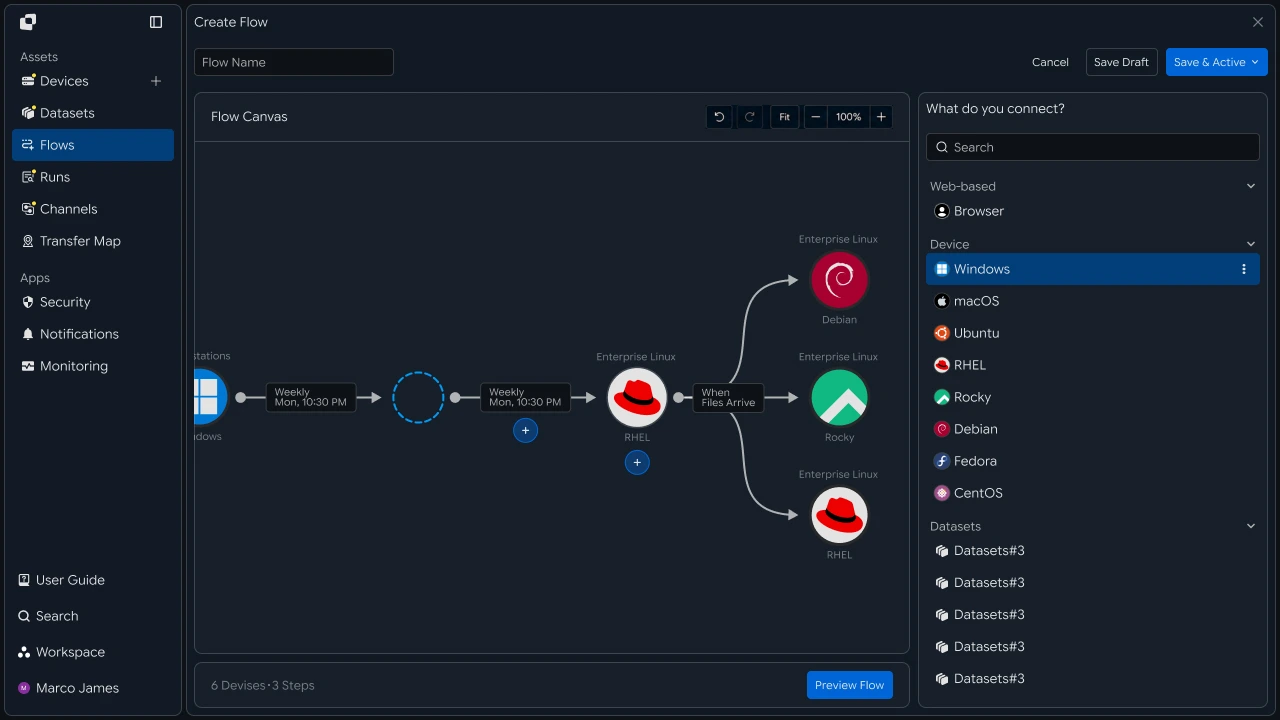
For example, after changing source code and completing a build, you can automatically transfer the generated package or result files to test servers, deployment servers, or data-processing equipment.
Integration Flow#
Automatically continue from Git operations to file transfer
Run build or file-processing tasks based on Git operations, and start file transfer according to the specified conditions when the required files are ready.
When the transfer is complete, the target device can continue with the next task, such as testing, deployment, or data processing.
- Git Task
- Build, File Processing
- Result File Creation
- Transfer Task Execution
- Target Device Deployment
- Continue to the Next Task

Separation Benefits#
Manage source code and work files in their respective ways
Using Git and file transfer together lets you connect source-code change management with the transfer and use of separate files in one workflow.
| Category | Git | File Transfer |
|---|---|---|
| Managed Items | Source code and change history | Result files and work files |
| Primary Role | Code changes and version control | File processing and target-device deployment |
| Execution Timing | Code operation and event occurrence | Configured task conditions are met |
| Usage Environment | Development and configuration management | Testing, deployment, and work equipment |
This lets you manage each file according to its purpose while automatically running file transfers after Git operations when needed.
IT Engineers#
Environment Connection#
Connect Git operations to file-transfer devices
First, connect the devices used for Git operations and file transfer into one flow.
Connect Git operations with the build or file-processing environment and the target devices that will use the result files to form the complete file flow.
- Git
- Build Server
- File Transfer
- Target Device
Connecting each device and task prepares the basic environment in which files generated after Git operations continue to the next transfer stage.
Transfer Rules#
Set files, targets, and execution conditions as one standard
Specify the files to manage separately and the target devices, then set when to start the file transfer based on Git or a subsequent task.
Specify the path and type of files to transfer and connect the target server or device. You can then use conditions such as code changes, build completion, or result-file creation as the transfer start criteria.

| Configuration Item | Configure Details |
|---|---|
| Start Condition | Criteria for starting the transfer, such as a Git operation or build completion |
| Source | Result files and file paths |
| Filter | File name and extension conditions for transfer |
| Target | Server or device that will use the files |
| Transfer | File transfer executed according to the configured conditions |
With this configuration, you can manage which files to transfer to which devices after which operations as a single execution standard.
Automated Flow#
Automatically transfer files to designated devices after Git operations
Using the devices and transfer rules configured above, complete the automated flow from Git operations to file transfer.
When a Git operation occurs, the connected build or processing task runs, and prepared files are transferred to the designated devices according to the configured conditions.
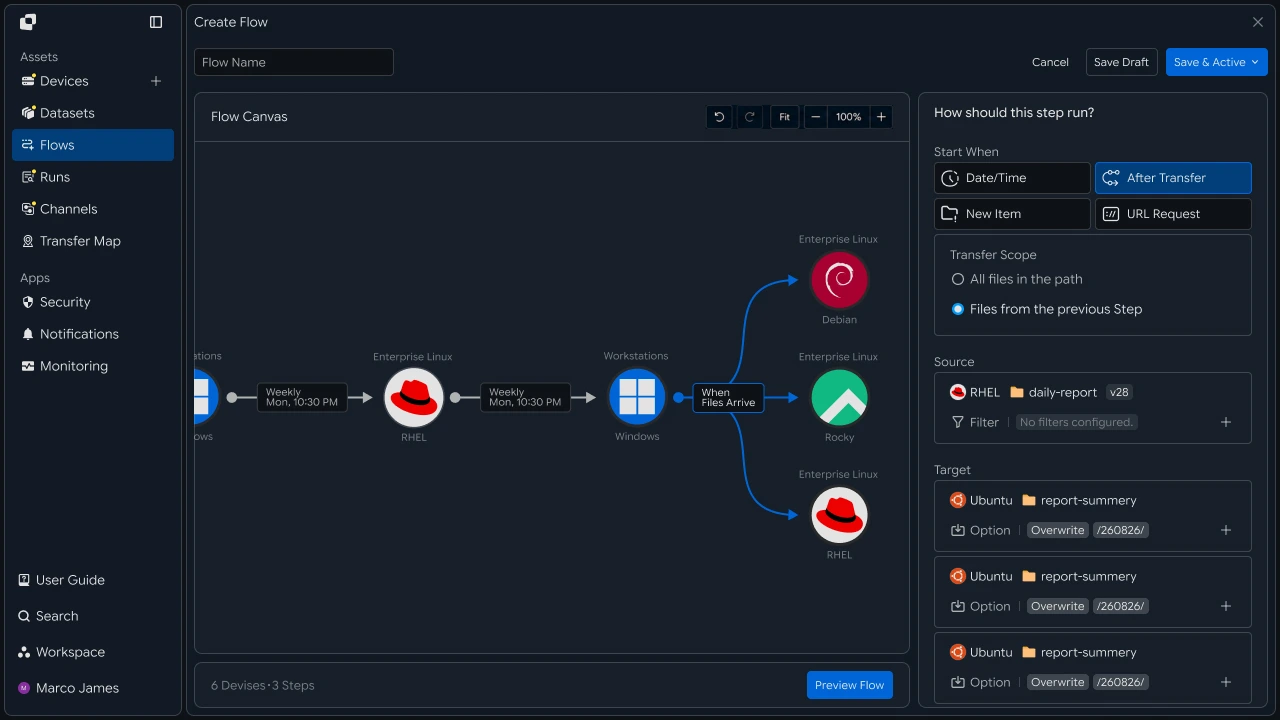
By configuring one result file to be transferred to multiple test or deployment environments, you can automatically connect files to the required work environments after Git operations.
Result Management#
Manage transfer status and reprocessing flow together
Review executed file-transfer tasks through Runs and execution details.
You can check which transfer tasks were executed based on Git operations and manage processing status and transferred-file information by target device.
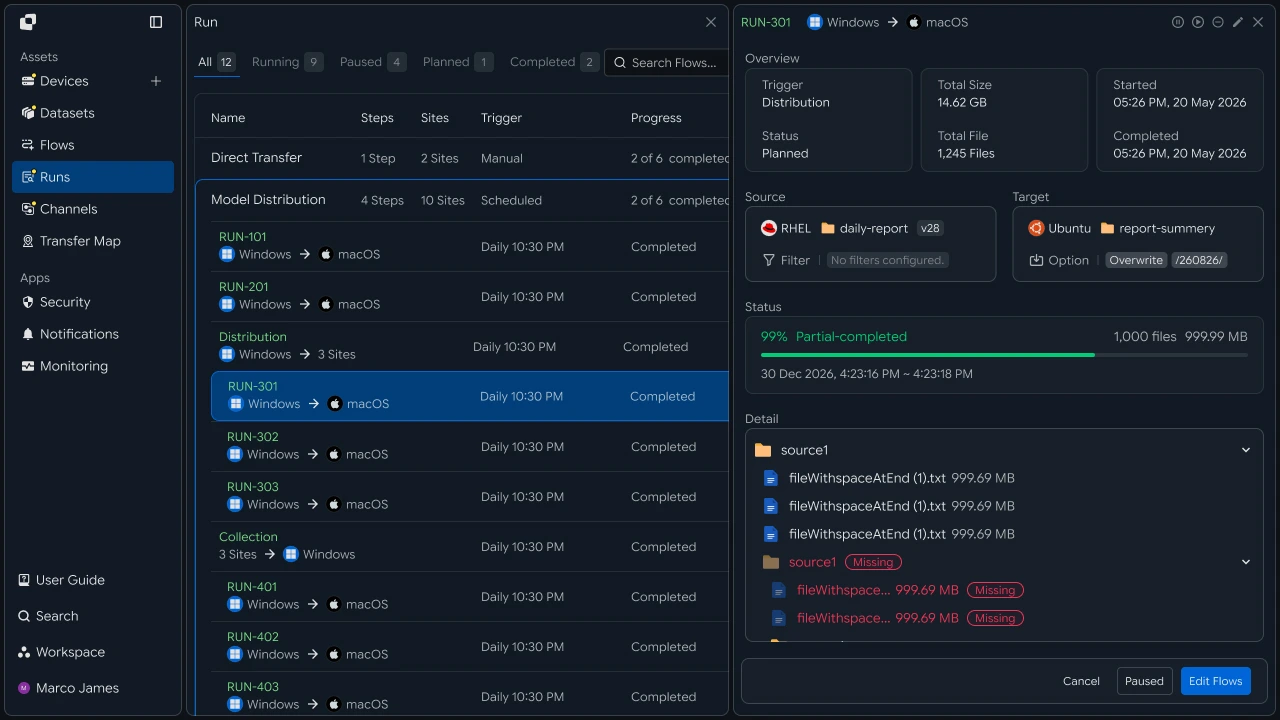
The main items to check are as follows.
| Check Item | Details |
|---|---|
| Trigger | Git or subsequent task that started the file transfer |
| Source | Transferred files and file paths |
| Target | Target device that will use the files |
| Progress | Transfer progress |
| Status | Execution status and processing result |
| Files | Number and size of processed files |
| Audit Log | Execution history and details for each task |
If the execution result requires additional review, use the Run details and Audit Log to check file readiness, transfer paths, and target-device connectivity, then rerun the required task.
Developer#
Send build artifacts to multiple deployment targets and reflect transfer results in the pipeline exit code
Integration Setup#
Prepare common API-call code and CI credentials
import os
import requests

BASE_URL = os.getenv("INNORIX_BASE_URL", "https://app.innorix.com").rstrip("/")
TOKEN = os.environ["INNORIX_ACCESS_TOKEN"]
WORKSPACE_ID = os.getenv("INNORIX_WORKSPACE_ID")   # optional; falls back to the current workspace

STATUS_COMPLETE = 2
TERMINAL = {2, 4, 5, 9, 99}          # complete / error / cancelled / partial / failed
NOT_SUCCEEDED = {4, 5, 9, 99}


def api(method, path, body=None, params=None):
    headers = {
        "Content-Type": "application/json",
        "Authorization": f"Bearer {TOKEN}",
    }

    if WORKSPACE_ID:
        headers["x-workspace-id"] = WORKSPACE_ID

    response = requests.request(
        method, BASE_URL + path,
        headers=headers, json=body, params=params, timeout=30,
    )

    payload = response.json() if response.content else {}

    if not response.ok:
        raise RuntimeError(payload.get("message") or f"HTTP {response.status_code}")

    return payload.get("data")


def is_terminal(detail):
    return detail.get("isTerminal", detail.get("status") in TERMINAL)
// InnorixClient.java
public static final String BASE_URL =
env("INNORIX_BASE_URL", "https://app.innorix.com").replaceAll("/+quot;, "");
public static final String WORKSPACE_ID = env("INNORIX_WORKSPACE_ID", null);
public static final int STATUS_COMPLETE = 2;
// States the transfer no longer moves out of
public static final Set<Integer> TERMINAL = Set.of(2, 4, 5, 9, 99);
// Terminal states that are not a full success
public static final Set<Integer> NOT_SUCCEEDED = Set.of(4, 5, 9, 99);
private HttpRequest.Builder headers(HttpRequest.Builder builder) {
builder.header("Content-Type", "application/json")
.header("Authorization", "Bearer " + session.accessToken());
// When omitted the account's current workspace is used.
if (workspaceId != null) builder.header("x-workspace-id", workspaceId);
return builder;
}
/** Unwraps and returns data from the response. Throws ApiError on failure. */
public Object api(String method, String path, Object body, Map<String, Object> params) {
Resp response = request(method, path, body, params);
Object payload = null;
try {
payload = Json.parse(response.text());
} catch (RuntimeException ignored) {
payload = null;
}
if (!response.ok()) {
Map<String, Object> map = Json.asObj(payload);
String message = Json.str(map, "message", Json.str(map, "error", "unknown error"));
throw new ApiError(response.status, message, map);
}
return Json.get(payload, "data");
}
/** Use the server flag when present, otherwise fall back to the status code. */
public static boolean isTerminal(Map<String, Object> record) {
Boolean flag = Json.boolOrNull(record, "isTerminal");
if (flag != null) return flag;
Integer status = Json.intOrNull(record, "status");
return status != null && TERMINAL.contains(status);
}// innorix-client.js
const BASE_URL = (process.env.INNORIX_BASE_URL
|| "https://app.innorix.com").replace(/\/+$/, "");
const TOKEN = process.env.INNORIX_ACCESS_TOKEN;
const WORKSPACE_ID = process.env.INNORIX_WORKSPACE_ID || null;
export const STATUS_COMPLETE = 2;
export const TERMINAL = new Set([2, 4, 5, 9, 99]); // complete / error / cancelled / partial / failed
export const NOT_SUCCEEDED = new Set([4, 5, 9, 99]);
export async function api(method, path, body = null, params = null) {
const url = new URL(BASE_URL + path);
if (params) {
for (const [key, value] of Object.entries(params)) {
if (value === undefined || value === null) continue;
url.searchParams.set(key, String(value));
}
}
const headers = {
"Content-Type": "application/json",
Authorization: `Bearer ${TOKEN}`,
};
// When omitted the account's current workspace is used.
if (WORKSPACE_ID) headers["x-workspace-id"] = WORKSPACE_ID;
const response = await fetch(url, {
method,
headers,
body: body === null ? undefined : JSON.stringify(body),
signal: AbortSignal.timeout(30_000),
});
const payload = await response.json().catch(() => ({}));
if (!response.ok) {
throw new Error(payload.message || `HTTP ${response.status}`);
}
return payload.data;
}
export function isTerminal(detail) {
return detail.isTerminal !== undefined
? detail.isTerminal
: TERMINAL.has(detail.status);
}// InnorixClient.cs
public static readonly string BaseUrl =
Env("INNORIX_BASE_URL", "https://app.innorix.com").TrimEnd('/');
public static readonly string WorkspaceIdFromEnv = Env("INNORIX_WORKSPACE_ID", null);
public const int StatusComplete = 2;
/// <summary>States the transfer no longer moves out of</summary>
public static readonly HashSet<int> Terminal = new HashSet<int> { 2, 4, 5, 9, 99 };
/// <summary>Terminal states that are not a full success</summary>
public static readonly HashSet<int> NotSucceeded = new HashSet<int> { 4, 5, 9, 99 };
// Applied on every request
request.Headers.TryAddWithoutValidation("Authorization", "Bearer " + Session.AccessToken);
// When omitted the account's current workspace is used.
if (WorkspaceId != null) request.Headers.TryAddWithoutValidation("x-workspace-id", WorkspaceId);
public async Task<JsonNode> ApiAsync(string method, string path, JsonNode body = null,
IDictionary<string, object> parameters = null)
{
Resp response = await RequestAsync(method, path, body, parameters).ConfigureAwait(false);
JsonNode payload = null;
try
{
payload = J.Parse(response.Text());
}
catch (Exception)
{
payload = null;
}
if (!response.Ok)
{
JsonObject map = J.AsObj(payload);
string message = J.Str(map, "message", J.Str(map, "error", "unknown error"));
throw new ApiError(response.Status, message, map);
}
return J.Get(payload, "data");
}
/// <summary>Use the server flag when present, otherwise fall back to the status code.</summary>
public static bool IsTerminal(JsonObject record)
{
bool? flag = J.BoolOrNull(record, "isTerminal");
if (flag != null) return flag.Value;
int? status = J.IntOrNull(record, "status");
return status != null && Terminal.Contains(status.Value);
}Transfer status is determined by the values below. There are five terminal states, and the value corresponding to success is Complete (2).
| Status Value | Meaning | Terminal |
|---|---|---|
| 2 | Complete | Yes |
| 4 | Error | Yes |
| 5 | Canceled | Yes |
| 9 | Partially Complete | Yes |
| 99 | Failed | Yes |
| 1, 6, 12, 13 | Starting, Transferring, Synchronizing, Receiving | No |
When calling from CI, inject the token as a pipeline secret. Do not commit it to the repository.
# GitHub Actions example
env:
  INNORIX_BASE_URL: https://app.innorix.com
  INNORIX_ACCESS_TOKEN: ${{ secrets.INNORIX_ACCESS_TOKEN }}
Artifact Path Design#
Include the commit or tag in the path to preserve deployment history
Record which code produced the artifact in the path. Keeping separate version folders preserves previous artifacts and makes rollback easier when problems occur.
import os
import subprocess


def git_ref():
    try:
        sha = subprocess.check_output(
            ["git", "rev-parse", "--short", "HEAD"], text=True).strip()
    except (subprocess.CalledProcessError, FileNotFoundError):
        sha = "unknown"

    return os.getenv("GIT_TAG") or sha


def target_path(base, ref):
    return f"{base}/{ref}"
String gitRef() {
String sha;
try {
Process process = new ProcessBuilder("git", "rev-parse", "--short", "HEAD")
.redirectErrorStream(true).start();
sha = new String(process.getInputStream().readAllBytes(),
StandardCharsets.UTF_8).strip();
if (process.waitFor() != 0) sha = "unknown";
} catch (Exception error) {
sha = "unknown";
}
String tag = System.getenv("GIT_TAG");
return tag != null ? tag : sha;
}
String targetPath(String base, String ref) {
return base + "/" + ref;
}import { execFileSync } from "node:child_process";
function gitRef() {
let sha;
try {
sha = execFileSync("git", ["rev-parse", "--short", "HEAD"],
{ encoding: "utf8" }).trim();
} catch {
sha = "unknown";
}
return process.env.GIT_TAG || sha;
}
const targetPath = (base, ref) => `${base}/${ref}`;string GitRef()
{
string sha;
try
{
var psi = new ProcessStartInfo("git", "rev-parse --short HEAD")
{
RedirectStandardOutput = true,
};
using var process = Process.Start(psi);
sha = process.StandardOutput.ReadToEnd().Trim();
process.WaitForExit();
if (process.ExitCode != 0) sha = "unknown";
}
catch
{
sha = "unknown";
}
return Environment.GetEnvironmentVariable("GIT_TAG") ?? sha;
}
string TargetPath(string baseDir, string ref) => quot;{baseDir}/{ref}";If you overwrite a single path, there is nothing to roll back to.
Artifact Transfer#
Send build result files to target devices
When sending a file, explicitly set isDir: false in sourceItem. sourcePaths treats every path as a folder, so putting an artifact file there can cause the server to scan it as a folder, slowing the operation or causing a timeout.
def deploy_artifact(source, target, artifact_path, base):
    ref = git_ref()

    transfer = api("POST", "/api/transfers/manual", {
        "sourceDevice": source,
        "targetDevice": target,
        "targetPath": target_path(base, ref),
        "sourceItem": [{
            "path": artifact_path,
            "isDir": False,
            "isFolder": False,
            "fileSize": os.path.getsize(artifact_path),
        }],
        "sendAllFolder": False,
        "transferOptions": {"target-action": "overwrite"},
    })

return transfer["monitorId"], target_path(base, ref)String[] deployArtifact(String source, String target,
String artifactPath, String base) {
String ref = gitRef();
String targetPath = targetPath(base, ref);
Map<String, Object> transfer = client.apiObj("POST", "/api/transfers/manual", Json.newObj(
"sourceDevice", source,
"targetDevice", target,
"targetPath", targetPath,
"sourceItem", List.of(Json.newObj(
"path", artifactPath,
"isDir", false,
"isFolder", false,
"fileSize", new File(artifactPath).length())),
"sendAllFolder", false,
"transferOptions", Json.newObj("target-action", "overwrite")));
return new String[]{Json.str(transfer, "monitorId"), targetPath};
}import { statSync } from "node:fs";
async function deployArtifact(source, target, artifactPath, base) {
const ref = gitRef();
const path = targetPath(base, ref);
const transfer = await client.api("POST", "/api/transfers/manual", {
sourceDevice: source,
targetDevice: target,
targetPath: path,
sourceItem: [{
path: artifactPath,
isDir: false,
isFolder: false,
fileSize: statSync(artifactPath).size,
}],
sendAllFolder: false,
transferOptions: { "target-action": "overwrite" },
});
return [transfer.monitorId, path];
}async Task<(string MonitorId, string Path)> DeployArtifactAsync(
string source, string target, string artifactPath, string baseDir)
{
string ref = GitRef();
string path = TargetPath(baseDir, ref);
JsonObject transfer = await client.ApiObjAsync("POST", "/api/transfers/manual",
new JsonObject
{
["sourceDevice"] = source,
["targetDevice"] = target,
["targetPath"] = path,
["sourceItem"] = new JsonArray
{
new JsonObject
{
["path"] = artifactPath,
["isDir"] = false,
["isFolder"] = false,
["fileSize"] = new FileInfo(artifactPath).Length,
},
},
["sendAllFolder"] = false,
["transferOptions"] = new JsonObject { ["target-action"] = "overwrite" },
});
return (J.Str(transfer, "monitorId"), path);
}When sending a build directory as a folder, use sourcePaths and sendAllFolder: True.
api("POST", "/api/transfers/manual", {
    "sourceDevice": source,
    "targetDevice": target,
    "targetPath": target_path(base, ref),
    "sourcePaths": ["/build/output"],
    "sendAllFolder": True,
    "transferOptions": {"target-action": "overwrite"},
})client.api("POST", "/api/transfers/manual", Json.newObj(
"sourceDevice", source,
"targetDevice", target,
"targetPath", targetPath(base, ref),
"sourcePaths", List.of("/build/output"),
"sendAllFolder", true,
"transferOptions", Json.newObj("target-action", "overwrite")));await client.api("POST", "/api/transfers/manual", {
sourceDevice: source,
targetDevice: target,
targetPath: targetPath(base, ref),
sourcePaths: ["/build/output"],
sendAllFolder: true,
transferOptions: { "target-action": "overwrite" },
});await client.ApiAsync("POST", "/api/transfers/manual", new JsonObject
{
["sourceDevice"] = source,
["targetDevice"] = target,
["targetPath"] = TargetPath(baseDir, ref),
["sourcePaths"] = new JsonArray { "/build/output" },
["sendAllFolder"] = true,
["transferOptions"] = new JsonObject { ["target-action"] = "overwrite" },
});Because rebuilds usually use the same reference, use overwrite. With numbering, copies accumulate each time you redeploy.
Multi-Target Deployment#
Send one artifact to multiple environments
One transfer handles one target device. To send to both test and staging, create separate transfers.
TARGETS = [
    ("device-test-01", "/deploy/app"),
    ("device-stage-01", "/deploy/app"),
]

transfers = {
    target: deploy_artifact("device-build-01", target,
                            "/build/output/app.tar.gz", base)[0]
    for target, base in TARGETS
}List<String[]> targets = List.of(
new String[]{"device-test-01", "/deploy/app"},
new String[]{"device-stage-01", "/deploy/app"});
Map<String, String> transfers = new LinkedHashMap<>();
for (String[] t : targets) {
String monitorId = deployArtifact("device-build-01", t[0],
"/build/output/app.tar.gz", t[1])[0];
transfers.put(t[0], monitorId);
}const TARGETS = [
["device-test-01", "/deploy/app"],
["device-stage-01", "/deploy/app"],
];
const transfers = {};
for (const [target, base] of TARGETS) {
const [monitorId] = await deployArtifact("device-build-01", target,
"/build/output/app.tar.gz", base);
transfers[target] = monitorId;
}var targets = new[]
{
("device-test-01", "/deploy/app"),
("device-stage-01", "/deploy/app"),
};
var transfers = new Dictionary<string, string>();
foreach (var (target, baseDir) in targets)
{
var (monitorId, _) = await DeployArtifactAsync("device-build-01", target,
"/build/output/app.tar.gz", baseDir);
transfers[target] = monitorId;
}def wait(monitor_id, timeout=3600, interval=3):
deadline = time.time() + timeout
while time.time() < deadline:
detail = api("GET", f"/api/transfers/{monitor_id}")
if is_terminal(detail):
return detail
time.sleep(interval)
raise TimeoutError(monitor_id)
def failed_files(monitor_id):
result = api("GET", f"/api/transfers/{monitor_id}/files", params={
"state": "any", "size": 500,
}) or {}
return [r for r in (result.get("children") or [])
if r.get("status") in NOT_SUCCEEDED]
def retry_failed(monitor_id):
rows = failed_files(monitor_id)
if not rows:
return 0
api("POST", f"/api/transfers/{monitor_id}/retry", {
"filesRetry": [
{"filePath": r["sourceFilePath"], "isDir": bool(r.get("isFolder"))}
for r in rows
]
})
return len(rows)public Map<String, Object> wait(String monitorId, int timeoutSeconds, int intervalSeconds) {
long deadline = System.currentTimeMillis() + timeoutSeconds * 1000L;
while (System.currentTimeMillis() < deadline) {
Map<String, Object> detail = apiObj("GET", "/api/transfers/" + monitorId);
if (isTerminal(detail)) return detail;
sleep(intervalSeconds * 1000L);
}
throw new ApiError(0, "timeout waiting for " + monitorId);
}
public List<Map<String, Object>> failedFiles(String monitorId) {
List<Map<String, Object>> failed = new ArrayList<>();
for (Map<String, Object> row : transferFiles(monitorId)) {
Integer status = Json.intOrNull(row, "status");
if (status != null && NOT_SUCCEEDED.contains(status)) failed.add(row);
}
return failed;
}
public int retryFailed(String monitorId) {
List<Map<String, Object>> rows = failedFiles(monitorId);
if (rows.isEmpty()) return 0;
List<Object> filesRetry = new ArrayList<>();
for (Map<String, Object> row : rows) {
String path = Json.str(row, "sourceFilePath");
if (path == null) continue;
filesRetry.add(Json.newObj("filePath", path, "isDir", Json.bool(row, "isFolder", false)));
}
api("POST", "/api/transfers/" + monitorId + "/retry", Json.newObj("filesRetry", filesRetry));
return rows.size();
}const sleep = (ms) => new Promise((resolve) => setTimeout(resolve, ms));
export async function wait(monitorId, { timeout = 3600, interval = 3 } = {}) {
const deadline = Date.now() + timeout * 1000;
while (Date.now() < deadline) {
const detail = await api("GET", `/api/transfers/${monitorId}`);
if (isTerminal(detail)) return detail;
await sleep(interval * 1000);
}
throw new Error(`timeout waiting for ${monitorId}`);
}
export async function failedFiles(monitorId) {
const result = (await api("GET", `/api/transfers/${monitorId}/files`, null, {
state: "any", size: 500,
})) || {};
return (result.children || []).filter((row) => NOT_SUCCEEDED.has(row.status));
}
export async function retryFailed(monitorId) {
const rows = await failedFiles(monitorId);
if (rows.length === 0) return 0;
await api("POST", `/api/transfers/${monitorId}/retry`, {
filesRetry: rows
.filter((row) => row.sourceFilePath)
.map((row) => ({ filePath: row.sourceFilePath, isDir: Boolean(row.isFolder) })),
});
return rows.length;
}public async Task<JsonObject> WaitAsync(string monitorId, int timeoutSeconds = 3600,
int intervalSeconds = 3)
{
long deadline = Environment.TickCount64 + timeoutSeconds * 1000L;
while (Environment.TickCount64 < deadline)
{
JsonObject detail = await ApiObjAsync("GET", "/api/transfers/" + monitorId)
.ConfigureAwait(false);
if (IsTerminal(detail)) return detail;
await Task.Delay(intervalSeconds * 1000).ConfigureAwait(false);
}
throw new ApiError(0, "timeout waiting for " + monitorId);
}
public async Task<List<JsonObject>> FailedFilesAsync(string monitorId)
{
List<JsonObject> rows = await TransferFilesAsync(monitorId).ConfigureAwait(false);
return rows.Where(row =>
{
int? status = J.IntOrNull(row, "status");
return status != null && NotSucceeded.Contains(status.Value);
}).ToList();
}
/// <summary>Only callable once the transfer has reached a terminal state.</summary>
public async Task<int> RetryFailedAsync(string monitorId)
{
List<JsonObject> rows = await FailedFilesAsync(monitorId).ConfigureAwait(false);
if (rows.Count == 0) return 0;
var filesRetry = new JsonArray();
foreach (JsonObject row in rows)
{
string path = J.Str(row, "sourceFilePath");
if (path == null) continue;
filesRetry.Add(new JsonObject
{
["filePath"] = path,
["isDir"] = J.Bool(row, "isFolder", false),
});
}
await ApiAsync("POST", "/api/transfers/" + monitorId + "/retry",
new JsonObject { ["filesRetry"] = filesRetry }).ConfigureAwait(false);
return rows.Count;
}results = {}
for target, monitor_id in transfers.items():
results[target] = wait(monitor_id, timeout=3600)
failed = [t for t, d in results.items() if d["status"] != STATUS_COMPLETE]Map<String, Map<String, Object>> results = new LinkedHashMap<>();
for (var entry : transfers.entrySet()) {
results.put(entry.getKey(), client.await(entry.getValue(), 3600, null));
}
List<String> failed = new ArrayList<>();
results.forEach((target, detail) -> {
if (Json.intOr(detail, "status", -1) != InnorixClient.STATUS_COMPLETE) {
failed.add(target);
}
});const results = {};
for (const [target, monitorId] of Object.entries(transfers)) {
results[target] = await wait(monitorId, { timeout: 3600 });
}
const failed = Object.entries(results)
.filter(([, d]) => d.status !== STATUS_COMPLETE)
.map(([target]) => target);var results = new Dictionary<string, JsonObject>();
foreach (var (target, monitorId) in transfers)
{
results[target] = await client.WaitAsync(monitorId, 3600);
}
var failed = results
.Where(kv => J.IntOrNull(kv.Value, "status") != InnorixClient.StatusComplete)
.Select(kv => kv.Key).ToList();Even if one target fails, continue checking the others so you know how far the deployment progressed. If you stop at the first failure, you cannot determine the redeployment scope.
Large Artifact Transfer#
Control large-artifact throughput with speed and concurrency options
For large artifacts such as container images or datasets, control transfer speed with throughput options.
api("POST", "/api/transfers/manual", {
    "sourceDevice": source,
    "targetDevice": target,
    "targetPath": target_path(base, ref),
    "sourcePaths": ["/build/output"],
    "sendAllFolder": True,
    "transferOptions": {
        "target-action": "overwrite",
        "networkLevel": 3,           # throughput priority level
        "concurrentTransfers": 8,    # concurrent transfers
    },
})client.api("POST", "/api/transfers/manual", Json.newObj(
"sourceDevice", source,
"targetDevice", target,
"targetPath", targetPath(base, ref),
"sourcePaths", List.of("/build/output"),
"sendAllFolder", true,
"transferOptions", Json.newObj(
"target-action", "overwrite",
"networkLevel", 3, // throughput priority level
"concurrentTransfers", 8))); // concurrent transfersawait client.api("POST", "/api/transfers/manual", {
sourceDevice: source,
targetDevice: target,
targetPath: targetPath(base, ref),
sourcePaths: ["/build/output"],
sendAllFolder: true,
transferOptions: {
"target-action": "overwrite",
networkLevel: 3, // throughput priority level
concurrentTransfers: 8, // concurrent transfers
},
});await client.ApiAsync("POST", "/api/transfers/manual", new JsonObject
{
["sourceDevice"] = source,
["targetDevice"] = target,
["targetPath"] = TargetPath(baseDir, ref),
["sourcePaths"] = new JsonArray { "/build/output" },
["sendAllFolder"] = true,
["transferOptions"] = new JsonObject
{
["target-action"] = "overwrite",
["networkLevel"] = 3, // throughput priority level
["concurrentTransfers"] = 8, // concurrent transfers
},
});If the CI runner and deployment target share the same network link, apply a rate limit so other tasks are not affected.
"transferOptions": {
  "target-action": "overwrite",
  "limitRate": 51200
}
The unit of limitRate is KB/s.
Pipeline Integration#
Set the pipeline exit code from the transfer result
CI determines success from the exit code. If the transfer fails, the pipeline must fail as well.
import sys

if __name__ == "__main__":
    monitor_id, path = deploy_artifact(
        os.environ["BUILD_DEVICE"],
        os.environ["TARGET_DEVICE"],
        os.environ["ARTIFACT_PATH"],
        os.environ["DEPLOY_BASE"],
    )

    detail = wait(monitor_id)

    if detail["status"] != STATUS_COMPLETE:
        for row in failed_files(monitor_id)[:10]:
            print(row["sourceFilePath"], row.get("errorCode"), file=sys.stderr)

        print(f"retried {retry_failed(monitor_id)} files", file=sys.stderr)
        sys.exit(1)

    print(f"deployed: {path}")
public static void main(String[] args) throws Exception {
String[] out = deployArtifact(
System.getenv("BUILD_DEVICE"),
System.getenv("TARGET_DEVICE"),
System.getenv("ARTIFACT_PATH"),
System.getenv("DEPLOY_BASE"));
String monitorId = out[0], path = out[1];
Map<String, Object> detail = client.await(monitorId, 3600, null);
if (Json.intOr(detail, "status", -1) != InnorixClient.STATUS_COMPLETE) {
for (Map<String, Object> row : client.failedFiles(monitorId).subList(0,
Math.min(10, client.failedFiles(monitorId).size()))) {
System.err.println(Json.str(row, "sourceFilePath") + " "
+ Json.str(row, "errorCode"));
}
System.err.println("Retransmitted " + client.retryFailed(monitorId) + " files");
System.exit(1);
}
System.out.println("Deployment Complete: " + path);
}const [monitorId, path] = await deployArtifact(
process.env.BUILD_DEVICE,
process.env.TARGET_DEVICE,
process.env.ARTIFACT_PATH,
process.env.DEPLOY_BASE,
);
const detail = await wait(monitorId);
if (detail.status !== STATUS_COMPLETE) {
for (const row of (await failedFiles(monitorId)).slice(0, 10)) {
console.error(row.sourceFilePath, row.errorCode);
}
console.error(`Retransmitted ${await retryFailed(monitorId)} files`);
process.exit(1);
}
console.log(`Deployment Complete: ${path}`);var (monitorId, path) = await DeployArtifactAsync(
Environment.GetEnvironmentVariable("BUILD_DEVICE"),
Environment.GetEnvironmentVariable("TARGET_DEVICE"),
Environment.GetEnvironmentVariable("ARTIFACT_PATH"),
Environment.GetEnvironmentVariable("DEPLOY_BASE"));
JsonObject detail = await client.WaitAsync(monitorId, 3600);
if (J.IntOrNull(detail, "status") != InnorixClient.StatusComplete)
{
foreach (JsonObject row in (await client.FailedFilesAsync(monitorId)).Take(10))
{
Console.Error.WriteLine(quot;{J.Str(row, "sourceFilePath")} "
+ quot;{J.Str(row, "errorCode")}");
}
Console.Error.WriteLine(quot;Retransmitted {await client.RetryFailedAsync(monitorId)} files");
Environment.Exit(1);
}
Console.WriteLine(quot;Deployment Complete: {path}");Deployment History Integration#
Record monitorId together with commit information
Recording monitorId together with commit information links deployment history with code history.
record = {
    "monitorId": monitor_id,
    "commit": subprocess.check_output(
        ["git", "rev-parse", "HEAD"], text=True).strip(),
    "branch": os.getenv("GIT_BRANCH"),
    "buildNumber": os.getenv("BUILD_NUMBER"),
    "targetPath": path,
}

db.insert("deployments", record)Map<String, Object> record = Json.newObj(
"monitorId", monitorId,
"commit", new String(new ProcessBuilder("git", "rev-parse", "HEAD")
.start().getInputStream().readAllBytes(), StandardCharsets.UTF_8).strip(),
"branch", System.getenv("GIT_BRANCH"),
"buildNumber", System.getenv("BUILD_NUMBER"),
"targetPath", path);
db.insert("deployments", record);const record = {
monitorId,
commit: execFileSync("git", ["rev-parse", "HEAD"], { encoding: "utf8" }).trim(),
branch: process.env.GIT_BRANCH,
buildNumber: process.env.BUILD_NUMBER,
targetPath: path,
};
await db.insert("deployments", record);var record = new
{
monitorId,
commit = RunGit("rev-parse HEAD").Trim(),
branch = Environment.GetEnvironmentVariable("GIT_BRANCH"),
buildNumber = Environment.GetEnvironmentVariable("BUILD_NUMBER"),
targetPath = path,
};
await db.InsertAsync("deployments", record);| Record Item | Details |
|---|---|
monitorId |
Transfer identifier |
commit, branch |
Code point that produced the artifact |
buildNumber |
CI run number |
targetPath |
Deployment path on the target device |
When a deployment problem occurs, find the history using monitorId and trace it back to the commit.
Query recent deployment history by time period.
from datetime import datetime, timedelta, timezone


def paginate(path, params=None, limit=200, max_pages=50):
    query = dict(params or {})
    query["limit"] = limit
    cursor = None

    for _ in range(max_pages):
        if cursor:
            query["cursor"] = cursor

        result = api("GET", path, params=query) or {}

        for record in result.get("data") or []:
            yield record

        pagination = result.get("pagination") or {}

        if not pagination.get("hasMore"):
            return

        cursor = pagination.get("nextCursor")

        if not cursor:
            return


end = datetime.now(timezone.utc)
fmt = "%Y-%m-%dT%H:%M:%SZ"

for row in paginate("/api/transfer-history", params={
    "startDate": (end - timedelta(days=7)).strftime(fmt),
    "endDate": end.strftime(fmt),
}):
    print(row["monitorId"], row.get("statusName"),
          row.get("targetDeviceName"), row.get("startDate"))
Instant end = Instant.now();
DateTimeFormatter fmt = DateTimeFormatter.ofPattern("yyyy-MM-dd'T'HH:mm:ss'Z'")
.withZone(ZoneOffset.UTC);
List<Map<String, Object>> rows = client.paginate("/api/transfer-history",
Json.newObj("startDate", fmt.format(end.minus(7, ChronoUnit.DAYS)),
"endDate", fmt.format(end)), 200, 50);
for (Map<String, Object> row : rows) {
System.out.println(Json.str(row, "monitorId") + " "
+ Json.str(row, "statusName") + " "
+ Json.str(row, "targetDeviceName") + " "
+ Json.str(row, "startDate"));
}const end = new Date();
const fmt = (d) => d.toISOString().replace(/\.\d{3}Z$/, "Z");
const params = {
startDate: fmt(new Date(end.getTime() - 7 * 86400000)),
endDate: fmt(end),
};
for await (const row of paginate("/api/transfer-history", params, 200)) {
console.log(row.monitorId, row.statusName, row.targetDeviceName, row.startDate);
}DateTime end = DateTime.UtcNow;
const string Fmt = "yyyy-MM-dd'T'HH:mm:ss'Z'";
List<JsonObject> rows = await client.PaginateAsync("/api/transfer-history",
new Dictionary<string, object>
{
["startDate"] = end.AddDays(-7).ToString(Fmt),
["endDate"] = end.ToString(Fmt),
}, 200);
foreach (JsonObject row in rows)
{
Console.WriteLine(quot;{J.Str(row, "monitorId")} {J.Str(row, "statusName")} "
+ quot;{J.Str(row, "targetDeviceName")} {J.Str(row, "startDate")}");
}| Check Item | Details |
|---|---|
| Artifact | Transferred files and paths |
| Reference | Commit or tag |
| Target | Deployed device and path |
| Status | Success and failure by target |
| Failed Files | Errors and retransmission results by file |