
Modern INNORIX vs Traditional
In the Cloud-Native, AI, and Multi-Cloud era, automating file operations is more important than simply transferring files. Compare the difference between traditional approaches and INNORIX.
| Category | Limitations of Traditional Approaches | INNORIX |
|---|---|---|
| CLI-Based File Transfer | Designed for server-to-server file transfers. Administrators must manually manage server addresses, user accounts, SSH keys, ports, and file paths for every system. As environments grow, repetitive connections and manual operations increase significantly. Failed transfers typically require users to inspect logs and restart jobs manually. | A unified Explorer for enterprise file operations. Register devices once, then browse, transfer, monitor, and resume file operations across all connected systems without repeatedly logging in or reconnecting. Multiple devices can be explored and transferred simultaneously. |
| File Copy & Synchronization Tools | Traditionally used for incremental transfer and synchronization. Different operating systems require different commands and options, while multi-device distribution, collection, and sequential workflows rely on additional scripts and manual operational procedures. | A unified platform for copy, move, incremental transfer, one-way synchronization, two-way synchronization, and mirroring. Connect and operate across multiple devices simultaneously with built-in parallel processing, automatic resume, and integrity verification. |
| Script-Based Automation | File transfers can be automated, but every change to schedules, devices, directories, or business requirements requires scripts to be modified manually. Exception handling, retry logic, log analysis, and ongoing validation are also the administrator's responsibility. As environments evolve, maintenance effort grows continuously. | Automation is built into the platform. Create distribution, collection, sequential workflows, event-driven execution, and scheduled tasks without writing or maintaining scripts. Changes to devices, paths, or policies can be applied immediately through configuration instead of code. |
| Configuration & Automation Platforms | Designed primarily for infrastructure and configuration management. File transfers are typically implemented using modules such as copy, fetch, and synchronize, while inventories, credentials, playbooks, retry logic, and exception handling must be designed separately. File movement is only one component of the overall automation workflow rather than the platform's core capability. | File operations are the core capability. Build multi-device distribution, centralized collection, A→B→C sequential transfers, and policy-based routing without writing orchestration logic. The same workflows are available through the UI, CLI, REST APIs, and SDKs. |
| Traditional Managed File Transfer (MFT) | Built for an era when enterprise file operations were managed through centralized servers and dedicated IT administrators. Deployments typically require implementation projects, dedicated servers, gateways, agents, and ongoing administration. Many architectures still depend on centralized transfer hubs, increasing deployment time and operational complexity. | A Cloud-Native Enterprise File Operations Platform. Start immediately by registering devices. Explorer, security policies, automation, auditing, APIs, and direct source-to-target transfers are delivered through a single platform, significantly reducing deployment time and operational overhead. |
| UDP-Based High-Speed File Transfer | Developed to accelerate WAN file transfers. These solutions typically rely on proprietary UDP-based protocols that may require dedicated firewall rules and additional network configuration. They are primarily optimized for high-speed point-to-point transfers, while distribution, collection, and sequential workflows require additional systems. Licensing is often based on transfer endpoints or server infrastructure, increasing deployment costs as environments expand. | High-performance transfer is only one part of the platform. INNORIX combines multipart transfer, parallel processing, automatic resume, WAN optimization, multi-device distribution, centralized collection, sequential workflows, Explorer, CLI, APIs, and automation in a single platform. |
| File Sharing Services | Designed primarily for person-to-person file sharing by uploading files to cloud storage and distributing download links. They are not intended for enterprise system-to-system file operations or workflow automation. In many government, financial, defense, and manufacturing environments, uploading business data to external or overseas cloud storage is restricted or prohibited by security and compliance policies. | Purpose-built for enterprise system-to-system file operations. Files are transferred directly between customer systems without being stored in third-party cloud storage. Organizations can automate internal distribution, collection, and policy-based transfers while maintaining full control over where their data resides. Guest Sender and Guest Receiver provide secure external collaboration without changing the enterprise file operation model. |
| Environment-Specific File Transfer | Typically limited to a specific operating system, application, or storage platform. As organizations adopt additional environments, new transfer tools, workflows, and operational procedures must also be introduced and maintained. | A universal file operations layer across every environment. Connect Windows, macOS, Linux, servers, edge devices, cloud platforms, and storage systems through one consistent interface for browsing, transferring, applying policies, and automating file operations. |
The Future of File Operations Starts Here
Move from human-managed file operations to autonomous file operations.
Modern File Operations Have Outgrown Human Management.
File Operations Are Still Stuck in the Past.
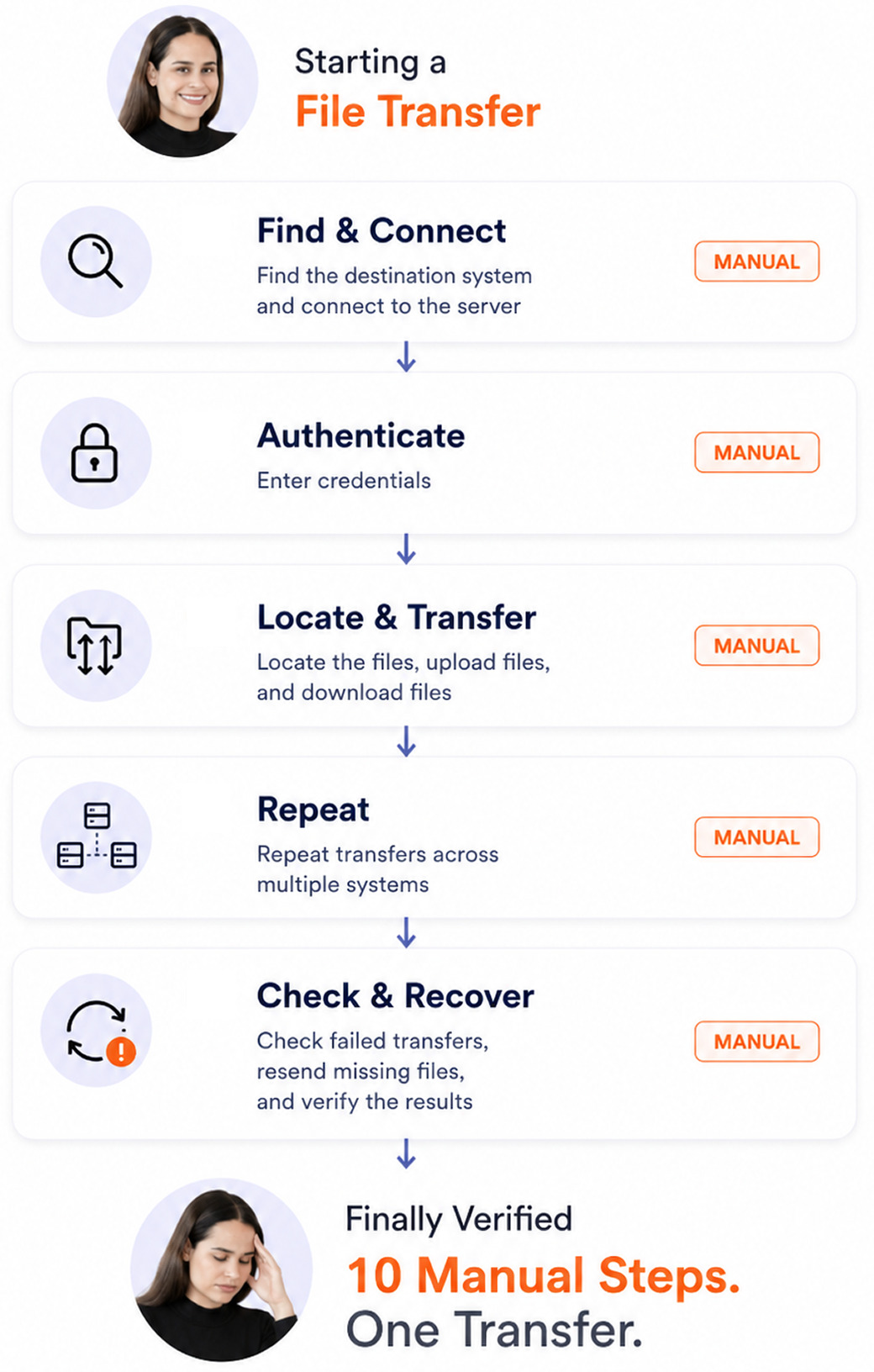
Most file transfers still require people to connect systems, locate files, initiate transfers, monitor failures, retry, and verify results.
Enterprise solutions add deployment, configuration, provisioning, and operational overhead before transfers even begin.
As systems and file volumes grow, manual file operations no longer scale. File movement must become autonomous.
Modern Infrastructure Is Already Automated.
Build Modern File Operations
Discover the next-generation file operations platform built for Cloud-Native, AI, Multi-Cloud, and Edge environments.