Getting Started
Core Concepts
Automatically transfer data and model files to the required systems
AI workflows use a wide range of files across multiple systems and environments, including raw data, preprocessing results, training data, model files, and inference results.
By connecting where each file is created with the systems that use it, you can transfer data to the next processing environment as soon as it is ready and route generated models and result files to where they are needed.
Data Source
     │
     ▼
Data Processing
     │
     ▼
AI Training
     │
     ▼
Model Output
     │
     ▼
Result Storage
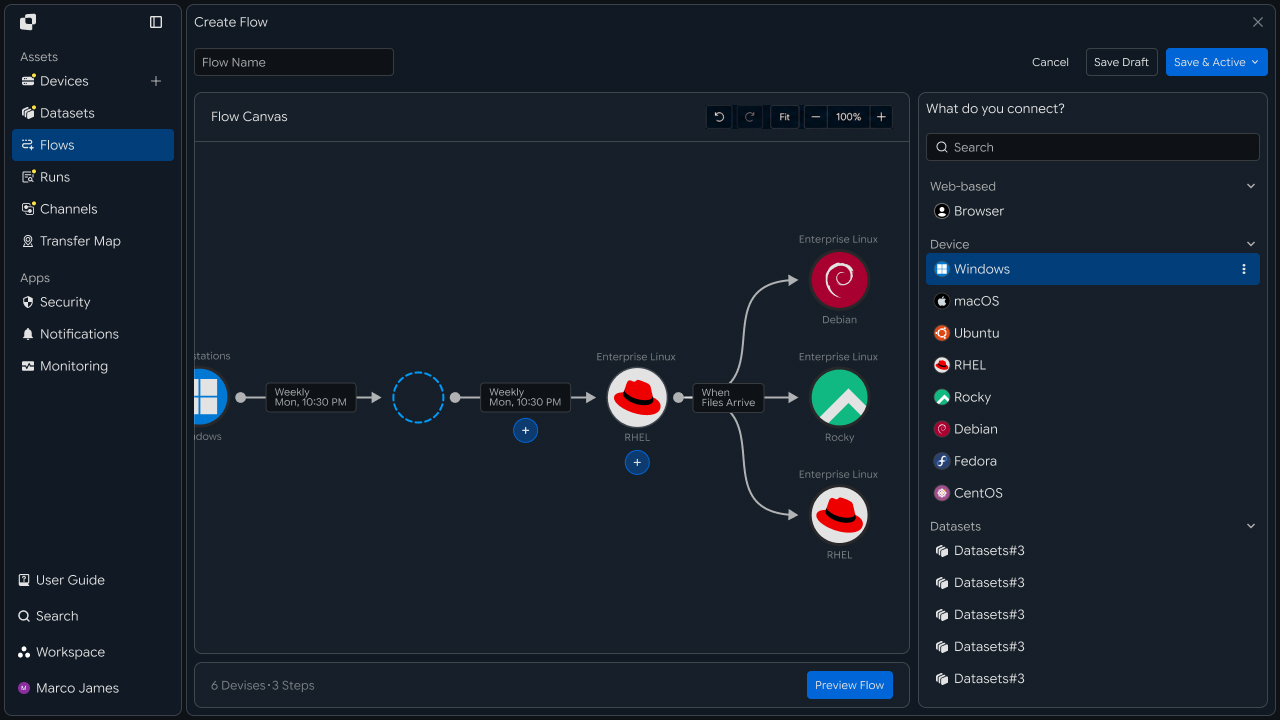
This configuration lets you manage AI data and model files according to the processing environment at each stage and automatically trigger the next task when files are ready.
Workflow Flow
Connect the entire process from data collection and processing to using the results
Collect data generated across multiple systems and transfer it to the required AI processing environment.
When data processing and training are complete, transfer the generated models and result files to the next system or storage environment for downstream use.
Data Generation
     │
     ▼
Data Collection
     │
     ▼
Preprocessing · AI Processing
     │
     ▼
Model Generation
     │
     ├──────────────┐
     ▼              ▼
Model Storage        Result Delivery
     │              │
     └──────┬───────┘
            ▼
         Next Task
Each stage can use files and processing results generated by the previous task as input for the next stage.
Automation Benefits
Reduce the repetitive large-file transfers and management tasks required at every stage
As data volumes and processing stages increase in AI workflows, the work required to prepare files and transfer them to the necessary systems also grows.
By configuring the next task to run automatically based on file creation and processing status, you can connect the file flow at each stage in a defined sequence.
| Category | Individual File Management | Workflow Automation |
|---|---|---|
| Data Collection | Check files on each system | Collect data from multiple systems in a single flow |
| Processing Environment Connection | Prepare files for the next system | Automatically transfer files to the required system based on processing conditions |
| Model Management | Check generated model files | Route models to the designated environment after they are generated |
| Result Utilization | Prepare processing results for the next task | Automatically connect result files to the next task |
This allows you to organize the flow of data, models, and result files by stage and manage the entire AI operation as a single file workflow.
IT Engineers
Build an automated workflow for AI data and model files
Data Collection
Bring data from multiple systems together into a single workflow
First, connect the multiple systems where data for AI processing is generated or stored to the workflow.
By configuring the file paths and collection targets for each system, you can consolidate data from multiple locations into a single processing flow for use in the next stage.
Source A ──┐
           │
Source B ──┼──→ Data Collection
           │
Source C ──┘
                  │
                  ▼
             AI Processing
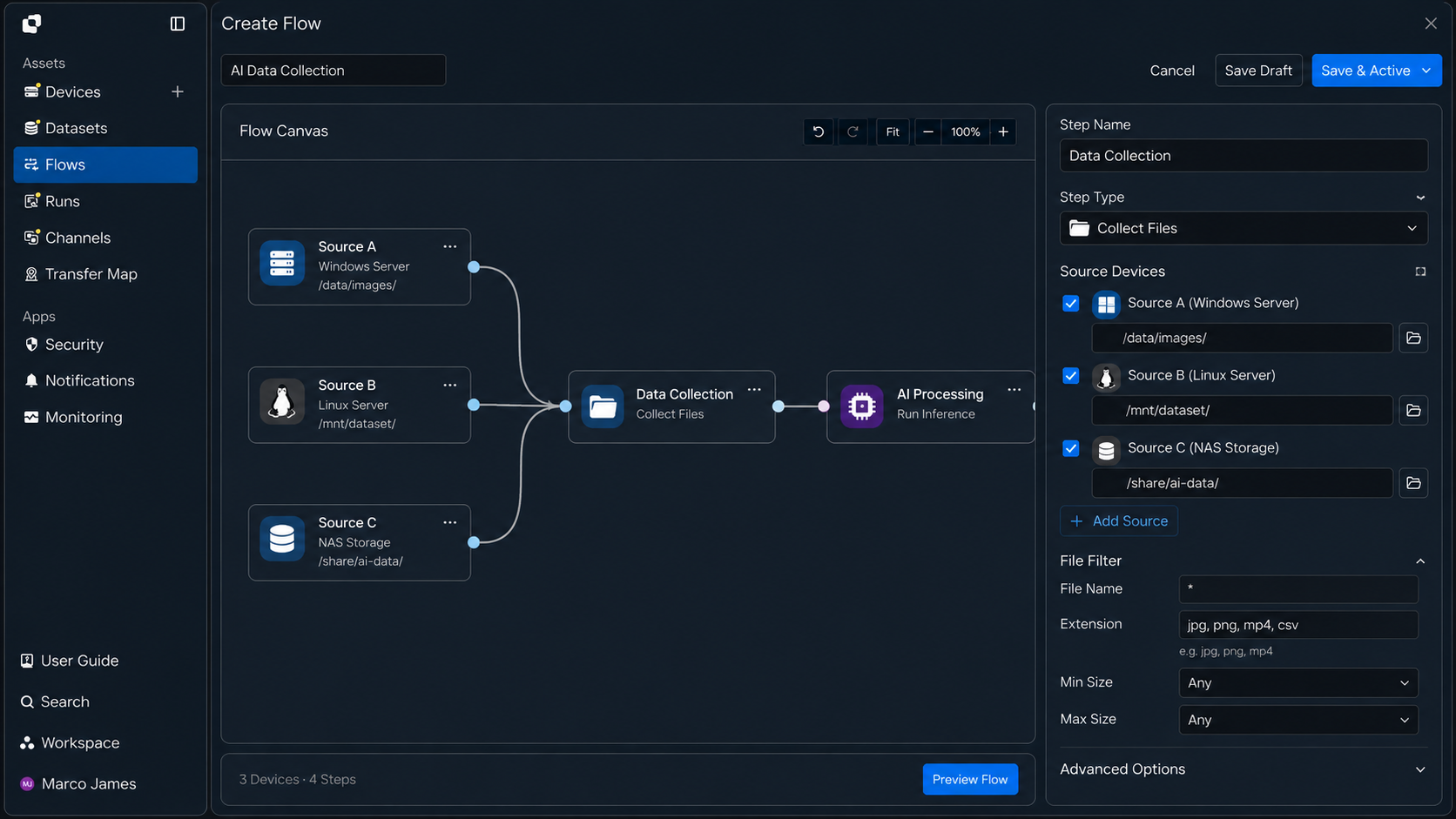
[Product UI: Flow Canvas screen connecting multiple Source systems and data folders to a single data collection task]
When needed, configure conditions such as file paths, names, and extensions to collect only the data required for AI processing.
Processing Connection
Transfer collected data to the required AI processing systems
Once collected data is ready, connect it to the AI processing systems that perform the next tasks, such as preprocessing, training, or inference.
Specify the system and file path for each processing stage, and configure the result files from the previous stage to become input for the next system.
Collected Data
       │
       ▼
Preprocessing
       │
       ▼
Training Server
       │
       ▼
Inference / Analysis
This configuration automatically transfers the files required at each AI processing stage to the prepared work environment.
Task Conditions
Run the next task based on data and processing status
Each workflow stage can be configured to start the next task when specified conditions are met, such as file creation, completed data collection, or completed processing.
For example, preprocessing can begin after data from multiple systems has been collected, and training can start when preprocessing results are generated.
Data Ready
    │
    ▼
Collection Complete
    │
    ▼
Start Processing
    │
    ▼
Processing Complete
    │
    ▼
Start Training
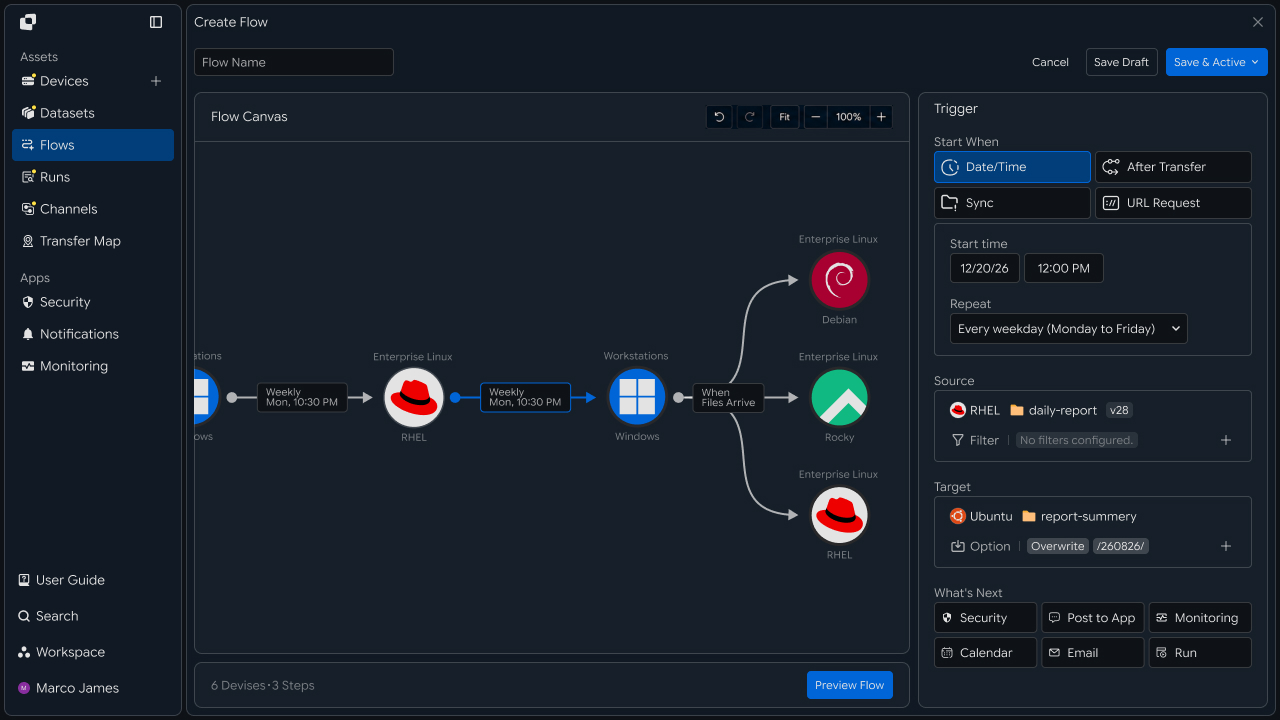
By connecting task conditions, you can execute everything from data collection and AI processing to model generation in sequence according to the processing status at each stage.
Result Transfer
Transfer generated models and processing results to the required systems
When training and processing are complete, transfer the generated model files and result data to the next environment.
Connect the locations where files will be used—such as model repositories, inference systems, validation environments, and business systems—and transfer each result to the appropriate destination.
AI Training
     │
     ▼
Model Generated
     │
 ┌───┴───────────┐
 ▼               ▼
Model Storage  Inference Server
                     │
                     ▼
                Result Output
                     │
                     ▼
               Target System
When a model or result file is used across multiple environments, connect destination-specific file flows to automatically extend delivery to every required work location.
Execution Management
Check the processing status of each stage, from data to models and results
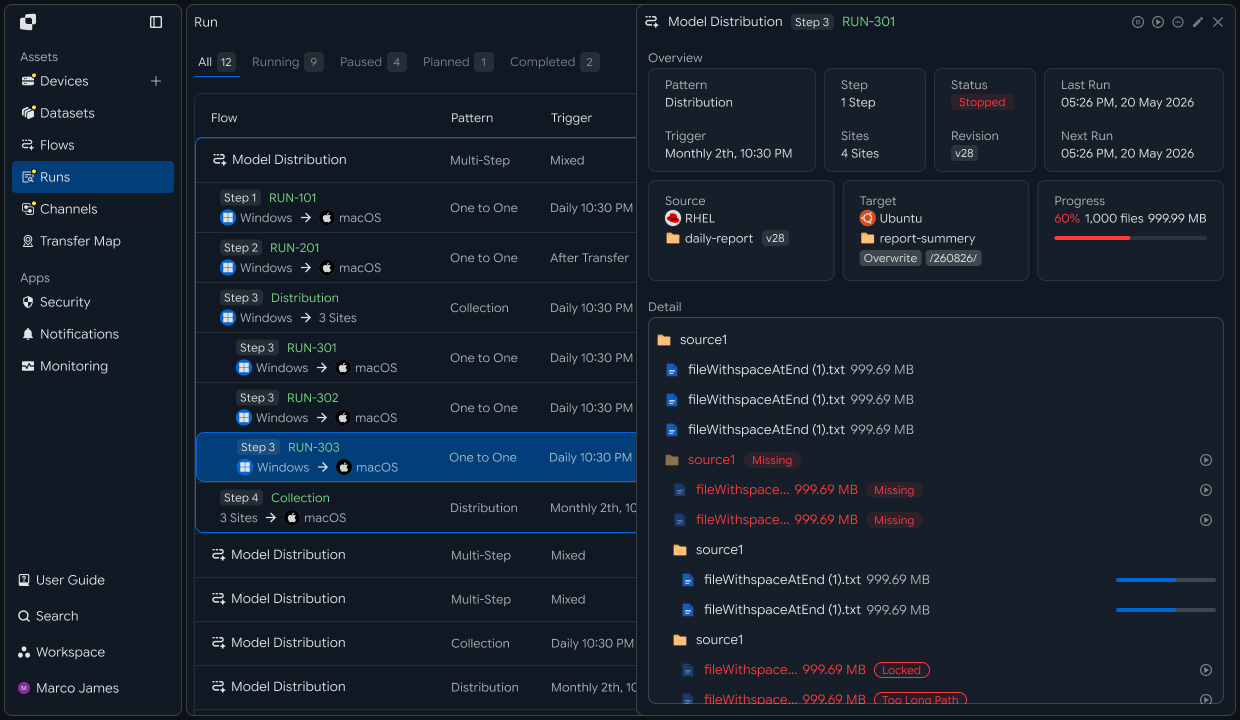
For an executed workflow, review both the overall flow and the task status at each stage.
You can check the processed files and progress at each stage of data collection, preprocessing, AI processing, model generation, and result transfer.
AI Workflow
     │
     ├── Data Collection   ✓
     │
     ├── Processing        ✓
     │
     ├── Model Training    ●
     │
     └── Result Transfer   ○
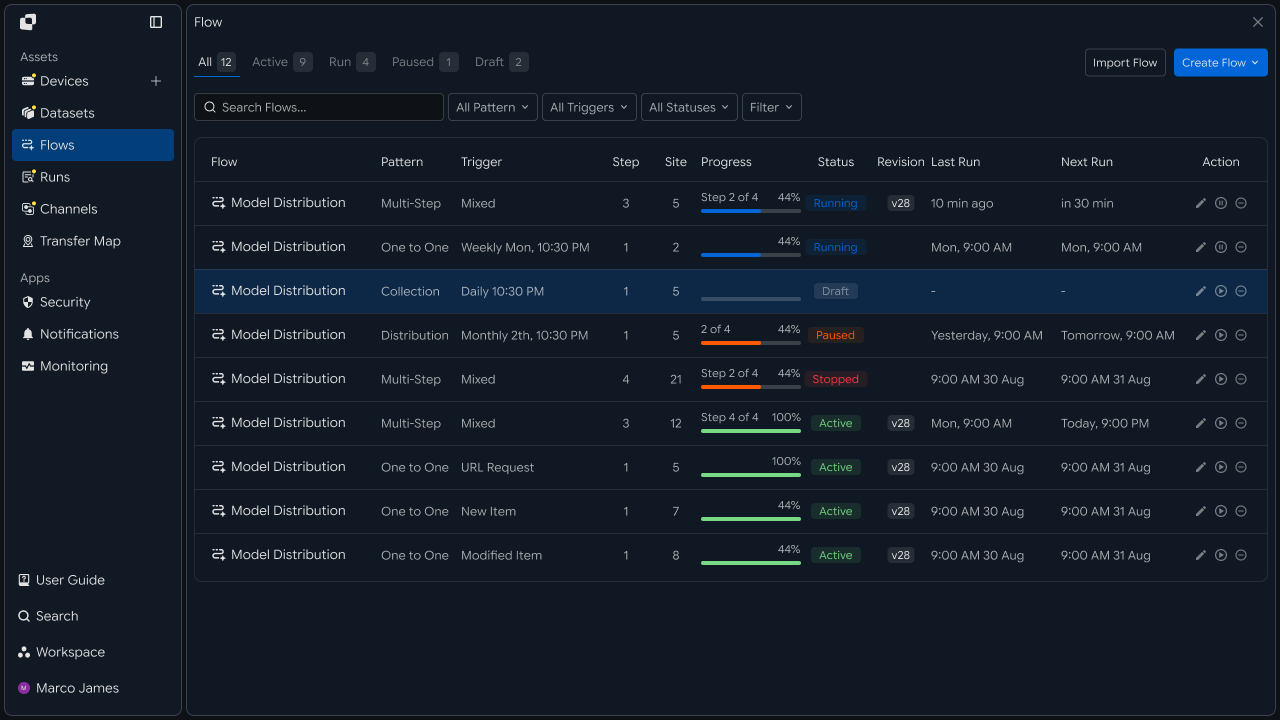
The main items to review are as follows.
| Review Item | Details |
|---|---|
| Stage | Current workflow stage being executed |
| Source | System and file location where the data was collected |
| Files | Number of processed files and total size |
| Progress | Processing progress for each stage |
| Target | Destination for model and result files |
| Status | Execution result for the overall workflow and each task |
This allows you to manage both the processing status of a specific stage and the overall AI file flow.
Exception Handling
Check transfer and processing status, then rerun the required stage
If a stage requires additional review during execution, use the task details and execution records to check the data status, system connection, and file transfer result.
You can review each workflow stage separately—from data collection through AI processing and result transfer—and rerun the required task.
Workflow Run
      │
      ▼
Stage Status
      │
 ┌────┴─────┐
 ▼          ▼
Completed   Check Required
                │
                ▼
           Run Details
                │
       ┌────────┼────────┐
       ▼        ▼        ▼
     Data     Device    Transfer
                │
                ▼
           Retry Stage
                │
                ▼
          Result Check
Developers
Distribute a dataset to multiple training nodes and collect results from each node into an archive system
Integration Preparation
Prepare shared request code and path conventions
import os
import requests

BASE_URL = os.getenv("INNORIX_BASE_URL", "https://app.innorix.com").rstrip("/")
TOKEN = os.environ["INNORIX_ACCESS_TOKEN"]
WORKSPACE_ID = os.getenv("INNORIX_WORKSPACE_ID")   # optional; falls back to the current workspace

STATUS_COMPLETE = 2
TERMINAL = {2, 4, 5, 9, 99}          # complete / error / cancelled / partial / failed
NOT_SUCCEEDED = {4, 5, 9, 99}


def api(method, path, body=None, params=None):
    headers = {
        "Content-Type": "application/json",
        "Authorization": f"Bearer {TOKEN}",
    }

    if WORKSPACE_ID:
        headers["x-workspace-id"] = WORKSPACE_ID

    response = requests.request(
        method, BASE_URL + path,
        headers=headers, json=body, params=params, timeout=30,
    )

    payload = response.json() if response.content else {}

    if not response.ok:
        raise RuntimeError(payload.get("message") or f"HTTP {response.status_code}")

    return payload.get("data")


def is_terminal(detail):
return detail.get("isTerminal", detail.get("status") in TERMINAL)import base64
import time
def encode_path(device_id, raw_path):
normalized = str(raw_path or "").replace("\\", "/")
token = base64.b64encode(normalized.encode("utf-8")).decode("ascii")
return f"{device_id}_ino_{token}"
def now_iso():
return time.strftime("%Y-%m-%dT%H:%M:%S.000Z", time.gmtime())Determine the transfer status using the values below. There are five terminal states, and the successful state is Complete (2).
| Status Value | Meaning | Terminal |
|---|---|---|
| 2 | Complete | Yes |
| 4 | Error | Yes |
| 5 | Cancelled | Yes |
| 9 | Partially Complete | Yes |
| 99 | Failed | Yes |
| 1 · 6 · 12 · 13 | Started · Transferring · Synchronizing · Receiving | No |
Path Rules
Include the dataset version and run identifier in the path
As runs accumulate, it becomes difficult to tell which results came from which data. Defining path rules in a function prevents string assembly from being scattered throughout the code.
DATA_ROOT = "/data"
WORK_ROOT = "/work"
ARCHIVE_ROOT = "/archive"


# source dataset on the storage device
def dataset_path(dataset, version):
    return f"{DATA_ROOT}/datasets/{dataset}/{version}"


# path the training job reads on the node
def node_input_path(dataset, version, run_id):
    return f"{WORK_ROOT}/{run_id}/input/{dataset}/{version}"


# path the node writes its results to
def node_output_path(run_id):
    return f"{WORK_ROOT}/{run_id}/output"


# archive path where results are collected
def archive_path(run_id):
    return f"{ARCHIVE_ROOT}/runs/{run_id}"


run_id = f"r-{time.strftime('%Y%m%d-%H%M%S')}"
Putting the run identifier at the beginning of the path makes it easy to delete or move results by run. Using only a date can mix two runs performed on the same day, while using only the dataset name makes older results indistinguishable after a version update.
Data Distribution
Send the dataset to multiple nodes and confirm that every node received it
One transfer goes to one destination. If there are multiple nodes, there must be multiple transfers.
def deploy(storage, nodes, dataset, version, run_id):
    source_path = dataset_path(dataset, version)
    target_path = node_input_path(dataset, version, run_id)

    return {
        node: api("POST", "/api/transfers/manual", {
            "sourceDevice": storage,
            "targetDevice": node,
            "targetPath": target_path,
            "sourcePaths": [source_path],
            "sendAllFolder": True,
            "checkIntegrity": True,
            "transferOptions": {"target-action": "overwrite"},
        })["monitorId"]
        for node in nodes
}def wait(monitor_id, timeout=3600, interval=3):
deadline = time.time() + timeout
while time.time() < deadline:
detail = api("GET", f"/api/transfers/{monitor_id}")
if is_terminal(detail):
return detail
time.sleep(interval)
raise TimeoutError(monitor_id)
def failed_files(monitor_id):
result = api("GET", f"/api/transfers/{monitor_id}/files", params={
"state": "any", "size": 500,
}) or {}
return [r for r in (result.get("children") or [])
if r.get("status") in NOT_SUCCEEDED]
def retry_failed(monitor_id):
rows = failed_files(monitor_id)
if not rows:
return 0
api("POST", f"/api/transfers/{monitor_id}/retry", {
"filesRetry": [
{"filePath": r["sourceFilePath"], "isDir": bool(r.get("isFolder"))}
for r in rows
]
})
return len(rows)Do not start training if even one node fails to receive the data. Do not stop at the first failure; check every node to determine the retry scope.
transfers = deploy(STORAGE, NODES, "imagenet", "v3", run_id)
results = {node: wait(mid) for node, mid in transfers.items()}

incomplete = [n for n, d in results.items() if d["status"] != STATUS_COMPLETE]

if incomplete:
    raise RuntimeError(f"nodes not fully delivered: {', '.join(incomplete)}")
Use overwrite as the destination policy. If you use numbering, copies accumulate on the nodes and the training code can no longer determine which file to read.
Delta Transfer
Send only data that changed since the last distribution
monitor_id = api("POST", "/api/transfers/manual", {
    "sourceDevice": STORAGE,
    "targetDevice": node,
    "targetPath": node_input_path("imagenet", "v3", run_id),
    "sourcePaths": [dataset_path("imagenet", "v3")],
    "sendAllFolder": True,
    "incremental": True,
    "transferOptions": {"target-action": "overwrite"},
})["monitorId"]

detail = wait(monitor_id)
print(f"transferred {detail['fileCount']} files, {detail['totalSize']} bytes")
This option is disabled by default. Delta calculation is performed by the agent on each node, and only files added or modified since the last distribution are transferred.
Always use overwrite for incremental transfers. With numbering, changed files accumulate with numbered names and the training code continues to read the old files.
Integrity Verification
Verify that the transferred data matches the source
Integrity verification has two stages. Start verification with POST /api/transfers/{monitorId}/verification, then poll the result with GET while the server processes the request.
def verify(monitor_id, timeout=1800, interval=10):
    api("POST", f"/api/transfers/{monitor_id}/verification", {})

    deadline = time.time() + timeout

    while time.time() < deadline:
        result = api("GET", f"/api/transfers/{monitor_id}/verification") or {}

        if result.get("verified"):
            return result

        time.sleep(interval)

    raise TimeoutError(f"verification: {monitor_id}")


result = verify(monitor_id)

if result["sourceFileCount"] != result["targetFileCount"]:
    raise RuntimeError("file counts differ - part of the transfer is missing")

if not result["checksumMatched"]:
    for row in result.get("mismatchedFiles") or []:
print("mismatch:", row)| Response Item | Details |
|---|---|
checksumAlgorithm | Checksum algorithm used |
sourceFileCount · targetFileCount | Number of files at the source and destination |
checksumMatched | Whether the checksums match |
mismatchedCount · mismatchedFiles | Number and list of mismatches |
If the file counts differ, the transfer is incomplete. If the counts match but mismatches remain, the file contents are corrupted. The former can be resolved by retransmission, while the latter requires investigating the cause.
Result Collection
Collect output from each node into an archive system without overwriting other results
All nodes use the same names, such as model.pt. If you collect them into a single path, they overwrite one another.
def collect(nodes, archive, run_id):
    transfers = {}

    for node in nodes:
        target_path = f"{archive_path(run_id)}/{node}"

        transfers[node] = api("POST", "/api/transfers/manual", {
            "sourceDevice": node,
            "targetDevice": archive,
            "targetPath": target_path,
            "sourcePaths": [node_output_path(run_id)],
            "sendAllFolder": True,
            "checkIntegrity": True,
            "transferOptions": {"target-action": "overwrite"},
        })["monitorId"]

return transfers/archive/runs/r-20260901-0200/
dev-gpu-01/
model.pt
metrics.json
dev-gpu-02/
model.pt
metrics.json
Including the node identifier in the destination path is the simplest solution. Avoiding collisions with numbering makes it impossible to tell which node produced model_1.pt.
Collect metrics and logs together with the model files. The cause of a failed training run is recorded in the logs, which can be lost when a node is decommissioned.
Connect Distribution and Collection
Automatically start collection when distribution is complete
The previous code waits for completion before the client calls the next step. If training takes several hours, the process must remain running the entire time, and collection will not occur if it stops.
import uuid

flow_id = str(uuid.uuid4())


def build_step(name, source, source_path, target, target_path,
               step, trigger_id=None, webhook=None):
    schedule = {
        "type": "none",
        "startDateType": "now",
        "startDate": now_iso(),
        "timezone": "Asia/Seoul",
    }

    if trigger_id:
        schedule["triggerAutomation"] = {"value": trigger_id}

    body = {
        "name": name,
        "flowName": name,
        "flowId": flow_id,
        "transferType": "normal",
        "timezone": "Asia/Seoul",
        "step": step,
        "isUpcoming": False,
        "details": [
            {
                "senderId": source,
                "receiverId": target,
                "sourceItem": [
                    {
                        "hash": encode_path(source, source_path),
                        "filePath": source_path,
                        "isDir": True,
                    }
                ],
                "targetPath": encode_path(target, target_path),
                "step": step,
                "transferOptions": {
                    "noSchedule": False,
                    "target-action": "overwrite",
                    "send-fileoption": {},
                },
            }
        ],
        "schedules": [schedule],
    }

    if webhook:
        body["processors"] = [{
            "category": "run",
            "type": "http",
            "config": {"url": webhook, "method": "POST"},
        }]

    return body


deploy_id = api("POST", "/api/automations", build_step(
    f"deploy imagenet:v3", STORAGE, dataset_path("imagenet", "v3"),
    node, node_input_path("imagenet", "v3", run_id),
    step=1, webhook=TRAIN_HOOK))["automationId"]

collect_id = api("POST", "/api/automations", build_step(
    f"collect {run_id}", node, node_output_path(run_id),
    ARCHIVE, f"{archive_path(run_id)}/{node}",
    step=2, trigger_id=deploy_id))["automationId"]
There are four requirements that must always be followed when creating an automation request.
| Item | How to Configure |
|---|---|
isUpcoming | Must be false. The server default of true ignores the schedule in the request and replaces it with a one-time five-minute schedule. A stage with triggerAutomation forces the value to false, so you only need to set it directly on the first stage without a trigger |
step | Set it in both the top level and details. It indicates the hop position within the workflow |
sourceItem | Include both hash (the path token) and filePath (the plain-text path) |
syncType | Set it inside transferOptions. 1 is one-way and 2 is two-way |
Registration succeeds even if all four items are omitted, but the behavior changes at execution time. If you registered a recurring schedule and it runs only once, check isUpcoming first.
After sending the two requests, the application's work is complete. Save the identifier for each stage with the execution record so you can check the status later.
Training Trigger and Retransmission
Trigger training when data arrives and retransmit only failed files
The request arrives after the transfer is complete, and the endpoint that receives it processes the request as follows.
def on_train_hook(payload):
    monitor_id = payload.get("monitorId")

    if monitor_id:
        detail = wait(monitor_id)

        if detail["status"] != STATUS_COMPLETE:
            return abort_run(payload)

    start_training(payload)
Review the results for each run through the execution history.
runs = api("GET", f"/api/automations/{deploy_id}/executions") or []
latest = runs[0] if runs else None

if latest and latest["status"] != STATUS_COMPLETE:
    print("deploy failed:", latest["monitorId"],
          "retried", retry_failed(latest["monitorId"]), "files")
When the dataset is large, retransmitting the entire dataset because of a few files is a significant waste.
| Review Item | Details |
|---|---|
| Path | Dataset version and run identifier |
| Distribution | Whether delivery to each node was completed |
| Verification | Whether file counts and checksums match |
| Collection | Destination path for results from each node |
| Workflow | Run and status for each stage |
| Retransmission | Failed files and processing results |