Getting Started
Core Concepts
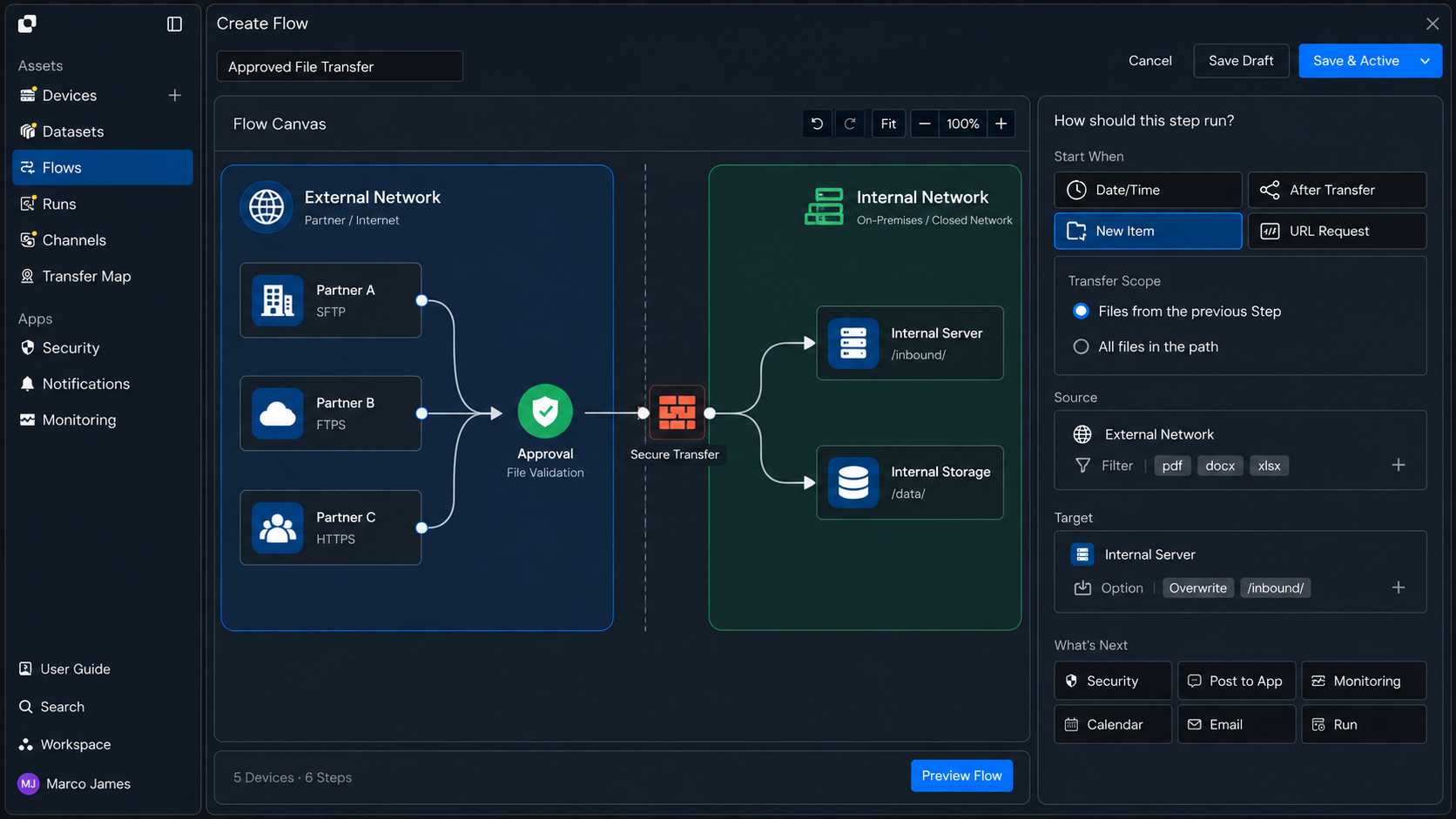
Import and export approved files through predefined paths and procedures
In isolated network environments, such as secure internal networks and external networks, manage file transfer directions, destination paths, and processing criteria according to operational requirements.
File import and export workflows can be configured so users submit files for transfer, which then pass through the configured approval and validation procedures before being transferred to the designated environment.
For example, files intended for use in an external environment can be imported into a secure network, while output files generated during internal operations can be exported externally through an approval process.
Transfer Flow
Connect the entire process from file request and approval to validation and final import or export
File transfers in an air-gapped environment follow a defined procedure, from selecting files to applying them to the destination environment.
File Request
   ↓

Confirm Transfer Destination
   ↓

Apply Approval Criteria
   ↓

File Validation
   ↓

Import or Export
   ↓

Record Transfer Result
Apply the required approval and validation criteria based on the direction of the file transfer, and review the processed results through execution records.
This makes it possible to configure file flows between internal and external environments according to operational requirements while managing the status and results of each transfer.
Operational Benefits
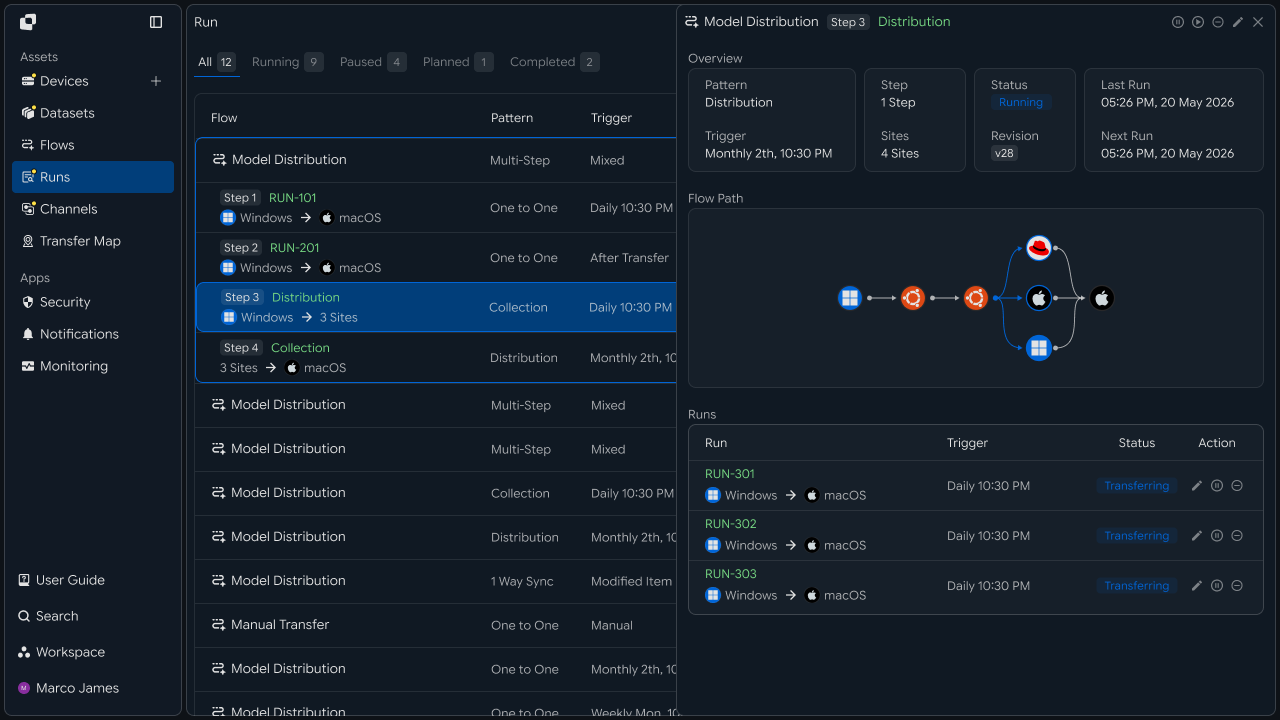
Manage file movement, validation, and processing history as a single workflow
In an air-gapped environment, operations need a workflow that not only transfers files but also makes it clear which files were processed and in which direction.
By configuring file import and export tasks, you can manage file requests, approval results, validation information, and transfer status within a single execution workflow.
| Management Item | File Import/Export Workflow |
|---|---|
| Transfer Request | Manage requests based on users and operational requirements |
| Transfer Direction | Manage import and export paths between internal and external networks |
| Approval Processing | Apply approval workflows according to configured criteria |
| File Validation | Associate validation results with transfer tasks |
| Execution Records | Review everything from the initial request to the final processing result |
With this configuration, you can move beyond managing file imports and exports separately and establish an operational workflow that connects file requests, validation, transfers, and result confirmation.
IT Engineers
Environment Setup
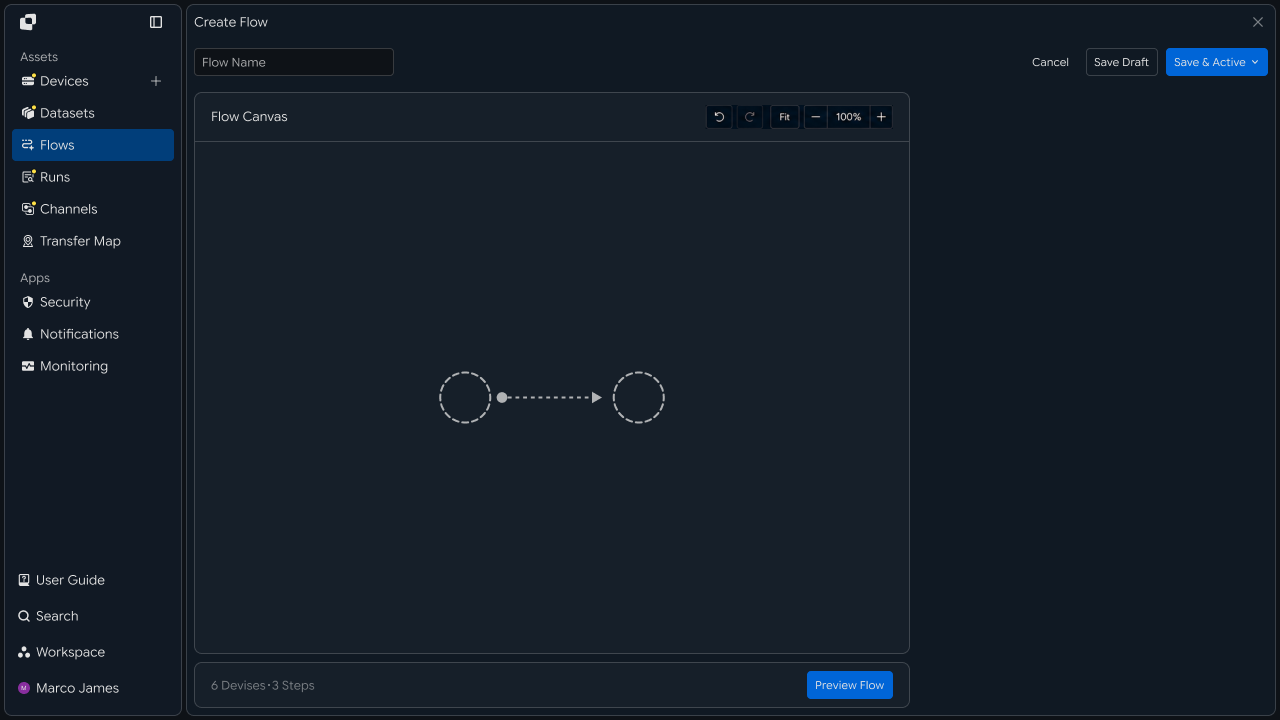
Connect transfer paths between internal and external networks
First, connect the network environments and transfer devices used to import or export files.
Define the file paths and destination locations for each environment, then configure the import and export flows based on the direction in which files are processed.
External Environment
    │
    │ Import
    ▼
┌──────────┐
│ Approval / Validation │
└──────────┘
    │
    ▼
Internal Environment
Export tasks connect files generated in the internal environment to the external environment according to the applicable approval and validation criteria.
Internal Environment
    │
    │ Export
    ▼
┌──────────┐
│ Approval / Validation │
└──────────┘
    │
    ▼
External Environment
Approval and Validation Settings
Configure processing procedures based on files, users, and operational requirements
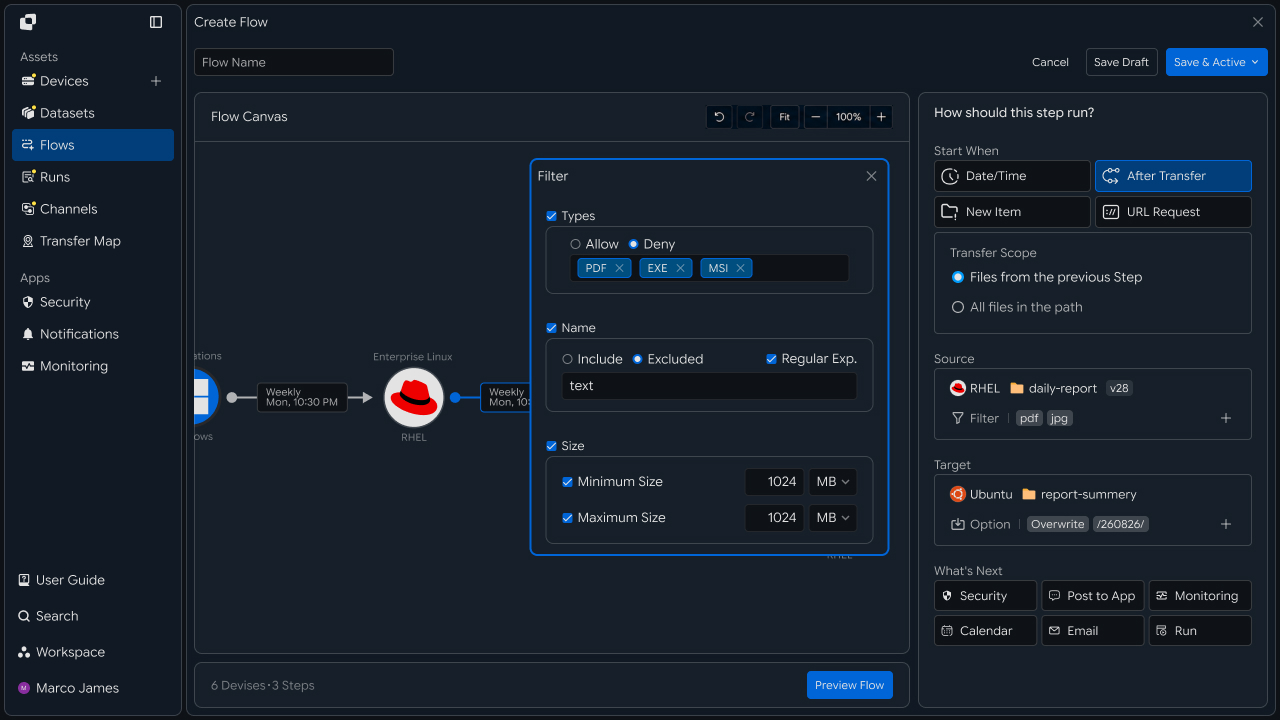
For file import and export tasks, define which files are processed and according to which criteria.
Build approval workflows based on factors such as file type, user, business purpose, and transfer direction, and connect file validation tasks when needed.
For example, files with specific extensions can be configured to require an additional approval procedure, or the next step can be triggered only after approval by a designated business owner.
Transfer Request
   │
    ├── Check Approval Criteria
   │
   ▼
Approval Processing
   │
   ▼
File Validation
   │
   ▼
Execute Transfer
Import and Export Flow
Apply files to the designated environment based on approval and validation results
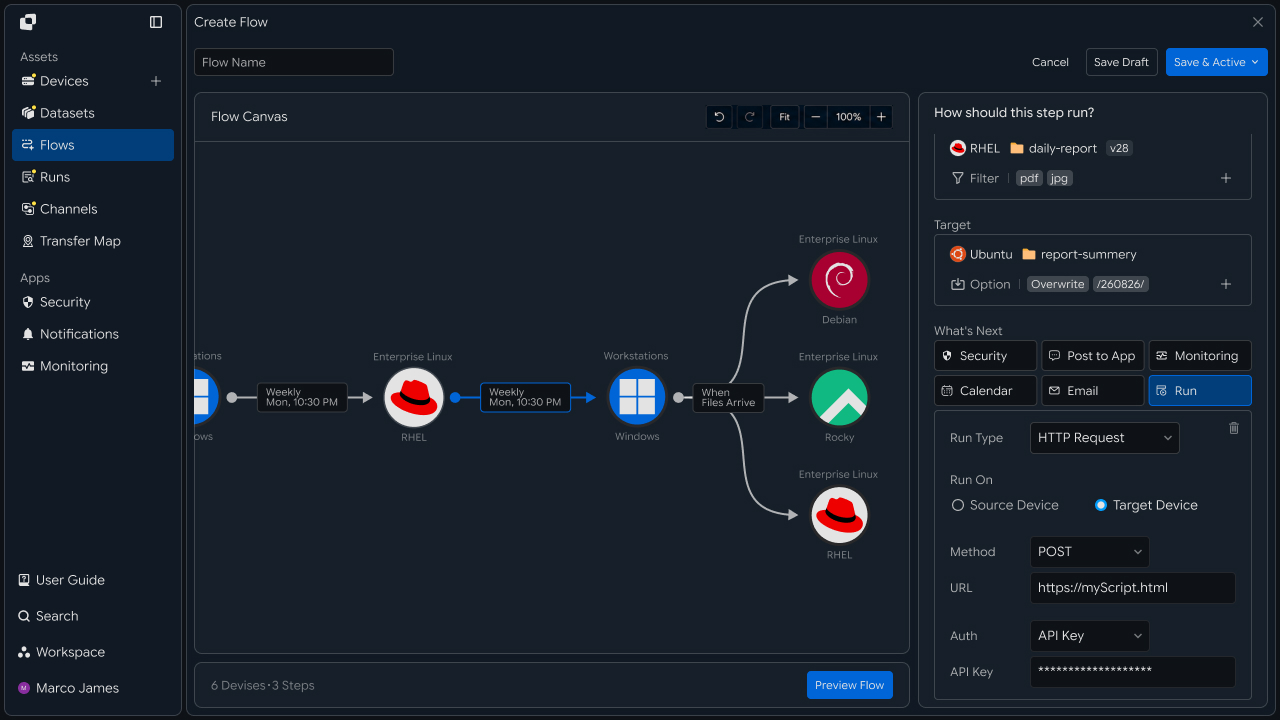
After configuring the transfer environment and processing criteria, build the workflow so approved files are imported or exported through the designated paths.
For both import and export, you can specify the required destination environment and storage location, while managing file processing results in a single execution record.
Import Request ──→ Approval ──→ Validation ──→ Store on Internal Network

Export Request ──→ Approval ──→ Validation ──→ Store on External Network
Although the two flows are separated by transfer direction and destination path, approval, validation, and execution results can be managed under the same operational criteria.
Review History
Manage everything from the initial request to the final transfer result through execution records
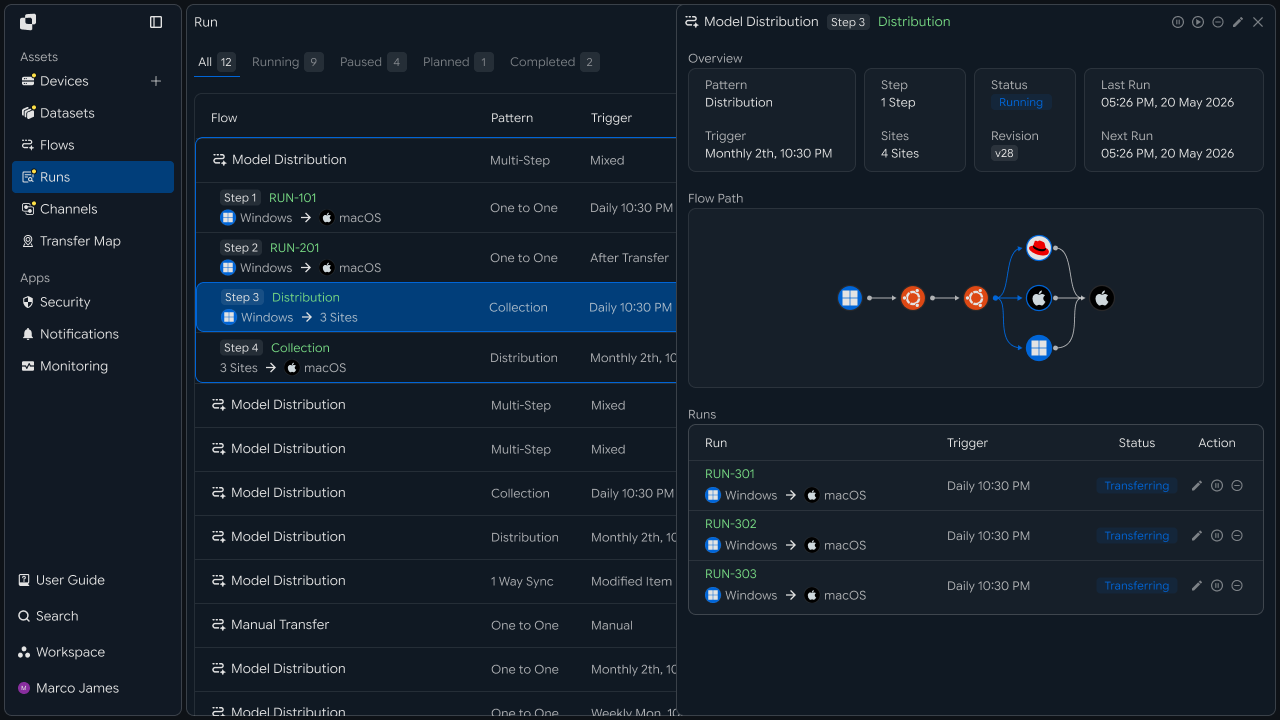
When an import or export task runs, review the request details, approval result, validation status, and file processing result in the execution record.
Each task can manage the following information together.
| Review Item | Details |
|---|---|
| Request Details | Requesting user and files |
| Transfer Direction | Import or export |
| Approval Result | Approval status |
| Validation Result | File inspection and processing result |
| Transfer Status | Current progress and completion result |
| Execution Record | Processing time and complete history for each task |
Request
   ↓

Approval
   ↓

Validation
   ↓

Transfer
   ↓

Completed
This allows you to trace, at the execution level, which procedures a specific file passed through and which environment it was ultimately processed in.
Security Operations
Manage file flows based on access scope and transfer policies
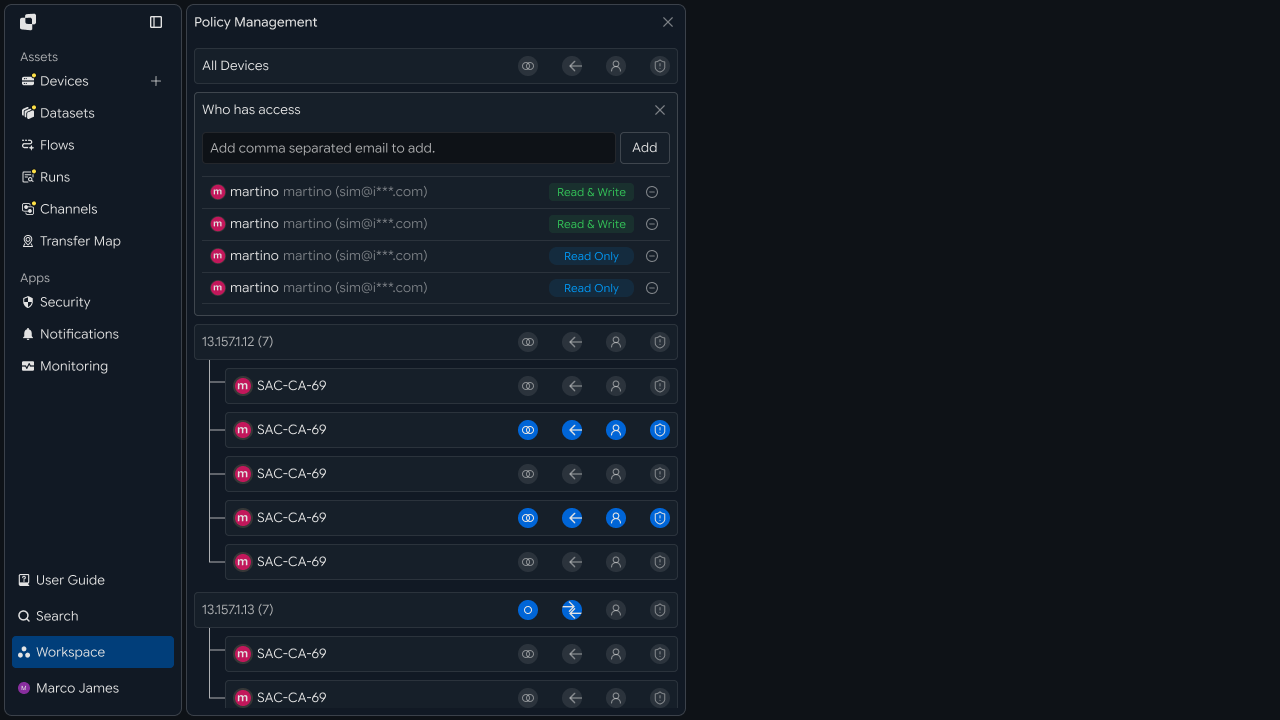
During operations, manage access scopes for users and devices, transferable files and paths, and the applicable approval and validation criteria together.
When the operating environment or policies change, adjust the relevant policies and configure the updated criteria to apply to subsequent import and export tasks.
| Management Area | Operational Criteria |
|---|---|
| Users | Scope for submitting file requests and running tasks |
| Devices | Transfer environments that can be connected |
| Files | Processing targets and file types |
| Paths | Import and export destination locations |
| Approval | Processing procedures for each business workflow |
| Validation | File inspection and result criteria |
Operational Response
Review processing status and rerun tasks when necessary
For tasks that require review based on their execution results, check the processing details using the import or export direction, approval status, validation result, connection status, and destination path.
Review Execution Record
      ↓

Review Processing Stage
      ↓

Check Approval, Validation, and Connection Status
      ↓

Adjust the Environment or Policy
      ↓

Rerun the Task
      ↓

Confirm the Final Result
After rerunning the task, use the new execution record to confirm that the file was successfully applied to the designated environment.
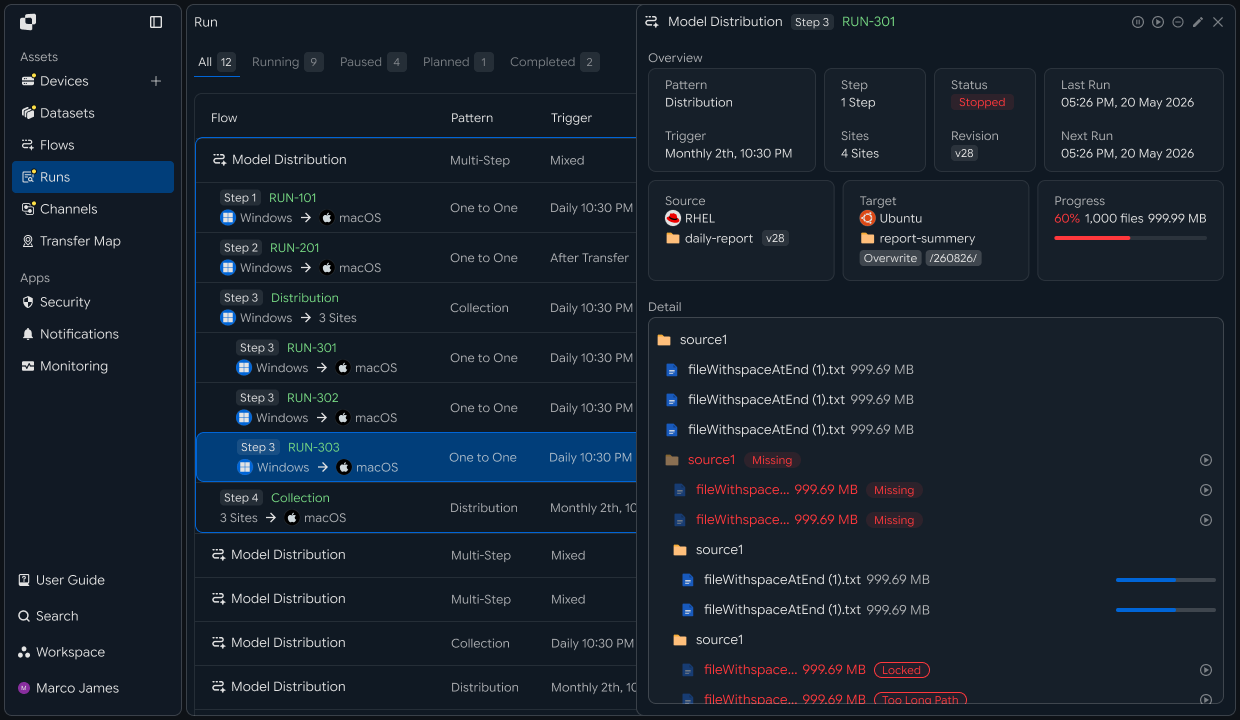
With this configuration, you can connect file request → approval → validation → import/export → execution history management in an air-gapped environment as a single workflow. By managing the processing criteria and results for each stage together, you can establish a controlled file transfer operation between internal and external environments.
Developers
Connect import and export requests through approval, inspection, and transfer stages while retaining a complete history
Integration Preparation
Separate clients by network and prepare transfer status values
import os
import requests

BASE_URL = os.getenv("INNORIX_BASE_URL", "https://app.innorix.com").rstrip("/")
TOKEN = os.environ["INNORIX_ACCESS_TOKEN"]
WORKSPACE_ID = os.getenv("INNORIX_WORKSPACE_ID")   # optional; falls back to the current workspace

STATUS_COMPLETE = 2
TERMINAL = {2, 4, 5, 9, 99}          # complete / error / cancelled / partial / failed
NOT_SUCCEEDED = {4, 5, 9, 99}


def api(method, path, body=None, params=None):
    headers = {
        "Content-Type": "application/json",
        "Authorization": f"Bearer {TOKEN}",
    }

    if WORKSPACE_ID:
        headers["x-workspace-id"] = WORKSPACE_ID

    response = requests.request(
        method, BASE_URL + path,
        headers=headers, json=body, params=params, timeout=30,
    )

    payload = response.json() if response.content else {}

    if not response.ok:
        raise RuntimeError(payload.get("message") or f"HTTP {response.status_code}")

    return payload.get("data")


def is_terminal(detail):
    return detail.get("isTerminal", detail.get("status") in TERMINAL)
Determine the transfer status using the values below. There are five terminal states, and the successful state is Complete (2).
| Status Value | Meaning | Terminal |
|---|---|---|
| 2 | Complete | Yes |
| 4 | Error | Yes |
| 5 | Cancelled | Yes |
| 9 | Partially Complete | Yes |
| 99 | Failed | Yes |
| 1 · 6 · 12 · 13 | Started · Transferring · Synchronizing · Receiving | No |
If you use separate workspaces for the internal and external networks, specify the workspace identifier for each request. Keep the clients separate so code on one side cannot access resources on the other.
def client_for(workspace_id):
    def call(method, path, body=None, params=None):
        headers = {
            "Content-Type": "application/json",
            "Authorization": f"Bearer {TOKEN}",
            "x-workspace-id": workspace_id,
        }

        response = requests.request(method, BASE_URL + path, headers=headers,
                                    json=body, params=params, timeout=30)

        payload = response.json() if response.content else {}

        if response.status_code == 403:
            raise PermissionError(f"{workspace_id}: {path}")

        if not response.ok:
            raise RuntimeError(payload.get("message"))

        return payload.get("data")

    return call


external = client_for(EXTERNAL_WORKSPACE)   # external network
internal = client_for(INTERNAL_WORKSPACE)   # internal network
If you specify a workspace without access permission, 403 is returned. Handling this as a separate exception allows you to distinguish policy violations from general errors in your records.
Register a Request
Create transfer requests as operational data and validate paths
Import and export differ only in direction; the procedure is the same. Handling requests through a single structure lets you share approval and validation logic.
import uuid


def create_request(user_id, direction, files, purpose):
    request_id = str(uuid.uuid4())

    db.insert("transfer_requests", {
        "id": request_id,
        "userId": user_id,
        "direction": direction,          # "import" or "export"
        "files": files,
        "purpose": purpose,
        "state": "pending",
    })

    return request_id
Checking that the files actually exist when the request is created helps prevent failures during execution after approval.
def validate_request(call, source_id, target_id, files, target_path):
    # sourceItems reads filePath, not path
    result = call("POST", "/api/transfers/validate-path", {
        "sourceId": source_id,
        "targetId": target_id,
        "sourceItems": [{"filePath": p} for p in files],
        "targetPath": target_path,
    }) or {}

    if result.get("invalidSourcePaths"):
        raise ValueError(f"missing source paths: {result['invalidSourcePaths']}")

    if result.get("validTargetPath") is False:
        raise ValueError(f"target path not found: {target_path}")

return result| Record Item | Details |
|---|---|
userId | Requesting user |
direction | Import or export |
files | Files and paths to transfer |
purpose | Business purpose |
state | Current processing stage |
Approval Integration
Use results from the approval system as conditions for transfer execution
When an approval result is received, pass the request to the next stage.
def on_approval(request_id, approved, approver):
    request = db.get("transfer_requests", request_id)

    db.update("transfer_requests", request_id, {
        "state": "approved" if approved else "rejected",
        "approver": approver,
    })

    if not approved:
        return None

    return send_for_scan(request)


def ensure_approved(request):
    if request["state"] not in ("approved", "validated"):
        raise PermissionError(f"request not approved: {request['id']}")
To prevent unapproved requests from being executed, the function that creates the transfer must always check the request status first.
Scan Integration
Send files to the scan folder first and wait for the result
File scanning is performed by a separate system. Send files to the scan target folder first, then use the result to determine the next step.
def send_for_scan(request, scan_device, scan_path):
    ensure_approved(request)

    transfer = external("POST", "/api/transfers/manual", {
        "sourceDevice": request["sourceDevice"],
        "targetDevice": scan_device,
        "targetPath": f"{scan_path}/{request['id']}",
        "sourceItem": [{"path": p, "isDir": False} for p in request["files"]],
        "sendAllFolder": False,
        "checkIntegrity": True,
        "transferOptions": {"target-action": "numbering"},
    })

    db.update("transfer_requests", request["id"], {
        "scanMonitorId": transfer["monitorId"],
        "state": "scanning",
    })

    return transfer["monitorId"]
The agent marks the transfer as complete only after file size changes have stopped and writing has finished. This prevents the scanning system from opening files that are still being written and producing incorrect results.
Use the verification API to confirm the integrity of the transfer itself.
def verify(monitor_id, timeout=1800, interval=10):
    api("POST", f"/api/transfers/{monitor_id}/verification", {})

    deadline = time.time() + timeout

    while time.time() < deadline:
        result = api("GET", f"/api/transfers/{monitor_id}/verification") or {}

        if result.get("verified"):
            return result

        time.sleep(interval)

    raise TimeoutError(monitor_id)
Execute Import/Export
Send only files that pass inspection to the destination network
def execute(request, scan_result):
    if not scan_result.get("passed"):
        db.update("transfer_requests", request["id"], {"state": "blocked"})
        return None

    verification = verify(request["scanMonitorId"])

    if not verification.get("checksumMatched"):
        db.update("transfer_requests", request["id"], {"state": "corrupted"})
        return None

    transfer = internal("POST", "/api/transfers/manual", {
        "sourceDevice": request["scanDevice"],
        "targetDevice": request["targetDevice"],
        "targetPath": request["targetPath"],
        "sourcePaths": [f"{request['scanPath']}/{request['id']}"],
        "sendAllFolder": True,
        "checkIntegrity": True,
        "transferOptions": {"target-action": "numbering"},
    })

    db.update("transfer_requests", request["id"], {
        "monitorId": transfer["monitorId"],
        "state": "transferring",
    })

    return transfer["monitorId"]
Recording the status at each stage makes it possible to identify later where processing stopped.
| Status | Meaning |
|---|---|
pending | Awaiting approval |
approved | Approved |
scanning | Scan in progress |
blocked | Failed inspection |
corrupted | Integrity mismatch |
transferring | Transferring to the destination network |
done · failed | Final result |
Confirm the Result
Apply the transfer result to the request status
def wait(monitor_id, timeout=3600, interval=3):
    deadline = time.time() + timeout

    while time.time() < deadline:
        detail = api("GET", f"/api/transfers/{monitor_id}")

        if is_terminal(detail):
            return detail

        time.sleep(interval)

    raise TimeoutError(monitor_id)


def failed_files(monitor_id):
    result = api("GET", f"/api/transfers/{monitor_id}/files", params={
        "state": "any", "size": 500,
    }) or {}

    return [r for r in (result.get("children") or [])
            if r.get("status") in NOT_SUCCEEDED]


def retry_failed(monitor_id):
    rows = failed_files(monitor_id)

    if not rows:
        return 0

    api("POST", f"/api/transfers/{monitor_id}/retry", {
        "filesRetry": [
            {"filePath": r["sourceFilePath"], "isDir": bool(r.get("isFolder"))}
            for r in rows
        ]
    })

return len(rows)def finalize(request_id):
request = db.get("transfer_requests", request_id)
detail = internal("GET", f"/api/transfers/{request['monitorId']}")
if not is_terminal(detail):
return None
succeeded = detail["status"] == STATUS_COMPLETE
db.update("transfer_requests", request_id, {
"state": "done" if succeeded else "failed",
"finalStatus": detail["status"],
})
return succeededPartial completion (9) and cancellation (5) are also terminal states. Treating every terminal state as a success would record a request as complete even when only some files were transferred.
Query History
Review import and export records for audit requirements
Transfer history provides the basis for confirming which files were processed and in which direction.
from datetime import datetime, timedelta, timezone


def paginate(call, path, params=None, limit=200, max_pages=50):
    query = dict(params or {})
    query["limit"] = limit
    cursor = None

    for _ in range(max_pages):
        if cursor:
            query["cursor"] = cursor

        result = call("GET", path, params=query) or {}

        for record in result.get("data") or []:
            yield record

        pagination = result.get("pagination") or {}

        if not pagination.get("hasMore"):
            return

        cursor = pagination.get("nextCursor")

        if not cursor:
            return


end = datetime.now(timezone.utc)
fmt = "%Y-%m-%dT%H:%M:%SZ"

for row in paginate(internal, "/api/transfer-history", params={
    "startDate": (end - timedelta(days=30)).strftime(fmt),
    "endDate": end.strftime(fmt),
}):
    print(row.get("startDate"), row.get("statusName"),
          row.get("sourceDeviceName"), "->", row.get("targetDeviceName"))
When you need files for an audit submission, use CSV export.
params = {
    "periodDays": 30,
    "page": 1,
    "size": 10000,
    "filter": "[]",              # the server parses this as a JSON string, so send an empty array
    "sort": "startDate:desc",
}
Recording both the transfer monitorId and the identifier of the operational request lets you trace in both directions—from an execution record to its request, and from a request to its execution record.
Exception Handling
Review interrupted requests by stage and reprocess them as needed
Failed inspection and transfer failure require different responses. The former is a problem with the file itself and cannot be resolved by retransmission, while the latter can be recovered by retrying the transfer.
def review(request_id):
    request = db.get("transfer_requests", request_id)
    state = request["state"]

    if state == "rejected":
        return "rejected - notify the requester with the reason"

    if state == "blocked":
        return "scan blocked - check the files and request again"

    if state == "corrupted":
        return "integrity mismatch - check the source"

    if state == "transferring":
        return f"retried {retry_failed(request['monitorId'])} failed files"

return f"current state: {state}"| Category | Symptom | Response |
|---|---|---|
| Approval Rejected | rejected | Notify the requester of the reason |
| Failed Inspection | blocked | Check the files and submit the request again |
| Integrity Mismatch | corrupted | Check the source state |
| Transfer Failed | failed | Retry the failed files |
| Review Item | Details |
|---|---|
| Request | Approval status and target files |
| Inspection | Transfer to the scan folder and the result |
| Integrity | Whether the file count and checksums match |
| Execution | Transfer status to the destination network |
| History | Transfer records for audit requirements |