
1. The Beginning of a Designed Disaster: An Extreme Transfer Environment with 1,000 Forced Shutdowns Repeated
A harsh test design that faithfully reproduces the worst real-world conditions where network disconnections and power outages are routine
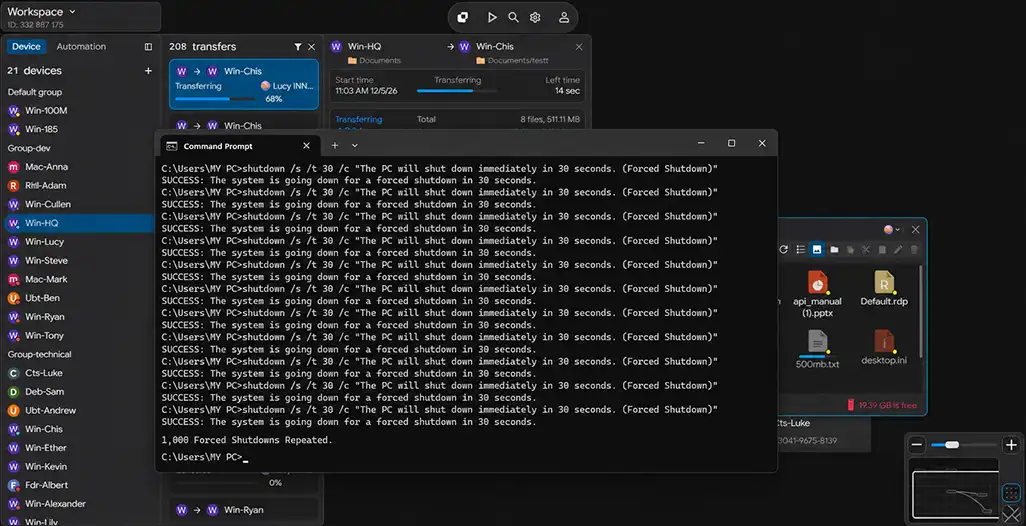
| Failure Type | Occurrence Method | Repetition Count | Real-World Equivalent Scenario | System Impact |
|---|---|---|---|---|
| Forced Power Off | Device power Off / Kill Script execution | 300+ | Unstable industrial equipment power / sudden shutdown | Immediate process termination, session loss |
| Network Disconnection | LAN cable removal / interface Down | 300+ | Unstable field network / line drop | Complete disconnection, packet loss |
| Forced Process Termination | Transfer engine Kill (-9) | 200+ | Software crash / forced termination | Task state forcibly reset |
| System Reboot | OS forced Reboot | 100+ | Device restart / recovery process | Memory state fully reset |
| Storage Access Error | Disk I/O blocked / unmount | 100+ | Storage failure / temporary inaccessibility | File read/write interruption |
2. Fatal Flaws of Legacy Transfer: Technical Powerlessness Where Even a Single Disruption Corrupts All Data
Limitations of legacy methods where transfers must restart from the beginning or files become corrupted to 0 bytes upon failure
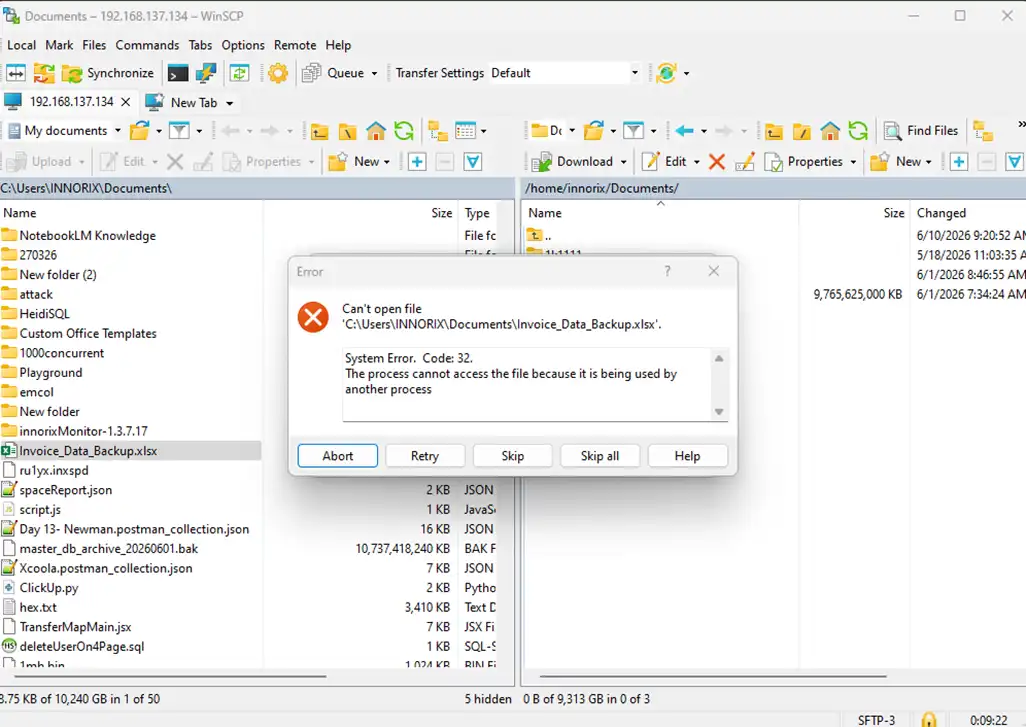
| Failure Type | Occurrence Timing | Legacy System Behavior | Result | Accumulated Impact |
|---|---|---|---|---|
| Network Disconnection | During transfer | Waits or fails after connection drop | Transfer stops | Full restart required |
| Power Loss | Mid-file transfer | Immediate process termination | File corruption (0 bytes) | Data loss |
| Forced Process Termination | During metadata processing | State information lost | Progress reset | Restart from beginning |
| System Reboot | During large transfer | Session cannot be restored | Task aborted | Hours of work lost |
| Storage Error | During file write | Exception and stop | Partial file corruption | Integrity collapse |
| File Lock Conflict | Multi-process environment | Access failure error | Specific file transfer fails | Entire job interrupted |
| Packet Loss | Unstable network | Limited retry logic | Possible data loss | Error accumulation |
| Verification Failure | After transfer completion | Some file mismatch | Revalidation or retransmission required | Reduced reliability |
3. Recovery That Begins the Moment It Is Detected: An Intelligent Engine That Rebuilds Paths Instantly Upon Failure Recognition
A unique detection technology of INNORIX that immediately identifies failure points even after cable removal or power loss
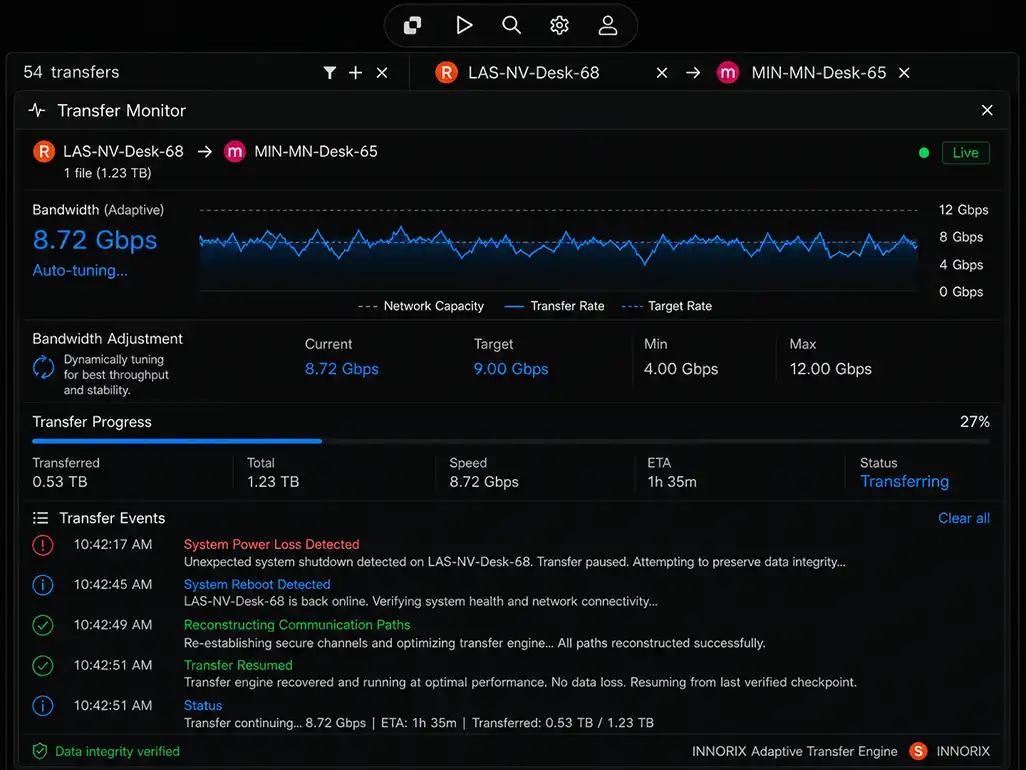
| Stage | Event (Failure Moment) | INNORIX Engine Behavior | Time Required | Perceived Result |
|---|---|---|---|---|
| 1. Failure Occurs | Power loss / network disconnection | Session state instantly recorded | Real-time | Data position preserved |
| 2. State Detection | Connection loss / system down recognized | Automatic failure event trigger | < 1 sec | No manual monitoring needed |
| 3. System Recovery | Power restored / network reconnected | Previous session info loaded | Seconds | No reconfiguration needed |
| 4. Path Reconstruction | Communication channel re-established | Optimal path auto-discovered | Immediate | Connection restored |
| 5. Transfer Position Identification | Interrupted point analyzed | Last transferred block precisely tracked | Real-time | No duplicate data |
| 6. Transfer Resume | Resume execution | Starts immediately from interruption | < 1 sec | No user intervention |
| 7. Flow Normalization | Continuous transfer maintained | Original speed restored | Immediate | Seamless continuity |
| 8. Accumulated Impact | Repeated failures | Same process repeated | No change | Identical behavior even after 1,000 times |
4. Obsession That Continues 1,000 Times: Resume from the Interrupted Point Within 1 Second Without User Intervention
A fully automated “checkpoint restart” mechanism that eliminates the need for manual verification and retransmission
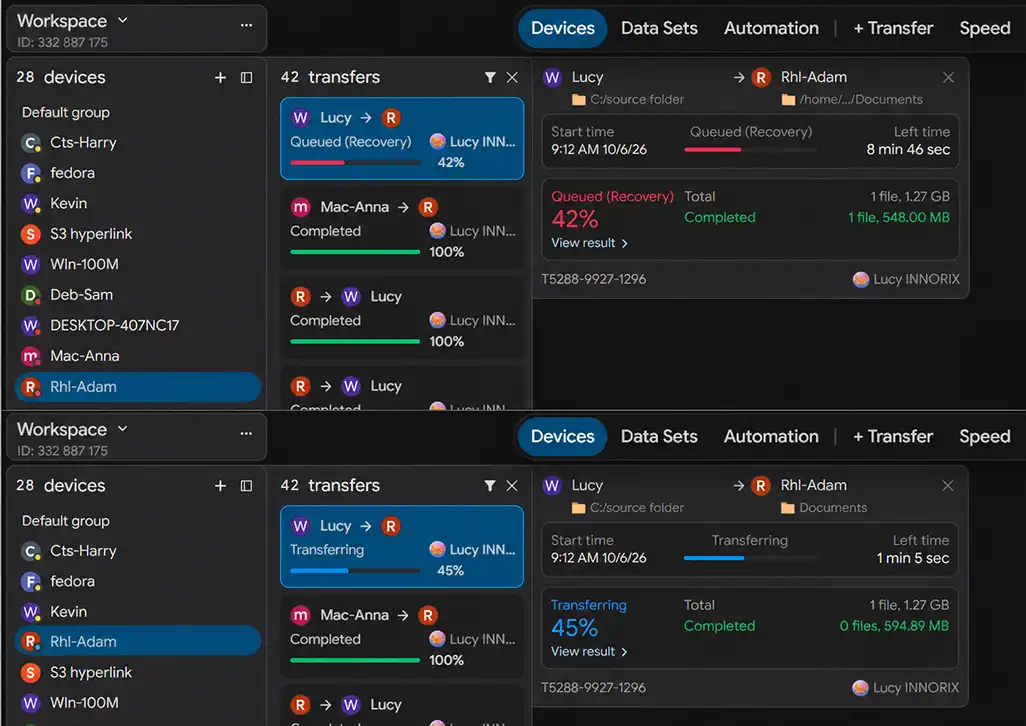
| Situation | Legacy Method (Manual Recovery) | Problem | INNORIX Auto Resume | Result |
|---|---|---|---|---|
| Immediately after failure | Requires user awareness | Cannot respond instantly | System auto-detects | No intervention needed |
| Progress State | Volatile (memory-based) | Lost after reboot | Stored as disk-based checkpoint | Fully preserved |
| Recovery Start | User manually restarts | Delay (minutes to hours) | Auto restart by system | Resume within < 1 sec |
| Transfer Position | Unknown (restart from beginning) | Duplicate transfers occur | Last block precisely tracked | Resume from interruption |
| Repeated Failures | Manual intervention every time | Operational fatigue increases | Same logic auto-repeats | Unmanned operation possible |
| Task Continuity | Interrupted | Flow broken | Continuous flow maintained | Seamless transfer |
| Operational Efficiency | Human-dependent | Human error occurs | Fully automated | Stability improved |
| Final Result | “Restarted multiple times” | Time/cost waste | “Start once → finish completely” | Fully automated completion |
5. An Immortal Engine That Overcomes Power Loss: Persistent Transfer Even After Hard Reboots
Unmatched resilience that preserves transfer state to completion even under repeated power loss and forced reboots
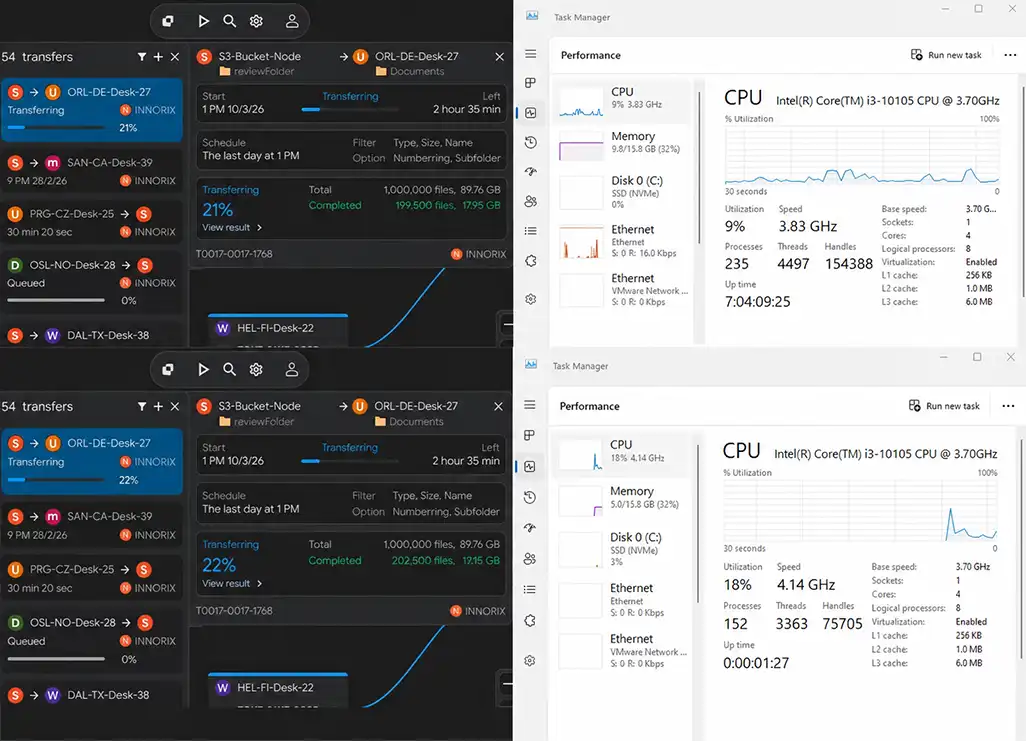
| Category | Before Reboot | Typical System (After Reboot) | INNORIX After Reboot | Result |
|---|---|---|---|---|
| Transfer Session | Active | Completely lost | Fully restored | Continuity maintained |
| Progress | 65% complete | Reset to 0% | Maintained at 65% | No rework |
| Transfer Position | Processing specific file/block | Position lost | Last block precisely restored | Accurate resume |
| Task Queue | Thousands to tens of thousands pending | Queue reset | Queue preserved | Flow maintained |
| Metadata | Partially memory-based | Fully lost | Persistently stored on disk | Fully restored |
| Recovery Process | Manual reconfiguration required | Reconstruction time needed | Auto load and immediate resume | < 1 sec |
| User Intervention | Required | Repeated actions needed | Not required | Unmanned operation |
| System Impact | Reload after restart | Performance degradation | Stable state maintained | Minimal impact |
6. Zeroing Retransmission Waste: Maximizing Efficiency by Eliminating Redundant Transfers
Technology that perfectly prevents unnecessary duplicate transfers, protecting network bandwidth and storage resources
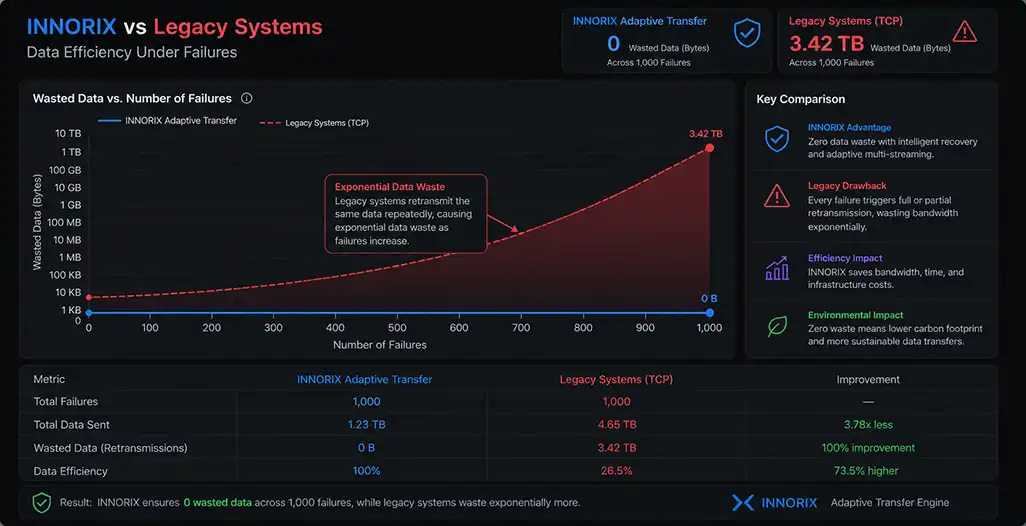
| Item | Legacy Method (Retransmission Occurs) | Problem | INNORIX Method (No Retransmission) | Result |
|---|---|---|---|---|
| During Failure | Full or file-level retransmission | Duplicate data sent | Resume only interrupted segment | Zero duplication |
| Cumulative Data Volume | 2~10x actual data | Network overload | Equal to actual data | 100% efficiency |
| Network Usage | Bandwidth wasted by repetition | Affects other services | Uses only required amount | Stable operation |
| Transfer Time | Increases with failures | Completion unpredictable | Remains constant | Time determinism ensured |
| Storage I/O | Rewrites same data repeatedly | Disk load increases | Single-write principle | Minimal I/O |
| 1,000 Failures | Partial/full retransmission each time | Data explosion | Zero retransmissions | Full efficiency |
| Operational Cost | Traffic + time + hardware increase | Cost escalation | Minimal resource usage | Cost reduction |
| Final Result | “Unknown how many times sent” | Accumulated inefficiency | “Transferred only once” | Full control |
7. Final Proof of 100% Integrity: Reassembling 1,000 Fragments into a Perfect Result with Zero Byte Error
Despite countless disruptions, delivering data that perfectly matches the original through bit-level verification
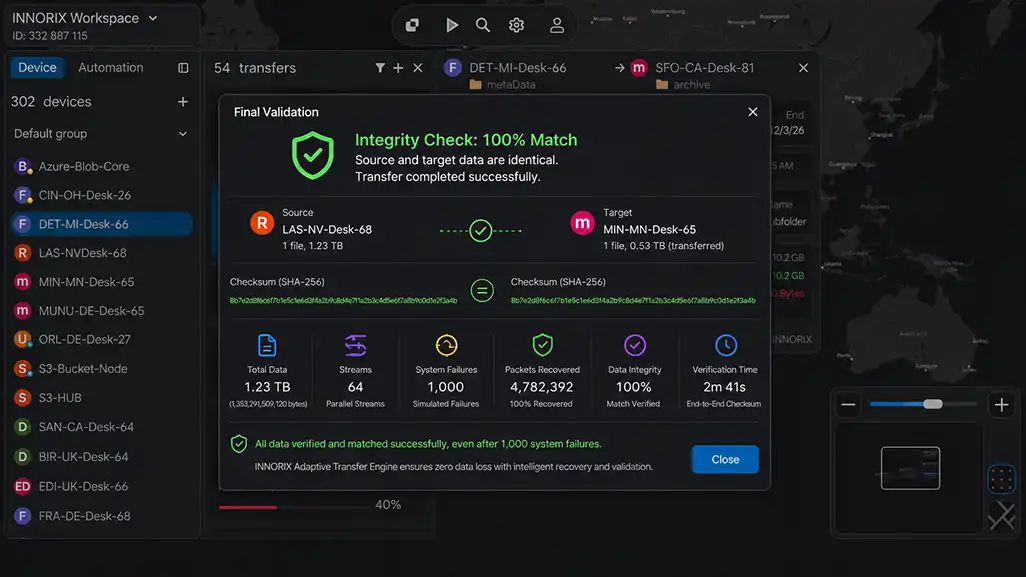
| Verification Item | Legacy Method | Limitation | INNORIX Verification Method | Final Result |
|---|---|---|---|---|
| File Count | Possible omissions | Hard to detect loss during failure | Full file count comparison | 100% match |
| Total Data Volume | Approximate comparison | Cannot detect partial corruption | Byte-level exact comparison | Fully identical |
| File Content | Sampling or skipped | Hidden errors possible | Bit-level validation of all files | Zero byte error |
| Checksum | Partial application | Low overall reliability | Full hash comparison | Perfect match |
| Failure Accumulation Impact | Possible retransmission/corruption | Uncertain results | Same result regardless of failures | No impact |
| Interrupted File Handling | Partial corruption remains | Incomplete recovery | Precise resume + revalidation | Full recovery |
| Verification Scope | Partial post-check | Low reliability | Dual verification (during + after) | Double assurance |
| Final Verdict | “Mostly normal” | Uncertainty exists | “Completely identical” | 100% integrity confirmed |