
EXABYTER
Connect everything from your existing web system to modern data architectures.
Enterprise web services are not all built the same way.
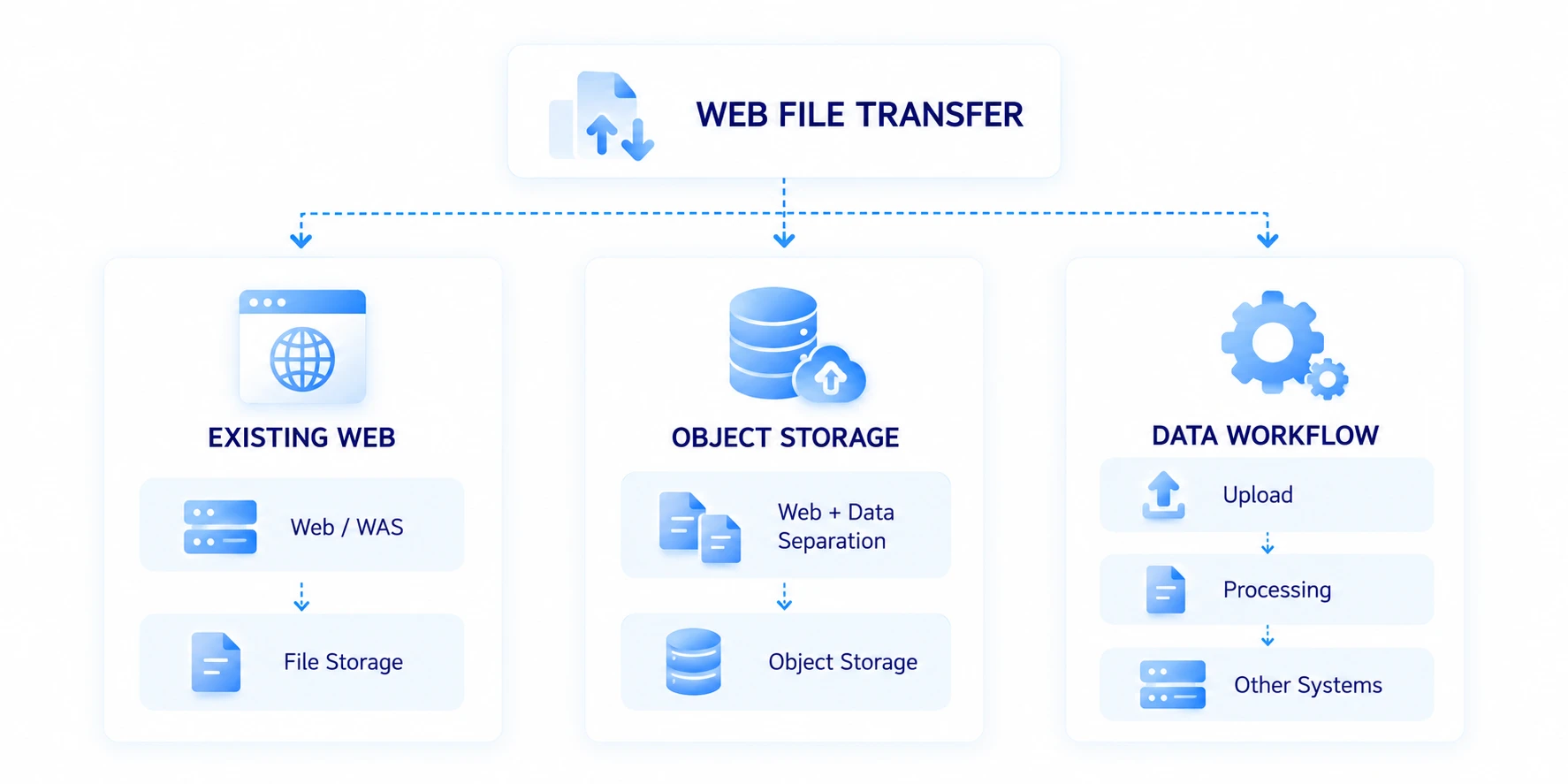
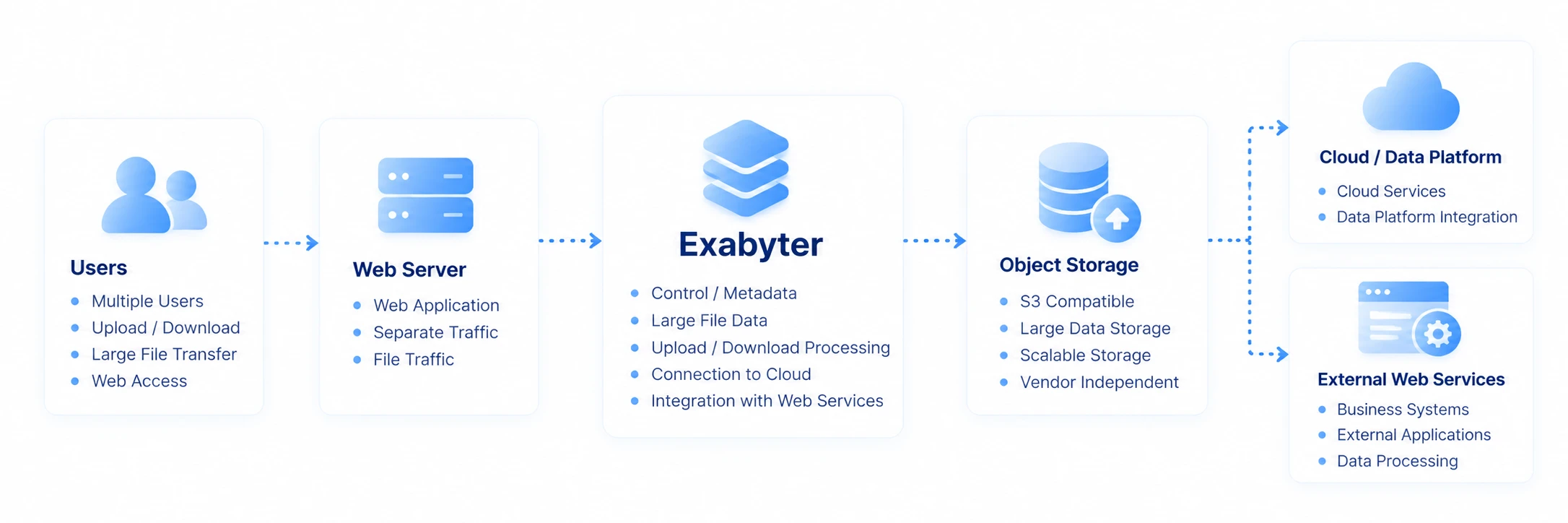
Existing business systems often operate with Web Servers, WAS, and file storage within a single application architecture. In newer cloud services and large-scale data environments, the application may handle authentication and business logic while the storage and transfer of actual large-file data are handled through a separate data path centered on Object Storage.
Exabyter does not assume only one architecture. You can add large-file Upload / Download to an existing web application, separate web business processing from the file data path, and connect uploaded files to broader data flows that continue to other servers, storage systems, and processing environments.

ONE TRANSFER, DIFFERENT ARCHITECTURES
What matters is how the file needs to move.
The right way to build web file transfer depends on the current system architecture, data scale, security policies, where files are stored, and what needs to happen after the transfer.
You may need to keep the existing system and strengthen only its file transfer capabilities. You may need to separate large-scale File Traffic from the web application. In some cases, the process ends when an uploaded file reaches Storage. In others, the file must automatically continue to a processing server, an AI system, or equipment in another location.
Rather than forcing these requirements into one fixed deployment model, Exabyter is configured around the file path required by the existing system.
ARCHITECTURE 01
Add file transfer to your existing web application.
You do not need to rebuild an enterprise business system from the ground up simply to support large-file transfer.
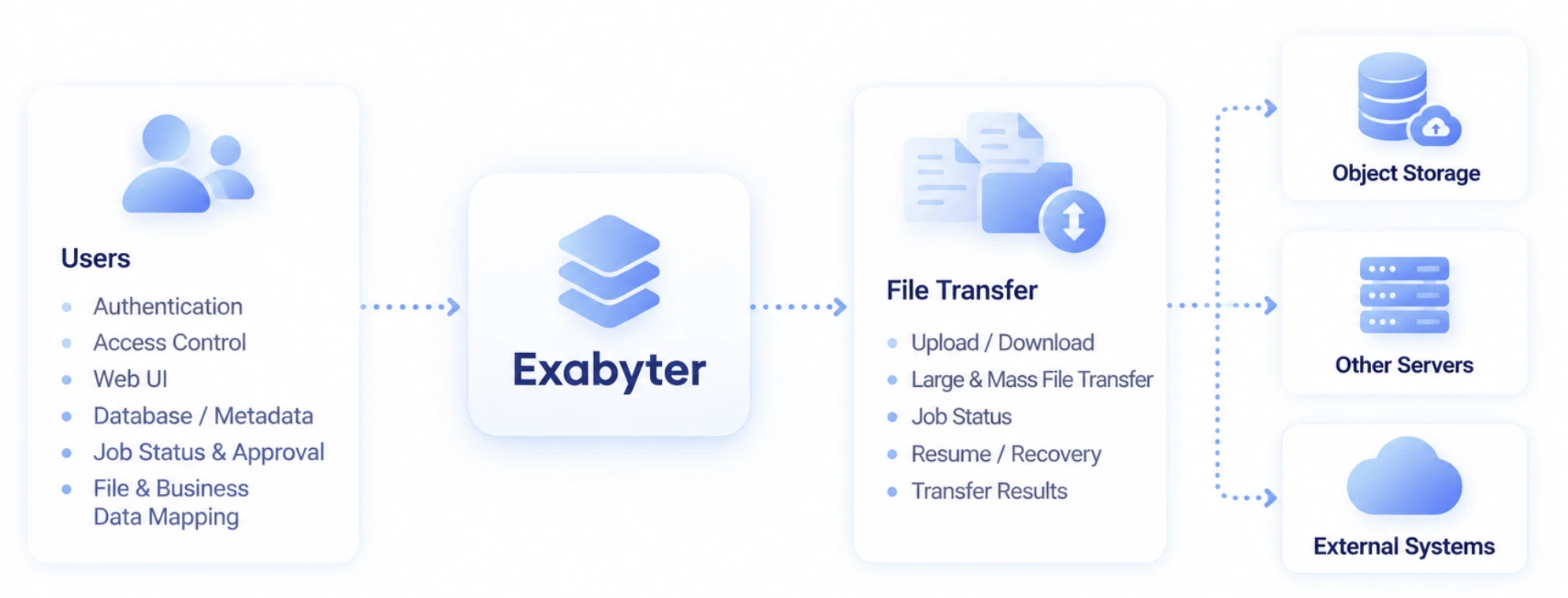
You can retain the existing Web Server and WAS, authentication and authorization, database, and business logic while connecting file selection, Upload / Download, progress, and transfer results to the current application workflow.

What the Existing System Handles
- User authentication
- Access permissions
- Business UI
- Database / Metadata
- Business status and approvals
- Relationships between files and business data
What File Transfer Handles
- Upload / Download
- Large & Mass File Transfer
- Progress
- Resume / Recovery
- Transfer completion results
There is no need for the file transfer product to recreate business functions the application already handles well.
The existing application continues to run the business, while file delivery is connected through a specialized Transfer layer.
ARCHITECTURE 02
Separate the web application from the file data path.
As file sizes and user counts increase, business Traffic in the web application and actual large-scale File Traffic begin to exhibit very different characteristics.
The web application handles authentication, authorization, APIs, Metadata, and relatively short business requests.
A File Transfer may move data ranging from several gigabytes to terabytes over a long period, while many users may Upload and Download at the same time.
Depending on the service architecture, these two paths can be separated
and designed around their respective roles.
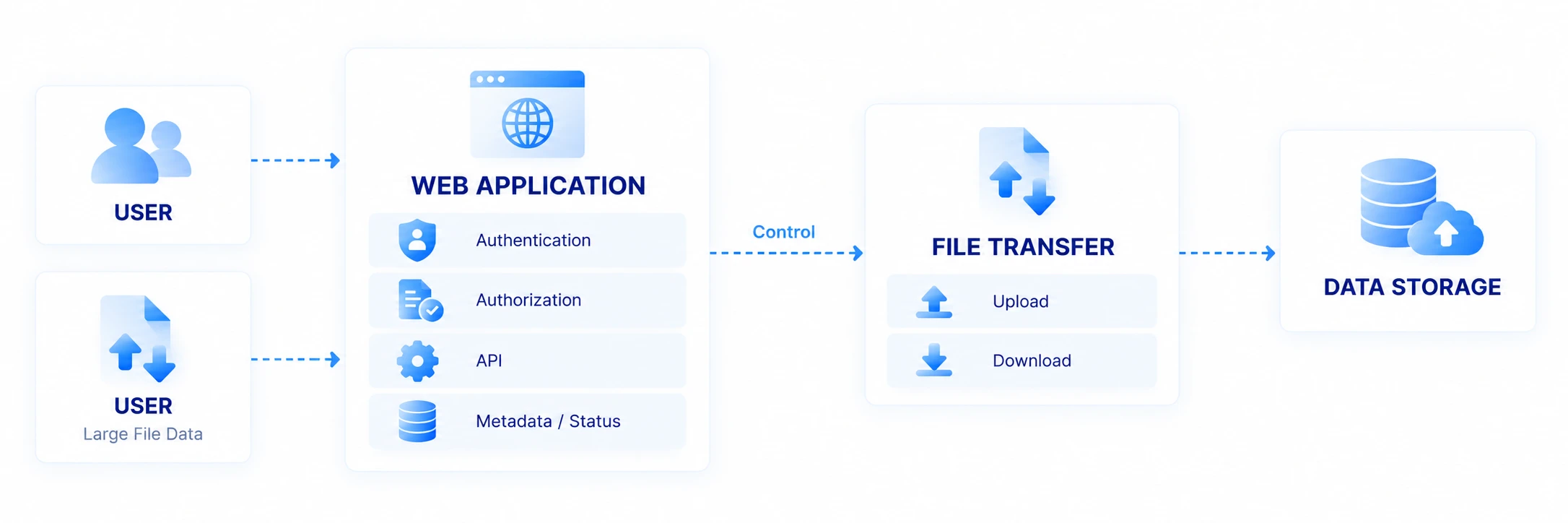
In this architecture, the application manages the business meaning of the file, while the Transfer path handles the actual movement of file data.
OBJECT STORAGE
Connect large files directly to Object Storage.
Cloud and large-scale data environments often store file data in Object Storage.
In this architecture, the web application does not necessarily need to receive every file byte and then relay it to Storage. Depending on the service design, authentication and business processing can remain in the application while actual file data connects to Object Storage through a separate Transfer path.
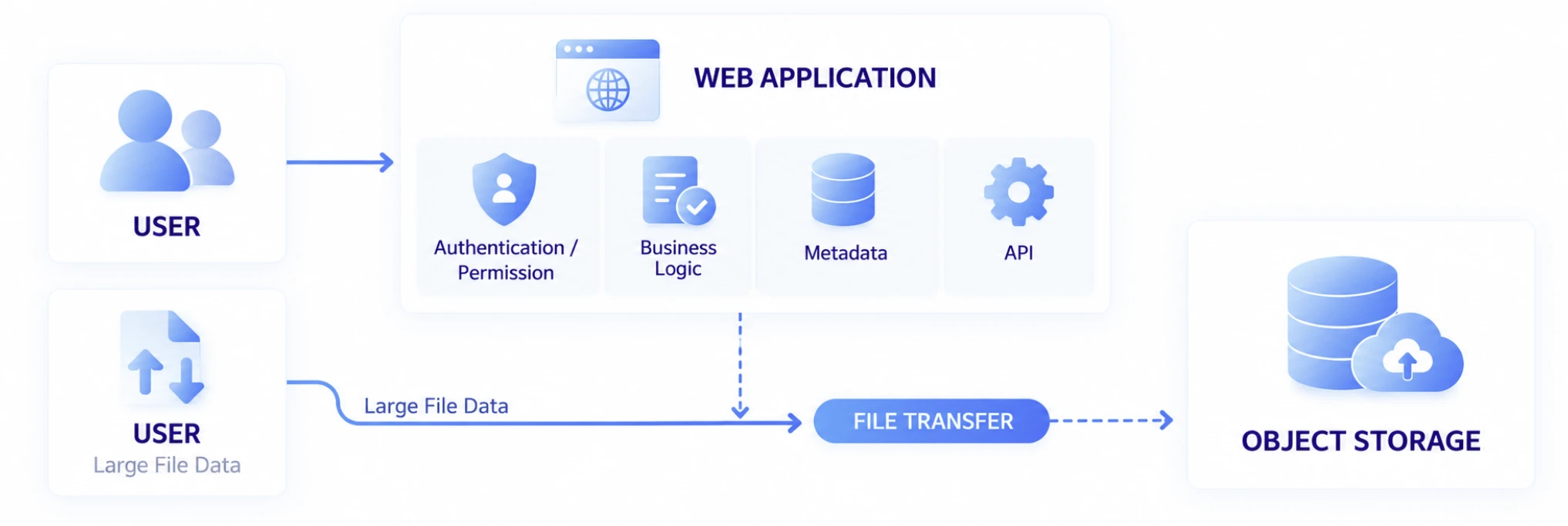
This allows web business processing and large-scale file storage and transfer to be designed according to their own requirements.
When This Architecture Is Useful
- Services using S3-compatible Object Storage
- Services where large-file volume continues to grow
- Environments with many concurrent Uploads / Downloads
- Environments that need to separate Web Traffic from File Traffic
- Services with downstream data processing after Upload
- Environments connecting web services to Cloud / Data Platforms
WEB APPLICATION & FILE DATA
Business data and file data move together, but they are not the same data.
A file Upload is rarely an isolated task.
Files are usually associated with business data such as users, projects, document numbers, orders, or inspection results. The outcome of a file transfer may also determine the next business state.
For example, when a user uploads inspection data, the application may already know:
PROJECT       PRJ-2026-1028
USER          USER-8421
DATA TYPE     INSPECTION
EQUIPMENT     LINE-04
STATUS        WAITING FOR FILE

FILE          inspection-1028.dat
SIZE          84.2 GB
Exabyter can be configured to connect this business information managed by the application with the start, progress, and completion of the file Transfer.
BUSINESS INTEGRATION
Connect the transfer result to the next business process.
In enterprise web services, completion of an Upload is often the condition that starts the next business process.
If the Database status is changed to Complete or downstream processing begins before the file has actually arrived, the business state and actual file state can become inconsistent.
By connecting the result of the file Transfer with the application's business state, the next process can begin based on actual file delivery.
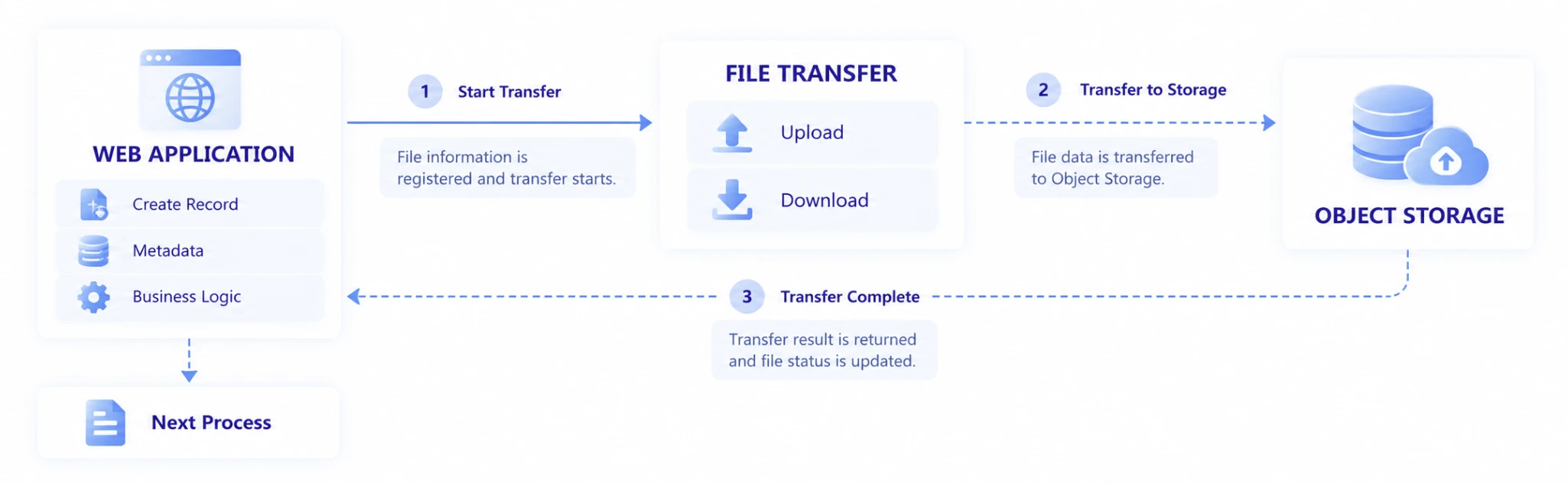
This architecture allows file transfer to function not merely as a UI feature, but as a state within the business Workflow.
INTEGRATION PATTERNS
Process files and Metadata in the order that fits the business.
Not every application needs to process files and Metadata in the same sequence. Different integration patterns can be used depending on the business requirements.
FILE FIRST
Deliver the file first, then register Metadata and business information after the Transfer completes.

This pattern can be used when the actual existence of the file is a prerequisite for creating business data.
METADATA FIRST
Create the business Record first, then deliver the file associated with that Record.

This is suitable when a business identifier such as a document number, order number, or project ID must exist before the file.
PARALLEL
Start business data processing and the file Transfer together, then complete the overall business process based on the completion state of both.

PROCESSING
After Upload, an external system processes the file and connects the result back to the web workflow.

The business system presents the required status at each stage while the actual file moves between processing steps.
EVENTS & STATUS
Use file transfer state within the application.
A web application may need to do more than simply provide an Upload button. The UI and business state may need to change according to Transfer State.
For example, the following states can be connected to the business workflow:

In an environment that includes interruption and recovery:

The application can use these Transfer states to display Progress, move the user to the next screen after completion, or start downstream Processing.
Specific API and Event integration methods are provided according to the actual development environment and product configuration.
UI INTEGRATION
Users transfer files within the web service they already use.
Users do not need to move to an entirely separate business system just to transfer large files. File selection, Upload / Download, progress, and results can be placed directly within the current web application's screens and business workflow.
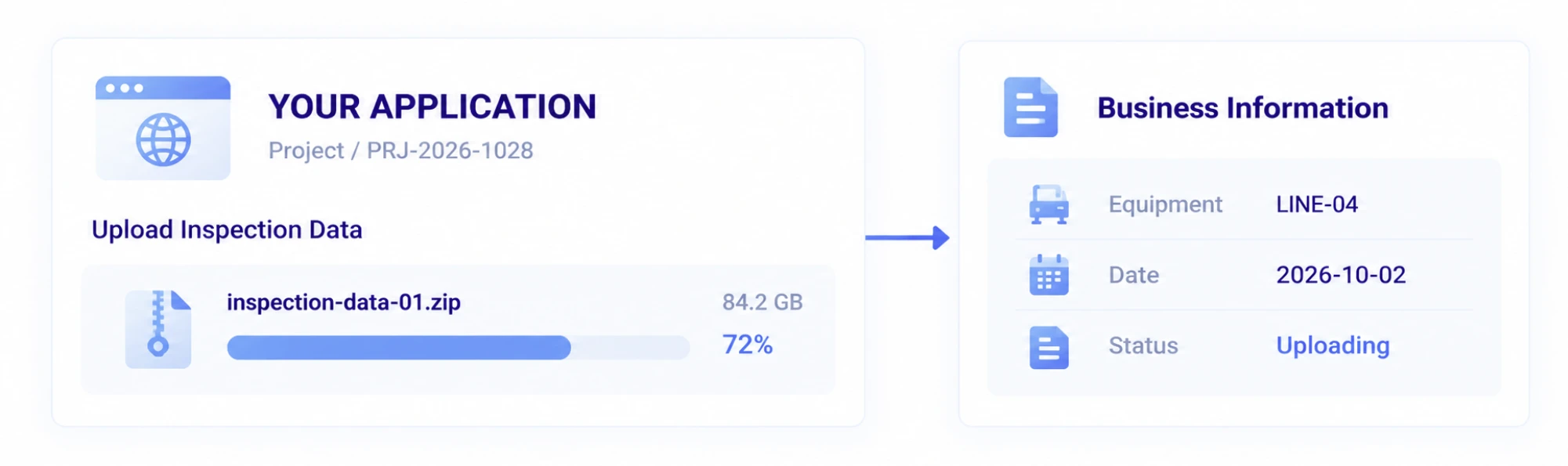
The existing UI design and information architecture can remain intact while file transfer is connected where it is needed.
BEYOND THE UPLOAD
Files can continue to their next destination after reaching Storage.
Storage is not always the final destination of a web Upload. An uploaded file may need to move to an analytics server, be used for AI Training, be delivered to a system in another region, or be retained in Archive Storage.
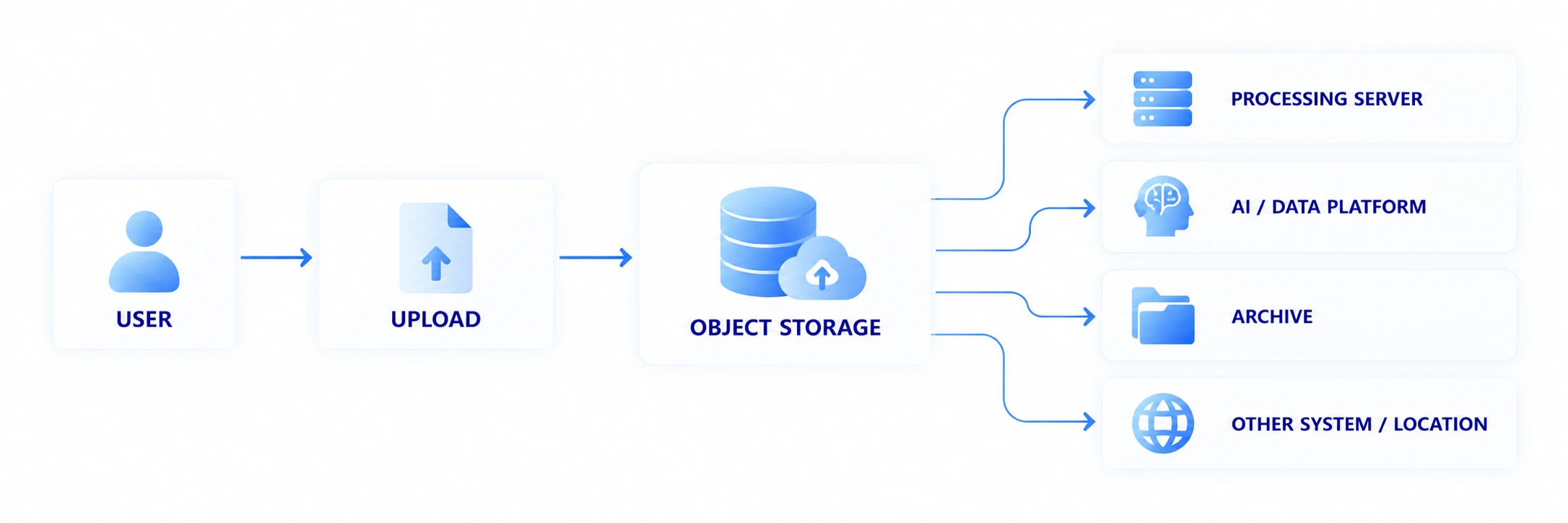
In this case, web file transfer can be connected as the starting point of the overall data Workflow rather than remaining an isolated Upload function.
The user uploads the file through the web, but the file continues moving to the systems that need it.
AUTOMATED DATA DELIVERY
Automate file delivery after Upload.
When an operator must find an uploaded file and manually copy it to another server, the work becomes increasingly repetitive as data volume and job frequency grow.
Based on business conditions, a Workflow can be configured so that a completed Upload continues automatically to the next system.
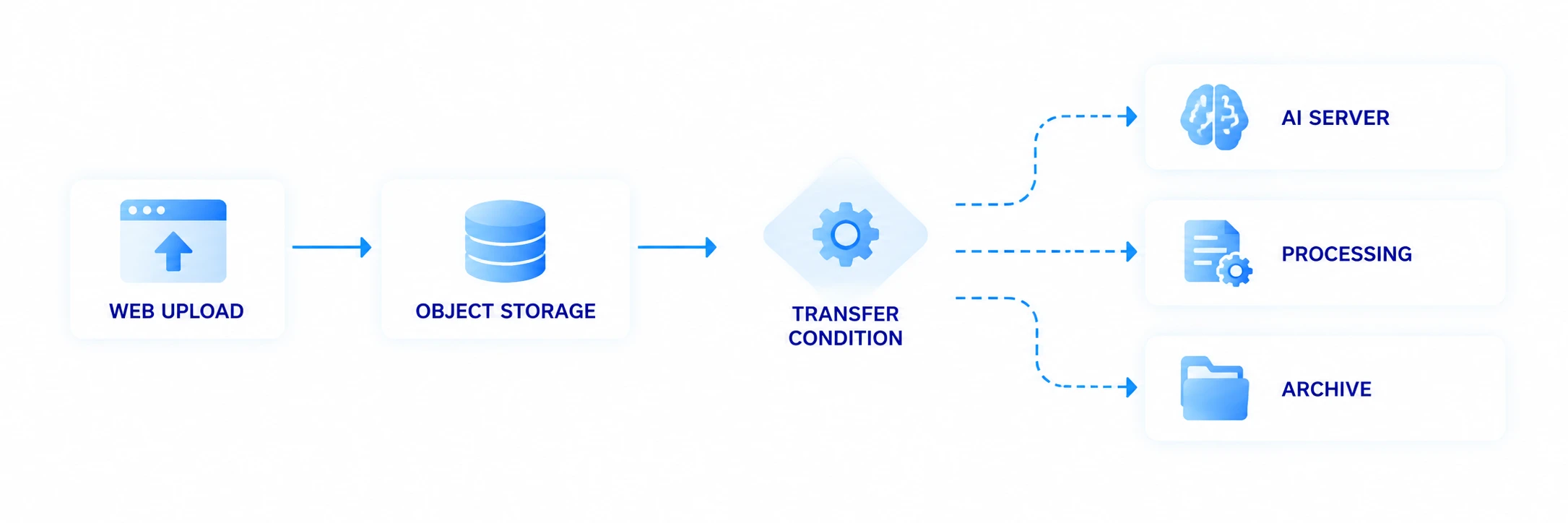
For example, when files for a specific project are uploaded, they can be delivered to a processing server, or completed analysis results can be moved to another Storage environment.
The Transfer after web Upload is connected according to how far the file needs to travel.
DOWNLOAD FROM OTHER SYSTEMS
Files from other systems can also be connected to web Download.
Data does not move only in the Web → System direction.
Files generated by equipment, servers, or other systems can be collected into Storage and made available for users to download through the web.

Examples include inspection results generated by manufacturing equipment, analysis results created by processing servers, and media processing outputs delivered to users through web Download.
In this model, the web becomes a delivery point connecting the systems that generate data with the users who need it.
BIDIRECTIONAL DATA FLOW
The web can be the starting point or the final delivery point of a data flow.
Upload and Download do not need to be treated as isolated functions.
In real business workflows, both directions are often connected within one process.
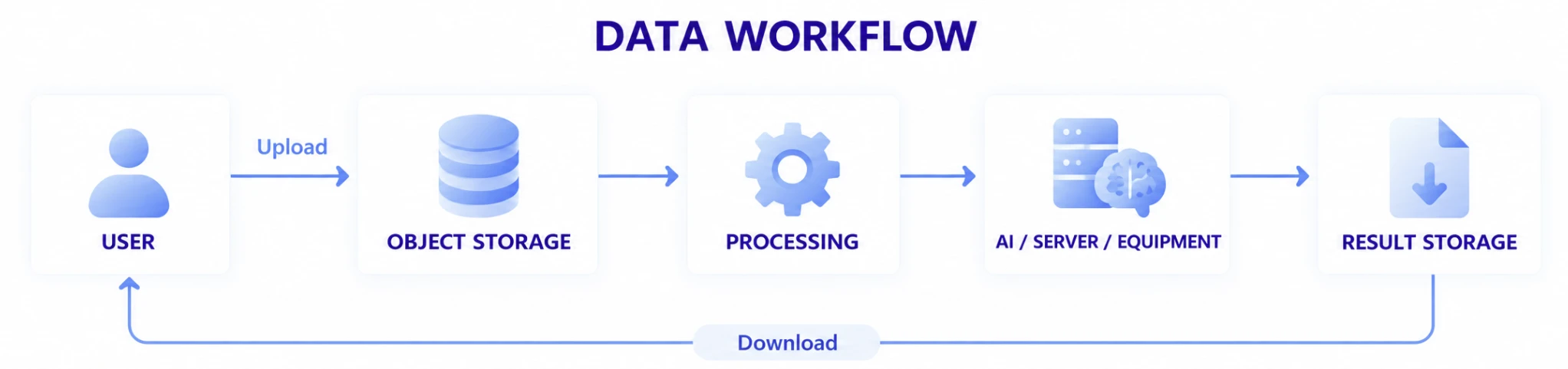
A user can submit data through the web, the system can perform the required Processing and Transfers, and the result can then be delivered back through the web.
This expands web file transfer from a simple file-selection UI into the user-facing access point of an enterprise data flow.
EXISTING SYSTEMS & MODERN DATA ENVIRONMENTS
Connect existing systems and modern data environments through one file flow.
Enterprise IT environments do not change all at once.
Long-running Web / WAS-based business systems often coexist with newer Cloud, Object Storage, AI, and data processing environments.
File transfer needs to connect these different environments.
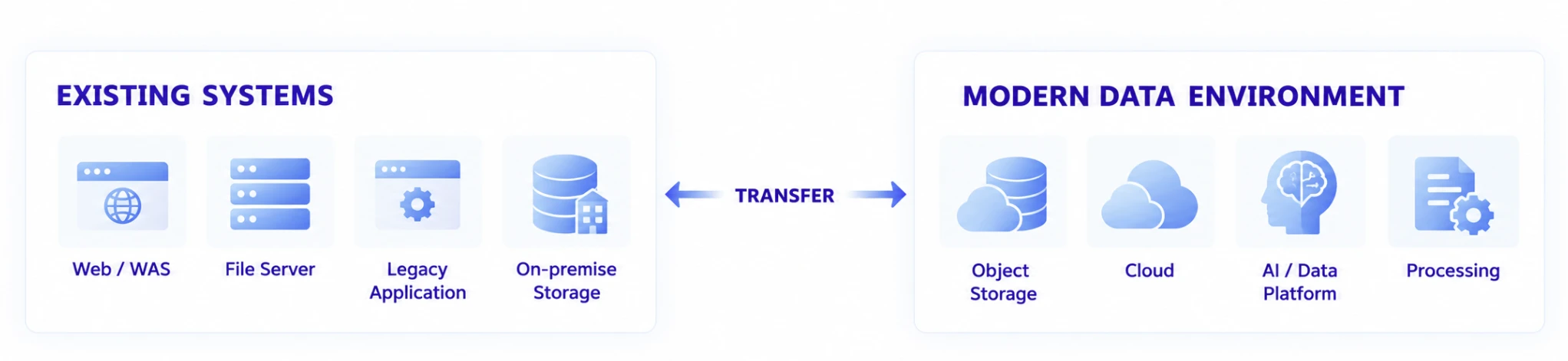
Rather than requiring every existing system to be replaced before a modern data environment can be used, the architecture can connect the files that need to move today from existing systems to new destinations.
SECURITY & CONTROL POINTS
Connect existing authentication and authorization to the file transfer flow.
Using a separate data path for File Transfer does not mean removing user authentication or business permissions.
Users, permissions, business Records, and file relationships already managed by the web application can be connected to the Transfer flow so that who can deliver which file within which business context remains governed by existing system policies.
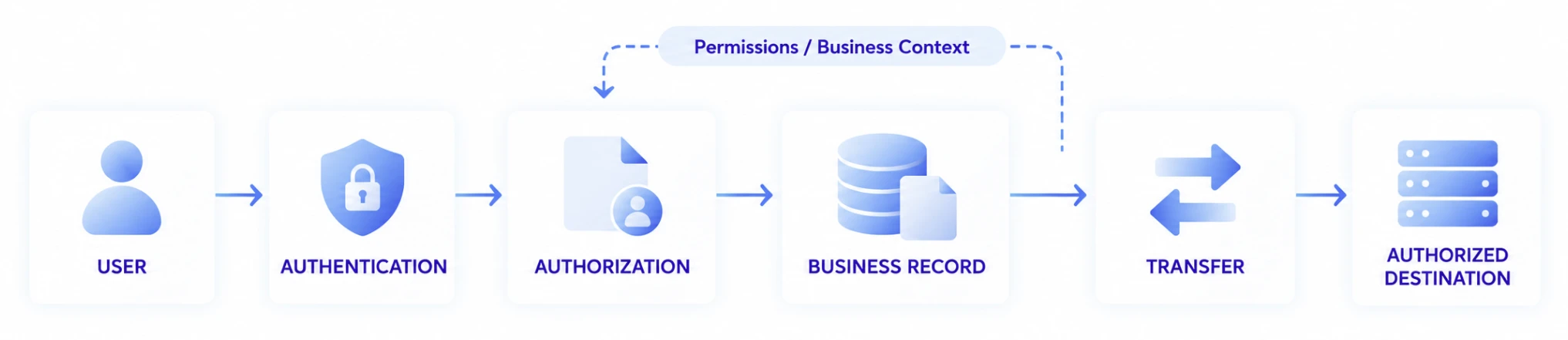
Specific authentication and security configurations are designed around the current application, network, and Storage environment.
Rather than enforcing one authentication technology as the standard architecture, this page explains the principle that File Transfer can be connected while preserving the security model of the existing enterprise system.
CHOOSE BY DATA FLOW
Start with the flow you need, not the product you need to choose.
Users do not need to understand every difference in product configuration at the beginning of an implementation.
First identify where the file starts, where it needs to go, and what business processes occur before and after the transfer. The required configuration can then be determined from that flow.
| Question to Ask | Examples |
|---|---|
| Where does the file start? | Browser / Server / Equipment |
| Who starts the transfer? | User / Application / System |
| Where is the file stored? | File Storage / Object Storage |
| What is the role of the web application? | Auth / Business / Metadata |
| Where does the file go after upload? | Storage / Server / AI / Archive |
| Who receives the result file? | User / System / External Partner |
| Are there stages that need to continue automatically? | Processing / Distribution / Collection |
| Must the existing system remain in place? | Existing Web / WAS / Legacy |
| How will the service scale? | Users / Traffic / Data Volume |
Using these questions, you can design the required file transfer architecture from an existing Web Server-centric environment to a data Workflow connecting Object Storage and multiple systems.
RELATED
Design for file scale and service operations together.
Large & Mass File Transfer
See how to reliably Upload / Download large files, massive numbers of files, and folders through the web.
Read moreHigh-Speed & Reliable Transfer
Learn how long distance, Latency, Packet Loss, and connection changes affect actual Transfers.
Read moreWeb Service at Scale
See how to separate and scale File Traffic from web business workloads when many users transfer files.
Read moreOperations & Management
Learn how to review and operate the status, results, failures, recoveries, and history of multiple Transfers.
Read moreFrequently Asked Questions
Can I add large-file transfer without rebuilding my existing web system?
Yes. You can retain the existing Web Server and WAS, authentication, authorization, Database, and business logic while connecting file Upload / Download, progress, Resume, and transfer results to the current application workflow. The exact scope of integration depends on the current system architecture and development environment.
Can large files be uploaded to Object Storage without passing through the web server?
Depending on the service architecture, the web application can handle authentication and business processing while actual file data connects to Object Storage through a separate Transfer path. This allows Web Traffic and large-scale File Traffic to be designed according to
different requirements.
Can Object Storage such as S3 be used for large-file transfer over the web?
An architecture can be configured to connect web file transfer with large-scale data storage environments, including S3-compatible Object Storage. Specific Storage support and integration methods should be confirmed for the deployment environment.
Can a file be delivered automatically to another server after Upload completes?
Based on business conditions, a Workflow can be configured to continue delivering files that arrive in Storage to a processing server, another Storage system, an AI / Data Platform, or another system. This can reduce the need for operators to manually move files after users Upload them.
Can files generated by another server or equipment be made available for web Download?
Yes. Data generated by servers, equipment, or other systems can be delivered to Storage through Transfer and then made available for the appropriate users to Download through the web. The web can serve as the delivery point connecting data-generating systems with users.
How are files connected to business Metadata?
The application can manage business Metadata such as users, projects, and document numbers while connecting the start and completion state of a Transfer to the corresponding business Record. Depending on the workflow, Metadata can be created first, the file can be delivered first, or both operations can proceed in parallel.
Can the next business process start automatically after file transfer completes?
Transfer completion can be connected to the application's business state so that downstream Processing, status changes, or delivery to another system begins after the file actually arrives. The specific integration method is designed around the application's APIs and Workflow.
Can I keep the existing authentication and authorization model?
Yes. Authentication and authorization already managed by the web application can be connected to the File Transfer flow. The exact implementation depends on the current authentication architecture and security policies, so the design can adapt to the existing system rather than assuming one specific authentication technology.
Should I use an existing Web Server architecture or an Object Storage architecture?
Neither architecture is always better. The appropriate design depends on whether the existing system must remain in place, file scale and concurrent user volume, where Storage is located, and whether files need to continue to other systems after Upload.