
EXABYTER
Completing the transfer quickly matters more than simply sending fast.
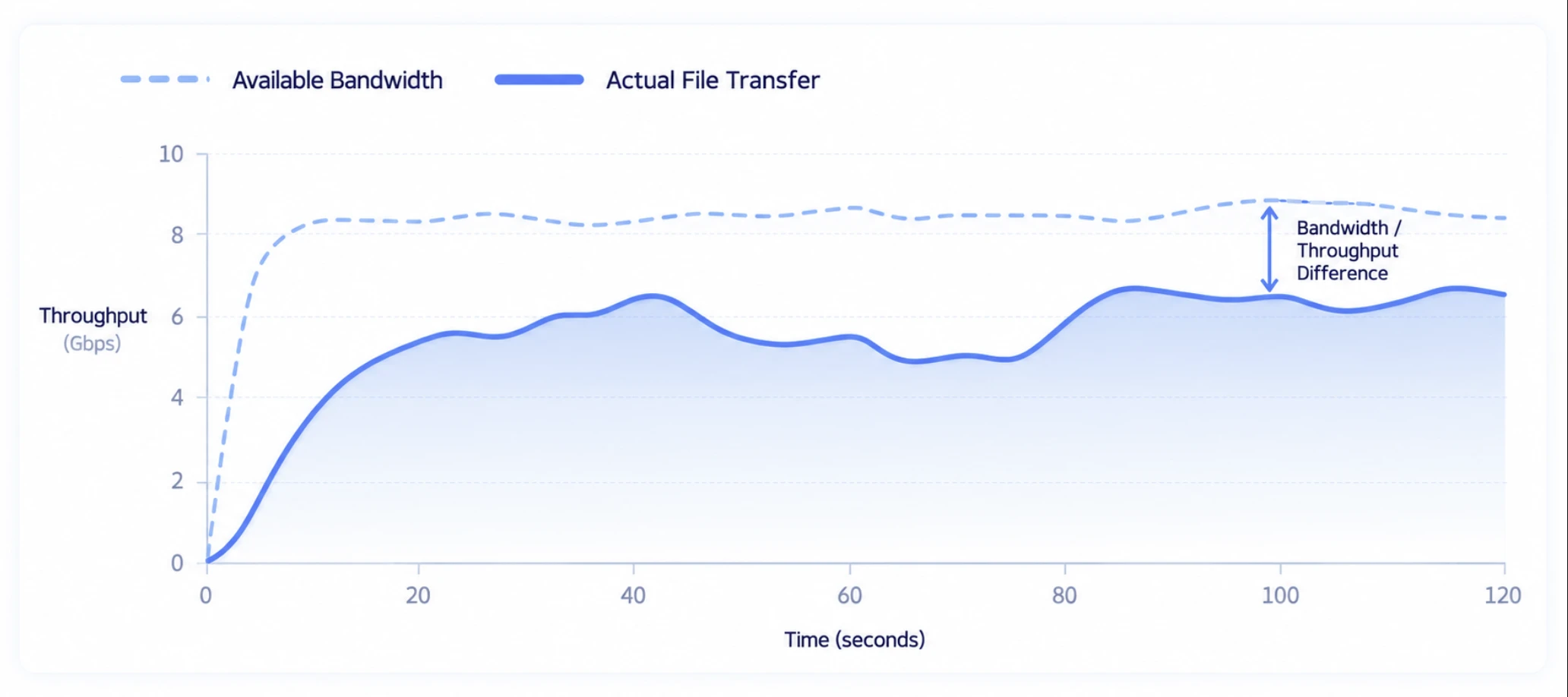
Even with sufficient network bandwidth, actual file transfer does not always use all of that capacity.
As transfer distance increases and Latency and Packet Loss rise, actual file transfer Throughput can decrease. With large files, where a single Transfer may remain active for a long time, small performance differences and temporary network issues can create major differences in
total completion time.
Exabyter focuses on completing large-file transfers as quickly and reliably as possible by using available bandwidth efficiently under real network conditions and maintaining and recovering Transfer State when connection issues occur.

REAL TRANSFER PERFORMANCE
Network speed and file transfer speed are not the same.
Network bandwidth such as 1Gbps or 10Gbps represents the transfer capacity the network can provide. Actual file transfer speed, however, is not determined by bandwidth alone.
Distance between Source and Target, Round Trip Time (RTT), Packet Loss, network congestion, Endpoint I/O performance, and the transfer method all affect actual performance.
In long-distance environments in particular, a Transfer may fail to make full use of available bandwidth even when substantial network capacity is available.
Rather than describing performance only in terms of nominal network speed, Exabyter optimizes transfer based on actual Throughput from Source to Target and total completion time.
WHAT MAKES TRANSFER SLOW
Why do large-file transfers slow down?
There is no single cause of poor file transfer performance.
Bandwidth
The maximum amount of data the network can carry. Sufficient Bandwidth is a basic requirement for high transfer performance, but high Bandwidth alone does not guarantee high actual file transfer speed.
Latency
As the time required for data to travel from Source to Target and for a response to return increases, it can affect how a transfer protocol sends data and confirms delivery.
Packet Loss
When data is lost during transfer, it must be sent again. As loss repeats, retransmission and transfer control can reduce actual Throughput.
Distance
Physical distance generally increases RTT. Even with the same network bandwidth, actual file transfer performance can differ between a nearby connection and a long-distance connection across countries or continents.
Endpoint I/O
Even when the network is sufficiently fast, the overall Transfer cannot run faster than the rate at which the Source can read data or the Target can write it.
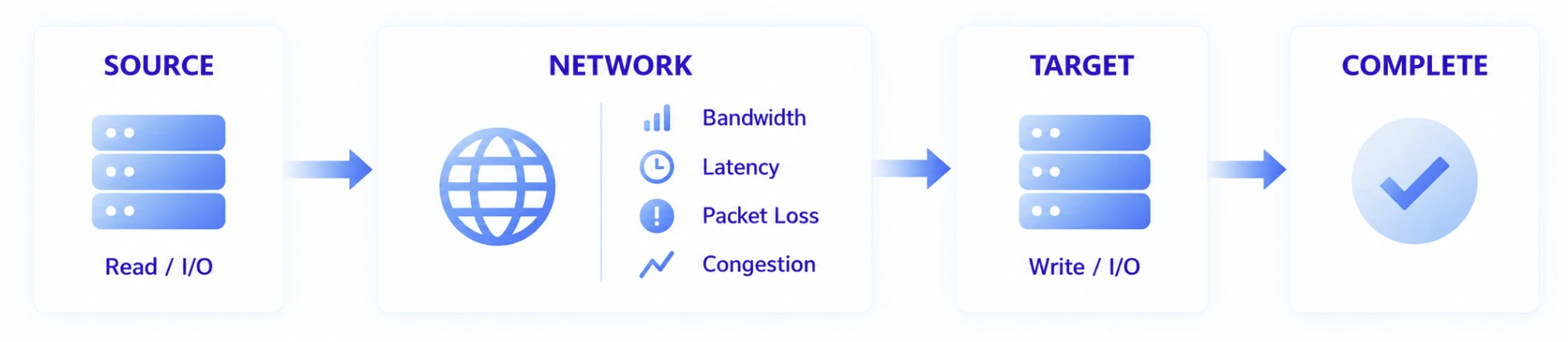
Large-file transfer performance must therefore be evaluated across the entire Source → Network → Target path, not at a single point.
LONG-DISTANCE TRANSFER
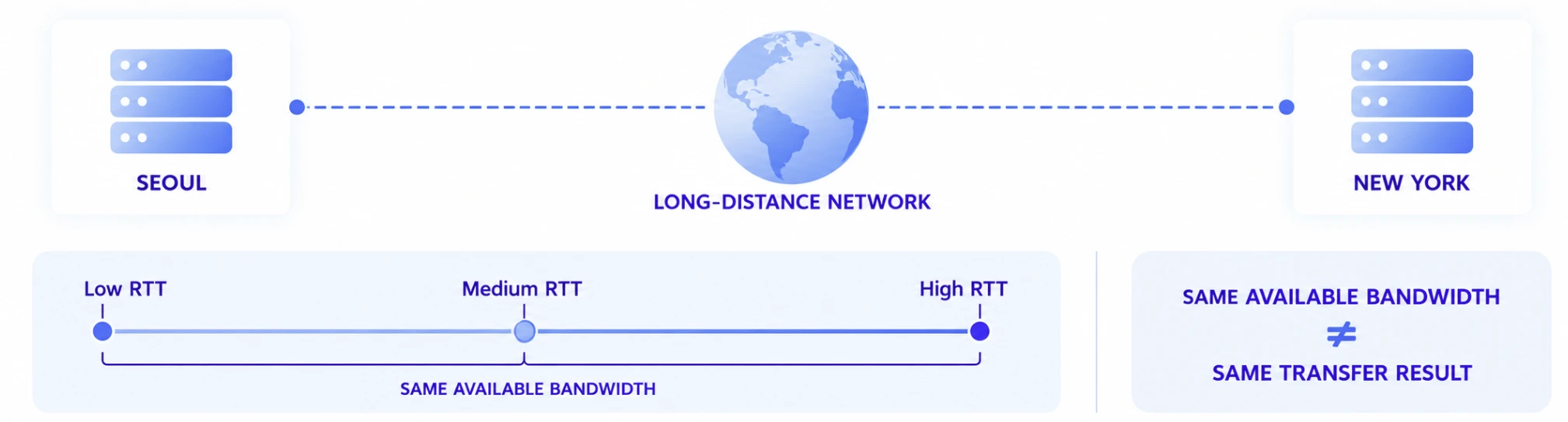
The same network behaves differently over longer distances.
Transferring a file within the same data center is not the same as transferring it over a long-distance network from Seoul to Tokyo, the United States, or Europe.
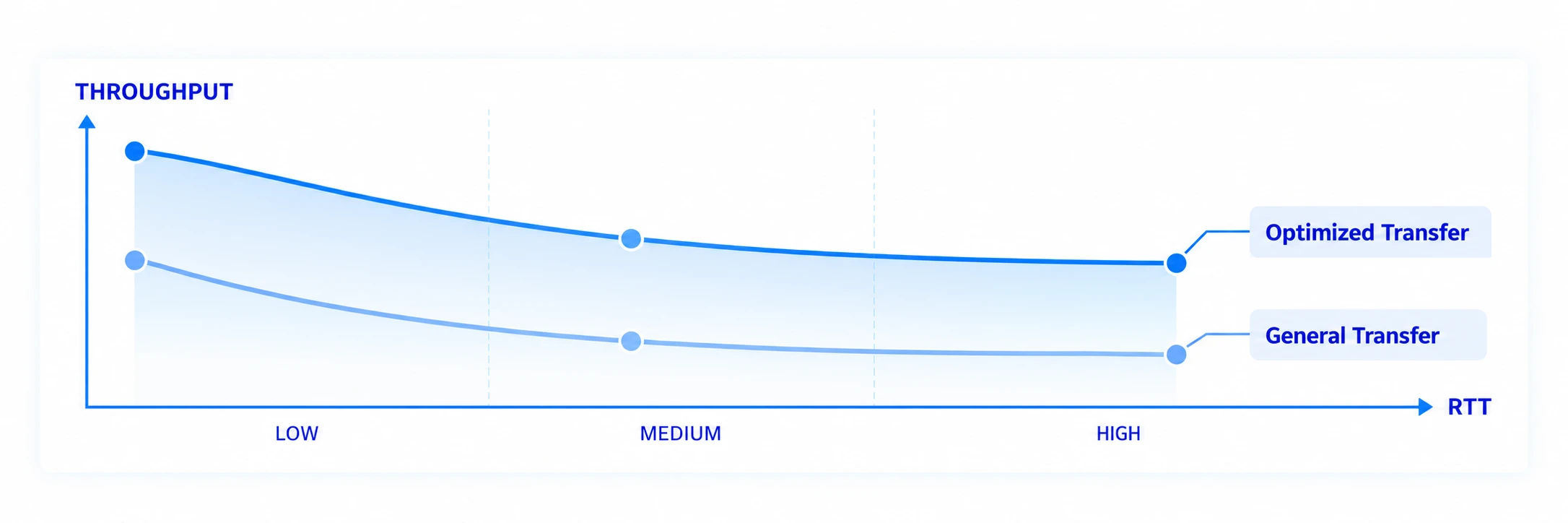
As distance increases, the round-trip time for data and responses also increases. If the transfer method does not handle that delay effectively, actual Throughput can remain low even when available bandwidth is not fully utilized.
Exabyter is designed to adapt transfer processing to real network conditions in long-distance environments so that available network capacity can be used more efficiently for file delivery.
LATENCY & THROUGHPUT
Higher Latency can make it harder to use all available bandwidth.
File transfer is not simply a matter of sending all data to the destination at once.
Depending on the transfer method, the process repeatedly sends data, confirms delivery state, and proceeds with additional data. As response time between Source and Target increases, this control process can also be affected.
With large files, even a small difference in Throughput can accumulate over a long transfer and produce a significant difference in total completion time.
PACKET LOSS
Small losses repeat over long-running transfers.
Real internet and enterprise networks do not remain in perfect condition at all times.
Packet Loss can occur because of temporary congestion, wireless conditions, network equipment, or the multiple paths data travels through. Lost data must be retransmitted, and depending on the transfer method, the response to loss can significantly reduce overall
Throughput.
Exabyter accounts for these real network conditions so the transfer can continue and temporary loss does not escalate into failure of the entire Transfer.
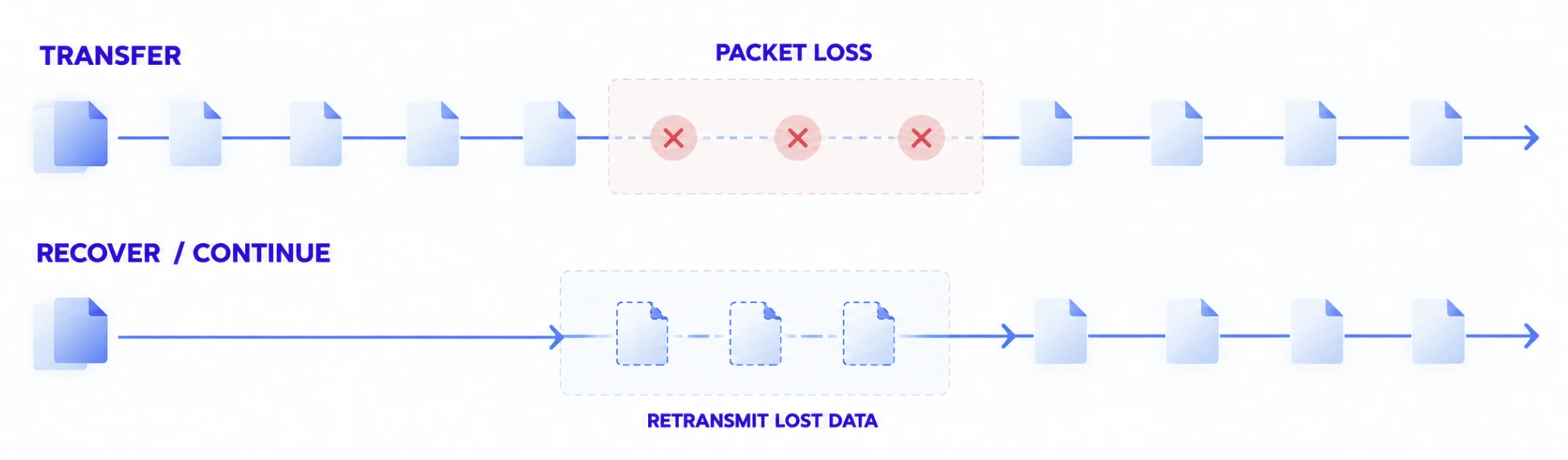
Performance under Packet Loss should be evaluated not only by peak speed but also by how quickly the Transfer can continue normally after loss occurs.
NETWORK CHANGE
The network can change while a transfer is in progress.
During a long-running file transfer, it is difficult to assume that the network at completion will always be identical to the network at the start.
A user may move from Wi-Fi to a wired network, the VPN connection may change, or the network may temporarily disconnect and reconnect.
With a small file, retransmission may be an acceptable solution. With a large Transfer that has already consumed significant time, preserving existing progress becomes much more important.
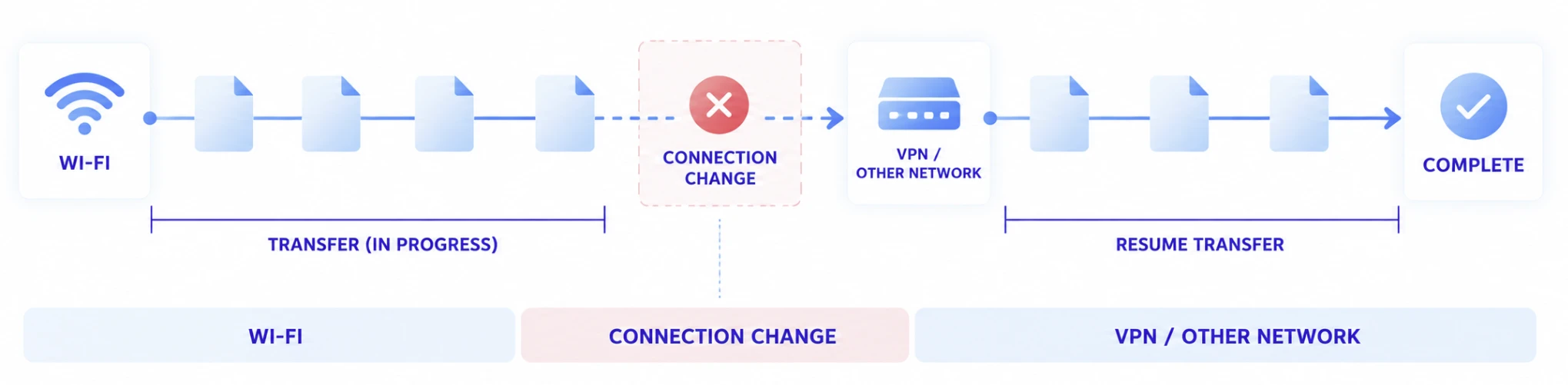
Exabyter maintains Transfer State and, where reconnection is possible, allows an interrupted Transfer to continue, reducing the need to retransmit the entire dataset after a network change.
RESUME & RECOVERY
A dropped connection does not mean resending data that has already arrived.
The cost of a failed large-file transfer is more than an error message.
If most of a 100GB file has already been delivered when the connection is interrupted, retransmitting the entire file consumes the user's time and network Traffic again.
Exabyter maintains Transfer progress and allows transmission to continue from the interrupted point.


Resume is not merely a convenience. As files become larger and transfer duration increases, it directly affects the likelihood of completing the transfer and the amount of network capacity consumed.
COMPLETION-FIRST
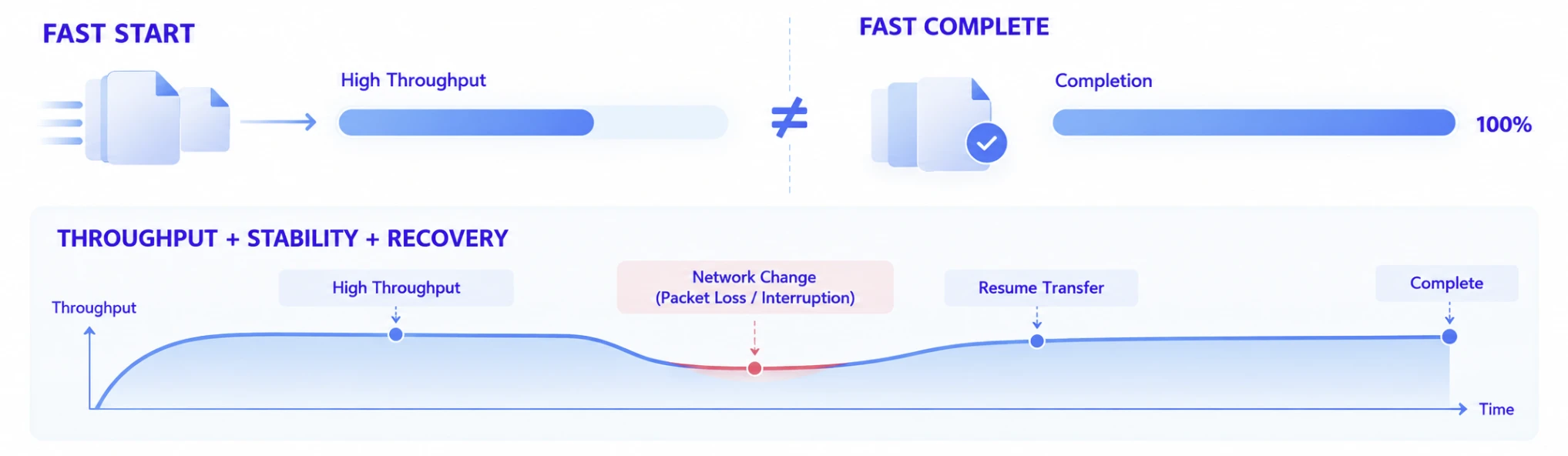
Measure actual completion time, not just peak speed.
A single moment of Peak Throughput does not fully describe large-file transfer performance in real-world conditions.
A transfer may start at very high speed, but if a network change causes it to fail and the entire file must be resent, actual business completion time can become much longer.
Exabyter therefore considers performance across the following factors:
- Efficient use of available network capacity
- Actual Throughput over long-distance networks
- Continuous transfer under Packet Loss
- Resume after connection interruption
- Reduced unnecessary full retransmission
- End-to-End Completion Time until the file reaches the Target
REAL NETWORKS
Designed for real enterprise networks.
Enterprise file transfers do not always take place over dedicated networks or under ideal laboratory conditions.
Users upload and download files through corporate networks, the public internet, VPNs, remote offices, and many other access environments. Even within the same service, network quality and Source / Target conditions can differ from one user to another.
Exabyter is designed to complete large-file Transfers under these real-world network conditions.
Example Environments
Headquarters ↔ Overseas Office
Deliver large business files over long-distance networks.
External User → Enterprise System
Upload large files from users operating under different internet
conditions.
Enterprise System → External User
Download large deliverables and datasets.
Remote Work Environment
Run long-duration Transfers over VPN or external networks.
Cloud / Data Center Connectivity
Move data initiated from the web between systems and Storage located in
different regions.
PERFORMANCE BY ARCHITECTURE
Transfer performance is not only a network problem.
Improving large-file transfer performance requires looking not only at the Transfer Engine but also at the actual path the file takes.
In an existing web architecture, the processing performance of the Web Server and Storage can affect the overall Transfer.

At larger scale, the web application and file data path can also be separated so each can be designed around its own role.

Actual performance evaluation should therefore consider bottlenecks across the entire Client / Network / Transfer / Server / Storage path.
For detailed architecture options, see Architecture & Integration.
MEASURE WHAT MATTERS
Evaluate performance together with the actual test conditions.
It is difficult to compare large-file transfer performance using a single maximum speed figure.
Even the same product can produce different results depending on Network RTT, Packet Loss, Bandwidth, file size, file count, and Endpoint I/O.
At a minimum, performance comparisons should include the following conditions.
| Measurement | What to Verify |
|---|---|
| Available Bandwidth | Actual network capacity available across the test path |
| RTT / Latency | Round-trip delay between Source and Target |
| Packet Loss | Data loss conditions across the test path |
| File Size | Size of files used in the test |
| File Count | Whether the test uses one file or a large file set |
| Source I/O | Actual rate at which the Source can read data |
| Target I/O | Actual rate at which the Target can write data |
| Throughput | Actual file data transfer rate |
| Completion Time | Time required to complete delivery of the entire file |
| Recovery | How the Transfer recovers after an interruption |
Publishing these conditions together makes comparisons between different file transfer approaches meaningful.
RELATED
Consider file scale and service architecture together.
Large & Mass File Transfer
See how large files, massive numbers of small files, and folders affect transfer performance and completion.
Read moreWeb Service at Scale
Learn how to handle Traffic and Transfers when many users Upload and Download at the same time.
Read moreArchitecture & Integration
See how to design the actual file data path across existing Web Server and Object Storage environments.
Read moreFrequently Asked Questions
Why can large-file transfer be slow even when the internet connection is fast?
Network bandwidth is only one of several factors that determine actual file transfer performance. RTT between Source and Target, Packet Loss, network congestion, Endpoint read/write performance, and the transfer method can prevent a Transfer from using all available bandwidth.
Why is long-distance file transfer slower than transfer over a short distance?
As distance increases, RTT between Source and Target generally increases as well. In transfer methods that repeatedly send data and confirm delivery state, this delay can affect actual Throughput. As a result, long-distance transfer can perform differently even when the available
bandwidth is the same.
Does Latency affect large-file transfer speed?
Yes. Depending on the transfer method, higher Latency can slow the process of sending data and handling responses, making it harder to use available network capacity efficiently. With large files, even a small Throughput difference accumulates over time and can significantly affect total completion time.
What happens to a file transfer when Packet Loss occurs?
Lost data must be retransmitted, and depending on the transfer method, the response to Packet Loss can reduce Throughput. For a large Transfer, it is important to evaluate not only the loss itself but also how reliably the Transfer continues and how quickly normal performance
recovers afterward.
If the network disconnects during a transfer, do I have to start over?
An interrupted Transfer can maintain its progress and continue from the interruption point instead of retransmitting all data that has already been delivered. For long-running large-file transfers, Resume and Recovery are important for reducing total completion time and retransmission Traffic.
What should I check when comparing file transfer performance?
Rather than comparing only maximum speed, review the Bandwidth, RTT, Packet Loss, file size and count, Source / Target I/O, actual Throughput, and total Completion Time used in each test. Speed figures measured under different conditions cannot be meaningfully compared without that context.
For large-file transfer, which matters more: peak speed or completion time?
From a business perspective, the total time required for the file to reach its destination is more important. A Transfer may record high Peak Throughput, but if an interruption requires the entire file to be resent, actual completion can take longer. Throughput should therefore be evaluated together with stability, Resume, and Recovery.