
EXABYTER
Keep your web service stable as file transfer demand grows.
One user uploading a large file and many users uploading and downloading at the same time are different problems.
As the number of users grows, so do the number of concurrent Transfers, total Traffic, server and Storage throughput requirements, failures and recoveries, and per-user transfer states. In environments where a single large-file transfer may remain active for a long time, how many Transfers are active at once and how long they remain active matters more than a momentary user count.
Exabyter handles each file transfer as an independent Transfer and, depending on the service architecture, can separate web application processing from the actual file data path so that web services can scale as both user count and transfer volume increase.

FROM ONE USER TO MANY
One large transfer and thousands of concurrent transfers are different problems.
When one user transfers a single 100GB file, the primary concern is how quickly and reliably that Transfer can reach completion.
When 100 users upload or download large files at the same time, however, the service is no longer handling a single file.
Each user's transfer starts at a different time, uses a different network, and has a different transfer rate and completion time. Some Transfers may complete normally while others encounter connection interruptions or Resume operations.
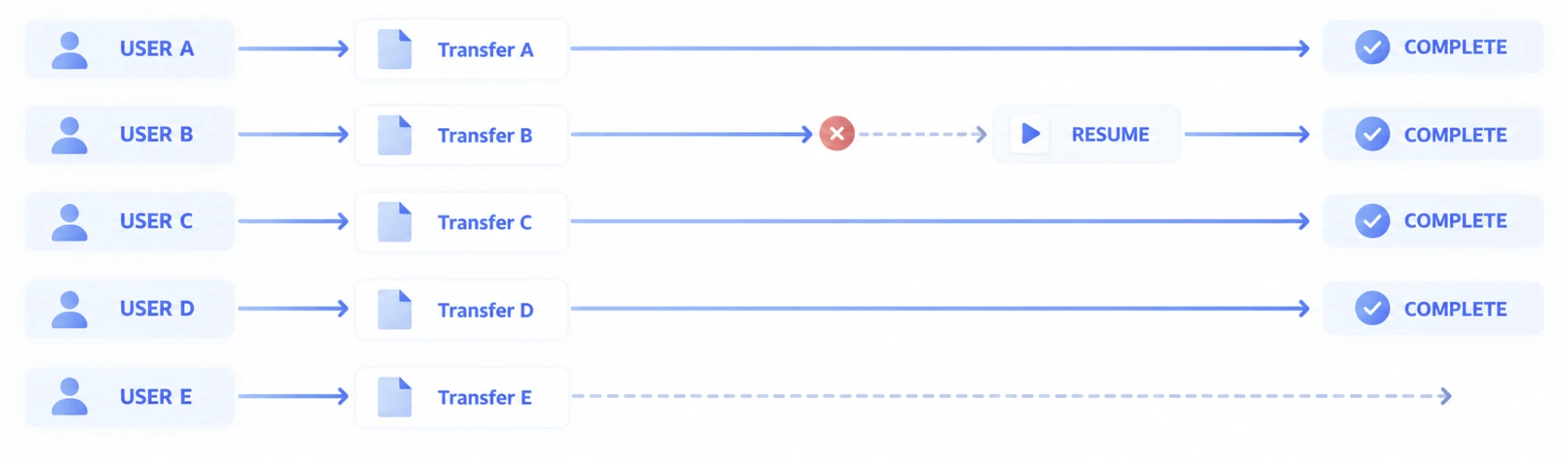
Large-scale web file transfer therefore requires both managing overall user Traffic and maintaining every Transfer independently.
CONCURRENT TRANSFERS
Handle each user's transfer independently.
When many users transfer files at the same time, a problem in one Transfer should not disrupt the work of other users.
Each user has different files and network conditions, and each Transfer starts, progresses, pauses, recovers, and completes at a different time.
Exabyter handles each user's file transfer as an independent Transfer so individual job state can be maintained even when multiple Uploads and Downloads are running simultaneously.
What can happen at the same time
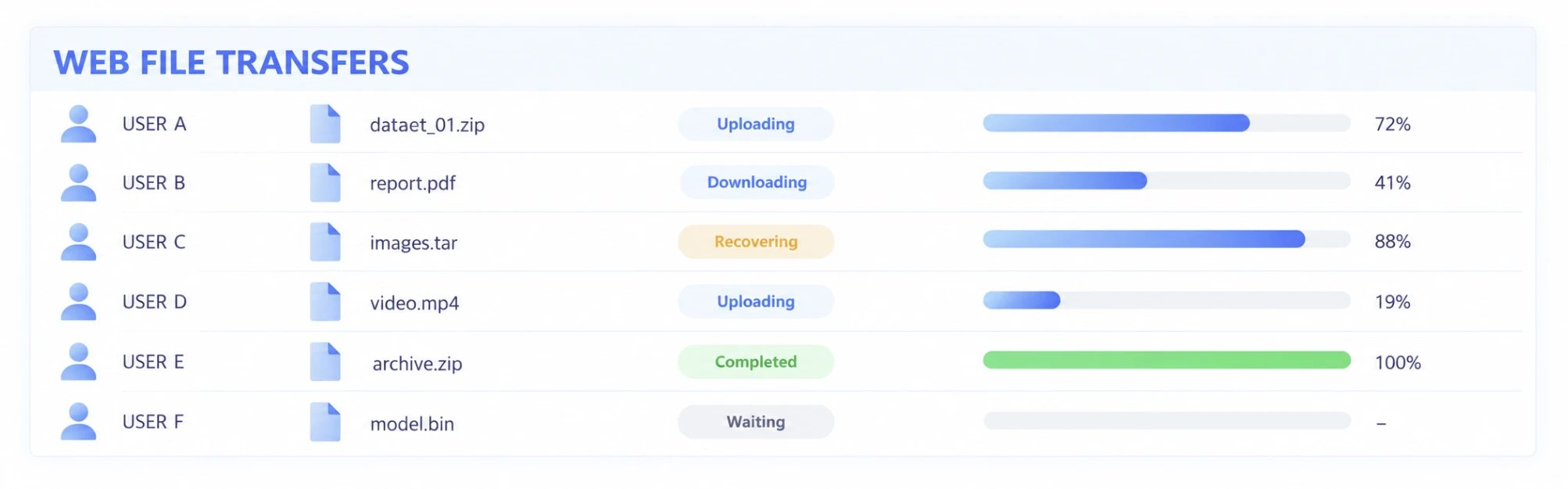
At scale, knowing that 6 users are currently connected is less useful than knowing the actual state of each Transfer.
LONG-LIVED TRANSFERS
Large-file transfers can outlive ordinary web requests.
A typical web request is processed and completed within a relatively short period.
A large-file Transfer, however, can remain active much longer depending on file size and network conditions. When many users run long-lived Transfers at the same time, the web service must handle not only a large number of requests but also data transfer jobs whose state persists for extended periods.
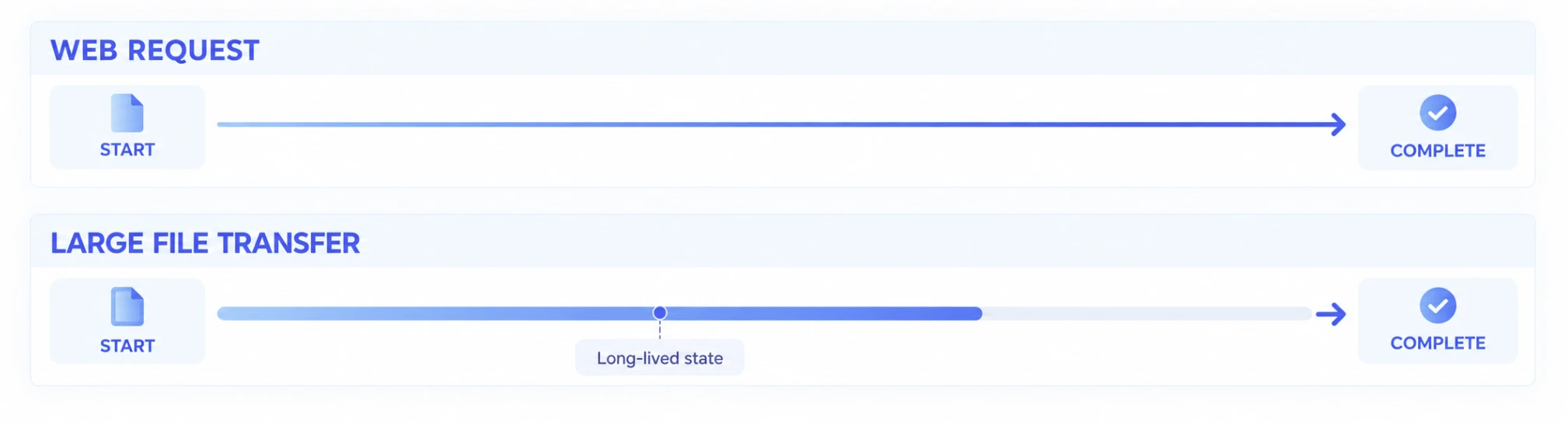
For large-scale web file transfer, it is therefore important to maintain each Transfer state over time and allow the job to continue even when network changes or interruptions occur.
TRAFFIC SURGE
When users surge, File Traffic surges with them.
Growth in web service Traffic does not mean only more page views or API Requests.
In services that include file uploads and downloads, the actual amount of data moving through the service can increase rapidly as user activity grows.
For example, if one user uploads 10GB and tens or hundreds of users begin Transfers during the same period, the web service must process large-scale File Traffic alongside normal business requests.
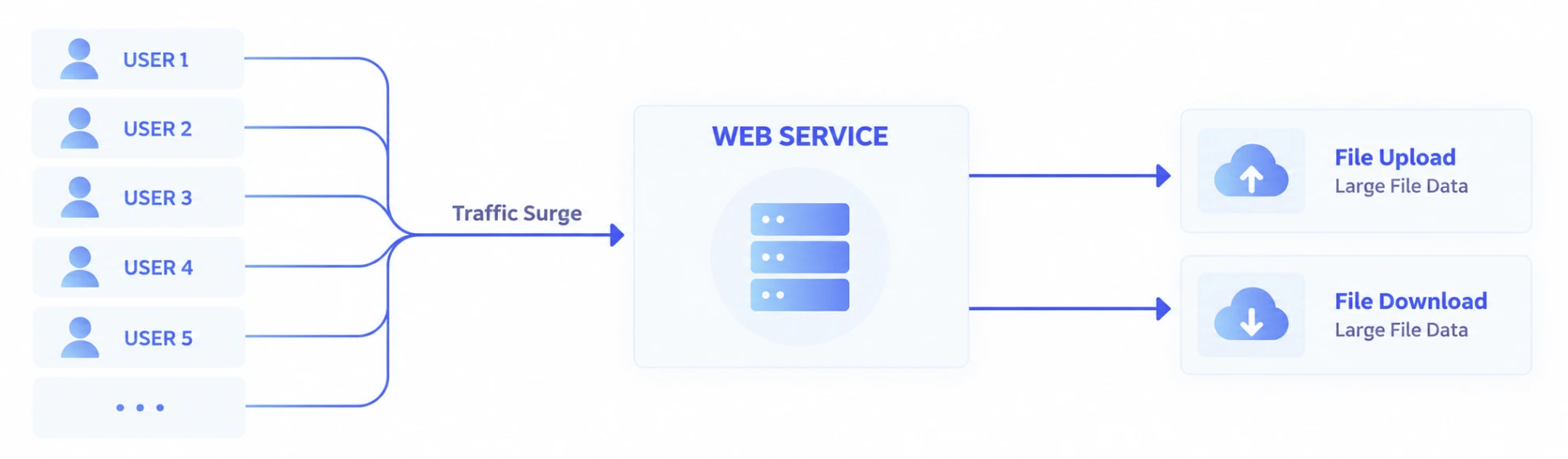
At scale, a Traffic Surge should not be treated simply as a matter of increasing the performance of one server. You need to understand which resources are being consumed by web workloads and which are being consumed by file data.
WEB TRAFFIC & FILE TRAFFIC
Web workloads and file data have different characteristics.
A web application handles authentication, authorization, screens, APIs, Metadata, and business logic.
A File Transfer reads, moves, and stores large volumes of actual data over extended periods.
Even when both begin within the same web service, they may use resources differently and require different scaling strategies.
| Web Application | File Transfer |
|---|---|
| Authentication | Large Data |
| Authorization | Long-lived Transfer |
| Business Logic | Upload / Download |
| API | Throughput |
| Metadata | Resume / Recovery |
| Short Requests | Long-running Data Flow |
If all file data is processed through the same path as the Web Application without accounting for these differences, growing File Traffic can affect business application processing.
SEPARATE THE DATA PATH
Separate the web service from the file data path.
As a service grows, it can be beneficial to separate the application's responsibilities from the movement of actual file data.
The web application can handle user authentication, authorization, Metadata, and business state, while large-file data travels through a separate Transfer path.
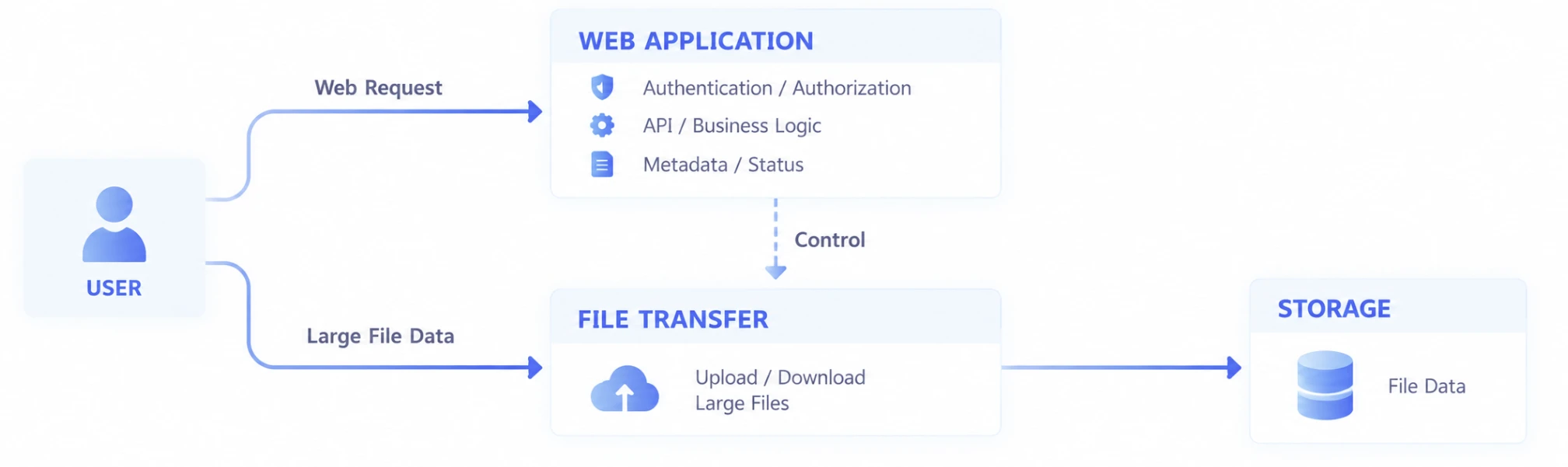
With this architecture, the web application does not need to process every file byte directly. Each layer can instead be designed around its own role.
The web service handles the business. The Transfer path moves the file data.
TWO WAYS TO SCALE
Keep the existing architecture or separate the data path.
Not every service needs to be rebuilt around a new architecture from day one.
Exabyter can be applied to an existing web application architecture, or the file data path can be separated according to service scale and data architecture.
Existing Web Server-Centric Architecture

Apply large-file Upload / Download while retaining the existing authentication, authorization, business logic, and storage structure.
This approach is suitable when adding file transfer capabilities to an existing enterprise business system or an already operational web service.
Separated File Data Path

Separate the roles of the web application and large-file data so each can scale according to its own requirements.
The appropriate approach depends on the service architecture, existing systems, data scale, and what needs to happen to the files after transfer.
OBJECT STORAGE
Scale the storage architecture along with file data.
As file transfer volume grows, where and how the data is stored becomes as important as the path used to move it.
In environments using Object Storage, the web application can handle authentication and business logic while actual file data connects to Storage through a separate Transfer path.

This architecture allows application processing and large-scale file storage and transfer to be designed according to different requirements.
It can also be extended to environments where files arriving in Object Storage need to continue to another server, storage system, or processing environment.
For detailed Web Server / Object Storage architectures and downstream system integration, see Architecture & Integration.
TRAFFIC CONTROL
Not every Transfer needs to compete for the same resources at full speed.
In a large-scale file service, running every possible Transfer at maximum speed is not always the best approach.
When many users perform large Uploads and Downloads at the same time, they share network, Storage, and Endpoint processing capacity. If Transfer volume rises sharply during a particular period, the service may need to manage resource usage across the entire environment.
Depending on the service, considerations can include:
- Number of concurrent Transfers
- Upload and Download Traffic
- Available Network Bandwidth
- Storage Read / Write performance
- Endpoint processing capacity
- Business hours and large-transfer windows
- Transfer requirements by user or service
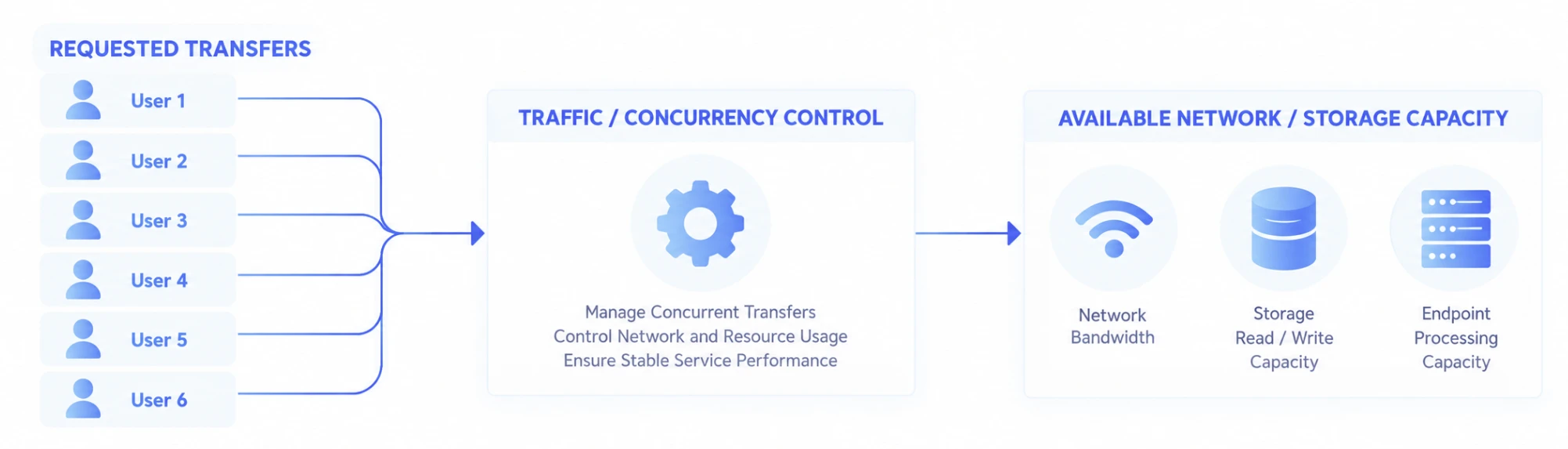
The goal is not simply to limit the number of Transfers. It is to keep the overall service operating within a predictable range as file transfer volume increases.
TRANSFER ISOLATION
Do not let one user's problem become a service-wide problem.
In environments with many concurrent users, some users may have slow networks or experience connection interruptions.
Each job needs to remain independent so that delay or recovery in one Transfer does not interrupt normal Transfers for other users.
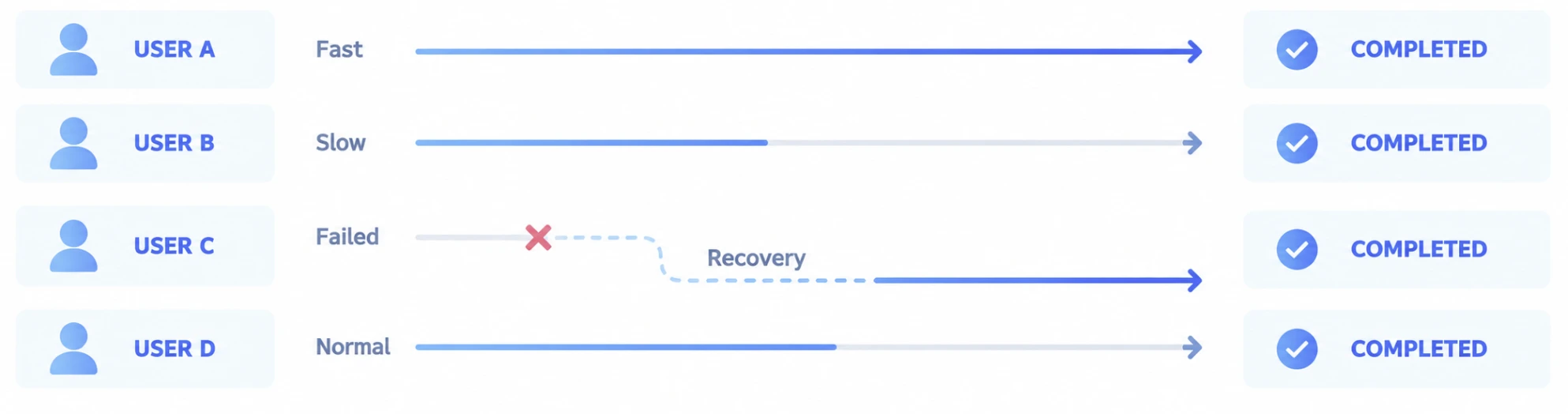
Even when every user has a different network and different files, each Transfer proceeds according to its own state.
This isolation is particularly important when external users, remote workers, and offices in different regions share the same service while operating under very different network conditions.
SCALE EACH LAYER
Scale where the actual bottleneck exists.
The performance of large-scale web file transfer is not determined by the specifications of a single server.
As user count increases, different bottlenecks can emerge in the Web Application, Transfer processing, Network, and Storage layers.

Rather than scaling the entire system at once, it is important to identify where the actual bottleneck occurs.
Web Application
Authentication, authorization, APIs, and business processing volume
Transfer
Concurrent Uploads / Downloads and long-running Transfers
Network
Total File Traffic and available Bandwidth
Storage
Concurrent Read / Write operations, file count, and storage throughput
When these responsibilities are separated, each layer can be scaled according to service growth and actual demand.
UPLOAD & DOWNLOAD AT SCALE
Upload and Download happen at the same time in large-scale services.
File-based web services often have bidirectional data flows rather than supporting Upload alone.
Users may upload source files and later download processed results, while an organization distributes large datasets to many users and collects new data at the same time.
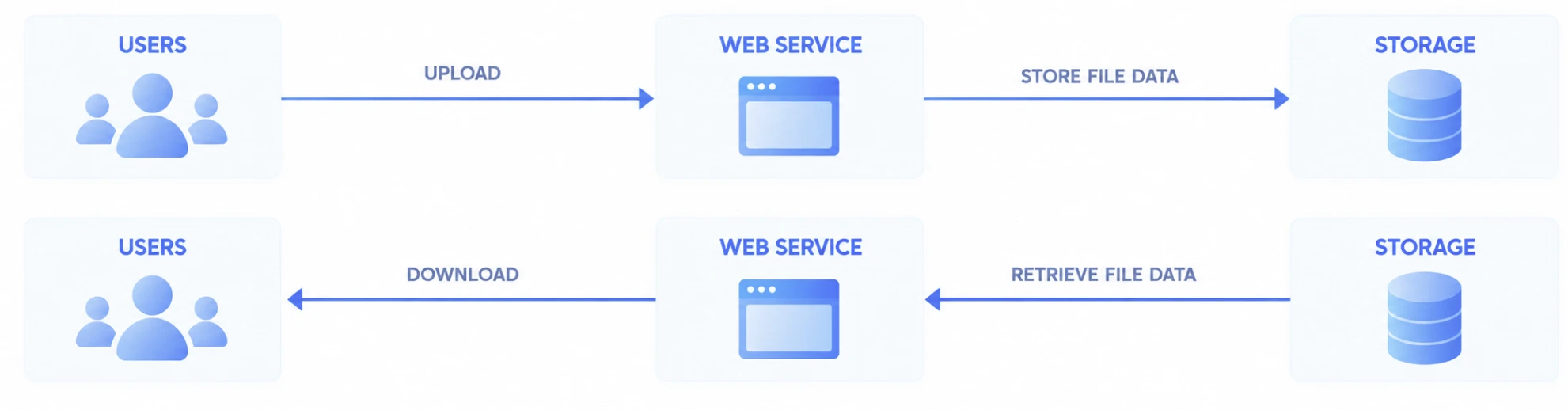
Capacity planning should therefore consider real usage patterns where Upload and Download occur simultaneously, not only maximum Traffic in one direction.
AFTER THE UPLOAD
Plan for growth in both users and data.
As a web service grows, the number of users is not the only thing that increases.
The volume of uploaded files continues to grow as well, along with the data flows required to process, analyze, archive, or deliver those files to other systems after they reach Storage.
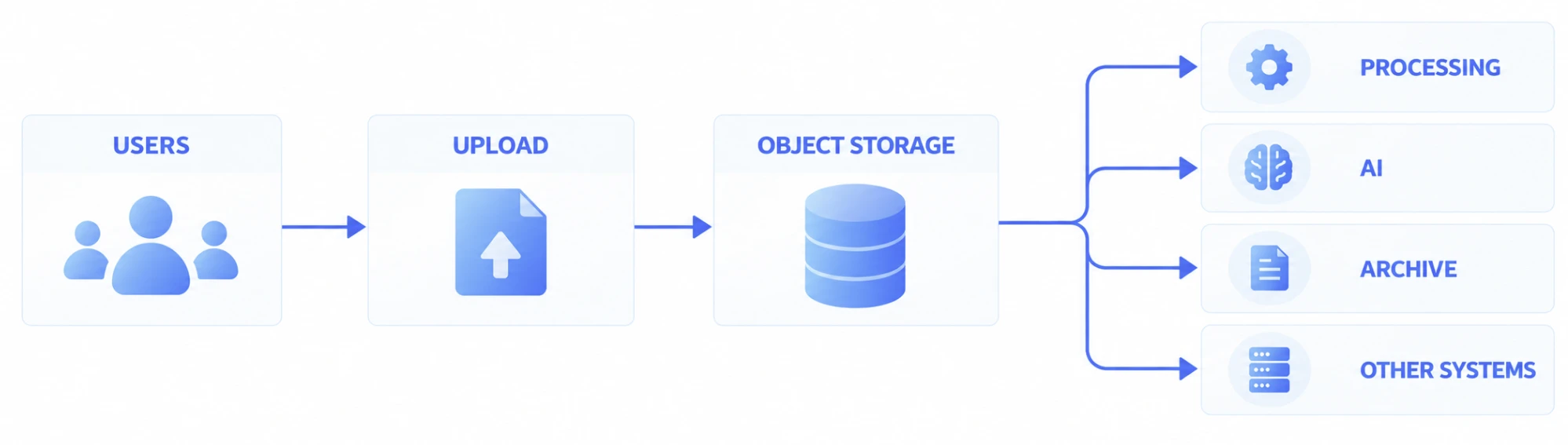
At scale, a web Upload can be designed not as the final destination but as the entry point to a larger data Workflow.
The reverse is also possible: large datasets generated by other systems can be collected into Storage and connected to a web Download for users.
OPERATING AT SCALE
As Transfer volume grows, status and results need to remain visible.
A few Transfers can often be monitored from individual user screens.
When many Transfers are active at the same time, however, the service needs a broader view: how many jobs are currently active, which have completed, and whether any Transfers have failed or are recovering.
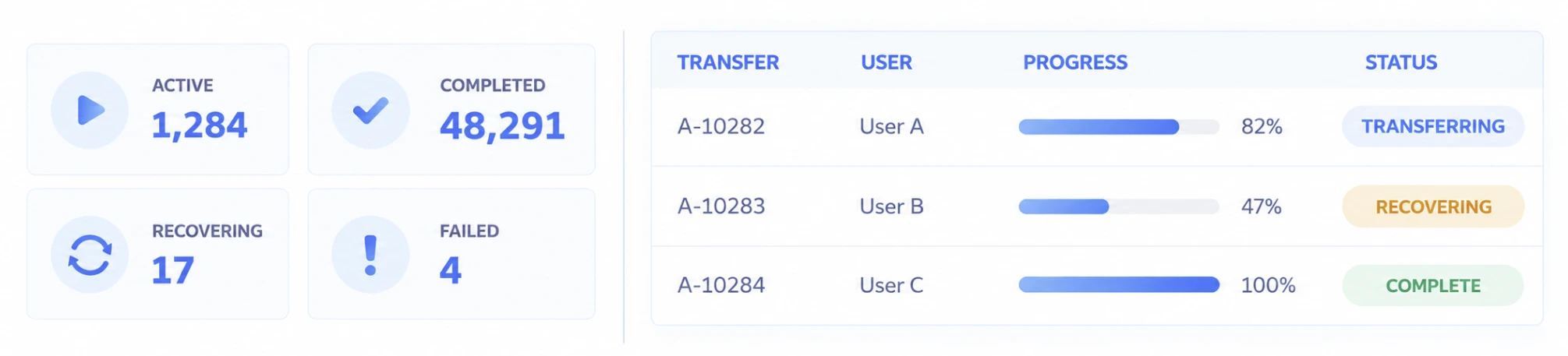
Where operational visibility is required, the status, results, and history of multiple Transfers can be reviewed together, including file flows that begin on the web and continue into other systems.
For detailed operational models, see Operations & Management.
CAPACITY PLANNING
Plan around actual Transfer conditions, not just concurrent user count.
When designing a large-scale web file transfer service, a single number such as How many users can it support? is not enough to determine the required capacity.
Even with the same 1,000 users, a service where each user sends a 10MB file is very different from one where users maintain 100GB Transfers for extended periods. Their Network and Storage requirements are not the same.
Capacity planning should consider the following conditions together.
| Factor | Why It Matters |
|---|---|
| Concurrent Users | Number of users actually transferring during the same period |
| Concurrent Transfers | Number of Transfers maintained simultaneously |
| Average File Size | Typical amount of data per transfer |
| Maximum File Size | Potential duration of the longest Transfer |
| File Count | Impact of per-file processing and Storage I/O |
| Upload / Download Ratio | Scale of bidirectional Traffic |
| Peak Traffic | Maximum transfer volume during peak periods |
| Available Bandwidth | Network capacity actually available to the service |
| Storage Performance | Concurrent Read / Write throughput |
| Transfer Duration | Affects how many jobs remain active simultaneously |
These conditions provide the basis for sizing the Transfer environment and infrastructure required for the actual service.
USE CASES
Built for web services where many users work with large files.
Public & Enterprise Services
Support web services where applications, submissions, data registration, and result downloads are concentrated during specific periods.
Customer & Partner Portals
Allow external users on different networks to Upload large datasets and Download completed results.
Media Portals
Enable multiple creators and customers to upload and download high-resolution video and project data simultaneously.
Research Platforms
Allow researchers to submit large Datasets and receive processed results through the same web service.
AI & Data Services
Enable multiple users to deliver Datasets and large-scale data to Object Storage and connect them to downstream Processing or AI Workflows.
Enterprise File Services
Create a web environment where multiple departments and external users can exchange large files through one service.
RELATED
Consider file scale and architecture together with service scale.
Large & Mass File Transfer
Learn how large files, massive file sets, and folders are handled as a single Transfer.
Read moreHigh-Speed & Reliable Transfer
See how long distance, Latency, Packet Loss, and network changes affect large numbers of concurrent Transfers.
Read moreArchitecture & Integration
Learn how to design Web Traffic and File Traffic paths using existing Web Server environments and Object Storage.
Read moreOperations & Management
See how to monitor and operate the status, results, failures, recoveries, and history of large numbers of Transfers.
Read moreFrequently Asked Questions
What problems can occur when many users upload large files at the same time?
As the number of concurrent Transfers and total File Traffic increases, load can rise across the Network, Web Server, Transfer processing layer, and Storage. With long-running large-file Transfers in particular, it is important to consider not only the number of connected users but also the number of Transfers active at the same time and the amount of data in each Transfer.
Can large-file uploads affect web service performance?
Yes. If file data and ordinary web requests share the same resources, growing File Traffic can affect business processing in the web application. Depending on the service architecture, authentication and business processing can be separated from the actual large-file data path so each can be designed around its own requirements.
Can large files be delivered to Object Storage without passing through the web server?
Depending on the service architecture, the web application can handle authentication, authorization, and business processing while actual file data connects to Object Storage through a separate Transfer path. The specific design should reflect the existing system, Storage, security, and business requirements.
If concurrent users increase, is adding more servers enough?
Not always. The bottleneck may exist in the Web Application, Transfer layer, Network, or Storage. Concurrent Transfers, file sizes, the Upload / Download ratio, Network Bandwidth, and Storage I/O should be evaluated together before scaling the layer that actually needs more capacity.
Can one user's slow network affect other users' transfers?
At scale, it is important to maintain each user's Transfer state independently. Because every user has different files and network conditions, slow or recovering Transfers should be handled independently from other Transfers that are progressing normally.
How should capacity for a large-scale file transfer service be calculated?
Capacity should not be based only on the total number of registered users. Actual concurrent users, Concurrent Transfers, average and maximum file sizes, file count, Upload / Download ratio, Peak Traffic, Network Bandwidth, and Storage performance should be evaluated together.
Can uploaded files automatically continue to other systems?
Yes. At scale, a web Upload can be designed as the starting point of a larger data flow. Files arriving in Storage can continue to processing servers, AI systems, Archives, or other systems. In the opposite direction, data collected from other systems can be connected to a web Download.