
INNORIX Platform doesn't leave any copies of files anywhere other than the target device.#
| Classification | INNORIX Platform - Cloud | INNORIX Platform - On-premises |
|---|---|---|
| Between various types of workstation, servers | Transfers only to the target device, no external copies. | Transfers only to the target device, no external copies. |
| Between cloud object storage | Transfers only to the target device, no external copies. | Transfers only to the target device, no external copies. |
| Between various industrial devices | Transfers only to the target device, no external copies. | Transfers only to the target device, no external copies. |
| Private-network ↔ external-private-IP transfer | Transfers only to the target device, no external copies. | Transfers only to the target device, no external copies. |
| Private-network ↔ external-private-IP transfer | Transfers only to the target device, no external copies. | Transfers only to the target device, no external copies. |
| Private-network ↔ external-private-IP transfer | Transfers only to the target device, no external copies. | Transfers only to the target device, no external copies. |
| Private-network ↔ external-private-IP transfer | Transfers only to the target device, no external copies. | Transfers only to the target device, no external copies. |
| Private-network ↔ public-IP connect | Transfers only to the target device, no external copies. | Transfers only to the target device, no external copies. |
| Private-network ↔ public-IP connect | Transfers only to the target device, no external copies. | Transfers only to the target device, no external copies. |
| Large file distribution | Transfers only to the target device, no external copies. | Transfers only to the target device, no external copies. |
| Large file collection | Transfers only to the target device, no external copies. | Transfers only to the target device, no external copies. |
| Sequential transfer between devices | Transfers only to the target device, no external copies. | Transfers only to the target device, no external copies. |
| Tree-structure distribution | Transfers only to the target device, no external copies. | Transfers only to the target device, no external copies. |
| Tree-structure collection | Transfers only to the target device, no external copies. | Transfers only to the target device, no external copies. |
Direct, real-time transfer between source and target eliminates unnecessary storage, making it the fastest and most secure solution.#
Conversely, other transfer methods can expose copies in the middle, posing serious security risks.#
| Classification | FTP | USB drive, SSD, HDD | Cloud storage | INNORIX Platform |
|---|---|---|---|---|
| File storage location | Files stored on an FTP server → Risk of full file leak if the server is hacked. | Files stored on USB drives are completely leaked if lost. | Stored in external cloud storage → May include overseas servers. | Stored only on each device. No replication to central servers or external storage. |
| Transfer scope restrictions | Requires NAT and firewall access → Exposure to external attackers. | USB drives can be moved physically, allowing free movement internally and externally. | Cloud URL/SAS link access → Risk of external leakage. | Only internal devices communicate with internal devices. No external leakage. |
| Publicly Closed Network (PNW) | No internet required (server itself can be internal), but server attacks are possible. | Can be used on closed networks, but physical removal or import is prohibited. | Not available on closed networks (internet access required). | Operates normally even on a completely closed network without the internet. |
| Data/account exposure risk | FTP transfers in plaintext (exposing accounts and data). Vulnerable to MITM and sniffing attacks. | 100% leak if the media is lost. Infinite copies are created. | If permissions are excessive, anyone worldwide can access the file. Risk of URL leakage. | Very little risk of exposure due to the structure blocking external connections. |
| Malware risk | RCE and backdoor risks via vulnerable FTP servers. | Risk of USB infection (Autorun malware, BadUSB) | Malicious files can be uploaded and downloaded to cloud storage. | Very little risk due to no external access. |
| Regulatory and legal risks | Plaintext exposure of accounts and data → Risk of violation of personal information processing regulations. | Many companies prohibit the removal of USB drives. | Storing files in overseas regions may violate the Personal Information Protection Act. | Transfer only within the company → No overseas export restrictions. |
In particular, uploading to cloud storage and then downloading data poses a critical security vulnerability.#
| Classification | Security issues in cloud storage |
|---|---|
| Incorrect permissions (open bucket) | Public settings or excessive ACLs allow anyone to access data → Large-scale breaches are frequent. |
| Exposed temporary links (pre-signed/SAS) | Third parties can access data if links are leaked. |
| Full data access in case of account hijacking | If an administrator account is compromised, the entire bucket/container is at risk. |
| Shared tenancy and backend access issues | Indirect risks of insider and supply chain attacks in multi-tenant environments in public clouds. |
| Metadata and log exposure | Object metadata may contain sensitive information (file name, path, description, etc.). |
| Uncertainty over long-term deletion | Complete deletion is impossible or delayed due to cloud snapshots, backups, and replication. |
| Corporate policy violations | If the company prohibits the use of public shared storage, this could be a policy violation. |
| Data residency (sovereignty) violations | If cloud storage is located overseas, legal restrictions and approval are required. |
| Audit and attestation limitations | There are cases where it's difficult to prove who accessed which link (log retention period, log integrity issues). |
| Risk of legal action and subpoenas (region of server location) | Overseas servers may be subject to local laws (seizure, request). |
| Prohibition on international transfer of specific data | Overseas transfers or storage in foreign clouds may be prohibited. |
| Prohibition on public sharing | Most companies prohibit this policy and technically block access. |
INNORIX Platform secures the entire transfer path by strongly encrypting files names and all metadata.#
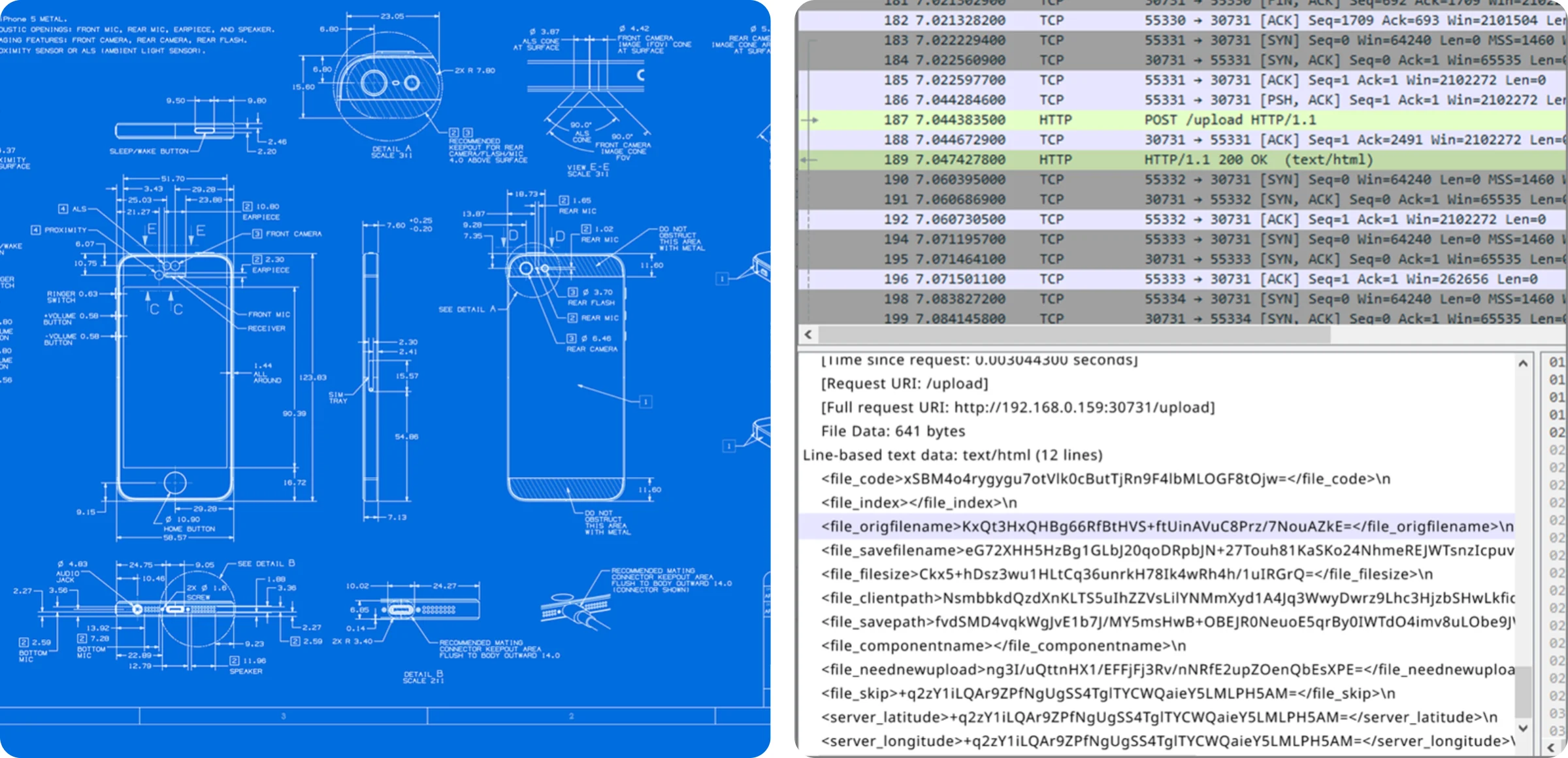
For example, if we look at the security structure of FTP, we can see that the lack of encryption poses a very high risk.#
| Classification | FTP issues |
|---|---|
| Cleartext authentication and data exposure | FTP primarily transfers authentication information and data in plain text → Network sniffing exposes account and file contents. |
| Exposure due to open firewall and NAT ports | Opening ports (ports 21, data ports, and passive port ranges) expands the attack surface, making it vulnerable to port scanning and automated attacks. |
| MITM (Man-in-the-middle) attacks | In addition to sniffing, session hijacking and command modification are possible. |
| Brute-force attacks | Weak passwords pose a risk of account hijacking. |
| Wide port range in passive mode | Firewall rules become complex, leading to false positives and incorrect permissions. |
| Server software vulnerabilities | Vulnerabilities such as RCE and DoS attacks can arise on older FTP servers. |
| Insufficient logs and auditing | Standard FTP servers may lack detailed audit logs and logs for transfers and connections, or may not be centrally aggregated. |
| Vulnerable key and password management | Plain text transfers and weak passwords can lead to unrecoverable incidents. |
| Difficulties separating access and permissions | Many FTP servers do not provide detailed RBAC. |
| Network and port policy conflicts | Corporate network policies often prohibit port opening, making this impossible. |
| Legal violations during cross-border/cross-region transfers | Sending sensitive data overseas without encryption can violate the Personal Information Protection Act and data sovereignty regulations. |
| Insufficient auditing and evidence | Insufficient verification of transfer paths and access users during regulatory audits. |
If you wish, you can further enhance security by encrypting the file body itself.#
INNORIX Platform operates only under the administrator's security policies and can monitor and control transfer status in real time.#
| Classification | FTP | USB drive, SSD, HDD | Cloud storage | INNORIX Platform |
|---|---|---|---|---|
| Administrator control functionality | FTP server permissions and account management are vulnerable, making centralized control difficult. | Physical media cannot be centrally managed. Copies cannot be tracked. | Storage permissions/ACL management is possible, but human error can open permissions, increasing the risk of oversharing. | Central administrators and security administrators have full policy control. |
| Transfer status monitoring | Most transfers lack monitoring. Automatic detection of failures is difficult. | Physical copies cannot be tracked. No logs or history are kept. | Some upload and download logs exist, but tracking who provided the link is difficult. | Real-time monitoring of all device transfer status. |
| Transfer traceability | Detailed logs are generally insufficient. Tracking accounts is meaningless if they are hijacked. | The location of copies cannot be tracked. | Sharing a pre-signed URL is difficult. No trace of external sharing may remain | Automatically records time, device name, file name, and transfer results. |
Administrators can freely configure device-to-device transfer security rules tailored to their corporate environment.#
Transferring data via removable storage media like USB drives, SSDs, and HDDs poses greater security concerns due to the risk of loss, theft, and duplication.#
| Classification | USB drive issues |
|---|---|
| Unauthorized removal/loss (physical loss) | Loss of physical media can lead to mass, irrecoverable data breaches. |
| Lack of copy management | Tracking who made which copies, when, and what is copied is difficult or impossible (no chain of custody). |
| Propagation of malware | Offline USB drives can spread malware (ransomware, malicious firmware modifications - such as BadUSB). |
| Firmware-level attacks | Manipulating USB firmware can evade detection and lead to permanent infection. |
| Inadequate encryption/key management | Standard USB drives are unencrypted, making them immediately accessible if stolen. |
| Possible policy violations: | Many companies ban the use of USB drives - using them can lead to disciplinary action and legal issues due to regulatory violations. |
| Scaling issues | Physical distribution, collection, and log management are impractical for mass deployments (tens to hundreds of devices). |
| Quarantine and verification required | Inspection and integrity verification processes are required for each receiving device (time and manpower intensive). |
| Physical transfer costs and risks | There is a risk of loss or physical damage during logistics service transit. |
| Prohibition on external export of sensitive data | Physical export of personal information, medical data, and government secrets is prohibited or strictly controlled by law. |
| Possible violation of domestic and international export regulations | Exporting certain data overseas is illegal (data sovereignty), and the movement of storage media is subject to legal liability. |
| Insufficient auditing and evidence | Insufficient proof of transfer path and access point during regulatory audit. |
INNORIX Platform records all transaction details in detail, allowing administrators to verify and audit them at any time.#
Additionally, the system directly verifies that the message has arrived at the target device, preventing "denial of receipt."#
Ultimately, INNORIX Platform provides complete secure transfers, integrating file protection, transfer monitoring, and detailed logging into a single system.#
| Classification | INNORIX Platform |
|---|---|
| File storage location | Each file is stored solely on the device and is not unnecessarily replicated to a central server or external storage. |
| Transfer range restrictions | Transfers are performed only between in-house devices, ensuring data is not leaked to external networks. |
| Administrator controllability | The entire file transfer process can only be performed under the policies and approval of the central administrator or security manager. |
| Transfer status monitoring | Operators can monitor the transfer progress across all devices in real time, enabling immediate detection of any issues. |
| Transfer history traceability | Detailed logs of all transfers between devices (time, device name, file name, sender, status, etc.) are stored for tracking. |
| Publicly Closed Network(PNW) | File transfers can be used normally even within a closed network completely disconnected from the Internet, with no external dependencies. |