
시작하기#
기본 개념#
파일 전송을 작업 공간별로 분리해 관리하기
파일 작업 공간은 특정 업무에서 사용하는 파일, 저장 위치, 전송 대상, 접근 범위를 하나의 공간으로 구성하는 방식입니다.
예를 들어 개발팀, 콘텐츠팀, 데이터 분석팀이 각각 사용하는 파일을 별도의 작업 공간으로 구성하고, 각 공간마다 필요한 저장 위치와 전송 장비를 연결할 수 있습니다.
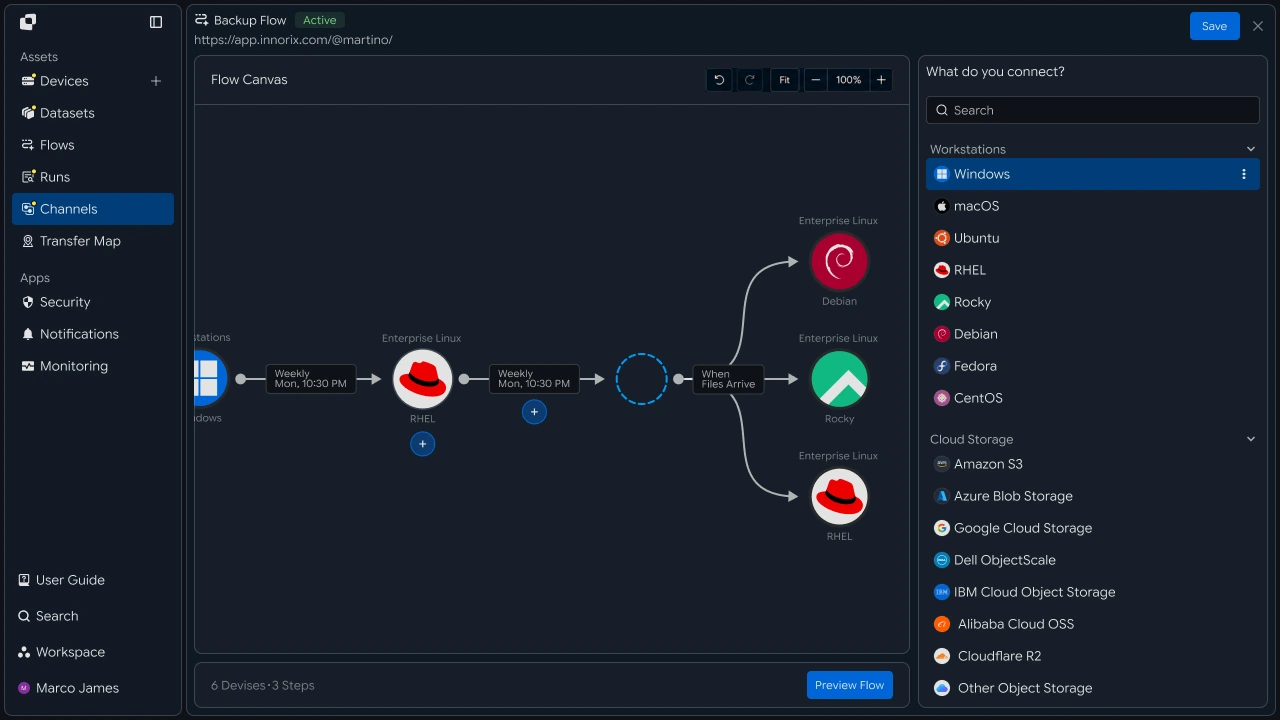
이렇게 구성하면 여러 업무에서 사용하는 파일과 전송 환경을 작업 공간별로 구분하고 관리할 수 있습니다.
공간 흐름#
파일 저장부터 전송과 결과 확인까지 이어가기
사용자는 접근 권한이 설정된 작업 공간을 선택하고 필요한 파일을 저장하거나 확인합니다.
작업 공간에 연결된 전송 작업을 실행하면 선택한 파일이 지정된 장비와 업무 환경으로 전송되며, 실행 결과도 같은 공간에서 확인할 수 있습니다.
- 작업 공간 선택
- 파일 저장, 확인
- 전송 작업 실행
- 대상 장비 반영
- 처리 결과 확인

분리 효과#
여러 업무와 장비의 파일을 목적에 맞게 관리하기
업무별로 작업 공간을 구성하면 파일과 저장 위치, 전송 대상, 접근 범위를 하나의 관리 기준으로 정리할 수 있습니다.
| 구분 | 개별 관리 | 작업 공간 관리 |
|---|---|---|
| 파일 | 여러 위치의 파일을 각각 확인 | 업무별 파일을 공간별로 관리 |
| 저장 위치 | 파일마다 위치 확인 | 작업 공간별 저장 위치 구성 |
| 전송 대상 | 작업마다 대상 확인 | 공간별 전송 장비와 경로 연결 |
| 접근 범위 | 사용자별 파일 확인 | 작업 공간 기준으로 접근 범위 관리 |
| 결과 확인 | 작업별 결과 확인 | 공간별 실행 결과 확인 |
업무팀#
필요한 파일을 작업 공간에서 관리하고 활용하기
공간 선택#
업무에 맞는 파일과 작업을 한곳에서 확인하기
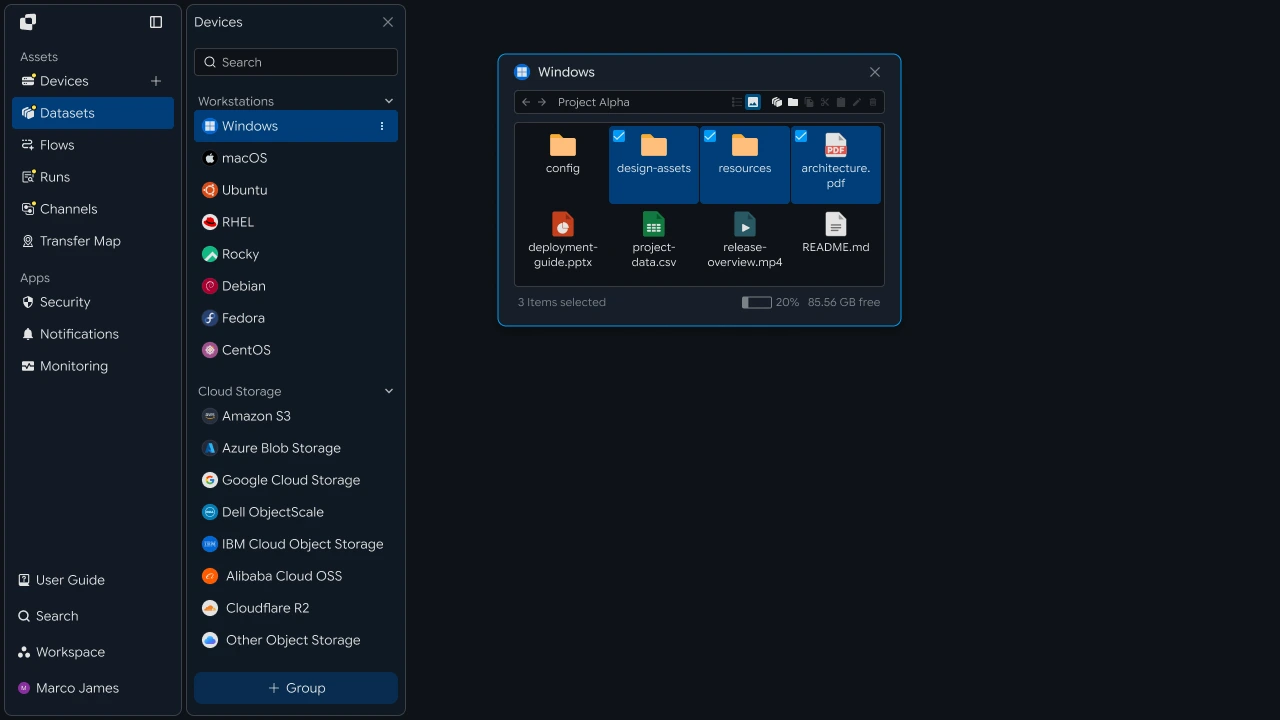
업무를 시작할 때 필요한 파일과 작업이 구성된 작업 공간을 선택합니다.
작업 공간에는 해당 업무에서 사용하는 파일과 연결된 전송 작업이 함께 구성되어 있어, 담당자는 현재 업무에 필요한 공간에서 파일 작업을 진행할 수 있습니다.
My WorkspacesProject AFilesTransfersMedia TeamFilesTransfersData AnalysisFilesTransfers
파일 활용#
필요한 파일을 저장하고 다음 업무에 활용하기
작업 공간에서 업무에 필요한 파일을 저장하고, 현재 작업에 사용할 파일을 확인합니다.
저장된 파일은 해당 작업 공간에 연결된 업무 흐름과 함께 활용할 수 있어, 담당자는 필요한 파일을 선택해 다음 작업을 이어갈 수 있습니다.
전송 실행#
준비된 전송 작업으로 파일 보내기
필요한 파일을 선택한 후 작업 공간에 구성된 전송 작업을 실행합니다.
담당자는 현재 업무에서 사용할 파일과 실행할 작업을 선택하고, 진행 상태와 처리 결과를 확인할 수 있습니다.
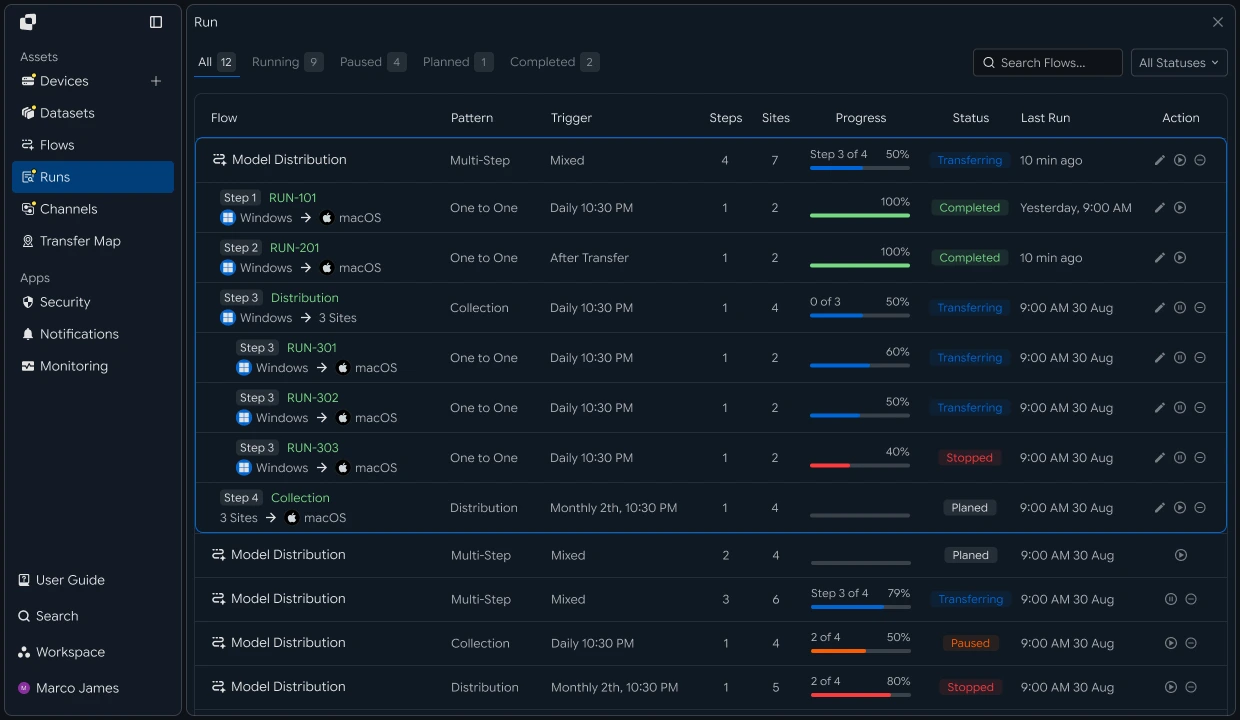
업무팀은 작업 공간에서 필요한 파일을 관리하고 준비된 전송 흐름을 활용해 다음 업무까지 이어갈 수 있습니다.
IT 엔지니어#
파일 작업 공간과 전송 환경을 구성하고 중앙에서 관리하기
공간 구성#
업무별 파일 저장 위치와 관리 범위 구성하기
업무 목적에 따라 작업 공간을 생성하고, 각 공간에서 사용할 파일 저장 위치와 관리 범위를 구성합니다.
예를 들어 개발 결과물, 미디어 파일, 데이터 처리 결과를 각각 별도의 작업 공간으로 구성할 수 있습니다.
전송 연결#
작업 공간과 대상 장비, 파일 경로 연결하기
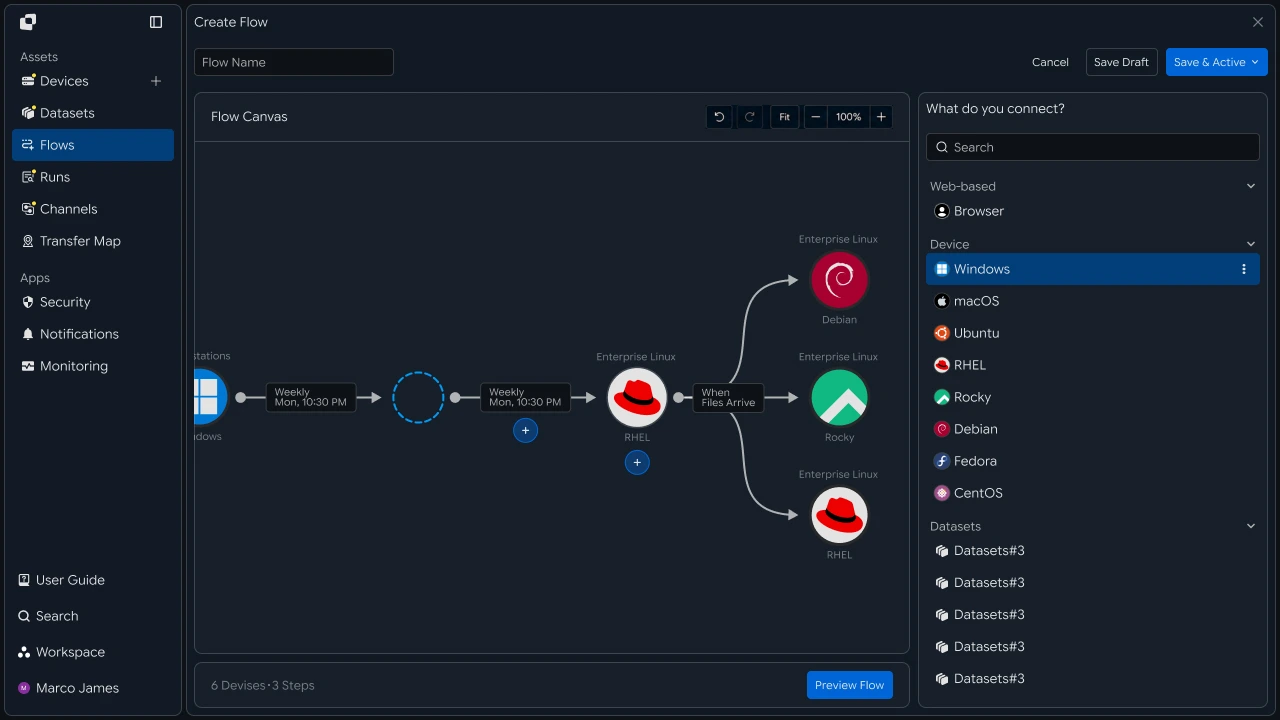
각 작업 공간에 사용할 전송 대상 장비와 파일 경로를 연결합니다.
서버, 스토리지, 업무 장비를 작업 공간에 연결하고 파일 전송 경로를 설정해 업무별 전송 환경을 구성할 수 있습니다.
Workspace
- Source Storage
- Transfer Flow
- Target DevicesServerStorageSystem
접근 정책#
사용자와 장비별 접근 범위와 전송 기준 관리하기
작업 공간마다 사용자와 그룹의 접근 범위, 연결 가능한 장비, 파일 경로와 실행 가능한 전송 작업을 구성합니다.
업무 환경이나 사용자 구성이 변경되면 동일한 정책 화면에서 접근 범위와 처리 기준을 조정할 수 있습니다.
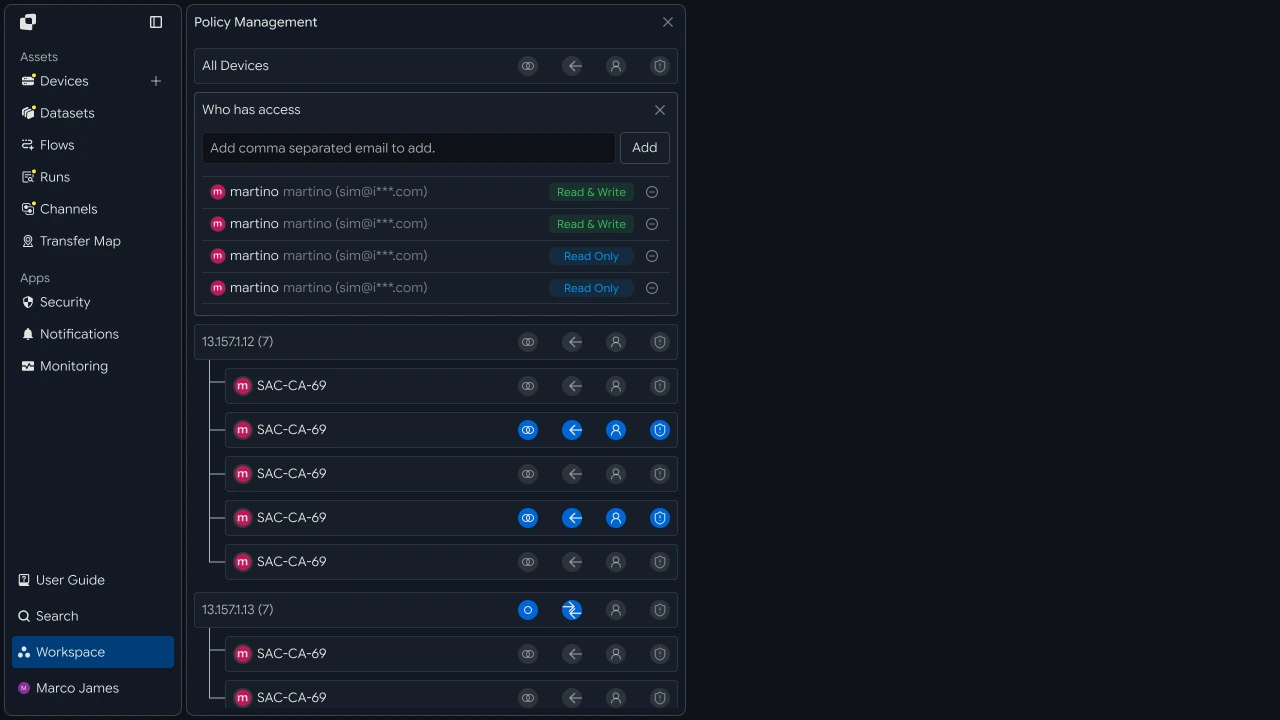
| 관리 항목 | 설정 내용 |
|---|---|
| Workspace | 사용자와 업무별 작업 공간 |
| Users / Groups | 작업 공간을 사용할 사용자와 그룹 |
| Devices | 연결 가능한 장비 |
| Paths | 파일을 사용할 경로 |
| Operations | 실행 가능한 파일 작업 |
| Transfer Rules | 파일 전송 기준과 처리 규칙 |
운영 관리#
작업 공간별 전송 결과와 전체 운영 상태 함께 확인하기
각 작업 공간에서 실행되는 파일 전송과 처리 결과를 확인하고, 여러 작업 공간과 연결 장비의 상태를 중앙에서 함께 관리합니다.
운영자는 특정 작업 공간의 실행 상태를 확인하거나 전체 환경의 작업 현황을 기준으로 운영 상황을 파악할 수 있습니다.

작업 공간은 다음 흐름으로 구성하고 관리할 수 있습니다.
개발자#
작업 공간 식별자와 토큰을 요청에 실어 보내고 권한 응답 처리하기
인증 처리#
토큰을 발급받고 만료 시 갱신하기
작업 공간 API는 액세스 토큰으로 인증합니다. 토큰이 없다면 계정으로 로그인해 발급받습니다.
import os
import threading

import requests

BASE_URL = os.getenv("INNORIX_BASE_URL", "https://app.innorix.com").rstrip("/")


def login(email, password):
    response = requests.post(f"{BASE_URL}/api/auth/login",
                             json={"email": email, "password": password},
                             timeout=30)
    response.raise_for_status()

    # the login response nests the tokens under data.user
    user = response.json()["data"]["user"]
    return user["accessToken"], user.get("refreshToken")


def refresh(refresh_token):
    response = requests.post(f"{BASE_URL}/api/auth/token/refresh",
                             headers={"X-Refresh-Token": refresh_token},
                             timeout=30)
    response.raise_for_status()

    # the refresh response nests the tokens directly under data
    data = response.json()["data"]
    return data["accessToken"], data.get("refreshToken")
static final String BASE_URL = System.getenv()
.getOrDefault("INNORIX_BASE_URL", "https://app.innorix.com").replaceAll("/+quot;, "");
static final HttpClient HTTP = HttpClient.newHttpClient();
static final ObjectMapper MAPPER = new ObjectMapper();
// Returns { accessToken, refreshToken }
String[] login(String email, String password) throws Exception {
JsonNode body = post("/api/auth/login",
MAPPER.createObjectNode().put("email", email).put("password", password));
// the login response nests the tokens under data.user
JsonNode user = body.path("data").path("user");
return new String[]{user.path("accessToken").asText(),
user.path("refreshToken").asText(null)};
}
String[] refresh(String refreshToken) throws Exception {
HttpRequest request = HttpRequest.newBuilder(URI.create(BASE_URL + "/api/auth/token/refresh"))
.header("X-Refresh-Token", refreshToken)
.POST(HttpRequest.BodyPublishers.noBody()).build();
JsonNode data = MAPPER.readTree(
HTTP.send(request, HttpResponse.BodyHandlers.ofString()).body()).path("data");
return new String[]{data.path("accessToken").asText(),
data.path("refreshToken").asText(refreshToken)};
}const BASE_URL = (process.env.INNORIX_BASE_URL
|| "https://app.innorix.com").replace(/\/+$/, "");
async function login(email, password) {
const response = await fetch(`${BASE_URL}/api/auth/login`, {
method: "POST",
headers: { "Content-Type": "application/json" },
body: JSON.stringify({ email, password }),
});
if (!response.ok) throw new Error(`login failed: ${response.status}`);
// the login response nests the tokens under data.user
const { user } = (await response.json()).data;
return { access: user.accessToken, refresh: user.refreshToken };
}
async function refresh(refreshToken) {
const response = await fetch(`${BASE_URL}/api/auth/token/refresh`, {
method: "POST",
headers: { "X-Refresh-Token": refreshToken },
});
if (!response.ok) throw new Error(`refresh failed: ${response.status}`);
// the refresh response nests the tokens directly under data
const { data } = await response.json();
return { access: data.accessToken, refresh: data.refreshToken ?? refreshToken };
}static readonly string BaseUrl = (Environment.GetEnvironmentVariable("INNORIX_BASE_URL")
?? "https://app.innorix.com").TrimEnd('/');
static readonly HttpClient Http = new();
async Task<(string Access, string Refresh)> LoginAsync(string email, string password)
{
var response = await Http.PostAsJsonAsync(quot;{BaseUrl}/api/auth/login",
new { email, password });
response.EnsureSuccessStatusCode();
// the login response nests the tokens under data.user
JsonNode user = JsonNode.Parse(await response.Content.ReadAsStringAsync())
!["data"]!["user"]!;
return (user["accessToken"]!.GetValue<string>(),
user["refreshToken"]?.GetValue<string>());
}
async Task<(string Access, string Refresh)> RefreshAsync(string refreshToken)
{
using var request = new HttpRequestMessage(HttpMethod.Post,
quot;{BaseUrl}/api/auth/token/refresh");
request.Headers.Add("X-Refresh-Token", refreshToken);
var response = await Http.SendAsync(request);
response.EnsureSuccessStatusCode();
// the refresh response nests the tokens directly under data
JsonNode data = JsonNode.Parse(await response.Content.ReadAsStringAsync())!["data"]!;
return (data["accessToken"]!.GetValue<string>(),
data["refreshToken"]?.GetValue<string>() ?? refreshToken);
}로그인과 갱신의 응답 구조가 다릅니다. 로그인은 data.user 아래, 갱신은 data 바로 아래입니다.
리프레시 토큰은 한 번만 유효합니다. 여러 스레드가 같은 토큰을 쓰는 서버 애플리케이션이라면 갱신이 동시에 일어나지 않도록 잠급니다.
class Session:
    def __init__(self, email, password):
        self._lock = threading.Lock()
        self._access, self._refresh = login(email, password)

    @property
    def access_token(self):
        with self._lock:
            return self._access

    def renew(self):
        with self._lock:
            self._access, self._refresh = refresh(self._refresh)
            return self._access
class Session {
private final Object lock = new Object();
private String access;
private String refresh;
Session(String email, String password) throws Exception {
String[] tokens = login(email, password);
this.access = tokens[0];
this.refresh = tokens[1];
}
String accessToken() {
synchronized (lock) { return access; }
}
String renew() throws Exception {
synchronized (lock) {
String[] tokens = refresh(this.refresh);
this.access = tokens[0];
this.refresh = tokens[1];
return this.access;
}
}
}class Session {
#access;
#refresh;
static async create(email, password) {
const session = new Session();
const tokens = await login(email, password);
session.#access = tokens.access;
session.#refresh = tokens.refresh;
return session;
}
get accessToken() {
return this.#access;
}
async renew() {
const tokens = await refresh(this.#refresh);
this.#access = tokens.access;
this.#refresh = tokens.refresh;
return this.#access;
}
}class Session
{
private readonly SemaphoreSlim _lock = new(1, 1);
private string _access;
private string _refresh;
public static async Task<Session> CreateAsync(string email, string password)
{
var session = new Session();
(session._access, session._refresh) = await session.LoginAsync(email, password);
return session;
}
public string AccessToken => _access;
public async Task<string> RenewAsync()
{
await _lock.WaitAsync();
try
{
(_access, _refresh) = await RefreshAsync(_refresh);
return _access;
}
finally { _lock.Release(); }
}
}작업 공간 지정#
모든 요청에 작업 공간 식별자를 함께 보내기
작업 공간은 요청 본문이 아니라 헤더로 전달됩니다. 호출부마다 직접 지정하면 누락될 수 있으므로 요청 조립을 한 곳으로 일원화합니다.
class Client:
    def __init__(self, session, workspace_id=None):
        self.session = session
        self.workspace_id = workspace_id

    def request(self, method, path, body=None, params=None, retried=False):
        headers = {
            "Content-Type": "application/json",
            "Authorization": f"Bearer {self.session.access_token}",
        }

        # when omitted the account's current workspace is used
        if self.workspace_id:
            headers["x-workspace-id"] = self.workspace_id

        response = requests.request(method, BASE_URL + path, headers=headers,
                                    json=body, params=params, timeout=30)

        if response.status_code == 401 and not retried:
            self.session.renew()
            return self.request(method, path, body, params, retried=True)

        return response
class Client {
private final Session session;
private final String workspaceId;
Client(Session session, String workspaceId) {
this.session = session;
this.workspaceId = workspaceId;
}
HttpResponse<String> request(String method, String path, String body,
boolean retried) throws Exception {
HttpRequest.Builder builder = HttpRequest.newBuilder(URI.create(BASE_URL + path))
.header("Content-Type", "application/json")
.header("Authorization", "Bearer " + session.accessToken());
// when omitted the account's current workspace is used
if (workspaceId != null) builder.header("x-workspace-id", workspaceId);
builder.method(method, body == null
? HttpRequest.BodyPublishers.noBody()
: HttpRequest.BodyPublishers.ofString(body));
HttpResponse<String> response = HTTP.send(builder.build(),
HttpResponse.BodyHandlers.ofString());
if (response.statusCode() == 401 && !retried) {
session.renew();
return request(method, path, body, true);
}
return response;
}
}class Client {
constructor(session, workspaceId = null) {
this.session = session;
this.workspaceId = workspaceId;
}
async request(method, path, body = null, retried = false) {
const headers = {
"Content-Type": "application/json",
Authorization: `Bearer ${this.session.accessToken}`,
};
// when omitted the account's current workspace is used
if (this.workspaceId) headers["x-workspace-id"] = this.workspaceId;
const response = await fetch(BASE_URL + path, {
method,
headers,
body: body === null ? undefined : JSON.stringify(body),
});
if (response.status === 401 && !retried) {
await this.session.renew();
return this.request(method, path, body, true);
}
return response;
}
}class Client
{
private readonly Session _session;
private readonly string _workspaceId;
public Client(Session session, string workspaceId = null)
{
_session = session;
_workspaceId = workspaceId;
}
public async Task<HttpResponseMessage> RequestAsync(HttpMethod method, string path,
object body = null, bool retried = false)
{
using var request = new HttpRequestMessage(method, BaseUrl + path);
request.Headers.Add("Authorization", quot;Bearer {_session.AccessToken}");
// when omitted the account's current workspace is used
if (_workspaceId != null) request.Headers.Add("x-workspace-id", _workspaceId);
if (body != null)
request.Content = JsonContent.Create(body);
HttpResponseMessage response = await Http.SendAsync(request);
if (response.StatusCode == HttpStatusCode.Unauthorized && !retried)
{
await _session.RenewAsync();
return await RequestAsync(method, path, body, true);
}
return response;
}
}작업 공간 식별자를 지정하지 않으면 계정의 현재 접근 가능한 공간이 사용됩니다. 단일 공간을 쓰는 애플리케이션은 지정하지 않아도 동작합니다.
토큰 만료도 이 지점에서 함께 처리합니다. 401을 받으면 한 번 갱신하고 재시도하되, 재시도한 요청이 다시 실패하면 그대로 올려보냅니다.
접근 범위 확인#
계정의 조회 범위와 접근 가능한 장비 확인하기
me = api("GET", "/api/auth/me") or {}
print(me)

result = api("GET", "/api/devices", params={"page": 1, "size": 20}) or {}

if result.get("viewScope"):
    print("view scope:", result["viewScope"])

for device in result.get("devices") or []:
    print(device["deviceId"], device["name"])
JsonNode me = client.api("GET", "/api/auth/me");
System.out.println(me);
Map<String, Object> result = client.apiObj("GET", "/api/devices", null,
Json.newObj("page", 1, "size", 20));
if (result.containsKey("viewScope")) {
System.out.println("view scope: " + Json.str(result, "viewScope"));
}
for (Object node : Json.arrOf(result, "devices")) {
Map<String, Object> device = Json.asObj(node);
System.out.println(Json.str(device, "deviceId") + " " + Json.str(device, "name"));
}const me = (await client.api("GET", "/api/auth/me")) || {};
console.log(me);
const result = (await client.api("GET", "/api/devices", null,
{ page: 1, size: 20 })) || {};
if (result.viewScope) console.log("view scope:", result.viewScope);
for (const device of result.devices || []) {
console.log(device.deviceId, device.name);
}JsonObject me = await client.ApiObjAsync("GET", "/api/auth/me");
Console.WriteLine(me);
JsonObject result = await client.ApiObjAsync("GET", "/api/devices", null,
new Dictionary<string, object> { ["page"] = 1, ["size"] = 20 });
if (result["viewScope"] is not null)
Console.WriteLine(quot;view scope: {J.Str(result, "viewScope")}");
foreach (JsonNode node in J.ArrOf(result, "devices"))
{
JsonObject device = J.AsObj(node);
Console.WriteLine(quot;{J.Str(device, "deviceId")} {J.Str(device, "name")}");
}| 응답 항목 | 내용 |
|---|---|
devices |
작업 공간에 연결된 장비 목록 |
totalRows, lastPage |
전체 개수와 마지막 페이지 |
viewScope |
현재 계정의 조회 범위 |
장비 목록은 data.devices 배열로 반환됩니다. 응답의 viewScope로 계정이 전체를 보는지 일부만 보는지 확인할 수 있습니다.
권한 처리#
401과 403을 구분해 재로그인과 화면 안내로 나누기
인증 실패와 권한 부족은 다르게 다뤄야 합니다. 전자는 재로그인, 후자는 화면 안내입니다.
| 상태 | 의미 | 처리 |
|---|---|---|
| 401 | 토큰이 없거나 유효하지 않음 | 갱신 후 재시도, 실패하면 재로그인 |
| 403 | 해당 작업 공간이나 경로에 접근 불가 | 사용자에게 안내 |
| 404 | 장비나 경로가 없음 | 대상이 사라졌음을 안내 |
| 429 | 요청이 과도함 | 잠시 후 재시도 |
class WorkspaceForbidden(Exception):
    pass


def call(client, method, path, body=None, params=None):
    response = client.request(method, path, body, params)

    if response.status_code == 403:
        raise WorkspaceForbidden(path)

    payload = response.json() if response.content else {}

    if not response.ok:
        raise RuntimeError(payload.get("message") or f"HTTP {response.status_code}")

    return payload.get("data")


try:
    devices = call(client, "GET", "/api/devices")
except WorkspaceForbidden:
    devices, notice = [], "no permission to access this workspace"
class WorkspaceForbidden extends RuntimeException {
WorkspaceForbidden(String path) { super(path); }
}
JsonNode call(Client client, String method, String path) throws Exception {
HttpResponse<String> response = client.request(method, path, null, false);
if (response.statusCode() == 403) throw new WorkspaceForbidden(path);
JsonNode payload = response.body().isEmpty()
? MAPPER.createObjectNode() : MAPPER.readTree(response.body());
if (response.statusCode() >= 400) {
throw new RuntimeException(payload.path("message").asText("HTTP " + response.statusCode()));
}
return payload.path("data");
}
List<JsonNode> devices;
String notice = null;
try {
devices = List.of(call(client, "GET", "/api/devices"));
} catch (WorkspaceForbidden error) {
devices = List.of();
notice = "이 작업 공간에 접근할 권한이 없습니다.";
}class WorkspaceForbidden extends Error {}
async function call(client, method, path, body = null) {
const response = await client.request(method, path, body);
if (response.status === 403) throw new WorkspaceForbidden(path);
const payload = response.body ? await response.json() : {};
if (!response.ok) throw new Error(payload.message || `HTTP ${response.status}`);
return payload.data;
}
let devices;
let notice = null;
try {
devices = await call(client, "GET", "/api/devices");
} catch (error) {
if (!(error instanceof WorkspaceForbidden)) throw error;
devices = [];
notice = "이 작업 공간에 접근할 권한이 없습니다.";
}class WorkspaceForbidden : Exception
{
public WorkspaceForbidden(string path) : base(path) { }
}
async Task<JsonNode> CallAsync(Client client, HttpMethod method, string path,
object body = null)
{
HttpResponseMessage response = await client.RequestAsync(method, path, body);
if (response.StatusCode == HttpStatusCode.Forbidden)
throw new WorkspaceForbidden(path);
JsonNode payload = JsonNode.Parse(await response.Content.ReadAsStringAsync());
if (!response.IsSuccessStatusCode)
throw new Exception(J.Str(J.AsObj(payload), "message")
?? quot;HTTP {(int)response.StatusCode}");
return payload?["data"];
}
JsonNode devices;
string notice = null;
try
{
devices = await CallAsync(client, HttpMethod.Get, "/api/devices");
}
catch (WorkspaceForbidden)
{
devices = new JsonArray();
notice = "이 작업 공간에 접근할 권한이 없습니다.";
}권한 부족을 별도 예외로 분리하면 호출부에서 안내 문구로 변환할 수 있습니다. 같은 사용자라도 작업 공간에 따라 결과가 달라지므로, 화면 상단에 현재 작업 공간을 표시해 사용자가 빈 목록을 권한 문제로 오해하지 않게 합니다.
다중 공간 처리#
여러 작업 공간을 다루는 코드에서 자격 정보 분리하기
작업 공간 식별자를 함수 인자로 전달하면 호출부 어딘가에서 누락됩니다. 공간마다 클라이언트를 만들고 그 객체를 전달합니다.
clients = {
    workspace_id: Client(session, workspace_id)
    for workspace_id in WORKSPACE_IDS
}


def collect_devices():
    result = {}

    for workspace_id, client in clients.items():
        try:
            result[workspace_id] = call(client, "GET", "/api/devices")
        except WorkspaceForbidden:
            continue

return resultMap<String, Client> clients = new LinkedHashMap<>();
for (String workspaceId : WORKSPACE_IDS) {
clients.put(workspaceId, new Client(session, workspaceId));
}
Map<String, JsonNode> collectDevices() {
Map<String, JsonNode> result = new LinkedHashMap<>();
clients.forEach((workspaceId, client) -> {
try {
result.put(workspaceId, call(client, "GET", "/api/devices"));
} catch (WorkspaceForbidden ignored) {
// skip workspaces this account cannot reach
} catch (Exception error) {
throw new RuntimeException(error);
}
});
return result;
}const clients = Object.fromEntries(
WORKSPACE_IDS.map((workspaceId) => [workspaceId, new Client(session, workspaceId)]),
);
async function collectDevices() {
const result = {};
for (const [workspaceId, client] of Object.entries(clients)) {
try {
result[workspaceId] = await call(client, "GET", "/api/devices");
} catch (error) {
if (!(error instanceof WorkspaceForbidden)) throw error;
// skip workspaces this account cannot reach
}
}
return result;
}var clients = WorkspaceIds.ToDictionary(
workspaceId => workspaceId,
workspaceId => new Client(session, workspaceId));
async Task<Dictionary<string, JsonNode>> CollectDevicesAsync()
{
var result = new Dictionary<string, JsonNode>();
foreach (var (workspaceId, client) in clients)
{
try
{
result[workspaceId] = await CallAsync(client, HttpMethod.Get, "/api/devices");
}
catch (WorkspaceForbidden)
{
// skip workspaces this account cannot reach
}
}
return result;
}작업 공간 목록을 조회하는 엔드포인트는 없습니다. 후보를 넣고 접근 가능한 것만 걸러내는 방식으로 확인합니다.
고객사별로 계정이 다르다면 세션도 분리합니다. 하나의 세션을 여러 공간이 공유하는 구성과 섞이지 않도록 생성 지점을 나눕니다.
def build_client(config):
    session = Session(config["email"], config["password"])
    return Client(session, config["workspace_id"])


clients = {name: build_client(cfg) for name, cfg in TENANTS.items()}
Client buildClient(Map<String, String> config) throws Exception {
Session session = new Session(config.get("email"), config.get("password"));
return new Client(session, config.get("workspaceId"));
}
Map<String, Client> clients = new LinkedHashMap<>();
for (Map.Entry<String, Map<String, String>> entry : TENANTS.entrySet()) {
clients.put(entry.getKey(), buildClient(entry.getValue()));
}async function buildClient(config) {
const session = await Session.create(config.email, config.password);
return new Client(session, config.workspaceId);
}
const clients = {};
for (const [name, cfg] of Object.entries(TENANTS)) {
clients[name] = await buildClient(cfg);
}async Task<Client> BuildClientAsync(TenantConfig config)
{
Session session = await Session.CreateAsync(config.Email, config.Password);
return new Client(session, config.WorkspaceId);
}
var clients = new Dictionary<string, Client>();
foreach (var (name, cfg) in Tenants)
{
clients[name] = await BuildClientAsync(cfg);
}여러 작업 공간을 순회하는 배치는 한 공간의 실패가 전체를 멈추지 않게 합니다.
failed = []

for name, client in clients.items():
    try:
        run_for(client)
    except Exception as error:
        failed.append((name, error))

for name, error in failed:
    print(f"{name}: {error}")
List<Map.Entry<String, Exception>> failed = new ArrayList<>();
clients.forEach((name, client) -> {
try {
runFor(client);
} catch (Exception error) {
failed.add(Map.entry(name, error));
}
});
for (Map.Entry<String, Exception> entry : failed) {
System.out.println(entry.getKey() + ": " + entry.getValue().getMessage());
}const failed = [];
for (const [name, client] of Object.entries(clients)) {
try {
await runFor(client);
} catch (error) {
failed.push([name, error]);
}
}
for (const [name, error] of failed) {
console.log(`${name}: ${error.message}`);
}var failed = new List<(string Name, Exception Error)>();
foreach (var (name, client) in clients)
{
try
{
await RunForAsync(client);
}
catch (Exception error)
{
failed.Add((name, error));
}
}
foreach (var (name, error) in failed)
{
Console.WriteLine(quot;{name}: {error.Message}");
}| 관리 항목 | 코드에서 다루는 내용 |
|---|---|
| 세션 | 계정별 액세스, 리프레시 토큰 |
| 작업 공간 | 요청 헤더의 공간 식별자 |
| 권한 | 403 응답과 화면 안내 |
| 자원 | 공간별 장비와 조회 범위 |
| 실행 | 공간 안에서 생성한 전송 |