
시작하기#
기본 개념#
여러 시스템에서 생성되는 로그와 진단 파일을 하나의 분석 환경으로 수집하기
서버와 애플리케이션에서는 운영 과정에서 로그, 코어 덤프, 오류 보고서와 다양한 진단 파일이 생성됩니다.
로그, 코어 덤프 중앙 수집은 각 시스템에서 생성되는 파일을 설정한 기준에 따라 수집하고, 지정된 중앙 분석 환경으로 자동 전송하는 방식입니다.
여러 서버와 애플리케이션을 하나의 수집 흐름으로 연결하면 시스템별로 생성되는 진단 자료를 중앙에서 확인하고 분석 작업에 활용할 수 있습니다.
수집 흐름#
파일 생성부터 중앙 분석 환경 반영까지 자동으로 이어가기
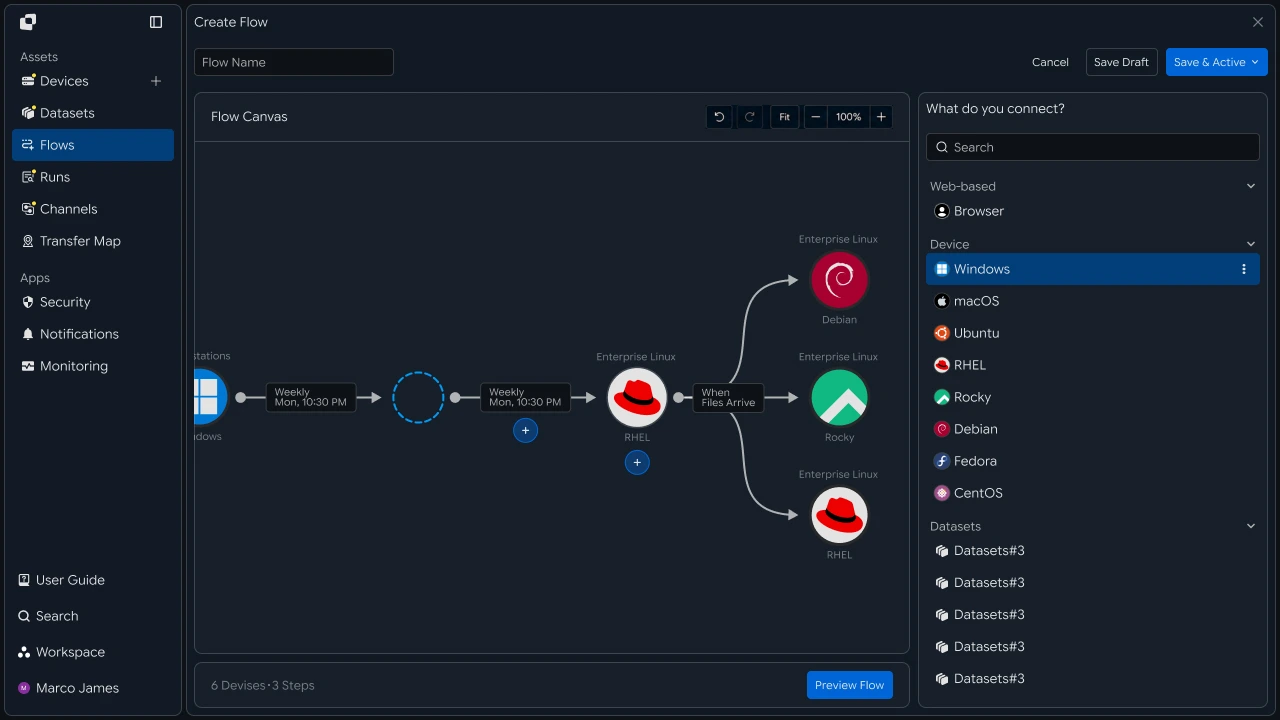
수집 대상 시스템에서 로그나 진단 파일이 생성되면 파일 유형과 경로, 설정한 실행 조건을 기준으로 수집 작업을 시작합니다.
수집된 파일은 중앙 저장 또는 분석 환경으로 전송하며, 파일 수집이 완료된 후에는 필요한 분석과 모니터링 작업으로 연결할 수 있습니다.
- 로그, 진단 파일 생성
- 수집 대상 확인
- 수집 기준 적용
- 중앙 분석 환경으로 전송
- 분석, 모니터링 작업 연결
- 실행 결과 확인
이 흐름을 통해 여러 시스템에서 생성되는 진단 파일의 수집과 이후 활용 과정을 하나의 운영 흐름으로 구성할 수 있습니다.
운영 효과#
분산된 진단 자료를 중앙에서 확인하고 분석 흐름으로 활용하기
여러 시스템에서 생성되는 진단 파일을 중앙 수집 환경으로 연결하면 파일 생성 위치와 수집 상태, 분석 대상 파일을 하나의 흐름으로 관리할 수 있습니다.
| 구분 | 개별 시스템 관리 | 중앙 수집 |
|---|---|---|
| 파일 위치 | 시스템별 경로 확인 | 수집 환경에서 통합 관리 |
| 수집 실행 | 시스템별 작업 진행 | 조건에 따라 자동 수집 |
| 분석 준비 | 필요한 파일을 개별 전송 | 수집 후 분석 환경으로 연결 |
| 상태 확인 | 시스템별 결과 확인 | 전체 수집 현황 확인 |
이렇게 구성하면 파일 생성 → 중앙 수집 → 분석 연계 → 결과 확인까지 이어지는 진단 파일 운영 흐름을 구성할 수 있습니다.
IT 엔지니어#
수집 환경#
로그와 진단 파일이 생성되는 시스템 연결하기
먼저 로그와 코어 덤프, 진단 파일이 생성되는 서버와 애플리케이션 환경을 수집 흐름에 연결합니다.
각 시스템에서 파일이 생성되는 위치를 지정하면 중앙 수집 작업에서 사용할 원본 경로를 구성할 수 있습니다.
| 수집 환경 | 주요 파일 |
|---|---|
| 애플리케이션 서버 | 애플리케이션 로그와 오류 보고서 |
| 운영 서버 | 시스템 로그와 진단 파일 |
| 처리 서버 | 작업 로그와 처리 결과 |
| 장애 분석 환경 | 코어 덤프와 오류 자료 |
| 엣지 장비 | 현장 로그와 진단 데이터 |
Devices
- Application Server/var/log/application
- Linux Server/var/log/system
- Edge Device/data/diagnostics

수집 정책#
파일 유형과 중요도에 따라 수집 기준 구성하기
수집 환경을 연결한 후에는 어떤 파일을 어떤 기준으로 수집할지 설정합니다.
파일 확장자와 경로, 생성 또는 변경 조건을 기준으로 수집 대상을 지정하고, 파일 유형과 중요도에 따라 처리 순서와 실행 기준을 구성할 수 있습니다.
| 파일 유형 | 수집 기준 | 처리 흐름 |
|---|---|---|
| 일반 로그 | 일정 또는 파일 변경 | 정기 수집 |
| 오류 로그 | 생성 또는 변경 감지 | 분석 작업 연결 |
| 코어 덤프 | 파일 생성 | 우선 수집 |
| 진단 파일 | 지정된 경로와 조건 | 분석, 모니터링 연계 |

중앙 수집#
여러 시스템의 진단 파일을 중앙 분석 환경으로 전송하기
설정한 수집 기준에 따라 각 시스템의 파일을 중앙 저장 위치로 전송합니다.
여러 시스템의 파일을 하나의 중앙 환경으로 모으고, 파일 유형이나 분석 목적에 따라 이후 작업을 연결할 수 있습니다.
분석 연계#
수집된 파일을 다음 분석과 모니터링 작업으로 연결하기
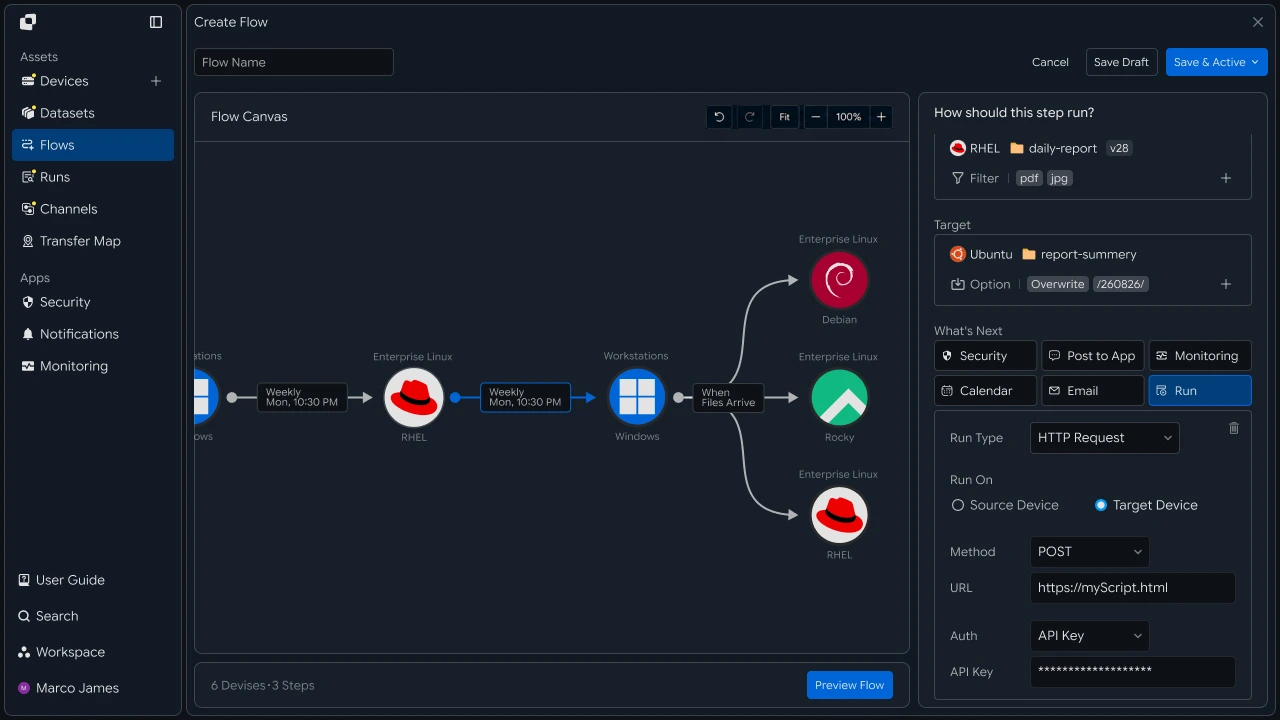
중앙 환경에 파일이 수집되면 완료된 파일을 분석 시스템이나 모니터링 환경에서 바로 활용할 수 있습니다.
수집 작업의 완료 상태를 다음 작업의 실행 조건으로 연결하면 파일 전송 이후의 분석 과정까지 하나의 워크플로로 구성할 수 있습니다.
운영 확인#
수집 상태와 실행 결과를 확인하고 필요한 작업 다시 실행하기
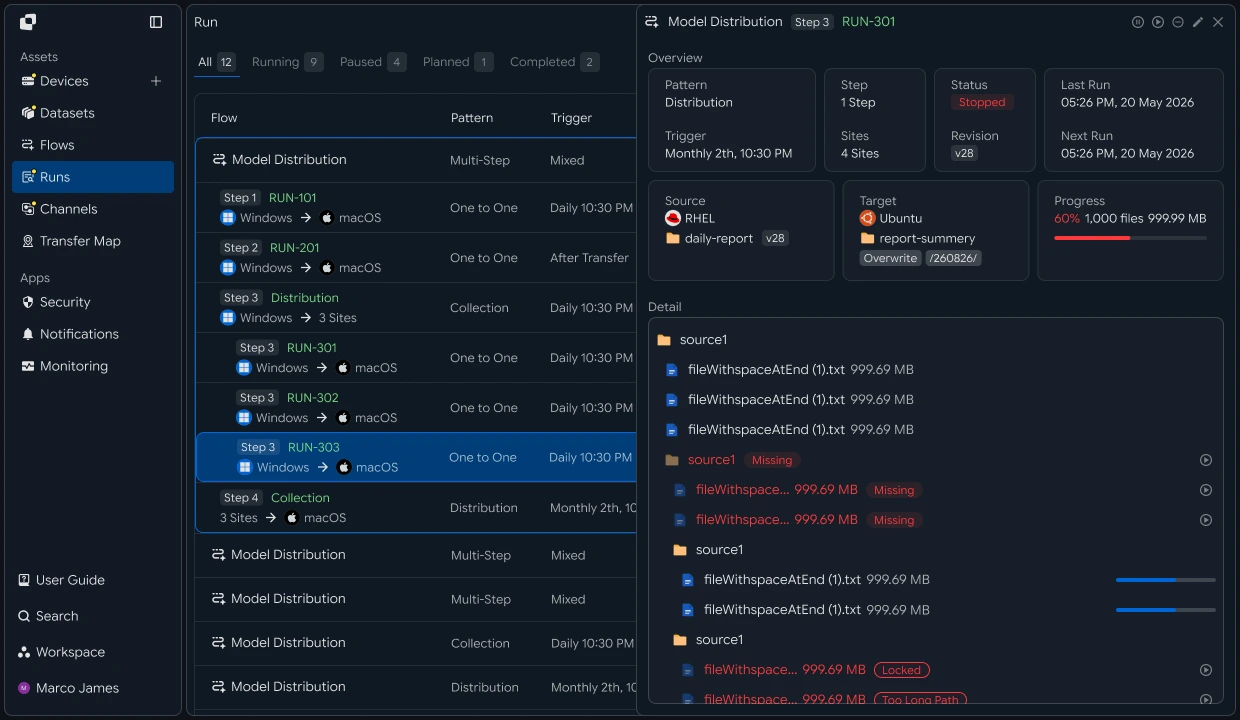
수집 작업이 실행되면 Runs와 상세 실행 기록을 통해 시스템별 파일 처리 상태와 결과를 확인합니다.
수집 환경, 파일 경로, 연결 상태와 처리 결과를 함께 확인하고, 추가 확인이 필요한 작업은 상세 정보를 기준으로 필요한 조치를 진행한 후 다시 실행할 수 있습니다.
| 확인 항목 | 확인 내용 |
|---|---|
| 수집 시스템 | 파일이 생성된 서버 또는 장비 |
| 수집 대상 | 로그, 코어 덤프, 진단 파일 |
| 실행 상태 | 현재 작업 상태와 진행률 |
| 처리 결과 | 수집된 파일 수와 전체 용량 |
| 대상 환경 | 중앙 저장 및 분석 위치 |
| 실행 기록 | 수집과 후속 작업의 처리 결과 |
개발자#
로그와 코어 덤프를 유형별로 필터링해 중앙 호스트로 수집하기
연동 준비#
공통 호출 코드와 경로 표기 준비하기
import os
import requests

BASE_URL = os.getenv("INNORIX_BASE_URL", "https://app.innorix.com").rstrip("/")
TOKEN = os.environ["INNORIX_ACCESS_TOKEN"]
WORKSPACE_ID = os.getenv("INNORIX_WORKSPACE_ID")   # optional; falls back to the current workspace

STATUS_COMPLETE = 2
TERMINAL = {2, 4, 5, 9, 99}          # complete / error / cancelled / partial / failed
NOT_SUCCEEDED = {4, 5, 9, 99}


def api(method, path, body=None, params=None):
    headers = {
        "Content-Type": "application/json",
        "Authorization": f"Bearer {TOKEN}",
    }

    if WORKSPACE_ID:
        headers["x-workspace-id"] = WORKSPACE_ID

    response = requests.request(
        method, BASE_URL + path,
        headers=headers, json=body, params=params, timeout=30,
    )

    payload = response.json() if response.content else {}

    if not response.ok:
        raise RuntimeError(payload.get("message") or f"HTTP {response.status_code}")

    return payload.get("data")


def is_terminal(detail):
    return detail.get("isTerminal", detail.get("status") in TERMINAL)
// InnorixClient.java
public static final String BASE_URL =
env("INNORIX_BASE_URL", "https://app.innorix.com").replaceAll("/+quot;, "");
public static final String WORKSPACE_ID = env("INNORIX_WORKSPACE_ID", null);
public static final int STATUS_COMPLETE = 2;
// States the transfer no longer moves out of
public static final Set<Integer> TERMINAL = Set.of(2, 4, 5, 9, 99);
// Terminal states that are not a full success
public static final Set<Integer> NOT_SUCCEEDED = Set.of(4, 5, 9, 99);
private HttpRequest.Builder headers(HttpRequest.Builder builder) {
builder.header("Content-Type", "application/json")
.header("Authorization", "Bearer " + session.accessToken());
// When omitted the account's current workspace is used.
if (workspaceId != null) builder.header("x-workspace-id", workspaceId);
return builder;
}
/** Unwraps and returns data from the response. Throws ApiError on failure. */
public Object api(String method, String path, Object body, Map<String, Object> params) {
Resp response = request(method, path, body, params);
Object payload = null;
try {
payload = Json.parse(response.text());
} catch (RuntimeException ignored) {
payload = null;
}
if (!response.ok()) {
Map<String, Object> map = Json.asObj(payload);
String message = Json.str(map, "message", Json.str(map, "error", "unknown error"));
throw new ApiError(response.status, message, map);
}
return Json.get(payload, "data");
}
/** Use the server flag when present, otherwise fall back to the status code. */
public static boolean isTerminal(Map<String, Object> record) {
Boolean flag = Json.boolOrNull(record, "isTerminal");
if (flag != null) return flag;
Integer status = Json.intOrNull(record, "status");
return status != null && TERMINAL.contains(status);
}// innorix-client.js
const BASE_URL = (process.env.INNORIX_BASE_URL
|| "https://app.innorix.com").replace(/\/+$/, "");
const TOKEN = process.env.INNORIX_ACCESS_TOKEN;
const WORKSPACE_ID = process.env.INNORIX_WORKSPACE_ID || null;
export const STATUS_COMPLETE = 2;
export const TERMINAL = new Set([2, 4, 5, 9, 99]); // complete / error / cancelled / partial / failed
export const NOT_SUCCEEDED = new Set([4, 5, 9, 99]);
export async function api(method, path, body = null, params = null) {
const url = new URL(BASE_URL + path);
if (params) {
for (const [key, value] of Object.entries(params)) {
if (value === undefined || value === null) continue;
url.searchParams.set(key, String(value));
}
}
const headers = {
"Content-Type": "application/json",
Authorization: `Bearer ${TOKEN}`,
};
// When omitted the account's current workspace is used.
if (WORKSPACE_ID) headers["x-workspace-id"] = WORKSPACE_ID;
const response = await fetch(url, {
method,
headers,
body: body === null ? undefined : JSON.stringify(body),
signal: AbortSignal.timeout(30_000),
});
const payload = await response.json().catch(() => ({}));
if (!response.ok) {
throw new Error(payload.message || `HTTP ${response.status}`);
}
return payload.data;
}
export function isTerminal(detail) {
return detail.isTerminal !== undefined
? detail.isTerminal
: TERMINAL.has(detail.status);
}// InnorixClient.cs
public static readonly string BaseUrl =
Env("INNORIX_BASE_URL", "https://app.innorix.com").TrimEnd('/');
public static readonly string WorkspaceIdFromEnv = Env("INNORIX_WORKSPACE_ID", null);
public const int StatusComplete = 2;
/// <summary>States the transfer no longer moves out of</summary>
public static readonly HashSet<int> Terminal = new HashSet<int> { 2, 4, 5, 9, 99 };
/// <summary>Terminal states that are not a full success</summary>
public static readonly HashSet<int> NotSucceeded = new HashSet<int> { 4, 5, 9, 99 };
// Applied on every request
request.Headers.TryAddWithoutValidation("Authorization", "Bearer " + Session.AccessToken);
// When omitted the account's current workspace is used.
if (WorkspaceId != null) request.Headers.TryAddWithoutValidation("x-workspace-id", WorkspaceId);
public async Task<JsonNode> ApiAsync(string method, string path, JsonNode body = null,
IDictionary<string, object> parameters = null)
{
Resp response = await RequestAsync(method, path, body, parameters).ConfigureAwait(false);
JsonNode payload = null;
try
{
payload = J.Parse(response.Text());
}
catch (Exception)
{
payload = null;
}
if (!response.Ok)
{
JsonObject map = J.AsObj(payload);
string message = J.Str(map, "message", J.Str(map, "error", "unknown error"));
throw new ApiError(response.Status, message, map);
}
return J.Get(payload, "data");
}
/// <summary>Use the server flag when present, otherwise fall back to the status code.</summary>
public static bool IsTerminal(JsonObject record)
{
bool? flag = J.BoolOrNull(record, "isTerminal");
if (flag != null) return flag.Value;
int? status = J.IntOrNull(record, "status");
return status != null && Terminal.Contains(status.Value);
}import base64
import time
def encode_path(device_id, raw_path):
normalized = str(raw_path or "").replace("\\", "/")
token = base64.b64encode(normalized.encode("utf-8")).decode("ascii")
return f"{device_id}_ino_{token}"
def now_iso():
return time.strftime("%Y-%m-%dT%H:%M:%S.000Z", time.gmtime())public static String encodePath(String deviceId, String rawPath) {
String normalized = (rawPath == null ? "" : rawPath).replace("\\", "/");
return deviceId + "_ino_"
+ Base64.getEncoder().encodeToString(normalized.getBytes(StandardCharsets.UTF_8));
}
public static String nowIso() {
return Instant.now().truncatedTo(ChronoUnit.SECONDS).toString().replace("Z", ".000Z");
}export function encodePath(deviceId, rawPath) {
const normalized = String(rawPath ?? "").replace(/\\/g, "/");
const token = Buffer.from(normalized, "utf8").toString("base64");
return `${deviceId}_ino_${token}`;
}
export function nowIso() {
return new Date().toISOString().replace(/\.\d{3}Z$/, ".000Z");
}public static string EncodePath(string deviceId, string rawPath)
{
string normalized = (rawPath ?? "").Replace("\\", "/");
return deviceId + "_ino_" + Convert.ToBase64String(Encoding.UTF8.GetBytes(normalized));
}
public static string NowIso()
{
return DateTime.UtcNow.ToString("yyyy-MM-dd'T'HH:mm:ss'.000Z'",
System.Globalization.CultureInfo.InvariantCulture);
}전송 상태는 아래 값으로 판단합니다. 종료 상태는 다섯 개이고 성공에 해당하는 값은 완료(2)입니다.
| 상태 값 | 의미 | 종료 |
|---|---|---|
| 2 | 완료 | 예 |
| 4 | 오류 | 예 |
| 5 | 취소 | 예 |
| 9 | 부분 완료 | 예 |
| 99 | 실패 | 예 |
| 1, 6, 12, 13 | 시작, 전송 중, 동기화 중, 수신 중 | 아니오 |
수집 대상 선별#
확장자와 크기로 수집할 파일만 고르기
로그 폴더에는 수집할 필요가 없는 파일도 함께 저장됩니다. 조건을 지정해 필요한 것만 보냅니다.
def build_filter(exts=None, min_size=None, exclude=None):
    file_option = {}

    if exts:
        # extension whitelist, without the leading dot
        file_option["extension"] = {
            "extension": [e.lstrip(".").lower() for e in exts],
            "allow": True,
        }

    if min_size is not None:
        # over and equal both True means size or larger
        file_option["fileSize"] = {"size": min_size, "over": True, "equal": True}

    if exclude:
        # allow=False excludes files whose name contains this. Server matching is case sensitive.
        file_option["fileName"] = {"name": exclude, "allow": False}

    return {"send-fileoption": file_option} if file_option else {}
public static Map<String, Object> buildFilter(List<String> exts, Long minSize, String exclude) {
Map<String, Object> fileOption = new LinkedHashMap<>();
if (exts != null && !exts.isEmpty()) {
List<Object> cleaned = new ArrayList<>();
// e.g. ["mp4","mov"] (no dot). allow=true -> whitelist
for (String ext : exts) cleaned.add(ext.replaceAll("^\\.+", "").toLowerCase());
fileOption.put("extension", Json.newObj("extension", cleaned, "allow", true));
}
if (minSize != null) {
// over=true/equal=true -> only files at or above size
fileOption.put("fileSize", Json.newObj("size", minSize, "over", true, "equal", true));
}
if (exclude != null) {
// allow=false -> skip files whose name contains exclude (server match is case sensitive)
fileOption.put("fileName", Json.newObj("name", exclude, "allow", false));
}
return fileOption.isEmpty()
? new LinkedHashMap<>()
: Json.newObj("send-fileoption", fileOption);
}export function buildFilter({ exts = null, minSize = null, exclude = null } = {}) {
const fileOption = {};
if (exts) {
// Extension whitelist, without the leading dot.
fileOption.extension = {
extension: exts.map((e) => e.replace(/^\./, "").toLowerCase()),
allow: true,
};
}
if (minSize !== null && minSize !== undefined) {
// over and equal both true means size or larger.
fileOption.fileSize = { size: minSize, over: true, equal: true };
}
if (exclude) {
// allow=false excludes files whose name contains this. Matching is case sensitive.
fileOption.fileName = { name: exclude, allow: false };
}
return Object.keys(fileOption).length ? { "send-fileoption": fileOption } : {};
}public static JsonObject BuildFilter(IReadOnlyList<string> exts = null,
long? minSize = null, string exclude = null)
{
var fileOption = new JsonObject();
if (exts != null && exts.Count > 0)
{
// e.g. ["mp4","mov"] (no dot). allow=true -> whitelist
var cleaned = new JsonArray();
foreach (string ext in exts) cleaned.Add(ext.TrimStart('.').ToLowerInvariant());
fileOption["extension"] = new JsonObject { ["extension"] = cleaned, ["allow"] = true };
}
if (minSize != null)
{
// over=true/equal=true -> only files at or above size
fileOption["fileSize"] = new JsonObject
{
["size"] = minSize.Value,
["over"] = true,
["equal"] = true,
};
}
if (exclude != null)
{
// allow=false -> skip files whose name contains exclude (server match is case sensitive)
fileOption["fileName"] = new JsonObject { ["name"] = exclude, ["allow"] = false };
}
return fileOption.Count == 0
? new JsonObject()
: new JsonObject { ["send-fileoption"] = fileOption };
}확장자 필터는 send-fileoption.extension을 씁니다. send-filetype-cus 정규식은 확장자를 뗀 파일명에만 매칭되므로 확장자 조건으로는 동작하지 않습니다.
| 필터 | 위치 | 동작 |
|---|---|---|
| 확장자 | send-fileoption.extension |
allow: true 면 이 확장자만 전송 |
| 크기 | send-fileoption.fileSize |
over, equal 로 이상, 이하 지정 |
| 이름 | send-fileoption.fileName |
allow: false 면 포함된 파일 제외 |
여러 필터를 함께 주면 AND로 결합됩니다. 모두 통과한 파일만 전송됩니다.
LOG_FILTER = build_filter(exts=["log", "gz"], exclude=".lck")
DUMP_FILTER = build_filter(exts=["core", "dmp", "hprof"])Map<String, Object> logFilter = InnorixClient.buildFilter(
List.of("log", "gz"), null, ".lck");
Map<String, Object> dumpFilter = InnorixClient.buildFilter(
List.of("core", "dmp", "hprof"), null, null);const logFilter = buildFilter({ exts: ["log", "gz"], exclude: ".lck" });
const dumpFilter = buildFilter({ exts: ["core", "dmp", "hprof"] });JsonObject logFilter = InnorixClient.BuildFilter(
new[] { "log", "gz" }, exclude: ".lck");
JsonObject dumpFilter = InnorixClient.BuildFilter(
new[] { "core", "dmp", "hprof" });로그는 회전되면서 .gz로 압축되는 경우가 많으므로 원본과 압축본을 함께 지정합니다. 잠금 파일은 이름 조건으로 걸러냅니다.
조건이 의도대로 걸리는지는 검색으로 미리 확인합니다.
page = api("POST", f"/api/devices/{device_id}/files/search",
           {"path": "/var/log/application", "pageSize": 500})

matched = [i for i in page["items"]
           if i["type"] == "file" and i["name"].endswith((".log", ".gz"))]

print(f"{len(matched)} matched")Map<String, Object> page = client.apiObj("POST",
"/api/devices/" + deviceId + "/files/search",
Json.newObj("path", "/var/log/application", "pageSize", 500));
long matched = 0;
for (Object node : Json.arrOf(page, "items")) {
Map<String, Object> item = Json.asObj(node);
String name = Json.str(item, "name");
if ("file".equals(Json.str(item, "type"))
&& (name.endsWith(".log") || name.endsWith(".gz"))) matched++;
}
System.out.println(matched + " matched");const page = await client.api("POST",
`/api/devices/${deviceId}/files/search`,
{ path: "/var/log/application", pageSize: 500 });
const matched = (page.items || []).filter((i) =>
i.type === "file" && /\.(log|gz)$/.test(i.name));
console.log(`${matched.length} matched`);JsonObject page = await client.ApiObjAsync("POST",
quot;/api/devices/{deviceId}/files/search",
new JsonObject { ["path"] = "/var/log/application", ["pageSize"] = 500 });
int matched = J.ArrOf(page, "items").Select(J.AsObj).Count(i =>
J.Str(i, "type") == "file"
&& Regex.IsMatch(J.Str(i, "name"), @"\.(log|gz)quot;));
Console.WriteLine(quot;{matched} matched");정기 수집 등록#
일반 로그를 정해진 시각에 모으기
def build_collection(name, source, source_path, target, target_path,
                     schedule, options):
    return {
        "name": name,
        "flowName": name,
        "transferType": "normal",
        "timezone": "Asia/Seoul",
        "step": 1,
        "isUpcoming": False,
        "details": [
            {
                "senderId": source,
                "receiverId": target,
                "sourceItem": [
                    {
                        "hash": encode_path(source, source_path),
                        "filePath": source_path,
                        "isDir": True,
                    }
                ],
                "targetPath": encode_path(target, target_path),
                "step": 1,
                "transferOptions": {
                    "noSchedule": False,
                    "target-action": "numbering",
                    "send-fileoption": {},
                    **options,
                },
            }
        ],
        "schedules": [schedule],
    }


DAILY_4AM = {
    "type": "day",
    "startDateType": "now",
    "hour": "04",
    "minute": "00",
    "ampm": "am",
    "startDate": now_iso(),
    "timezone": "Asia/Seoul",
}

api("POST", "/api/automations", build_collection(
    "daily log", "device-app-01", "/var/log/application",
    "device-central-01", "/collect/device-app-01",
DAILY_4AM, LOG_FILTER))Map<String, Object> buildCollection(String name, String source, String sourcePath,
String target, String targetPath,
Map<String, Object> schedule,
Map<String, Object> options) {
Map<String, Object> transferOptions = new LinkedHashMap<>(Json.newObj(
"noSchedule", false, "target-action", "numbering",
"send-fileoption", Json.newObj()));
if (options != null) transferOptions.putAll(options);
Map<String, Object> detail = Json.newObj(
"senderId", source, "receiverId", target,
"sourceItem", List.of(Json.newObj(
"hash", InnorixClient.encodePath(source, sourcePath),
"filePath", sourcePath, "isDir", true)),
"targetPath", InnorixClient.encodePath(target, targetPath),
"step", 1, "transferOptions", transferOptions);
return Json.newObj(
"name", name, "flowName", name,
"transferType", "normal", "timezone", "Asia/Seoul",
"step", 1, "isUpcoming", false,
"details", List.of(detail),
"schedules", List.of(schedule));
}function buildCollection(name, source, sourcePath, target, targetPath,
schedule, options) {
return {
name,
flowName: name,
transferType: "normal",
timezone: "Asia/Seoul",
step: 1,
isUpcoming: false,
details: [{
senderId: source,
receiverId: target,
sourceItem: [{
hash: encodePath(source, sourcePath),
filePath: sourcePath,
isDir: true,
}],
targetPath: encodePath(target, targetPath),
step: 1,
transferOptions: {
noSchedule: false,
"target-action": "numbering",
"send-fileoption": {},
...(options || {}),
},
}],
schedules: [schedule],
};
}JsonObject BuildCollection(string name, string source, string sourcePath,
string target, string targetPath, JsonObject schedule, JsonObject options)
{
var transferOptions = new JsonObject
{
["noSchedule"] = false,
["target-action"] = "numbering",
["send-fileoption"] = new JsonObject(),
};
if (options != null)
foreach (var kv in options) transferOptions[kv.Key] = kv.Value?.DeepClone();
var detail = new JsonObject
{
["senderId"] = source,
["receiverId"] = target,
["sourceItem"] = new JsonArray
{
new JsonObject
{
["hash"] = InnorixClient.EncodePath(source, sourcePath),
["filePath"] = sourcePath,
["isDir"] = true,
},
},
["targetPath"] = InnorixClient.EncodePath(target, targetPath),
["step"] = 1,
["transferOptions"] = transferOptions,
};
return new JsonObject
{
["name"] = name,
["flowName"] = name,
["transferType"] = "normal",
["timezone"] = "Asia/Seoul",
["step"] = 1,
["isUpcoming"] = false,
["details"] = new JsonArray { detail },
["schedules"] = new JsonArray { schedule },
};
}자동화 요청에서 반드시 지켜야 하는 항목이 네 개 있습니다.
| 항목 | 지정 방식 |
|---|---|
isUpcoming |
반드시 false. 서버 기본값 true는 요청에 담긴 일정을 무시하고 5분짜리 일회성 일정으로 대체합니다. triggerAutomation이 붙은 단계는 서버가 false로 강제하므로, 트리거가 없는 첫 단계에만 직접 지정하면 됩니다 |
step |
최상위와 details 양쪽에 넣습니다. 흐름 안에서의 홉 위치입니다 |
sourceItem |
hash(경로 토큰)와 filePath(평문 경로)를 함께 넣습니다 |
syncType |
transferOptions 안에 넣습니다. 1은 단방향, 2는 양방향입니다 |
네 항목 모두 누락해도 등록은 성공하고 실행 시점에 동작이 달라집니다. 반복 일정을 등록했는데 한 번만 실행되고 끝났다면 isUpcoming부터 확인합니다.
진단 파일은 회차를 남겨야 하므로 numbering을 씁니다. overwrite를 쓰면 같은 이름으로 회전되는 로그가 서로를 덮어씁니다.
즉시 수집 등록#
코어 덤프가 생기면 바로 가져오기
코어 덤프는 장애 직후에 필요하므로 생성 즉시 수집합니다. 실시간 감시 자동화로 등록하며, transferType을 sync로 두고 transferOptions에 syncType과 watchFolderType을 넣습니다.
body = build_collection(
    "core dump", "device-app-01", "/var/crash",
    "device-central-01", "/collect/device-app-01/dump",
    {"type": "none", "startDateType": "now",
     "startDate": now_iso(), "timezone": "Asia/Seoul"},
    {**DUMP_FILTER, "syncType": 1, "watchFolderType": 1})

body["transferType"] = "sync"
body["details"][0]["transferOptions"]["noSchedule"] = True

api("POST", "/api/automations", body)Map<String, Object> body = buildCollection(
"core dump", "device-app-01", "/var/crash",
"device-central-01", "/collect/device-app-01/dump",
Json.newObj("type", "none", "startDateType", "now",
"startDate", InnorixClient.nowIso(), "timezone", "Asia/Seoul"),
new LinkedHashMap<>(dumpFilter) {{
put("syncType", 1);
put("watchFolderType", 1);
}});
body.put("transferType", "sync");
Map<String, Object> detail = Json.asObj(Json.arrOf(body, "details").get(0));
Json.asObj(detail.get("transferOptions")).put("noSchedule", true);
client.api("POST", "/api/automations", body);const body = buildCollection(
"core dump", "device-app-01", "/var/crash",
"device-central-01", "/collect/device-app-01/dump",
{ type: "none", startDateType: "now", startDate: nowIso(), timezone: "Asia/Seoul" },
{ ...dumpFilter, syncType: 1, watchFolderType: 1 });
body.transferType = "sync";
body.details[0].transferOptions.noSchedule = true;
await client.api("POST", "/api/automations", body);JsonObject body = BuildCollection(
"core dump", "device-app-01", "/var/crash",
"device-central-01", "/collect/device-app-01/dump",
new JsonObject
{
["type"] = "none", ["startDateType"] = "now",
["startDate"] = InnorixClient.NowIso(), ["timezone"] = "Asia/Seoul",
},
new JsonObject(dumpFilter.DeepClone().AsObject())
{
["syncType"] = 1,
["watchFolderType"] = 1,
});
body["transferType"] = "sync";
body["details"]![0]!["transferOptions"]!["noSchedule"] = true;
await client.ApiAsync("POST", "/api/automations", body);syncType과 watchFolderType은 transferOptions 안에 넣습니다. 감시 경로는 sourceItem[0].filePath에서 읽으므로 build_collection이 넣는 평문 경로가 감시 대상이 됩니다.
에이전트는 파일 크기 변화가 멈추면 쓰기 완료로 판단하고 이벤트를 전달합니다. 코어 덤프처럼 큰 파일은 감지에서 이벤트까지 시간이 더 걸리는데, 잘린 파일이 전송되지 않게 하기 위한 동작입니다.
여러 시스템 등록#
수집 대상 서버를 목록으로 두고 일괄 등록하기
서버가 수십 대라면 화면에서 하나씩 만들기 어렵습니다. 목록을 두고 순회합니다.
SOURCES = [
    ("device-app-01", "/var/log/application"),
    ("device-app-02", "/var/log/application"),
    ("device-linux-01", "/var/log/system"),
    ("device-edge-01", "/data/diagnostics"),
]

for source, path in SOURCES:
    api("POST", "/api/automations", build_collection(
        f"collect {source}", source, path,
        "device-central-01", f"/collect/{source}",
DAILY_4AM, LOG_FILTER))List<String[]> sources = List.of(
new String[]{"device-app-01", "/var/log/application"},
new String[]{"device-app-02", "/var/log/application"},
new String[]{"device-linux-01", "/var/log/system"},
new String[]{"device-edge-01", "/data/diagnostics"});
for (String[] entry : sources) {
String source = entry[0], path = entry[1];
client.api("POST", "/api/automations", buildCollection(
"collect " + source, source, path,
"device-central-01", "/collect/" + source,
DAILY_4AM, logFilter));
}const SOURCES = [
["device-app-01", "/var/log/application"],
["device-app-02", "/var/log/application"],
["device-linux-01", "/var/log/system"],
["device-edge-01", "/data/diagnostics"],
];
for (const [source, path] of SOURCES) {
await client.api("POST", "/api/automations", buildCollection(
`collect ${source}`, source, path,
"device-central-01", `/collect/${source}`,
DAILY_4AM, logFilter));
}var sources = new[]
{
("device-app-01", "/var/log/application"),
("device-app-02", "/var/log/application"),
("device-linux-01", "/var/log/system"),
("device-edge-01", "/data/diagnostics"),
};
foreach (var (source, path) in sources)
{
await client.ApiAsync("POST", "/api/automations", BuildCollection(
quot;collect {source}", source, path,
"device-central-01", quot;/collect/{source}",
Daily4Am, logFilter));
}도착 경로에 장비 식별자를 넣습니다. 서버마다 application.log처럼 이름이 같으므로 한 경로로 모으면 출처를 구분할 수 없습니다.
/collect/device-app-01/application.logLOGdevice-app-02/application.logLOG
분석 연계#
수집이 끝나면 분석 작업 호출하기
body["processors"] = [{
    "category": "run",
    "type": "http",
    "config": {
        "url": "https://internal.example.com/analyze",
        "method": "POST",
    },
}]body.put("processors", List.of(Json.newObj(
"category", "run",
"type", "http",
"config", Json.newObj(
"url", "https://internal.example.com/analyze",
"method", "POST"))));body.processors = [{
category: "run",
type: "http",
config: {
url: "https://internal.example.com/analyze",
method: "POST",
},
}];body["processors"] = new JsonArray
{
new JsonObject
{
["category"] = "run",
["type"] = "http",
["config"] = new JsonObject
{
["url"] = "https://internal.example.com/analyze",
["method"] = "POST",
},
},
};category와 type을 지정하고, url, method, body는 config 안에 넣습니다.
호출은 전송 완료 후에 오며, 그 요청을 받는 엔드포인트는 다음과 같이 처리합니다.
def on_collect_hook(payload):
    monitor_id = payload.get("monitorId")

    # If you subscribed to the completed event only, this check can be skipped
    if monitor_id:
        detail = api("GET", f"/api/transfers/{monitor_id}")

        if detail["status"] != STATUS_COMPLETE:
            return skip_failed_collection(payload)

    start_analysis(payload)
void onCollectHook(Map<String, Object> payload) {
String monitorId = Json.str(payload, "monitorId");
// If you subscribed to the completed event only, this check can be skipped
if (monitorId != null) {
Map<String, Object> detail = client.apiObj("GET", "/api/transfers/" + monitorId);
if (Json.intOr(detail, "status", -1) != InnorixClient.STATUS_COMPLETE) {
skipFailedCollection(payload);
return;
}
}
startAnalysis(payload);
}async function onCollectHook(payload) {
const monitorId = payload.monitorId;
// If you subscribed to the completed event only, this check can be skipped
if (monitorId) {
const detail = await client.api("GET", `/api/transfers/${monitorId}`);
if (detail.status !== STATUS_COMPLETE) return skipFailedCollection(payload);
}
return startAnalysis(payload);
}async Task OnCollectHookAsync(JsonObject payload)
{
string monitorId = J.Str(payload, "monitorId");
// If you subscribed to the completed event only, this check can be skipped
if (monitorId != null)
{
JsonObject detail = await client.ApiObjAsync("GET", "/api/transfers/" + monitorId);
if (J.Int(detail, "status", -1) != InnorixClient.StatusComplete)
{
await SkipFailedCollectionAsync(payload);
return;
}
}
await StartAnalysisAsync(payload);
}수집 현황 확인#
시스템별 수집 건수와 실패 조회하기
def wait(monitor_id, timeout=3600, interval=3):
    deadline = time.time() + timeout

    while time.time() < deadline:
        detail = api("GET", f"/api/transfers/{monitor_id}")

        if is_terminal(detail):
            return detail

        time.sleep(interval)

    raise TimeoutError(monitor_id)


def failed_files(monitor_id):
    result = api("GET", f"/api/transfers/{monitor_id}/files", params={
        "state": "any", "size": 500,
    }) or {}

    return [r for r in (result.get("children") or [])
            if r.get("status") in NOT_SUCCEEDED]


def retry_failed(monitor_id):
    rows = failed_files(monitor_id)

    if not rows:
        return 0

    api("POST", f"/api/transfers/{monitor_id}/retry", {
        "filesRetry": [
            {"filePath": r["sourceFilePath"], "isDir": bool(r.get("isFolder"))}
            for r in rows
        ]
    })

    return len(rows)
public Map<String, Object> wait(String monitorId, int timeoutSeconds, int intervalSeconds) {
long deadline = System.currentTimeMillis() + timeoutSeconds * 1000L;
while (System.currentTimeMillis() < deadline) {
Map<String, Object> detail = apiObj("GET", "/api/transfers/" + monitorId);
if (isTerminal(detail)) return detail;
sleep(intervalSeconds * 1000L);
}
throw new ApiError(0, "timeout waiting for " + monitorId);
}
public List<Map<String, Object>> failedFiles(String monitorId) {
List<Map<String, Object>> failed = new ArrayList<>();
for (Map<String, Object> row : transferFiles(monitorId)) {
Integer status = Json.intOrNull(row, "status");
if (status != null && NOT_SUCCEEDED.contains(status)) failed.add(row);
}
return failed;
}
public int retryFailed(String monitorId) {
List<Map<String, Object>> rows = failedFiles(monitorId);
if (rows.isEmpty()) return 0;
List<Object> filesRetry = new ArrayList<>();
for (Map<String, Object> row : rows) {
String path = Json.str(row, "sourceFilePath");
if (path == null) continue;
filesRetry.add(Json.newObj("filePath", path, "isDir", Json.bool(row, "isFolder", false)));
}
api("POST", "/api/transfers/" + monitorId + "/retry", Json.newObj("filesRetry", filesRetry));
return rows.size();
}const sleep = (ms) => new Promise((resolve) => setTimeout(resolve, ms));
export async function wait(monitorId, { timeout = 3600, interval = 3 } = {}) {
const deadline = Date.now() + timeout * 1000;
while (Date.now() < deadline) {
const detail = await api("GET", `/api/transfers/${monitorId}`);
if (isTerminal(detail)) return detail;
await sleep(interval * 1000);
}
throw new Error(`timeout waiting for ${monitorId}`);
}
export async function failedFiles(monitorId) {
const result = (await api("GET", `/api/transfers/${monitorId}/files`, null, {
state: "any", size: 500,
})) || {};
return (result.children || []).filter((row) => NOT_SUCCEEDED.has(row.status));
}
export async function retryFailed(monitorId) {
const rows = await failedFiles(monitorId);
if (rows.length === 0) return 0;
await api("POST", `/api/transfers/${monitorId}/retry`, {
filesRetry: rows
.filter((row) => row.sourceFilePath)
.map((row) => ({ filePath: row.sourceFilePath, isDir: Boolean(row.isFolder) })),
});
return rows.length;
}public async Task<JsonObject> WaitAsync(string monitorId, int timeoutSeconds = 3600,
int intervalSeconds = 3)
{
long deadline = Environment.TickCount64 + timeoutSeconds * 1000L;
while (Environment.TickCount64 < deadline)
{
JsonObject detail = await ApiObjAsync("GET", "/api/transfers/" + monitorId)
.ConfigureAwait(false);
if (IsTerminal(detail)) return detail;
await Task.Delay(intervalSeconds * 1000).ConfigureAwait(false);
}
throw new ApiError(0, "timeout waiting for " + monitorId);
}
public async Task<List<JsonObject>> FailedFilesAsync(string monitorId)
{
List<JsonObject> rows = await TransferFilesAsync(monitorId).ConfigureAwait(false);
return rows.Where(row =>
{
int? status = J.IntOrNull(row, "status");
return status != null && NotSucceeded.Contains(status.Value);
}).ToList();
}
/// <summary>Only callable once the transfer has reached a terminal state.</summary>
public async Task<int> RetryFailedAsync(string monitorId)
{
List<JsonObject> rows = await FailedFilesAsync(monitorId).ConfigureAwait(false);
if (rows.Count == 0) return 0;
var filesRetry = new JsonArray();
foreach (JsonObject row in rows)
{
string path = J.Str(row, "sourceFilePath");
if (path == null) continue;
filesRetry.Add(new JsonObject
{
["filePath"] = path,
["isDir"] = J.Bool(row, "isFolder", false),
});
}
await ApiAsync("POST", "/api/transfers/" + monitorId + "/retry",
new JsonObject { ["filesRetry"] = filesRetry }).ConfigureAwait(false);
return rows.Count;
}from collections import Counter
from datetime import datetime, timedelta, timezone
def history(device_id, days=1):
end = datetime.now(timezone.utc)
fmt = "%Y-%m-%dT%H:%M:%SZ"
return list(paginate(f"/api/devices/{device_id}/transfer-history", params={
"startDate": (end - timedelta(days=days)).strftime(fmt),
"endDate": end.strftime(fmt),
}))
for source, _ in SOURCES:
rows = history(source)
failed = [r for r in rows if r.get("status") in NOT_SUCCEEDED]
mark = "" if not failed else " <- needs attention"
print(f"{source:20} collected {len(rows):>4} failed {len(failed):>3}{mark}")List<Map<String, Object>> history(String deviceId, int days) {
Instant end = Instant.now();
DateTimeFormatter fmt = DateTimeFormatter.ofPattern("yyyy-MM-dd'T'HH:mm:ss'Z'")
.withZone(ZoneOffset.UTC);
return client.paginate("/api/devices/" + deviceId + "/transfer-history",
Json.newObj("startDate", fmt.format(end.minus(days, ChronoUnit.DAYS)),
"endDate", fmt.format(end)), 200, 50);
}
for (String[] entry : sources) {
List<Map<String, Object>> rows = history(entry[0], 1);
long failed = rows.stream().filter(r -> {
Integer status = Json.intOrNull(r, "status");
return status != null && InnorixClient.NOT_SUCCEEDED.contains(status);
}).count();
String mark = failed == 0 ? "" : " <- needs attention";
System.out.printf("%-20s collected %4d failed %3d%s%n",
entry[0], rows.size(), failed, mark);
}async function history(deviceId, days = 1) {
const end = new Date();
const fmt = (d) => d.toISOString().replace(/\.\d{3}Z$/, "Z");
const rows = [];
for await (const row of paginate(`/api/devices/${deviceId}/transfer-history`, {
startDate: fmt(new Date(end.getTime() - days * 86400000)),
endDate: fmt(end),
})) rows.push(row);
return rows;
}
for (const [source] of SOURCES) {
const rows = await history(source);
const failed = rows.filter((r) => NOT_SUCCEEDED.has(r.status)).length;
const mark = failed ? " <- needs attention" : "";
console.log(`${source.padEnd(20)} collected ${String(rows.length).padStart(4)}`
+ ` failed ${String(failed).padStart(3)}${mark}`);
}async Task<List<JsonObject>> HistoryAsync(string deviceId, int days = 1)
{
DateTime end = DateTime.UtcNow;
const string Fmt = "yyyy-MM-dd'T'HH:mm:ss'Z'";
return await client.PaginateAsync(quot;/api/devices/{deviceId}/transfer-history",
new Dictionary<string, object>
{
["startDate"] = end.AddDays(-days).ToString(Fmt),
["endDate"] = end.ToString(Fmt),
});
}
foreach (var (source, _) in sources)
{
List<JsonObject> rows = await HistoryAsync(source);
int failed = rows.Count(r =>
{
int? status = J.IntOrNull(r, "status");
return status != null && InnorixClient.NotSucceeded.Contains(status.Value);
});
string mark = failed == 0 ? "" : " <- needs attention";
Console.WriteLine(quot;{source,-20} collected {rows.Count,4} failed {failed,3}{mark}");
}진단 파일 수집은 장애 시점에 가장 필요하지만, 그 시점에 수집도 함께 실패하는 경우가 있습니다. 수집 자체의 실패를 별도로 감시합니다.
| 확인 항목 | 확인 내용 |
|---|---|
| 수집 대상 | 확장자와 이름 필터 |
| 수집 방식 | 일정 실행 또는 생성 감지 |
| 도착 경로 | 장비별로 구분된 저장 위치 |
| 분석 연계 | 수집 후 호출되는 작업 |
| 수집 실패 | 시스템별 실패 건수와 재전송 |