
Getting Started#
Basic Concept#
Manage File Transfers Separately by Workspace
A file workspace is a way to organize the files, storage locations, transfer targets, and access scope used for a specific task into a single space.
For example, files used by development, content, and data analysis teams can be organized into separate workspaces, with the required storage locations and transfer devices connected to each workspace.
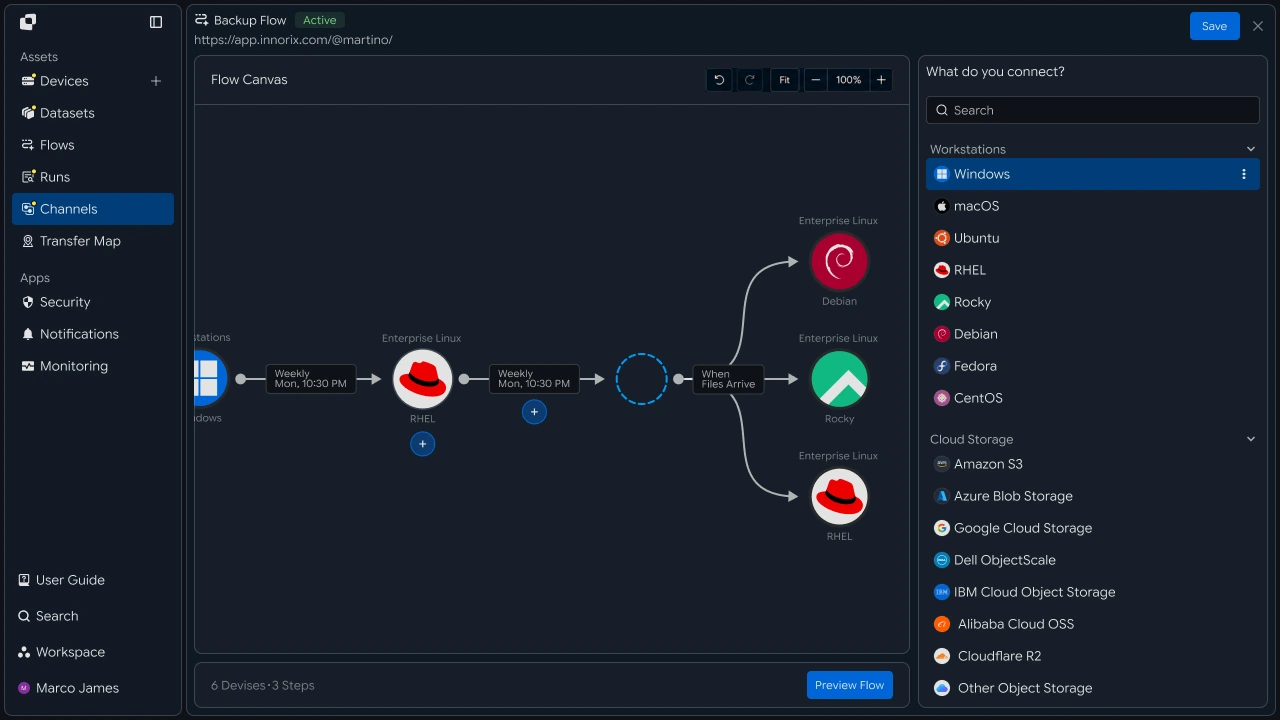
This configuration lets you separate and manage files and transfer environments by workspace across multiple business tasks.
Workspace Flow#
Continue from File Storage to Transfer and Result Verification
Users select a workspace with configured access permissions and store or check the required files.
When a transfer job connected to the workspace is run, the selected files are transferred to the specified devices and business environments, and the execution result can also be checked in the same workspace.
- Select Workspace
- Store, Check Files
- Run Transfer Job
- Reflect on Target Device
- Check Processing Result

Separation Benefits#
Manage Files from Multiple Tasks and Devices by Purpose
Organizing workspaces by task lets you manage files, storage locations, transfer targets, and access scope under a single management standard.
| Category | Individual Management | Workspace Management |
|---|---|---|
| Files | Check files in multiple locations individually | Manage task-specific files by workspace |
| Storage Location | Check the location for each file | Configure storage locations by workspace |
| Transfer Target | Check the target for each job | Connect transfer devices and paths by workspace |
| Access Scope | Check files by user | Manage access scope by workspace |
| Result Verification | Check results by job | Check execution results by workspace |
Business Team#
Manage and Use Required Files in Workspaces
Workspace Selection#
Check Task-Specific Files and Work in One Place
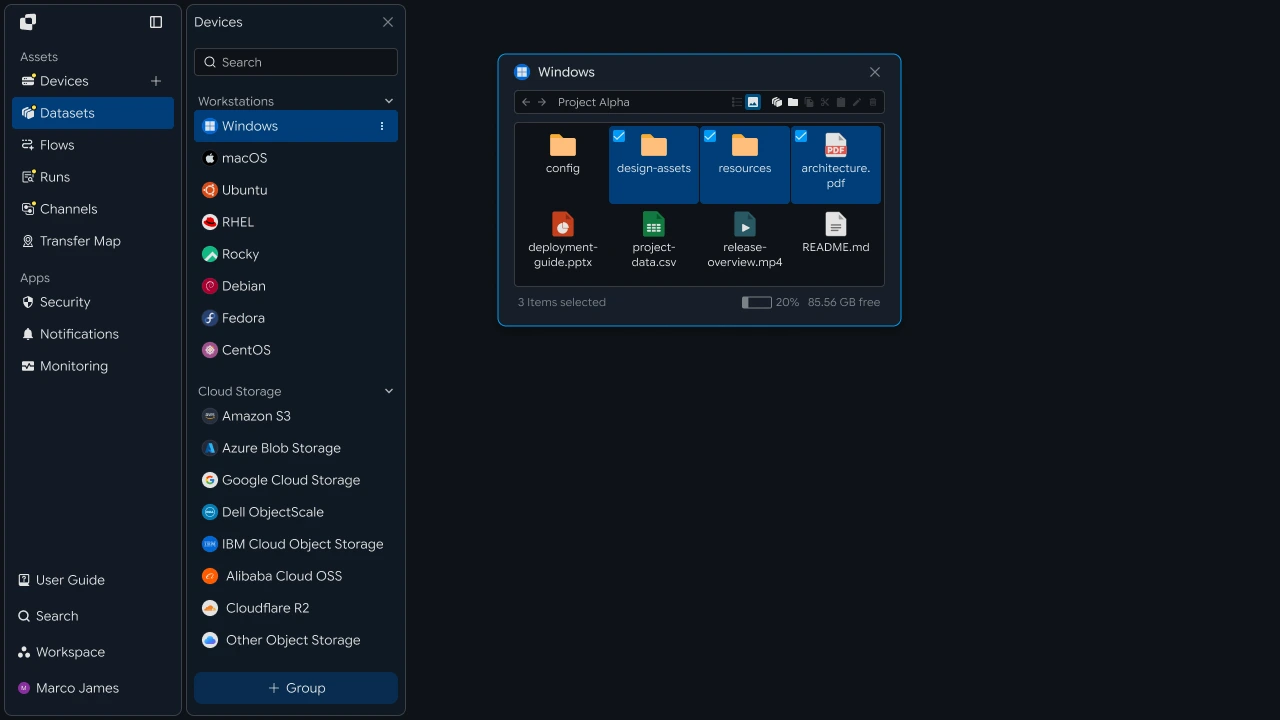
When starting a task, select the workspace containing the required files and jobs.
A workspace contains the files used for the task together with connected transfer jobs, allowing the responsible user to perform file operations in the workspace required for the current task.
My WorkspacesProject AFilesTransfersMedia TeamFilesTransfersData AnalysisFilesTransfers
File Usage#
Store Required Files and Use Them in the Next Task
Store the files required for the task in the workspace and check the files to use for the current work.
Stored files can be used with the business flow connected to the workspace, allowing the responsible user to select the required files and continue to the next task.
Run Transfer#
Send Files Using a Prepared Transfer Job
After selecting the required files, run the transfer job configured in the workspace.
The responsible user can select the files to use for the current task and the job to run, then check progress and processing results.
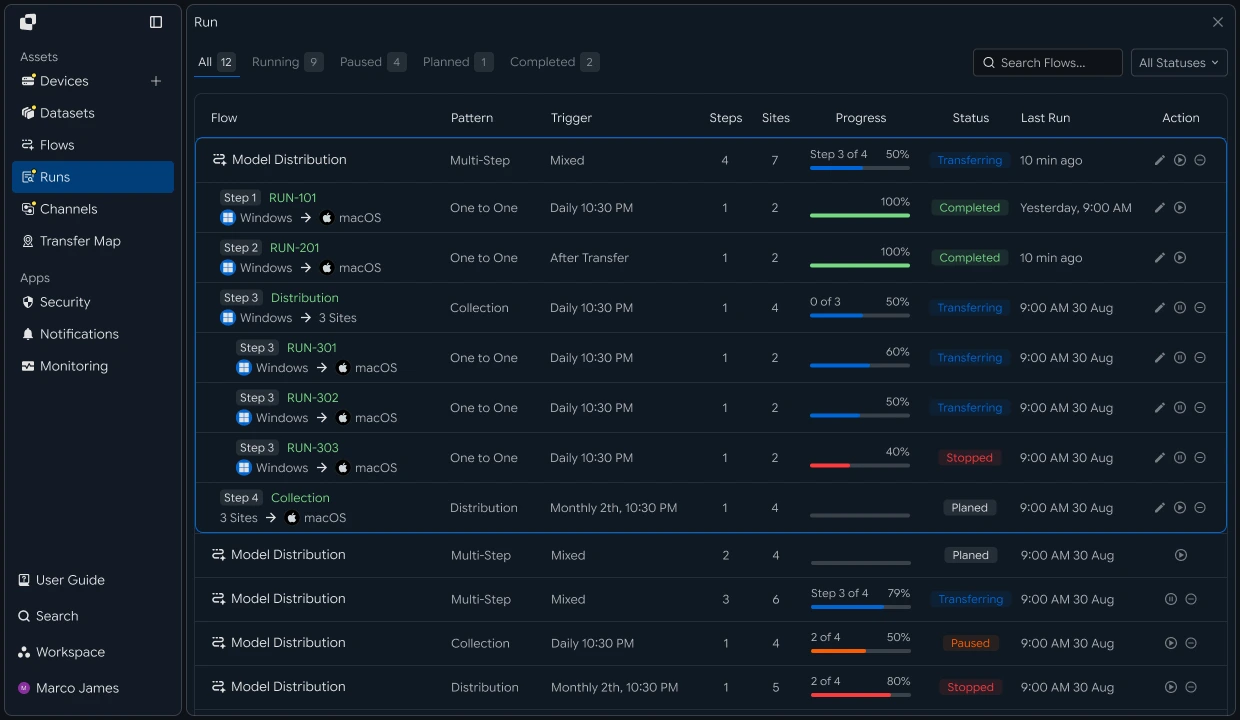
Business teams can manage required files in workspaces and use prepared transfer flows to continue to the next task.
IT Engineer#
Configure File Workspaces and Transfer Environments and Manage Them Centrally
Workspace Setup#
Configure File Storage Locations and Management Scope by Task
Create workspaces according to business purposes and configure the file storage locations and management scope used by each workspace.
For example, development outputs, media files, and data processing results can each be organized into separate workspaces.
Transfer Connection#
Connect Workspaces, Target Devices, and File Paths
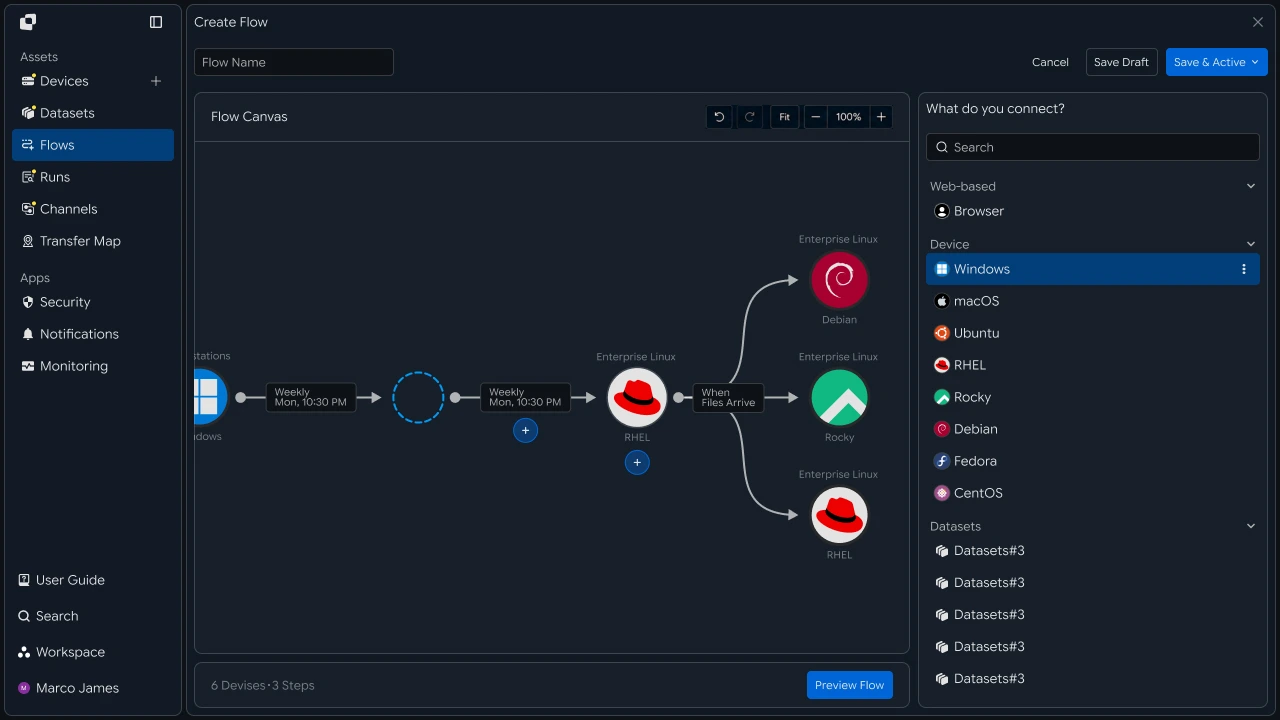
Connect the transfer target devices and file paths used by each workspace.
Connect servers, storage, and business devices to workspaces and configure file transfer paths to build task-specific transfer environments.
Workspace
- Source Storage
- Transfer Flow
- Target DevicesServerStorageSystem
Access Policy#
Manage Access Scope and Transfer Rules by User and Device
For each workspace, configure user and group access scope, connectable devices, file paths, and transfer jobs that can be run.
When the business environment or user configuration changes, adjust access scope and processing rules from the same policy screen.
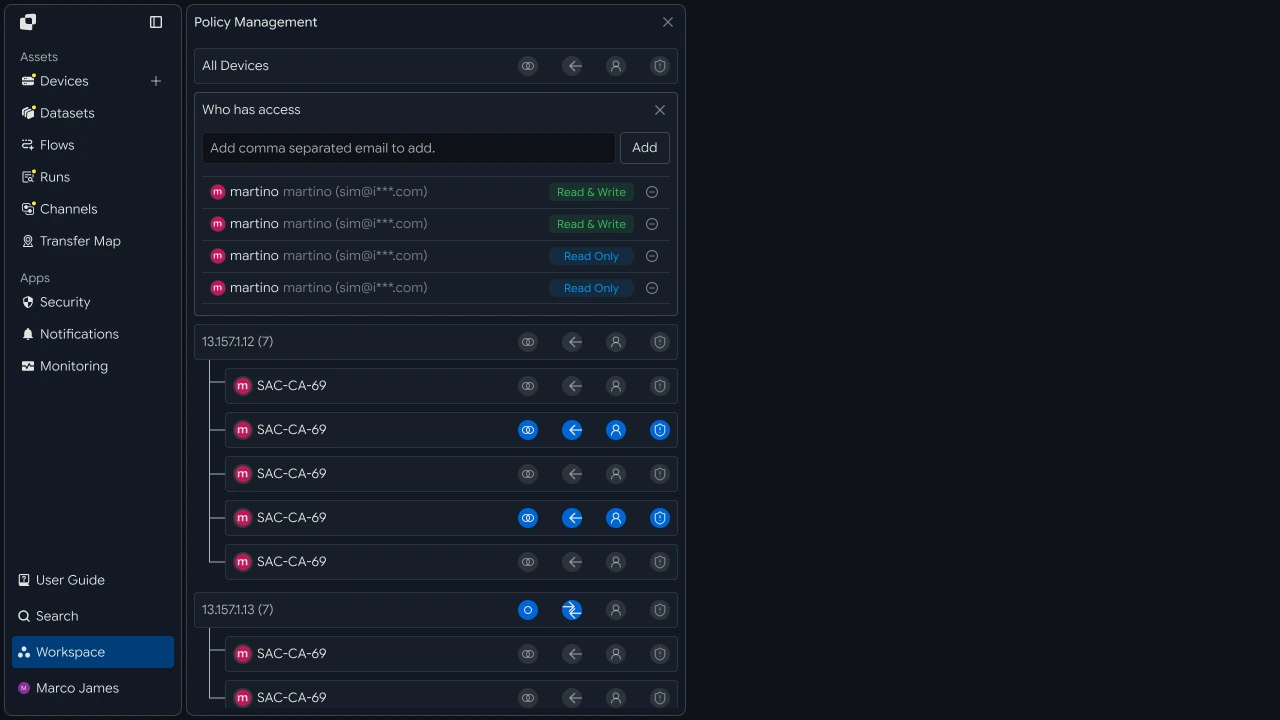
| Management Item | Configuration |
|---|---|
| Workspace | Workspaces by user and task |
| Users / Groups | Users and groups that use the workspace |
| Devices | Connectable devices |
| Paths | Paths used for files |
| Operations | File operations that can be run |
| Transfer Rules | File transfer criteria and processing rules |
Operations Management#
Check Transfer Results by Workspace and Overall Operational Status
Check file transfers and processing results for each workspace and centrally manage the status of multiple workspaces and connected devices.
Operators can check the execution status of a specific workspace or understand the operational situation based on job status across the entire environment.

Workspaces can be configured and managed through the following flow.
Developer#
Include the Workspace Identifier and Token in Requests and Handle Permission Responses
Authentication Handling#
Issue Tokens and Refresh Them When They Expire
The workspace API uses an access token for authentication. If no token is available, log in with the account to obtain one.
import os
import threading

import requests

BASE_URL = os.getenv("INNORIX_BASE_URL", "https://app.innorix.com").rstrip("/")


def login(email, password):
    response = requests.post(f"{BASE_URL}/api/auth/login",
                             json={"email": email, "password": password},
                             timeout=30)
    response.raise_for_status()

    # the login response nests the tokens under data.user
    user = response.json()["data"]["user"]
    return user["accessToken"], user.get("refreshToken")


def refresh(refresh_token):
    response = requests.post(f"{BASE_URL}/api/auth/token/refresh",
                             headers={"X-Refresh-Token": refresh_token},
                             timeout=30)
    response.raise_for_status()

    # the refresh response nests the tokens directly under data
    data = response.json()["data"]
    return data["accessToken"], data.get("refreshToken")
static final String BASE_URL = System.getenv()
.getOrDefault("INNORIX_BASE_URL", "https://app.innorix.com").replaceAll("/+quot;, "");
static final HttpClient HTTP = HttpClient.newHttpClient();
static final ObjectMapper MAPPER = new ObjectMapper();
// Returns { accessToken, refreshToken }
String[] login(String email, String password) throws Exception {
JsonNode body = post("/api/auth/login",
MAPPER.createObjectNode().put("email", email).put("password", password));
// the login response nests the tokens under data.user
JsonNode user = body.path("data").path("user");
return new String[]{user.path("accessToken").asText(),
user.path("refreshToken").asText(null)};
}
String[] refresh(String refreshToken) throws Exception {
HttpRequest request = HttpRequest.newBuilder(URI.create(BASE_URL + "/api/auth/token/refresh"))
.header("X-Refresh-Token", refreshToken)
.POST(HttpRequest.BodyPublishers.noBody()).build();
JsonNode data = MAPPER.readTree(
HTTP.send(request, HttpResponse.BodyHandlers.ofString()).body()).path("data");
return new String[]{data.path("accessToken").asText(),
data.path("refreshToken").asText(refreshToken)};
}const BASE_URL = (process.env.INNORIX_BASE_URL
|| "https://app.innorix.com").replace(/\/+$/, "");
async function login(email, password) {
const response = await fetch(`${BASE_URL}/api/auth/login`, {
method: "POST",
headers: { "Content-Type": "application/json" },
body: JSON.stringify({ email, password }),
});
if (!response.ok) throw new Error(`login failed: ${response.status}`);
// the login response nests the tokens under data.user
const { user } = (await response.json()).data;
return { access: user.accessToken, refresh: user.refreshToken };
}
async function refresh(refreshToken) {
const response = await fetch(`${BASE_URL}/api/auth/token/refresh`, {
method: "POST",
headers: { "X-Refresh-Token": refreshToken },
});
if (!response.ok) throw new Error(`refresh failed: ${response.status}`);
// the refresh response nests the tokens directly under data
const { data } = await response.json();
return { access: data.accessToken, refresh: data.refreshToken ?? refreshToken };
}static readonly string BaseUrl = (Environment.GetEnvironmentVariable("INNORIX_BASE_URL")
?? "https://app.innorix.com").TrimEnd('/');
static readonly HttpClient Http = new();
async Task<(string Access, string Refresh)> LoginAsync(string email, string password)
{
var response = await Http.PostAsJsonAsync(quot;{BaseUrl}/api/auth/login",
new { email, password });
response.EnsureSuccessStatusCode();
// the login response nests the tokens under data.user
JsonNode user = JsonNode.Parse(await response.Content.ReadAsStringAsync())
!["data"]!["user"]!;
return (user["accessToken"]!.GetValue<string>(),
user["refreshToken"]?.GetValue<string>());
}
async Task<(string Access, string Refresh)> RefreshAsync(string refreshToken)
{
using var request = new HttpRequestMessage(HttpMethod.Post,
quot;{BaseUrl}/api/auth/token/refresh");
request.Headers.Add("X-Refresh-Token", refreshToken);
var response = await Http.SendAsync(request);
response.EnsureSuccessStatusCode();
// the refresh response nests the tokens directly under data
JsonNode data = JsonNode.Parse(await response.Content.ReadAsStringAsync())!["data"]!;
return (data["accessToken"]!.GetValue<string>(),
data["refreshToken"]?.GetValue<string>() ?? refreshToken);
}The response structures for login and refresh are different. Login nests the tokens under data.user, while refresh places them directly under data.
A refresh token is valid only once. If a server application uses the same token across multiple threads, lock the refresh operation so it cannot occur concurrently.
class Session:
    def __init__(self, email, password):
        self._lock = threading.Lock()
        self._access, self._refresh = login(email, password)

    @property
    def access_token(self):
        with self._lock:
            return self._access

    def renew(self):
        with self._lock:
            self._access, self._refresh = refresh(self._refresh)
            return self._access
class Session {
private final Object lock = new Object();
private String access;
private String refresh;
Session(String email, String password) throws Exception {
String[] tokens = login(email, password);
this.access = tokens[0];
this.refresh = tokens[1];
}
String accessToken() {
synchronized (lock) { return access; }
}
String renew() throws Exception {
synchronized (lock) {
String[] tokens = refresh(this.refresh);
this.access = tokens[0];
this.refresh = tokens[1];
return this.access;
}
}
}class Session {
#access;
#refresh;
static async create(email, password) {
const session = new Session();
const tokens = await login(email, password);
session.#access = tokens.access;
session.#refresh = tokens.refresh;
return session;
}
get accessToken() {
return this.#access;
}
async renew() {
const tokens = await refresh(this.#refresh);
this.#access = tokens.access;
this.#refresh = tokens.refresh;
return this.#access;
}
}class Session
{
private readonly SemaphoreSlim _lock = new(1, 1);
private string _access;
private string _refresh;
public static async Task<Session> CreateAsync(string email, string password)
{
var session = new Session();
(session._access, session._refresh) = await session.LoginAsync(email, password);
return session;
}
public string AccessToken => _access;
public async Task<string> RenewAsync()
{
await _lock.WaitAsync();
try
{
(_access, _refresh) = await RefreshAsync(_refresh);
return _access;
}
finally { _lock.Release(); }
}
}Workspace Assignment#
Send the Workspace Identifier with Every Request
The workspace is passed in a header rather than the request body. Because specifying it at each call site can lead to omissions, centralize request construction in one place.
class Client:
    def __init__(self, session, workspace_id=None):
        self.session = session
        self.workspace_id = workspace_id

    def request(self, method, path, body=None, params=None, retried=False):
        headers = {
            "Content-Type": "application/json",
            "Authorization": f"Bearer {self.session.access_token}",
        }

        # when omitted the account's current workspace is used
        if self.workspace_id:
            headers["x-workspace-id"] = self.workspace_id

        response = requests.request(method, BASE_URL + path, headers=headers,
                                    json=body, params=params, timeout=30)

        if response.status_code == 401 and not retried:
            self.session.renew()
            return self.request(method, path, body, params, retried=True)

        return response
class Client {
private final Session session;
private final String workspaceId;
Client(Session session, String workspaceId) {
this.session = session;
this.workspaceId = workspaceId;
}
HttpResponse<String> request(String method, String path, String body,
boolean retried) throws Exception {
HttpRequest.Builder builder = HttpRequest.newBuilder(URI.create(BASE_URL + path))
.header("Content-Type", "application/json")
.header("Authorization", "Bearer " + session.accessToken());
// when omitted the account's current workspace is used
if (workspaceId != null) builder.header("x-workspace-id", workspaceId);
builder.method(method, body == null
? HttpRequest.BodyPublishers.noBody()
: HttpRequest.BodyPublishers.ofString(body));
HttpResponse<String> response = HTTP.send(builder.build(),
HttpResponse.BodyHandlers.ofString());
if (response.statusCode() == 401 && !retried) {
session.renew();
return request(method, path, body, true);
}
return response;
}
}class Client {
constructor(session, workspaceId = null) {
this.session = session;
this.workspaceId = workspaceId;
}
async request(method, path, body = null, retried = false) {
const headers = {
"Content-Type": "application/json",
Authorization: `Bearer ${this.session.accessToken}`,
};
// when omitted the account's current workspace is used
if (this.workspaceId) headers["x-workspace-id"] = this.workspaceId;
const response = await fetch(BASE_URL + path, {
method,
headers,
body: body === null ? undefined : JSON.stringify(body),
});
if (response.status === 401 && !retried) {
await this.session.renew();
return this.request(method, path, body, true);
}
return response;
}
}class Client
{
private readonly Session _session;
private readonly string _workspaceId;
public Client(Session session, string workspaceId = null)
{
_session = session;
_workspaceId = workspaceId;
}
public async Task<HttpResponseMessage> RequestAsync(HttpMethod method, string path,
object body = null, bool retried = false)
{
using var request = new HttpRequestMessage(method, BaseUrl + path);
request.Headers.Add("Authorization", quot;Bearer {_session.AccessToken}");
// when omitted the account's current workspace is used
if (_workspaceId != null) request.Headers.Add("x-workspace-id", _workspaceId);
if (body != null)
request.Content = JsonContent.Create(body);
HttpResponseMessage response = await Http.SendAsync(request);
if (response.StatusCode == HttpStatusCode.Unauthorized && !retried)
{
await _session.RenewAsync();
return await RequestAsync(method, path, body, true);
}
return response;
}
}If no workspace identifier is specified, the account's currently accessible workspace is used. An application that uses a single workspace can operate without specifying one.
Token expiration is also handled at this point. When a 401 is received, refresh once and retry; if the retried request fails again, propagate the failure as-is.
Check Access Scope#
Check the Account's View Scope and Accessible Devices
me = api("GET", "/api/auth/me") or {}
print(me)

result = api("GET", "/api/devices", params={"page": 1, "size": 20}) or {}

if result.get("viewScope"):
    print("view scope:", result["viewScope"])

for device in result.get("devices") or []:
    print(device["deviceId"], device["name"])
JsonNode me = client.api("GET", "/api/auth/me");
System.out.println(me);
Map<String, Object> result = client.apiObj("GET", "/api/devices", null,
Json.newObj("page", 1, "size", 20));
if (result.containsKey("viewScope")) {
System.out.println("view scope: " + Json.str(result, "viewScope"));
}
for (Object node : Json.arrOf(result, "devices")) {
Map<String, Object> device = Json.asObj(node);
System.out.println(Json.str(device, "deviceId") + " " + Json.str(device, "name"));
}const me = (await client.api("GET", "/api/auth/me")) || {};
console.log(me);
const result = (await client.api("GET", "/api/devices", null,
{ page: 1, size: 20 })) || {};
if (result.viewScope) console.log("view scope:", result.viewScope);
for (const device of result.devices || []) {
console.log(device.deviceId, device.name);
}JsonObject me = await client.ApiObjAsync("GET", "/api/auth/me");
Console.WriteLine(me);
JsonObject result = await client.ApiObjAsync("GET", "/api/devices", null,
new Dictionary<string, object> { ["page"] = 1, ["size"] = 20 });
if (result["viewScope"] is not null)
Console.WriteLine(quot;view scope: {J.Str(result, "viewScope")}");
foreach (JsonNode node in J.ArrOf(result, "devices"))
{
JsonObject device = J.AsObj(node);
Console.WriteLine(quot;{J.Str(device, "deviceId")} {J.Str(device, "name")}");
}| Response Item | Details |
|---|---|
devices |
List of devices connected to the workspace |
totalRows, lastPage |
Total count and last page |
viewScope |
Current account view scope |
The device list is returned as the data.devices array. Use viewScope in the response to determine whether the account can view everything or only part of the environment.
Permission Handling#
Distinguish 401 and 403 and Handle Them with Re-login or UI Guidance
Authentication failure and insufficient permissions must be handled differently. The former requires re-login, while the latter requires UI guidance.
| Status | Meaning | Handling |
|---|---|---|
| 401 | Token is missing or invalid | Refresh and retry; if it fails, re-login |
| 403 | Cannot access the workspace or path | Inform the user |
| 404 | Device or path does not exist | Inform the user that the target is no longer available |
| 429 | Too many requests | Retry after a short delay |
class WorkspaceForbidden(Exception):
    pass


def call(client, method, path, body=None, params=None):
    response = client.request(method, path, body, params)

    if response.status_code == 403:
        raise WorkspaceForbidden(path)

    payload = response.json() if response.content else {}

    if not response.ok:
        raise RuntimeError(payload.get("message") or f"HTTP {response.status_code}")

    return payload.get("data")


try:
    devices = call(client, "GET", "/api/devices")
except WorkspaceForbidden:
    devices, notice = [], "no permission to access this workspace"
class WorkspaceForbidden extends RuntimeException {
WorkspaceForbidden(String path) { super(path); }
}
JsonNode call(Client client, String method, String path) throws Exception {
HttpResponse<String> response = client.request(method, path, null, false);
if (response.statusCode() == 403) throw new WorkspaceForbidden(path);
JsonNode payload = response.body().isEmpty()
? MAPPER.createObjectNode() : MAPPER.readTree(response.body());
if (response.statusCode() >= 400) {
throw new RuntimeException(payload.path("message").asText("HTTP " + response.statusCode()));
}
return payload.path("data");
}
List<JsonNode> devices;
String notice = null;
try {
devices = List.of(call(client, "GET", "/api/devices"));
} catch (WorkspaceForbidden error) {
devices = List.of();
notice = "You do not have permission to access this workspace.";
}class WorkspaceForbidden extends Error {}
async function call(client, method, path, body = null) {
const response = await client.request(method, path, body);
if (response.status === 403) throw new WorkspaceForbidden(path);
const payload = response.body ? await response.json() : {};
if (!response.ok) throw new Error(payload.message || `HTTP ${response.status}`);
return payload.data;
}
let devices;
let notice = null;
try {
devices = await call(client, "GET", "/api/devices");
} catch (error) {
if (!(error instanceof WorkspaceForbidden)) throw error;
devices = [];
notice = "You do not have permission to access this workspace.";
}class WorkspaceForbidden : Exception
{
public WorkspaceForbidden(string path) : base(path) { }
}
async Task<JsonNode> CallAsync(Client client, HttpMethod method, string path,
object body = null)
{
HttpResponseMessage response = await client.RequestAsync(method, path, body);
if (response.StatusCode == HttpStatusCode.Forbidden)
throw new WorkspaceForbidden(path);
JsonNode payload = JsonNode.Parse(await response.Content.ReadAsStringAsync());
if (!response.IsSuccessStatusCode)
throw new Exception(J.Str(J.AsObj(payload), "message")
?? quot;HTTP {(int)response.StatusCode}");
return payload?["data"];
}
JsonNode devices;
string notice = null;
try
{
devices = await CallAsync(client, HttpMethod.Get, "/api/devices");
}
catch (WorkspaceForbidden)
{
devices = new JsonArray();
notice = "You do not have permission to access this workspace.";
}Separating insufficient permissions into a dedicated exception lets the calling code convert them into a user-facing message. Because results can differ by workspace even for the same user, display the current workspace at the top of the UI so users do not mistake an empty list for a permission problem.
Multi-Workspace Handling#
Separate Credentials in Code That Handles Multiple Workspaces
Passing the workspace identifier as a function argument can lead to omissions at some call site. Create a client for each workspace and pass the client object instead.
clients = {
    workspace_id: Client(session, workspace_id)
    for workspace_id in WORKSPACE_IDS
}


def collect_devices():
    result = {}

    for workspace_id, client in clients.items():
        try:
            result[workspace_id] = call(client, "GET", "/api/devices")
        except WorkspaceForbidden:
            continue

return resultMap<String, Client> clients = new LinkedHashMap<>();
for (String workspaceId : WORKSPACE_IDS) {
clients.put(workspaceId, new Client(session, workspaceId));
}
Map<String, JsonNode> collectDevices() {
Map<String, JsonNode> result = new LinkedHashMap<>();
clients.forEach((workspaceId, client) -> {
try {
result.put(workspaceId, call(client, "GET", "/api/devices"));
} catch (WorkspaceForbidden ignored) {
// skip workspaces this account cannot reach
} catch (Exception error) {
throw new RuntimeException(error);
}
});
return result;
}const clients = Object.fromEntries(
WORKSPACE_IDS.map((workspaceId) => [workspaceId, new Client(session, workspaceId)]),
);
async function collectDevices() {
const result = {};
for (const [workspaceId, client] of Object.entries(clients)) {
try {
result[workspaceId] = await call(client, "GET", "/api/devices");
} catch (error) {
if (!(error instanceof WorkspaceForbidden)) throw error;
// skip workspaces this account cannot reach
}
}
return result;
}var clients = WorkspaceIds.ToDictionary(
workspaceId => workspaceId,
workspaceId => new Client(session, workspaceId));
async Task<Dictionary<string, JsonNode>> CollectDevicesAsync()
{
var result = new Dictionary<string, JsonNode>();
foreach (var (workspaceId, client) in clients)
{
try
{
result[workspaceId] = await CallAsync(client, HttpMethod.Get, "/api/devices");
}
catch (WorkspaceForbidden)
{
// skip workspaces this account cannot reach
}
}
return result;
}There is no endpoint for listing workspaces. Provide candidate workspaces and filter them to determine which are accessible.
If each customer has a separate account, separate the sessions as well. Keep their creation points separate so they are not mixed with a configuration where multiple workspaces share one session.
def build_client(config):
    session = Session(config["email"], config["password"])
    return Client(session, config["workspace_id"])


clients = {name: build_client(cfg) for name, cfg in TENANTS.items()}
Client buildClient(Map<String, String> config) throws Exception {
Session session = new Session(config.get("email"), config.get("password"));
return new Client(session, config.get("workspaceId"));
}
Map<String, Client> clients = new LinkedHashMap<>();
for (Map.Entry<String, Map<String, String>> entry : TENANTS.entrySet()) {
clients.put(entry.getKey(), buildClient(entry.getValue()));
}async function buildClient(config) {
const session = await Session.create(config.email, config.password);
return new Client(session, config.workspaceId);
}
const clients = {};
for (const [name, cfg] of Object.entries(TENANTS)) {
clients[name] = await buildClient(cfg);
}async Task<Client> BuildClientAsync(TenantConfig config)
{
Session session = await Session.CreateAsync(config.Email, config.Password);
return new Client(session, config.WorkspaceId);
}
var clients = new Dictionary<string, Client>();
foreach (var (name, cfg) in Tenants)
{
clients[name] = await BuildClientAsync(cfg);
}A batch that iterates over multiple workspaces should not let a failure in one workspace stop the entire batch.
failed = []

for name, client in clients.items():
    try:
        run_for(client)
    except Exception as error:
        failed.append((name, error))

for name, error in failed:
    print(f"{name}: {error}")
List<Map.Entry<String, Exception>> failed = new ArrayList<>();
clients.forEach((name, client) -> {
try {
runFor(client);
} catch (Exception error) {
failed.add(Map.entry(name, error));
}
});
for (Map.Entry<String, Exception> entry : failed) {
System.out.println(entry.getKey() + ": " + entry.getValue().getMessage());
}const failed = [];
for (const [name, client] of Object.entries(clients)) {
try {
await runFor(client);
} catch (error) {
failed.push([name, error]);
}
}
for (const [name, error] of failed) {
console.log(`${name}: ${error.message}`);
}var failed = new List<(string Name, Exception Error)>();
foreach (var (name, client) in clients)
{
try
{
await RunForAsync(client);
}
catch (Exception error)
{
failed.Add((name, error));
}
}
foreach (var (name, error) in failed)
{
Console.WriteLine(quot;{name}: {error.Message}");
}| Management Item | Handled in Code |
|---|---|
| Session | Access and refresh tokens by account |
| Workspace | Workspace identifier in the request header |
| Permissions | 403 response and UI guidance |
| Resources | Devices and view scope by workspace |
| Execution | Transfers created within the workspace |