
Getting Started#
Basic Concept#
Collect logs and diagnostic files from multiple systems into one analysis environment
Servers and applications generate logs, core dumps, error reports, and other diagnostic files during operation.
Central log and core dump collection gathers files generated by each system according to configured criteria and automatically transfers them to a designated central analysis environment.
Connecting multiple servers and applications to a single collection flow lets you review diagnostic data centrally and use it for analysis.

Collection Flow#
Automate the flow from file creation to delivery into the central analysis environment
When a log or diagnostic file is created on a source system, collection starts based on the file type, path, and configured execution conditions.
Collected files are transferred to central storage or an analysis environment. After collection completes, the files can be passed to downstream analysis and monitoring tasks.
- Generate log or diagnostic files
- Identify collection targets
- Apply collection criteria
- Transfer to the central analysis environment
- Connect analysis and monitoring tasks
- Review execution results
This creates a single operational flow for collecting diagnostic files from multiple systems and using them downstream.
Operational Benefits#
Centralize distributed diagnostic data and connect it to analysis workflows
Connecting diagnostic files from multiple systems to a central collection environment lets you manage file locations, collection status, and analysis targets in one flow.
| Category | Per-System Management | Central Collection |
|---|---|---|
| File Location | Check paths on each system | Manage centrally in the collection environment |
| Collection Execution | Run tasks per system | Collect automatically based on conditions |
| Analysis Preparation | Transfer required files individually | Pass collected files to the analysis environment |
| Status Review | Check results per system | Review overall collection status |
This creates an operational flow from file creation → central collection → analysis integration → result verification.
IT Engineers#
Collection Environment#
Connect systems where logs and diagnostic files are generated
First, connect the servers and application environments where logs, core dumps, and diagnostic files are generated to the collection flow.
Specify the file locations on each system to define the source paths used by the central collection job.
| Collection Environment | Typical Files |
|---|---|
| Application Server | Application logs and error reports |
| Operations Server | System logs and diagnostic files |
| Processing Server | Job logs and processing results |
| Failure Analysis Environment | Core dumps and error data |
| Edge Device | Field logs and diagnostic data |
Devices
- Application Server/var/log/application
- Linux Server/var/log/system
- Edge Device/data/diagnostics

Collection Policy#
Configure collection criteria by file type and priority
After connecting the collection environment, define which files to collect and under what conditions.
Specify collection targets by file extension, path, and create or modify events, then configure processing order and execution criteria based on file type and importance.
| File Type | Collection Criteria | Processing Flow |
|---|---|---|
| Standard Log | Schedule or file change | Scheduled collection |
| Error Log | Create or modify detection | Connect to analysis workflow |
| Core Dump | File creation | Priority collection |
| Diagnostic File | Configured path and conditions | Connect to analysis and monitoring |
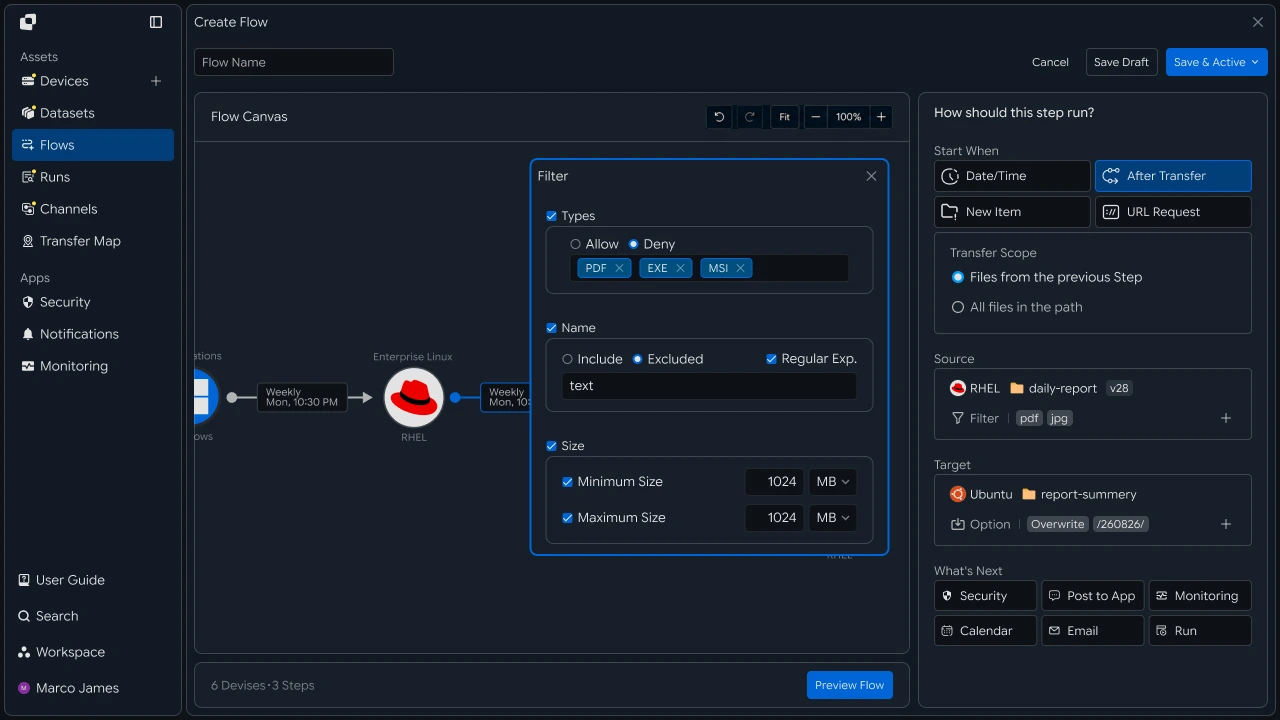
Central Collection#
Transfer diagnostic files from multiple systems to a central analysis environment
Transfer files from each system to a central storage location according to the configured collection criteria.
Bring files from multiple systems into one central environment, then connect downstream tasks based on file type or analysis purpose.
Analysis Integration#
Connect collected files to downstream analysis and monitoring tasks
After files are collected centrally, completed files can be used immediately by analysis systems or monitoring environments.
Using collection completion as the execution condition for the next task lets you extend the workflow from file transfer into analysis.

Operational Review#
Review collection status and execution results, then rerun required tasks
When collection runs, use Runs and detailed execution history to review per-system file processing status and results.
Review the collection environment, file paths, connection state, and processing results together. For jobs that require additional review, take the necessary action based on the details and rerun the required operation.
| Item | Details |
|---|---|
| Collection System | Server or device where the file was generated |
| Collection Target | Log, core dump, or diagnostic file |
| Execution Status | Current job status and progress |
| Processing Result | Number and total size of collected files |
| Target Environment | Central storage and analysis location |
| Execution History | Results of collection and downstream tasks |

Developers#
Filter logs and core dumps by type and collect them on a central host
Integration Setup#
Prepare shared API calls and path encoding
import os
import requests

BASE_URL = os.getenv("INNORIX_BASE_URL", "https://app.innorix.com").rstrip("/")
TOKEN = os.environ["INNORIX_ACCESS_TOKEN"]
WORKSPACE_ID = os.getenv("INNORIX_WORKSPACE_ID")   # optional; falls back to the current workspace

STATUS_COMPLETE = 2
TERMINAL = {2, 4, 5, 9, 99}          # complete / error / cancelled / partial / failed
NOT_SUCCEEDED = {4, 5, 9, 99}


def api(method, path, body=None, params=None):
    headers = {
        "Content-Type": "application/json",
        "Authorization": f"Bearer {TOKEN}",
    }

    if WORKSPACE_ID:
        headers["x-workspace-id"] = WORKSPACE_ID

    response = requests.request(
        method, BASE_URL + path,
        headers=headers, json=body, params=params, timeout=30,
    )

    payload = response.json() if response.content else {}

    if not response.ok:
        raise RuntimeError(payload.get("message") or f"HTTP {response.status_code}")

    return payload.get("data")


def is_terminal(detail):
    return detail.get("isTerminal", detail.get("status") in TERMINAL)
// InnorixClient.java
public static final String BASE_URL =
env("INNORIX_BASE_URL", "https://app.innorix.com").replaceAll("/+quot;, "");
public static final String WORKSPACE_ID = env("INNORIX_WORKSPACE_ID", null);
public static final int STATUS_COMPLETE = 2;
// States the transfer no longer moves out of
public static final Set<Integer> TERMINAL = Set.of(2, 4, 5, 9, 99);
// Terminal states that are not a full success
public static final Set<Integer> NOT_SUCCEEDED = Set.of(4, 5, 9, 99);
private HttpRequest.Builder headers(HttpRequest.Builder builder) {
builder.header("Content-Type", "application/json")
.header("Authorization", "Bearer " + session.accessToken());
// When omitted the account's current workspace is used.
if (workspaceId != null) builder.header("x-workspace-id", workspaceId);
return builder;
}
/** Unwraps and returns data from the response. Throws ApiError on failure. */
public Object api(String method, String path, Object body, Map<String, Object> params) {
Resp response = request(method, path, body, params);
Object payload = null;
try {
payload = Json.parse(response.text());
} catch (RuntimeException ignored) {
payload = null;
}
if (!response.ok()) {
Map<String, Object> map = Json.asObj(payload);
String message = Json.str(map, "message", Json.str(map, "error", "unknown error"));
throw new ApiError(response.status, message, map);
}
return Json.get(payload, "data");
}
/** Use the server flag when present, otherwise fall back to the status code. */
public static boolean isTerminal(Map<String, Object> record) {
Boolean flag = Json.boolOrNull(record, "isTerminal");
if (flag != null) return flag;
Integer status = Json.intOrNull(record, "status");
return status != null && TERMINAL.contains(status);
}// innorix-client.js
const BASE_URL = (process.env.INNORIX_BASE_URL
|| "https://app.innorix.com").replace(/\/+$/, "");
const TOKEN = process.env.INNORIX_ACCESS_TOKEN;
const WORKSPACE_ID = process.env.INNORIX_WORKSPACE_ID || null;
export const STATUS_COMPLETE = 2;
export const TERMINAL = new Set([2, 4, 5, 9, 99]); // complete / error / cancelled / partial / failed
export const NOT_SUCCEEDED = new Set([4, 5, 9, 99]);
export async function api(method, path, body = null, params = null) {
const url = new URL(BASE_URL + path);
if (params) {
for (const [key, value] of Object.entries(params)) {
if (value === undefined || value === null) continue;
url.searchParams.set(key, String(value));
}
}
const headers = {
"Content-Type": "application/json",
Authorization: `Bearer ${TOKEN}`,
};
// When omitted the account's current workspace is used.
if (WORKSPACE_ID) headers["x-workspace-id"] = WORKSPACE_ID;
const response = await fetch(url, {
method,
headers,
body: body === null ? undefined : JSON.stringify(body),
signal: AbortSignal.timeout(30_000),
});
const payload = await response.json().catch(() => ({}));
if (!response.ok) {
throw new Error(payload.message || `HTTP ${response.status}`);
}
return payload.data;
}
export function isTerminal(detail) {
return detail.isTerminal !== undefined
? detail.isTerminal
: TERMINAL.has(detail.status);
}// InnorixClient.cs
public static readonly string BaseUrl =
Env("INNORIX_BASE_URL", "https://app.innorix.com").TrimEnd('/');
public static readonly string WorkspaceIdFromEnv = Env("INNORIX_WORKSPACE_ID", null);
public const int StatusComplete = 2;
/// <summary>States the transfer no longer moves out of</summary>
public static readonly HashSet<int> Terminal = new HashSet<int> { 2, 4, 5, 9, 99 };
/// <summary>Terminal states that are not a full success</summary>
public static readonly HashSet<int> NotSucceeded = new HashSet<int> { 4, 5, 9, 99 };
// Applied on every request
request.Headers.TryAddWithoutValidation("Authorization", "Bearer " + Session.AccessToken);
// When omitted the account's current workspace is used.
if (WorkspaceId != null) request.Headers.TryAddWithoutValidation("x-workspace-id", WorkspaceId);
public async Task<JsonNode> ApiAsync(string method, string path, JsonNode body = null,
IDictionary<string, object> parameters = null)
{
Resp response = await RequestAsync(method, path, body, parameters).ConfigureAwait(false);
JsonNode payload = null;
try
{
payload = J.Parse(response.Text());
}
catch (Exception)
{
payload = null;
}
if (!response.Ok)
{
JsonObject map = J.AsObj(payload);
string message = J.Str(map, "message", J.Str(map, "error", "unknown error"));
throw new ApiError(response.Status, message, map);
}
return J.Get(payload, "data");
}
/// <summary>Use the server flag when present, otherwise fall back to the status code.</summary>
public static bool IsTerminal(JsonObject record)
{
bool? flag = J.BoolOrNull(record, "isTerminal");
if (flag != null) return flag.Value;
int? status = J.IntOrNull(record, "status");
return status != null && Terminal.Contains(status.Value);
}import base64
import time
def encode_path(device_id, raw_path):
normalized = str(raw_path or "").replace("\\", "/")
token = base64.b64encode(normalized.encode("utf-8")).decode("ascii")
return f"{device_id}_ino_{token}"
def now_iso():
return time.strftime("%Y-%m-%dT%H:%M:%S.000Z", time.gmtime())public static String encodePath(String deviceId, String rawPath) {
String normalized = (rawPath == null ? "" : rawPath).replace("\\", "/");
return deviceId + "_ino_"
+ Base64.getEncoder().encodeToString(normalized.getBytes(StandardCharsets.UTF_8));
}
public static String nowIso() {
return Instant.now().truncatedTo(ChronoUnit.SECONDS).toString().replace("Z", ".000Z");
}export function encodePath(deviceId, rawPath) {
const normalized = String(rawPath ?? "").replace(/\\/g, "/");
const token = Buffer.from(normalized, "utf8").toString("base64");
return `${deviceId}_ino_${token}`;
}
export function nowIso() {
return new Date().toISOString().replace(/\.\d{3}Z$/, ".000Z");
}public static string EncodePath(string deviceId, string rawPath)
{
string normalized = (rawPath ?? "").Replace("\\", "/");
return deviceId + "_ino_" + Convert.ToBase64String(Encoding.UTF8.GetBytes(normalized));
}
public static string NowIso()
{
return DateTime.UtcNow.ToString("yyyy-MM-dd'T'HH:mm:ss'.000Z'",
System.Globalization.CultureInfo.InvariantCulture);
}Use the following values to determine transfer status. There are five terminal states, and Complete (2) is the successful state.
| Status Value | Meaning | Terminal |
|---|---|---|
| 2 | Complete | Yes |
| 4 | Error | Yes |
| 5 | Cancelled | Yes |
| 9 | Partial Complete | Yes |
| 99 | Failed | Yes |
| 1, 6, 12, 13 | Starting, Transferring, Synchronizing, Receiving | No |
Select Collection Targets#
Select only the files to collect by extension and size
Log folders often contain files that do not need to be collected. Define filters so only required files are transferred.
def build_filter(exts=None, min_size=None, exclude=None):
    file_option = {}

    if exts:
        # extension whitelist, without the leading dot
        file_option["extension"] = {
            "extension": [e.lstrip(".").lower() for e in exts],
            "allow": True,
        }

    if min_size is not None:
        # over and equal both True means size or larger
        file_option["fileSize"] = {"size": min_size, "over": True, "equal": True}

    if exclude:
        # allow=False excludes files whose name contains this. Server matching is case sensitive.
        file_option["fileName"] = {"name": exclude, "allow": False}

    return {"send-fileoption": file_option} if file_option else {}
public static Map<String, Object> buildFilter(List<String> exts, Long minSize, String exclude) {
Map<String, Object> fileOption = new LinkedHashMap<>();
if (exts != null && !exts.isEmpty()) {
List<Object> cleaned = new ArrayList<>();
// e.g. ["mp4","mov"] (no dot). allow=true -> whitelist
for (String ext : exts) cleaned.add(ext.replaceAll("^\\.+", "").toLowerCase());
fileOption.put("extension", Json.newObj("extension", cleaned, "allow", true));
}
if (minSize != null) {
// over=true/equal=true -> only files at or above size
fileOption.put("fileSize", Json.newObj("size", minSize, "over", true, "equal", true));
}
if (exclude != null) {
// allow=false -> skip files whose name contains exclude (server match is case sensitive)
fileOption.put("fileName", Json.newObj("name", exclude, "allow", false));
}
return fileOption.isEmpty()
? new LinkedHashMap<>()
: Json.newObj("send-fileoption", fileOption);
}export function buildFilter({ exts = null, minSize = null, exclude = null } = {}) {
const fileOption = {};
if (exts) {
// Extension whitelist, without the leading dot.
fileOption.extension = {
extension: exts.map((e) => e.replace(/^\./, "").toLowerCase()),
allow: true,
};
}
if (minSize !== null && minSize !== undefined) {
// over and equal both true means size or larger.
fileOption.fileSize = { size: minSize, over: true, equal: true };
}
if (exclude) {
// allow=false excludes files whose name contains this. Matching is case sensitive.
fileOption.fileName = { name: exclude, allow: false };
}
return Object.keys(fileOption).length ? { "send-fileoption": fileOption } : {};
}public static JsonObject BuildFilter(IReadOnlyList<string> exts = null,
long? minSize = null, string exclude = null)
{
var fileOption = new JsonObject();
if (exts != null && exts.Count > 0)
{
// e.g. ["mp4","mov"] (no dot). allow=true -> whitelist
var cleaned = new JsonArray();
foreach (string ext in exts) cleaned.Add(ext.TrimStart('.').ToLowerInvariant());
fileOption["extension"] = new JsonObject { ["extension"] = cleaned, ["allow"] = true };
}
if (minSize != null)
{
// over=true/equal=true -> only files at or above size
fileOption["fileSize"] = new JsonObject
{
["size"] = minSize.Value,
["over"] = true,
["equal"] = true,
};
}
if (exclude != null)
{
// allow=false -> skip files whose name contains exclude (server match is case sensitive)
fileOption["fileName"] = new JsonObject { ["name"] = exclude, ["allow"] = false };
}
return fileOption.Count == 0
? new JsonObject()
: new JsonObject { ["send-fileoption"] = fileOption };
}Use send-fileoption.extension for extension filters. The send-filetype-cus regular expression matches only the file name without its extension, so it does not work as an extension filter.
| Filter | Location | Behavior |
|---|---|---|
| Extension | send-fileoption.extension |
With allow: true, transfer only files with these extensions |
| Size | send-fileoption.fileSize |
Use over and equal to define inclusive size thresholds |
| Name | send-fileoption.fileName |
With allow: false, exclude files containing the specified text |
When multiple filters are provided, they are combined with AND. Only files that match every condition are transferred.
LOG_FILTER = build_filter(exts=["log", "gz"], exclude=".lck")
DUMP_FILTER = build_filter(exts=["core", "dmp", "hprof"])Map<String, Object> logFilter = InnorixClient.buildFilter(
List.of("log", "gz"), null, ".lck");
Map<String, Object> dumpFilter = InnorixClient.buildFilter(
List.of("core", "dmp", "hprof"), null, null);const logFilter = buildFilter({ exts: ["log", "gz"], exclude: ".lck" });
const dumpFilter = buildFilter({ exts: ["core", "dmp", "hprof"] });JsonObject logFilter = InnorixClient.BuildFilter(
new[] { "log", "gz" }, exclude: ".lck");
JsonObject dumpFilter = InnorixClient.BuildFilter(
new[] { "core", "dmp", "hprof" });Logs are often rotated and compressed as .gz files, so include both the original and compressed extensions. Use a name condition to exclude lock files.
Use search to verify that the filters match the intended files before enabling collection.
page = api("POST", f"/api/devices/{device_id}/files/search",
           {"path": "/var/log/application", "pageSize": 500})

matched = [i for i in page["items"]
           if i["type"] == "file" and i["name"].endswith((".log", ".gz"))]

print(f"{len(matched)} matched")Map<String, Object> page = client.apiObj("POST",
"/api/devices/" + deviceId + "/files/search",
Json.newObj("path", "/var/log/application", "pageSize", 500));
long matched = 0;
for (Object node : Json.arrOf(page, "items")) {
Map<String, Object> item = Json.asObj(node);
String name = Json.str(item, "name");
if ("file".equals(Json.str(item, "type"))
&& (name.endsWith(".log") || name.endsWith(".gz"))) matched++;
}
System.out.println(matched + " matched");const page = await client.api("POST",
`/api/devices/${deviceId}/files/search`,
{ path: "/var/log/application", pageSize: 500 });
const matched = (page.items || []).filter((i) =>
i.type === "file" && /\.(log|gz)$/.test(i.name));
console.log(`${matched.length} matched`);JsonObject page = await client.ApiObjAsync("POST",
quot;/api/devices/{deviceId}/files/search",
new JsonObject { ["path"] = "/var/log/application", ["pageSize"] = 500 });
int matched = J.ArrOf(page, "items").Select(J.AsObj).Count(i =>
J.Str(i, "type") == "file"
&& Regex.IsMatch(J.Str(i, "name"), @"\.(log|gz)quot;));
Console.WriteLine(quot;{matched} matched");Register Scheduled Collection#
Collect standard logs at a specified time
def build_collection(name, source, source_path, target, target_path,
                     schedule, options):
    return {
        "name": name,
        "flowName": name,
        "transferType": "normal",
        "timezone": "Asia/Seoul",
        "step": 1,
        "isUpcoming": False,
        "details": [
            {
                "senderId": source,
                "receiverId": target,
                "sourceItem": [
                    {
                        "hash": encode_path(source, source_path),
                        "filePath": source_path,
                        "isDir": True,
                    }
                ],
                "targetPath": encode_path(target, target_path),
                "step": 1,
                "transferOptions": {
                    "noSchedule": False,
                    "target-action": "numbering",
                    "send-fileoption": {},
                    **options,
                },
            }
        ],
        "schedules": [schedule],
    }


DAILY_4AM = {
    "type": "day",
    "startDateType": "now",
    "hour": "04",
    "minute": "00",
    "ampm": "am",
    "startDate": now_iso(),
    "timezone": "Asia/Seoul",
}

api("POST", "/api/automations", build_collection(
    "daily log", "device-app-01", "/var/log/application",
    "device-central-01", "/collect/device-app-01",
DAILY_4AM, LOG_FILTER))Map<String, Object> buildCollection(String name, String source, String sourcePath,
String target, String targetPath,
Map<String, Object> schedule,
Map<String, Object> options) {
Map<String, Object> transferOptions = new LinkedHashMap<>(Json.newObj(
"noSchedule", false, "target-action", "numbering",
"send-fileoption", Json.newObj()));
if (options != null) transferOptions.putAll(options);
Map<String, Object> detail = Json.newObj(
"senderId", source, "receiverId", target,
"sourceItem", List.of(Json.newObj(
"hash", InnorixClient.encodePath(source, sourcePath),
"filePath", sourcePath, "isDir", true)),
"targetPath", InnorixClient.encodePath(target, targetPath),
"step", 1, "transferOptions", transferOptions);
return Json.newObj(
"name", name, "flowName", name,
"transferType", "normal", "timezone", "Asia/Seoul",
"step", 1, "isUpcoming", false,
"details", List.of(detail),
"schedules", List.of(schedule));
}function buildCollection(name, source, sourcePath, target, targetPath,
schedule, options) {
return {
name,
flowName: name,
transferType: "normal",
timezone: "Asia/Seoul",
step: 1,
isUpcoming: false,
details: [{
senderId: source,
receiverId: target,
sourceItem: [{
hash: encodePath(source, sourcePath),
filePath: sourcePath,
isDir: true,
}],
targetPath: encodePath(target, targetPath),
step: 1,
transferOptions: {
noSchedule: false,
"target-action": "numbering",
"send-fileoption": {},
...(options || {}),
},
}],
schedules: [schedule],
};
}JsonObject BuildCollection(string name, string source, string sourcePath,
string target, string targetPath, JsonObject schedule, JsonObject options)
{
var transferOptions = new JsonObject
{
["noSchedule"] = false,
["target-action"] = "numbering",
["send-fileoption"] = new JsonObject(),
};
if (options != null)
foreach (var kv in options) transferOptions[kv.Key] = kv.Value?.DeepClone();
var detail = new JsonObject
{
["senderId"] = source,
["receiverId"] = target,
["sourceItem"] = new JsonArray
{
new JsonObject
{
["hash"] = InnorixClient.EncodePath(source, sourcePath),
["filePath"] = sourcePath,
["isDir"] = true,
},
},
["targetPath"] = InnorixClient.EncodePath(target, targetPath),
["step"] = 1,
["transferOptions"] = transferOptions,
};
return new JsonObject
{
["name"] = name,
["flowName"] = name,
["transferType"] = "normal",
["timezone"] = "Asia/Seoul",
["step"] = 1,
["isUpcoming"] = false,
["details"] = new JsonArray { detail },
["schedules"] = new JsonArray { schedule },
};
}There are four required considerations when creating the automation request.
| Item | Configuration |
|---|---|
isUpcoming |
Must be false. The server default of true ignores the schedule in the request and replaces it with a one-time five-minute schedule. Steps with triggerAutomation are forced to false by the server, so you only need to set it explicitly on the first step when no trigger is present. |
step |
Include it at both the top level and in details. It identifies the hop position within the flow. |
sourceItem |
Include both hash (path token) and filePath (plain-text path). |
syncType |
Include it inside transferOptions. 1 is one-way and 2 is two-way. |
Registration succeeds even if all four fields are omitted, but runtime behavior changes. If a recurring schedule runs only once, check isUpcoming first.
Use numbering for diagnostic files so each collection cycle is preserved. With overwrite, rotating logs with the same name would replace one another.
Register Immediate Collection#
Collect a core dump as soon as it is created
Core dumps are most useful immediately after a failure, so collect them as soon as they are created. Register a real-time monitoring automation with transferType set to sync and include syncType and watchFolderType in transferOptions.
body = build_collection(
    "core dump", "device-app-01", "/var/crash",
    "device-central-01", "/collect/device-app-01/dump",
    {"type": "none", "startDateType": "now",
     "startDate": now_iso(), "timezone": "Asia/Seoul"},
    {**DUMP_FILTER, "syncType": 1, "watchFolderType": 1})

body["transferType"] = "sync"
body["details"][0]["transferOptions"]["noSchedule"] = True

api("POST", "/api/automations", body)Map<String, Object> body = buildCollection(
"core dump", "device-app-01", "/var/crash",
"device-central-01", "/collect/device-app-01/dump",
Json.newObj("type", "none", "startDateType", "now",
"startDate", InnorixClient.nowIso(), "timezone", "Asia/Seoul"),
new LinkedHashMap<>(dumpFilter) {{
put("syncType", 1);
put("watchFolderType", 1);
}});
body.put("transferType", "sync");
Map<String, Object> detail = Json.asObj(Json.arrOf(body, "details").get(0));
Json.asObj(detail.get("transferOptions")).put("noSchedule", true);
client.api("POST", "/api/automations", body);const body = buildCollection(
"core dump", "device-app-01", "/var/crash",
"device-central-01", "/collect/device-app-01/dump",
{ type: "none", startDateType: "now", startDate: nowIso(), timezone: "Asia/Seoul" },
{ ...dumpFilter, syncType: 1, watchFolderType: 1 });
body.transferType = "sync";
body.details[0].transferOptions.noSchedule = true;
await client.api("POST", "/api/automations", body);JsonObject body = BuildCollection(
"core dump", "device-app-01", "/var/crash",
"device-central-01", "/collect/device-app-01/dump",
new JsonObject
{
["type"] = "none", ["startDateType"] = "now",
["startDate"] = InnorixClient.NowIso(), ["timezone"] = "Asia/Seoul",
},
new JsonObject(dumpFilter.DeepClone().AsObject())
{
["syncType"] = 1,
["watchFolderType"] = 1,
});
body["transferType"] = "sync";
body["details"]![0]!["transferOptions"]!["noSchedule"] = true;
await client.ApiAsync("POST", "/api/automations", body);Place syncType and watchFolderType inside transferOptions. The monitored path is read from sourceItem[0].filePath, so the plain-text path inserted by build_collection becomes the monitored location.
The agent treats the file as fully written once its size stops changing, then emits the event. Large files such as core dumps may take longer to trigger, which prevents partially written files from being transferred.
Register Multiple Systems#
Store source servers in a list and register them in bulk
When you have dozens of servers, creating each collection job manually is impractical. Store them in a list and iterate over it.
SOURCES = [
    ("device-app-01", "/var/log/application"),
    ("device-app-02", "/var/log/application"),
    ("device-linux-01", "/var/log/system"),
    ("device-edge-01", "/data/diagnostics"),
]

for source, path in SOURCES:
    api("POST", "/api/automations", build_collection(
        f"collect {source}", source, path,
        "device-central-01", f"/collect/{source}",
DAILY_4AM, LOG_FILTER))List<String[]> sources = List.of(
new String[]{"device-app-01", "/var/log/application"},
new String[]{"device-app-02", "/var/log/application"},
new String[]{"device-linux-01", "/var/log/system"},
new String[]{"device-edge-01", "/data/diagnostics"});
for (String[] entry : sources) {
String source = entry[0], path = entry[1];
client.api("POST", "/api/automations", buildCollection(
"collect " + source, source, path,
"device-central-01", "/collect/" + source,
DAILY_4AM, logFilter));
}const SOURCES = [
["device-app-01", "/var/log/application"],
["device-app-02", "/var/log/application"],
["device-linux-01", "/var/log/system"],
["device-edge-01", "/data/diagnostics"],
];
for (const [source, path] of SOURCES) {
await client.api("POST", "/api/automations", buildCollection(
`collect ${source}`, source, path,
"device-central-01", `/collect/${source}`,
DAILY_4AM, logFilter));
}var sources = new[]
{
("device-app-01", "/var/log/application"),
("device-app-02", "/var/log/application"),
("device-linux-01", "/var/log/system"),
("device-edge-01", "/data/diagnostics"),
};
foreach (var (source, path) in sources)
{
await client.ApiAsync("POST", "/api/automations", BuildCollection(
quot;collect {source}", source, path,
"device-central-01", quot;/collect/{source}",
Daily4Am, logFilter));
}Include the device identifier in the destination path. Servers may generate files with the same name, such as application.log, so storing everything in one path would make the source impossible to distinguish.
/collect/device-app-01/application.logLOGdevice-app-02/application.logLOG
Analysis Integration#
Call an analysis job after collection completes
body["processors"] = [{
    "category": "run",
    "type": "http",
    "config": {
        "url": "https://internal.example.com/analyze",
        "method": "POST",
    },
}]body.put("processors", List.of(Json.newObj(
"category", "run",
"type", "http",
"config", Json.newObj(
"url", "https://internal.example.com/analyze",
"method", "POST"))));body.processors = [{
category: "run",
type: "http",
config: {
url: "https://internal.example.com/analyze",
method: "POST",
},
}];body["processors"] = new JsonArray
{
new JsonObject
{
["category"] = "run",
["type"] = "http",
["config"] = new JsonObject
{
["url"] = "https://internal.example.com/analyze",
["method"] = "POST",
},
},
};Specify category and type, and place url, method, and body inside config.
The callback is sent after the transfer completes. Process the receiving endpoint as follows.
def on_collect_hook(payload):
    monitor_id = payload.get("monitorId")

    # If you subscribed to the completed event only, this check can be skipped
    if monitor_id:
        detail = api("GET", f"/api/transfers/{monitor_id}")

        if detail["status"] != STATUS_COMPLETE:
            return skip_failed_collection(payload)

    start_analysis(payload)
void onCollectHook(Map<String, Object> payload) {
String monitorId = Json.str(payload, "monitorId");
// If you subscribed to the completed event only, this check can be skipped
if (monitorId != null) {
Map<String, Object> detail = client.apiObj("GET", "/api/transfers/" + monitorId);
if (Json.intOr(detail, "status", -1) != InnorixClient.STATUS_COMPLETE) {
skipFailedCollection(payload);
return;
}
}
startAnalysis(payload);
}async function onCollectHook(payload) {
const monitorId = payload.monitorId;
// If you subscribed to the completed event only, this check can be skipped
if (monitorId) {
const detail = await client.api("GET", `/api/transfers/${monitorId}`);
if (detail.status !== STATUS_COMPLETE) return skipFailedCollection(payload);
}
return startAnalysis(payload);
}async Task OnCollectHookAsync(JsonObject payload)
{
string monitorId = J.Str(payload, "monitorId");
// If you subscribed to the completed event only, this check can be skipped
if (monitorId != null)
{
JsonObject detail = await client.ApiObjAsync("GET", "/api/transfers/" + monitorId);
if (J.Int(detail, "status", -1) != InnorixClient.StatusComplete)
{
await SkipFailedCollectionAsync(payload);
return;
}
}
await StartAnalysisAsync(payload);
}Review Collection Status#
Review collection counts and failures by system
def wait(monitor_id, timeout=3600, interval=3):
    deadline = time.time() + timeout

    while time.time() < deadline:
        detail = api("GET", f"/api/transfers/{monitor_id}")

        if is_terminal(detail):
            return detail

        time.sleep(interval)

    raise TimeoutError(monitor_id)


def failed_files(monitor_id):
    result = api("GET", f"/api/transfers/{monitor_id}/files", params={
        "state": "any", "size": 500,
    }) or {}

    return [r for r in (result.get("children") or [])
            if r.get("status") in NOT_SUCCEEDED]


def retry_failed(monitor_id):
    rows = failed_files(monitor_id)

    if not rows:
        return 0

    api("POST", f"/api/transfers/{monitor_id}/retry", {
        "filesRetry": [
            {"filePath": r["sourceFilePath"], "isDir": bool(r.get("isFolder"))}
            for r in rows
        ]
    })

    return len(rows)
public Map<String, Object> wait(String monitorId, int timeoutSeconds, int intervalSeconds) {
long deadline = System.currentTimeMillis() + timeoutSeconds * 1000L;
while (System.currentTimeMillis() < deadline) {
Map<String, Object> detail = apiObj("GET", "/api/transfers/" + monitorId);
if (isTerminal(detail)) return detail;
sleep(intervalSeconds * 1000L);
}
throw new ApiError(0, "timeout waiting for " + monitorId);
}
public List<Map<String, Object>> failedFiles(String monitorId) {
List<Map<String, Object>> failed = new ArrayList<>();
for (Map<String, Object> row : transferFiles(monitorId)) {
Integer status = Json.intOrNull(row, "status");
if (status != null && NOT_SUCCEEDED.contains(status)) failed.add(row);
}
return failed;
}
public int retryFailed(String monitorId) {
List<Map<String, Object>> rows = failedFiles(monitorId);
if (rows.isEmpty()) return 0;
List<Object> filesRetry = new ArrayList<>();
for (Map<String, Object> row : rows) {
String path = Json.str(row, "sourceFilePath");
if (path == null) continue;
filesRetry.add(Json.newObj("filePath", path, "isDir", Json.bool(row, "isFolder", false)));
}
api("POST", "/api/transfers/" + monitorId + "/retry", Json.newObj("filesRetry", filesRetry));
return rows.size();
}const sleep = (ms) => new Promise((resolve) => setTimeout(resolve, ms));
export async function wait(monitorId, { timeout = 3600, interval = 3 } = {}) {
const deadline = Date.now() + timeout * 1000;
while (Date.now() < deadline) {
const detail = await api("GET", `/api/transfers/${monitorId}`);
if (isTerminal(detail)) return detail;
await sleep(interval * 1000);
}
throw new Error(`timeout waiting for ${monitorId}`);
}
export async function failedFiles(monitorId) {
const result = (await api("GET", `/api/transfers/${monitorId}/files`, null, {
state: "any", size: 500,
})) || {};
return (result.children || []).filter((row) => NOT_SUCCEEDED.has(row.status));
}
export async function retryFailed(monitorId) {
const rows = await failedFiles(monitorId);
if (rows.length === 0) return 0;
await api("POST", `/api/transfers/${monitorId}/retry`, {
filesRetry: rows
.filter((row) => row.sourceFilePath)
.map((row) => ({ filePath: row.sourceFilePath, isDir: Boolean(row.isFolder) })),
});
return rows.length;
}public async Task<JsonObject> WaitAsync(string monitorId, int timeoutSeconds = 3600,
int intervalSeconds = 3)
{
long deadline = Environment.TickCount64 + timeoutSeconds * 1000L;
while (Environment.TickCount64 < deadline)
{
JsonObject detail = await ApiObjAsync("GET", "/api/transfers/" + monitorId)
.ConfigureAwait(false);
if (IsTerminal(detail)) return detail;
await Task.Delay(intervalSeconds * 1000).ConfigureAwait(false);
}
throw new ApiError(0, "timeout waiting for " + monitorId);
}
public async Task<List<JsonObject>> FailedFilesAsync(string monitorId)
{
List<JsonObject> rows = await TransferFilesAsync(monitorId).ConfigureAwait(false);
return rows.Where(row =>
{
int? status = J.IntOrNull(row, "status");
return status != null && NotSucceeded.Contains(status.Value);
}).ToList();
}
/// <summary>Only callable once the transfer has reached a terminal state.</summary>
public async Task<int> RetryFailedAsync(string monitorId)
{
List<JsonObject> rows = await FailedFilesAsync(monitorId).ConfigureAwait(false);
if (rows.Count == 0) return 0;
var filesRetry = new JsonArray();
foreach (JsonObject row in rows)
{
string path = J.Str(row, "sourceFilePath");
if (path == null) continue;
filesRetry.Add(new JsonObject
{
["filePath"] = path,
["isDir"] = J.Bool(row, "isFolder", false),
});
}
await ApiAsync("POST", "/api/transfers/" + monitorId + "/retry",
new JsonObject { ["filesRetry"] = filesRetry }).ConfigureAwait(false);
return rows.Count;
}from collections import Counter
from datetime import datetime, timedelta, timezone
def history(device_id, days=1):
end = datetime.now(timezone.utc)
fmt = "%Y-%m-%dT%H:%M:%SZ"
return list(paginate(f"/api/devices/{device_id}/transfer-history", params={
"startDate": (end - timedelta(days=days)).strftime(fmt),
"endDate": end.strftime(fmt),
}))
for source, _ in SOURCES:
rows = history(source)
failed = [r for r in rows if r.get("status") in NOT_SUCCEEDED]
mark = "" if not failed else " <- needs attention"
print(f"{source:20} collected {len(rows):>4} failed {len(failed):>3}{mark}")List<Map<String, Object>> history(String deviceId, int days) {
Instant end = Instant.now();
DateTimeFormatter fmt = DateTimeFormatter.ofPattern("yyyy-MM-dd'T'HH:mm:ss'Z'")
.withZone(ZoneOffset.UTC);
return client.paginate("/api/devices/" + deviceId + "/transfer-history",
Json.newObj("startDate", fmt.format(end.minus(days, ChronoUnit.DAYS)),
"endDate", fmt.format(end)), 200, 50);
}
for (String[] entry : sources) {
List<Map<String, Object>> rows = history(entry[0], 1);
long failed = rows.stream().filter(r -> {
Integer status = Json.intOrNull(r, "status");
return status != null && InnorixClient.NOT_SUCCEEDED.contains(status);
}).count();
String mark = failed == 0 ? "" : " <- needs attention";
System.out.printf("%-20s collected %4d failed %3d%s%n",
entry[0], rows.size(), failed, mark);
}async function history(deviceId, days = 1) {
const end = new Date();
const fmt = (d) => d.toISOString().replace(/\.\d{3}Z$/, "Z");
const rows = [];
for await (const row of paginate(`/api/devices/${deviceId}/transfer-history`, {
startDate: fmt(new Date(end.getTime() - days * 86400000)),
endDate: fmt(end),
})) rows.push(row);
return rows;
}
for (const [source] of SOURCES) {
const rows = await history(source);
const failed = rows.filter((r) => NOT_SUCCEEDED.has(r.status)).length;
const mark = failed ? " <- needs attention" : "";
console.log(`${source.padEnd(20)} collected ${String(rows.length).padStart(4)}`
+ ` failed ${String(failed).padStart(3)}${mark}`);
}async Task<List<JsonObject>> HistoryAsync(string deviceId, int days = 1)
{
DateTime end = DateTime.UtcNow;
const string Fmt = "yyyy-MM-dd'T'HH:mm:ss'Z'";
return await client.PaginateAsync(quot;/api/devices/{deviceId}/transfer-history",
new Dictionary<string, object>
{
["startDate"] = end.AddDays(-days).ToString(Fmt),
["endDate"] = end.ToString(Fmt),
});
}
foreach (var (source, _) in sources)
{
List<JsonObject> rows = await HistoryAsync(source);
int failed = rows.Count(r =>
{
int? status = J.IntOrNull(r, "status");
return status != null && InnorixClient.NotSucceeded.Contains(status.Value);
});
string mark = failed == 0 ? "" : " <- needs attention";
Console.WriteLine(quot;{source,-20} collected {rows.Count,4} failed {failed,3}{mark}");
}Diagnostic-file collection is most valuable during an incident, but collection itself may also fail at that moment. Monitor collection failures separately.
| Item | Details |
|---|---|
| Collection Target | Extension and file-name filters |
| Collection Method | Scheduled run or create-event detection |
| Destination Path | Storage location separated by device |
| Analysis Integration | Task called after collection |
| Collection Failure | Failure count and retry by system |